[FEATURE REQUEST] Add option to set default console viewer for vms

GZTime

New Member
Oct 26, 2024
5
1
3
Currently, vm can only use noVNC as the default console viewer.

I checked the source code and the xtermjs property of this component can be set, so is it possible to add the option of a default console viewer to the vm options (similar to what is configured in the datacenter).

In www/manager6/qemu/Config.js:

JavaScript:
if (caps.vms['VM.Console'] && !template) {
    me.items.push({
    title: gettext('Console'),
    itemId: 'console',
    iconCls: 'fa fa-terminal',
    xtype: 'pveNoVncConsole',
    vmid: vmid,
    consoleType: 'kvm',
    // xtermjs: ...?
    nodename: nodename,
    });
}
 
Last edited:
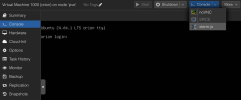
If your VM is configured correctly with the serial console, xterm.js is automatically used as the default viewer. The same applies to Spice. And what kind of guest operating system is it?
 
1730097696966.png

You can see my ubuntu has enabled getty@ttyS0, but the default console still is noVNC, I can't switch it to xterm.js even if I set the Display to None in hardware (which causes connection error instead).
 
I have correctly configured the getty@ttyS0, and let's talk about the frontend.

Currently, this noVNC has a default iframe:

HTML:
<iframe src="/?console=kvm&amp;vmid=1000&amp;node=pve&amp;resize=scale&amp;novnc=1"...></iframe>

What I want is change novnc=1 to xtermjs=1, I'm not talking about clicking the button to open a new page.

HTML:
<iframe src="/?console=kvm&amp;vmid=1000&amp;node=pve&amp;resize=scale&amp;xtermjs=1"...></iframe>

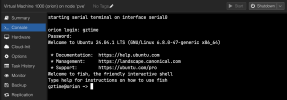
I just edit the HTML, and I will get this (THIS IS JUST A NON-PERSISTENT TRICK!!!):

1730168464178.png

So I found the source code that controls this functionality and discovered that for kvm, the xtermjs property is hardcoded as null, which left me with no way to use the xtermjs iframe directly in the Console tab in place of the default noVNC.

If your VM is configured correctly with the serial console, xterm.js is automatically used as the default viewer.

I've never been able to achieve that, after check the source code, only LXC and node console can display as expected.

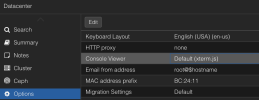
Moreover, here is what "Console Viewer" I'm talking about in Datacenter view:

1730168876707.png

I just want this option can also valid in kvms.
 
Some source code reference:

For node:

JavaScript:
me.items.push(
{
    xtype: 'pveNoVncConsole',
    title: gettext('Shell'),
    iconCls: 'fa fa-terminal',
    itemId: 'jsconsole',
    consoleType: 'shell',
    xtermjs: true,
    nodename: nodename,
},
);

For lxc:

JavaScript:
me.items.push(
{
    title: gettext('Console'),
    itemId: 'consolejs',
    iconCls: 'fa fa-terminal',
    xtype: 'pveNoVncConsole',
    vmid: vmid,
    consoleType: 'lxc',
    xtermjs: true,
    nodename: nodename,
});

But for qemu kvm:

JavaScript:
me.items.push({
    title: gettext('Console'),
    itemId: 'console',
    iconCls: 'fa fa-terminal',
    xtype: 'pveNoVncConsole',
    vmid: vmid,
    consoleType: 'kvm',
    nodename: nodename,
});

And the component pveNoVncConsole:

JavaScript:
Ext.define('PVE.noVncConsole', {
    extend: 'Ext.panel.Panel',
    alias: 'widget.pveNoVncConsole',

    nodename: undefined,
    vmid: undefined,
    cmd: undefined,

    consoleType: undefined, // lxc, kvm, shell, cmd
    xtermjs: false, // <---- default option is false (novnc)

    layout: 'fit',
    border: false,

    initComponent: function() {
    var me = this;

    if (!me.nodename) {
        throw "no node name specified";
    }

    if (!me.consoleType) {
        throw "no console type specified";
    }

    if (!me.vmid && me.consoleType !== 'shell' && me.consoleType !== 'cmd') {
        throw "no VM ID specified";
    }

    // always use same iframe, to avoid running several noVnc clients
    // at same time (to avoid performance problems)
    var box = Ext.create('Ext.ux.IFrame', { itemid: "vncconsole" });

    var type = me.xtermjs ? 'xtermjs' : 'novnc'; // <---- Here it choose the console
    Ext.apply(me, {
        items: box,
        listeners: {
        activate: function() {
            let sp = Ext.state.Manager.getProvider();
            if (Ext.isFunction(me.beforeLoad)) {
            me.beforeLoad();
            }
            let queryDict = {
            console: me.consoleType, // kvm, lxc, upgrade or shell
            vmid: me.vmid,
            node: me.nodename,
            cmd: me.cmd,
            'cmd-opts': me.cmdOpts,
            resize: sp.get('novnc-scaling', 'scale'),
            };
            queryDict[type] = 1; // <---- Here it set the query
            PVE.Utils.cleanEmptyObjectKeys(queryDict);
            var url = '/?' + Ext.Object.toQueryString(queryDict);
            box.load(url);
        },
        },
    });

    me.callParent();

    me.on('afterrender', function() {
        me.focus();
    });
    },

    reload: function() {
    // reload IFrame content to forcibly reconnect VNC/xterm.js to VM
    var box = this.down('[itemid=vncconsole]');
    box.getWin().location.reload();
    },
});
 
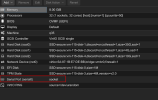
2 Things are important that this is working. First the serial port:
Screenshot_20241029_095913.png

Second, the right grub config inside your VM. Here as example an Ubuntu 24.04:

Code:
cat /etc/default/grub

Code:
GRUB_CMDLINE_LINUX_DEFAULT="console=ttyS0,115200 fsck.repair=preen"

This part console=ttyS0,115200
After you have set this config inside your VM you have to update grub:
Code:
update-grub
 
  • Like
Reactions: Johannes S
You guys are not understanding what my point is...

My system is FULLY AND CORRECTLY configured with serial port, but I don't want to use serial port in noVNC.

The only problem I have is the Console tab, which is a purely front-end issue...

There is no option that I can use xterm.js, because it has been HARDCODED to noVNC.
 
  • Like
Reactions: fireon
The only problem I have is the Console tab, which is a purely front-end issue...

There is no option that I can use xterm.js, because it has been HARDCODED to noVNC.
Yes, I have the same here. The Console tab appears to be always noVNC. I think I understand what this is the problem and the feature request. It would be nice if the Console tab would do the same as the Console button.

A work-around is setting Display to Serial terminal 0 (serial0) (as mentioned before) and clicking the Console button (which people also mentioned before).
That opens a terminal console in a new window with xterm.js for me. This might be a better way, since browsing away from the Console tab closes the terminal (which might abort a long running command or make it no longer accessible). But this is not a fix for your feature request.
 
  • Like
Reactions: GZTime
You guys are not understanding what my point is...

My system is FULLY AND CORRECTLY configured with serial port, but I don't want to use serial port in noVNC.

The only problem I have is the Console tab, which is a purely front-end issue...

There is no option that I can use xterm.js, because it has been HARDCODED to noVNC.

Since you went through all the hoops, I suggest you post this (observed vs expected) as report to Bugzilla, include all your snippets as well. I would start with your piece above. Component is Web UI.

I think it's a legit expectation, some would argue the Datacentre defaults should apply to any console. I would classify it as a bug, but that's just me.
 
  • Like
Reactions: GZTime
You guys are not understanding what my point is...

My system is FULLY AND CORRECTLY configured with serial port, but I don't want to use serial port in noVNC.

The only problem I have is the Console tab, which is a purely front-end issue...

There is no option that I can use xterm.js, because it has been HARDCODED to noVNC.
Now I've finally got it... thx. I never use the button, which is why I think everything is sooo far away.
 
I started using proxmox only about one week ago and this was the first thing i tried to change. I cant use copy/paste in noVNC and with in a headless VM i see no benefit of using it as default. When necessary i could still select noVNC. Is there any solution to fix this issue?
 
Last edited:
I faced this problem as well and it took me so much time to troubleshoot , but I finally found a perminant solutions for it
thanks to GZTime and his persistence
GZTime proved exactly what was the problem ( in the pve-manager package itself when downloaded it copied the official copy if the pvemanagerlib.js file < this in turned caused actual JavaScript (Config.js) that GZTime looked at the and found that for the built-in tab, the xtermjs property is literally missing or set to false in the code, while for the Node Shell, it is set to true.
Since the "official" setting is ignoring your intent for the built-in tab, we have to "force" the code to behave the way you (and GZTime) want. We will tell the Proxmox "Manager" that the built-in tab for VMs is allowed to use xterm.js.

Run this on your PVE Node Shell to align the Tab with your logic:
Bash:
# 1. Backup the UI source code
cp /usr/share/pve-manager/js/pvemanagerlib.js /usr/share/pve-manager/js/pvemanagerlib.js.bak

# 2. This command finds the 'kvm' (VM) console section and turns on xtermjs
sed -i "s/consoleType: 'kvm',/consoleType: 'kvm', xtermjs: true,/" /usr/share/pve-manager/js/pvemanagerlib.js

# 3. Restart the web server
systemctl restart pveproxy

What happens after this?​

  1. Open an Incognito Window (this is critical because your browser "remembers" the old noVNC code).
  2. Go to your VM > Console.
  3. Because you set Datacenter > xterm.js and we just "unlocked" the tab with that sed command, the built-in tab should finally be the clean black terminal with Right-Click Paste.

    You must refresh your browser with Ctrl + F5 after running this.

    the only problem is that this solution will work untell you run an apt updare < or apt upgrade because the pve-manage may reinstall again with the official pvemanagerlib.js that will bring you back to square one

    the workarround solution to make sure this fix is perminant is to create a script that checks the condition of the pvemanagerlib.js file and if it not then you should apply the same fix and make this script run everytime you reboot the system


  4. ️ The "Self-Healing" Automation​

    We can create a small script that runs at every boot. If an update has overwritten your changes, this script will find the code and "fix" it again automatically.

    Step 1: Create the Script​

    Run this in your PVE Node Shell to create the fix-script:

    Bash:
    cat <<'EOF' > /usr/local/bin/pve-xterm-fix.sh
    #!/bin/bash
    FILE="/usr/share/pve-manager/js/pvemanagerlib.js"
    # Check if the patch is already applied
    if ! grep -q "consoleType: 'kvm', xtermjs: true," "$FILE"; then
        echo "Patching Proxmox Console for xterm.js..."
        sed -i "s/consoleType: 'kvm',/consoleType: 'kvm', xtermjs: true,/" "$FILE"
        systemctl restart pveproxy
    else
        echo "Proxmox Console is already patched."
    fi
    EOF

    Step 2: Make it Executable​

    Bash:
    chmod +x /usr/local/bin/pve-xterm-fix.sh

    Step 3: Schedule it to Run at Boot​

    We will use crontab to tell Proxmox to run this every time the server starts up.
    1. Type crontab -e (Choose 1 for nano if it asks).
    2. Scroll to the very bottom and add this line:

      Code:
      @reboot /usr/local/bin/pve-xterm-fix.sh

    3. Press Ctrl + O, then Enter to save, and Ctrl + X to exit.
 
Last edited: