DNS Resolution Fails on Some VMs in Proxmox EVPN-VXLAN Network (Ping Works)

yuuki08noah

New Member
Feb 12, 2026
9
0
1
I’m running a Proxmox cluster with EVPN-VXLAN networking. I have multiple VMs on the same node, and I’m seeing a DNS issue:
  • VM101 can resolve DNS names (e.g., ping google.com) without issues.
  • VM102~VM103 on the same node cannot resolve DNS names. ping google.com or dig @211.182.233.2 google.com fail.
  • All VMs can ping the DNS server (211.182.233.2) successfully.
  • /etc/resolv.conf is identical on all VMs.
  • Proxmox firewall is disabled.

Has anyone experienced this issue on some VMs in Proxmox EVPN-VXLAN setups? Any guidance would be appreciated.

Thank you!
 
Last edited:
Please post
  • each VM configuration
  • your network configuration
  • traceroutes (censor private information)
  • error messages,
  • your resolv.conf
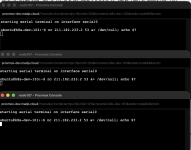
  • nc 211.182.233.2 53 &> /dev/null; echo $? for each single vm
 
Last edited:
this is the terraform code i used for provisioning
Code:
  terraform {
    required_providers {
      proxmox = {
        source  = "telmate/proxmox"
        version = "3.0.2-rc04" # [유지] 사용하시던 버전
      }
    }
  }

  provider "proxmox" {

    pm_tls_insecure = true
    pm_timeout      = 1000
  }

  variable "env" { default = "dev" }
  variable "vms_per_node" { default = 3 }
  variable "proxmox_nodes" {
    type    = list(string)
    default = ["node94", "node107"] # 노드 리스트
  }

  variable "ssh_key" {
    default = ""
  }

  resource "proxmox_vm_qemu" "k8s_nodes" {
    count       = length(var.proxmox_nodes) * var.vms_per_node
    vmid        = 101 + count.index
    name        = "k8s-${var.env}-${101 + count.index}"
    target_node = var.proxmox_nodes[floor(count.index / var.vms_per_node)]
    nameserver  = "211.182.233.2"
    searchdomain = "local"
    ciuser      = "ubuntu"
    cipassword  = ""

    clone       = "ubuntu-2404-template"
    full_clone  = false
    boot        = "order=scsi0;net0"

    agent       = 1
    os_type     = "cloud-init"
    cores       = 2
    sockets     = 1
    cpu_type    = "host"
    memory      = 4096
    scsihw      = "virtio-scsi-single"
    bootdisk    = "scsi0"

    serial {
      id   = 0
      type = "socket"
    }

    vga {
      type = "std"
    }

    disk {
      slot    = "ide2"
      type    = "cloudinit"
      storage = "vm-os"
    }

    disk {
      slot     = "scsi0"
      type     = "disk"
      size     = "32G"
      storage  = "vm-os"
      iothread = true   
    }

    network {
      id       = 0
      model    = "virtio"
      bridge   = "madp"
      firewall = false
    }

    # [유지] IP 및 MTU 설정
    ipconfig0 = "ip=172.16.0.${101 + count.index}/16,gw=172.16.0.1,mtu=1450"
    
    sshkeys = var.ssh_key
}

qm config 101
Code:
root@node94:~# qm config 101
agent: 1
balloon: 0
bios: seabios
boot: order=scsi0;net0
cicustom: 
cipassword: **********
ciupgrade: 0
ciuser: ubuntu
cores: 2
cpu: host
description: Managed by Terraform.
hotplug: network,disk,usb
ide2: vm-os:vm-101-cloudinit,media=cdrom,size=4M
ipconfig0: ip=172.16.0.101/16,gw=172.16.0.1
kvm: 1
memory: 4096
meta: creation-qemu=10.0.2,ctime=1768878313
name: k8s-dev-101
nameserver: 211.182.233.2
net0: virtio=BC:24:11:48:C2:44,bridge=madp
numa: 0
onboot: 0
protection: 0
scsi0: vm-os:base-9000-disk-0/vm-101-disk-1,iothread=1,replicate=0,size=32G
scsihw: virtio-scsi-single
searchdomain: local
serial0: socket
smbios1: uuid=93c5fccd-ebe1-43fb-86a8-dca4270d64f2
sockets: 1

qm config 102
Code:
root@node94:~# qm config 102
agent: 1
balloon: 0
bios: seabios
boot: order=scsi0;net0
cicustom: 
cipassword: **********
ciupgrade: 0
ciuser: ubuntu
cores: 2
cpu: host
description: Managed by Terraform.
hotplug: network,disk,usb
ide2: vm-os:vm-102-cloudinit,media=cdrom,size=4M
ipconfig0: ip=172.16.0.102/16,gw=172.16.0.1
kvm: 1
memory: 4096
meta: creation-qemu=10.0.2,ctime=1768878313
name: k8s-dev-102
nameserver: 211.182.233.2
net0: virtio=BC:24:11:0F:A3:57,bridge=madp
numa: 0
onboot: 0
protection: 0
scsi0: vm-os:base-9000-disk-0/vm-102-disk-1,iothread=1,replicate=0,size=32G
scsihw: virtio-scsi-single
searchdomain: local
serial0: socket
smbios1: uuid=a70110be-44f6-4ca3-91f2-901e605b4f98
sockets: 1

Code:
root@node94:~# qm config 103
agent: 1
balloon: 0
bios: seabios
boot: order=scsi0;net0
cicustom: 
cipassword: **********
ciupgrade: 0
ciuser: ubuntu
cores: 2
cpu: host
description: Managed by Terraform.
hotplug: network,disk,usb
ide2: vm-os:vm-103-cloudinit,media=cdrom,size=4M
ipconfig0: ip=172.16.0.103/16,gw=172.16.0.1
kvm: 1
memory: 4096
meta: creation-qemu=10.0.2,ctime=1768878313
name: k8s-dev-103
nameserver: 211.182.233.2
net0: virtio=BC:24:11:44:6D:C1,bridge=madp
numa: 0
onboot: 0
protection: 0
scsi0: vm-os:base-9000-disk-0/vm-103-disk-1,iothread=1,replicate=0,size=32G
scsihw: virtio-scsi-single
searchdomain: local
serial0: socket
smbios1: uuid=ebe32b83-f656-4100-9ffa-14f9415b6445
sockets: 1

every nslookup became timeout

resolv.conf:
Code:
ubuntu@k8s-dev-103:~$ cat /etc/resolv.conf
nameserver 127.0.0.53
options edns0 trust-ad
search local

resolvectl status:
Code:
ubuntu@k8s-dev-103:~$ resolvectl status
Global
         Protocols: -LLMNR -mDNS -DNSOverTLS DNSSEC=no/unsupported
  resolv.conf mode: stub

Link 2 (eth0)
    Current Scopes: DNS
         Protocols: +DefaultRoute -LLMNR -mDNS -DNSOverTLS DNSSEC=no/unsupported
Current DNS Server: 211.182.233.2
       DNS Servers: 211.182.233.2
        DNS Domain: local

same on vm102

thank you for your reply
 
tcpdump:
sudo tcpdump -ni any port 53
Code:
10:57:46.327987 eth0  Out IP 172.16.0.103.55024 > 211.182.233.2.53: Flags [P.], seq 1:75, ack 1, win 507, options [nop,nop,TS val 2202036535 ecr 331364761], length 74 [prefix length(32) != length(72)] (invalid)
10:57:46.755943 eth0  Out IP 172.16.0.103.54217 > 8.8.8.8.53: 14070+ [1au] A? google.com. (51)
10:57:49.112211 lo    In  IP 127.0.0.1.52963 > 127.0.0.53.53: 14747+ [1au] A? ntp.ubuntu.com. (43)
10:57:49.112221 lo    In  IP 127.0.0.1.52963 > 127.0.0.53.53: 62357+ [1au] AAAA? ntp.ubuntu.com. (43)
10:57:49.112351 eth0  Out IP 172.16.0.103.52843 > 211.182.233.2.53: 62936+ AAAA? ntp.ubuntu.com. (32)
10:57:51.761504 eth0  Out IP 172.16.0.103.54850 > 8.8.8.8.53: 14070+ [1au] A? google.com. (51)
10:57:53.623987 eth0  Out IP 172.16.0.103.55024 > 211.182.233.2.53: Flags [P.], seq 1:75, ack 1, win 507, options [nop,nop,TS val 2202043831 ecr 331364761], length 74 [prefix length(32) != length(72)] (invalid)
10:57:54.117251 lo    In  IP 127.0.0.1.52963 > 127.0.0.53.53: 14747+ [1au] A? ntp.ubuntu.com. (43)
10:57:54.117262 lo    In  IP 127.0.0.1.52963 > 127.0.0.53.53: 62357+ [1au] AAAA? ntp.ubuntu.com. (43)
10:57:54.117319 eth0  Out IP 172.16.0.103.52843 > 211.182.233.2.53: 62936+ AAAA? ntp.ubuntu.com. (32)
10:57:54.117374 eth0  Out IP 172.16.0.103.54865 > 211.182.233.2.53: 37979+ A? ntp.ubuntu.com. (32)
10:57:54.117397 eth0  Out IP 172.16.0.103.60282 > 211.182.233.2.53: 8372+ A? ntp.ubuntu.com.local. (38)
 
Could you please check if the port is reachable by executing this on all VMs

nc 211.182.233.2 53 &> /dev/null; echo $?

That command just checks if the port is reachable.
Do you have some selective routing going on? To me it looks like the return path is broken.
 
There's no answer for nc 211.182.233.2 53 &> /dev/null; echo $?
I think the return path is broken too, I checked the tcpdump, the returning ports are random. The exit node is node107(another node) and vm is on node94.

vm -> node94 -> node107 -> dns server -> node107 -> node94 -> vm <- at this point, the port is strange
1771154777113.png
 
Troubleshooting is beyond what i can do at this point as its solely network related. I'd have to have access to your network & switch infrastructure, vxlan setup and more to be able to debug further. You maybe want to get in touch with your network / backbone department :-)
 
  • Like
Reactions: yuuki08noah
Can you post some more information, from the node where the VM is running?

Code:
ip a
ip r

cat /etc/network/interfaces
cat /etc/network/interfaces.d/sdn

cat /etc/pve/sdn/zones.cfg
cat /etc/pve/sdn/vnets.cfg
cat /etc/pve/sdn/subnets.cfg
cat /etc/pve/sdn/controllers.cfg

cat /etc/frr/frr.conf

vtysh -c 'show bgp summary'
vtysh -c 'show bgp l2vpn evpn'