Hey everone!
So I had 2FA enabled for my
So I am now on Proxmox 7.3-6 and decided to check the options at
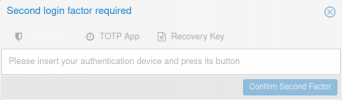
Unfortunately, this lead to me still being asked for a 2FA code when trying to add the node. Logging out and logging back in showed a user interface that had been rendered unusable because it did not show any text box to input the requested code. I am sorry but I forgot to take a screenshot. I solved it by logging in via SSH and shooting the
So I decided to post here to see whether I was doing something wrong before filing a bug report in the bug tracker.
Thanks in advance.
So I had 2FA enabled for my
root@pam user and wanted to add a new node to an existing cluster. Last time I had to do that (a couple of minor versions ago, if I recall correctly) I had to remove 2FA, then re-create it after the node was added and set up.So I am now on Proxmox 7.3-6 and decided to check the options at
Datacenter: Permissions: Two Factor. To my surprise, I found an Enabled, which I decided to use.Unfortunately, this lead to me still being asked for a 2FA code when trying to add the node. Logging out and logging back in showed a user interface that had been rendered unusable because it did not show any text box to input the requested code. I am sorry but I forgot to take a screenshot. I solved it by logging in via SSH and shooting the
/etc/pve/priv/tfa.cfg in the head (wasn't in the mood to fiddle with the JSON inside it, to be honest).So I decided to post here to see whether I was doing something wrong before filing a bug report in the bug tracker.
Thanks in advance.