

Hello everyone,
I am stuck in a difficult situation:
Server is running current and up-to-date Proxmox.
It is a LVM on LUKS on a fake hardware Raid (Intel Raid Controller) on a Supermicro Motherboard.
I upgraded the BIOS and failed to preserve the settings (preserve NVRAM).
It will start booting from grub and then fail to find the fake raid device md126.
Thus it can not decrypt the LUKS partition md126p3.
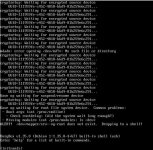
The error messages I get after grub are:
"cryptsetup: Waiting for encrypted source device
UUID=### "
and
"mdadm: error opening /dev/md?*: No such file or directory"
and
"ALERT! /dev/mapper/srv--vg-root does not exist. Dropping to a shell!"
blkid will not show the md126 device (as was before / as usual):
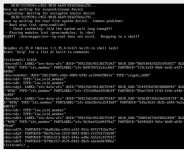
The devices sda through sdd are the four devices for the RAID10.
Their type is "isw_raid_member" as should be.
They should be automatically assembled as md126.
Here is the cmdline including mdadm=true:

I tried all sorts of combinations in the BIOS settings:
boot mode: UEFI boot or legacy boot or both. Currently it is set to "both".
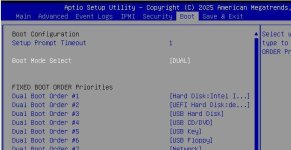
I tried setting the raid driver to UEFI mode and to legacy ROM:
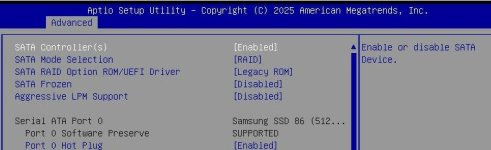
Secure boot is disabled:
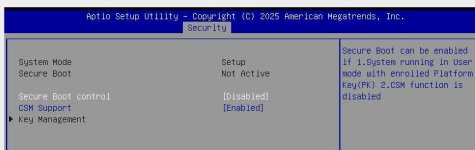
If I bott from the legacy boot entry, I get a black screen and nothing happens.
I can only boot into the bootloader/GRUB with the UEFI boot entry.
I tried also to add efivars to the modules and regenerate the initramfs, but it does not show when I type "cat /proc/modules" in the initramfs shell. So I can not manually mount the efivars partition.
I can get everything to decrypt and mount manually from a LIVE system, so the file systems are OK and nothing is corrupt.
The hardware / hard drives are also OK and healthy.
I am out of options at the moment.
What am I missing here?
I am kind of frustrated after trying for hours ...
Anyone able to help me out of this mess?
Sadly restoring from the backup (PBS) is not an option, since some containers (lvm thin volumes) are missing from the backups.
I am stuck in a difficult situation:
Server is running current and up-to-date Proxmox.
It is a LVM on LUKS on a fake hardware Raid (Intel Raid Controller) on a Supermicro Motherboard.
I upgraded the BIOS and failed to preserve the settings (preserve NVRAM).
It will start booting from grub and then fail to find the fake raid device md126.
Thus it can not decrypt the LUKS partition md126p3.
The error messages I get after grub are:
"cryptsetup: Waiting for encrypted source device
UUID=### "
and
"mdadm: error opening /dev/md?*: No such file or directory"
and
"ALERT! /dev/mapper/srv--vg-root does not exist. Dropping to a shell!"
blkid will not show the md126 device (as was before / as usual):
The devices sda through sdd are the four devices for the RAID10.
Their type is "isw_raid_member" as should be.
They should be automatically assembled as md126.
Here is the cmdline including mdadm=true:
I tried all sorts of combinations in the BIOS settings:
boot mode: UEFI boot or legacy boot or both. Currently it is set to "both".
I tried setting the raid driver to UEFI mode and to legacy ROM:
Secure boot is disabled:
If I bott from the legacy boot entry, I get a black screen and nothing happens.
I can only boot into the bootloader/GRUB with the UEFI boot entry.
I tried also to add efivars to the modules and regenerate the initramfs, but it does not show when I type "cat /proc/modules" in the initramfs shell. So I can not manually mount the efivars partition.
I can get everything to decrypt and mount manually from a LIVE system, so the file systems are OK and nothing is corrupt.
The hardware / hard drives are also OK and healthy.
I am out of options at the moment.
What am I missing here?
I am kind of frustrated after trying for hours ...
Anyone able to help me out of this mess?
Sadly restoring from the backup (PBS) is not an option, since some containers (lvm thin volumes) are missing from the backups.
Last edited:


