

Hi all,
I've actually had this card installed since the offset but not had it connected or the setup. I would like to get it set up now and I have connected both fibre links to my switch.
In PVE I have a total of 4 physical interfaces showing which would be correct given that the motherboard has two RJ45 LAN sockets.
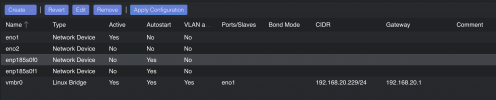
The two ports on the SFP+ card must be enp185s0f0 and enp185s0f1. I have set them to autostart and restarted the server. They are flashing away so seem to be active but they don't seem to be picking up any addresses.
I don't want to mess around too much with the network settings without knowing exactly what I'm doing as I don't want to end up losing access to the web interface.
I'm guessing I need to add or edit a config file somewhere?
What I would like to do is create a bond with them. I would also like to create a bond with the other two ports. One for PVE and another for the VM's. Does that make sense? I think I read on the wiki that when setting up a cluster it's best to have an interface for each. I'm not setting up the cluster right now but I am just thinking ahead and would like to get this done now.
Thanks,
FS
I've actually had this card installed since the offset but not had it connected or the setup. I would like to get it set up now and I have connected both fibre links to my switch.
In PVE I have a total of 4 physical interfaces showing which would be correct given that the motherboard has two RJ45 LAN sockets.
The two ports on the SFP+ card must be enp185s0f0 and enp185s0f1. I have set them to autostart and restarted the server. They are flashing away so seem to be active but they don't seem to be picking up any addresses.
I don't want to mess around too much with the network settings without knowing exactly what I'm doing as I don't want to end up losing access to the web interface.
I'm guessing I need to add or edit a config file somewhere?
What I would like to do is create a bond with them. I would also like to create a bond with the other two ports. One for PVE and another for the VM's. Does that make sense? I think I read on the wiki that when setting up a cluster it's best to have an interface for each. I'm not setting up the cluster right now but I am just thinking ahead and would like to get this done now.
Thanks,
FS
Last edited:
