

Hi All,
To begin i am totally new with Proxmox, i have seen a lot of videos on what you can do with it so i decided to grab some hardware and start my adventure.
Before i had created multiple setups with VMWare ESXi Clusters but since i have seen so much videos about Proxmox i would like to expand my horizon and see if i can work with Proxmox as well
Now below i have tried to draw out the setup that i have created.
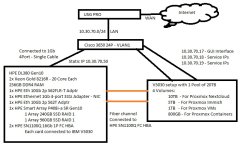
The Proxmox installation i have done on the 240GB Raid1 setup.
When the installation was complete (the first time - yes i had it re-installed 3 times now) i could login, after a long time waiting, and i have setup the 960GB as a ZFS (tried it before with LVM but i thought i was given the issues ill describe below).
After a long time searching on google and other posts i could add the V5030 disks (i see them double but i could add them).
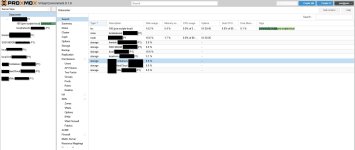
As you can see as well the site should be in Dark Mode but is not loading at all.
When i try to press F5 to reload the page it wont load at all!
Now when i am lucky and the page is loaded in dark mode and i can click around (that did not happen for the last 3 hours) i get a lot of "Connection error" - "Server not connected" when clicking.
Now i know i am new, i tried to follow lots of guides and did perform the "PVE Post Install" but still have lots of issues with my Proxmox installation.
What i want to create is a Nextckoud VM/LXC with the now 10TB that will increase in the future to like 20TB or 30TB.
When i have the Nextcloud working i will get Nginx Proxy Manager installed with Authentix and others like Immich.
After that all is working i want to use this server as my offside Backup for the Proxmox cluster i want to create at home.
But since i already have issues even opening and installing a relative simple application (VM or LXC) i tried to google my issue but it seems i cannot find it.
So that is why i am here now writing to you all hoping someone here can assist me and let me know what i do wrong or what i broke
With SSH i have no problem connecting to the machine and that is working without issue!
If you have Specific questions please let me know and i will answer to my best ability.
Thank you for reading <3
To begin i am totally new with Proxmox, i have seen a lot of videos on what you can do with it so i decided to grab some hardware and start my adventure.
Before i had created multiple setups with VMWare ESXi Clusters but since i have seen so much videos about Proxmox i would like to expand my horizon and see if i can work with Proxmox as well
Now below i have tried to draw out the setup that i have created.
The Proxmox installation i have done on the 240GB Raid1 setup.
When the installation was complete (the first time - yes i had it re-installed 3 times now) i could login, after a long time waiting, and i have setup the 960GB as a ZFS (tried it before with LVM but i thought i was given the issues ill describe below).
After a long time searching on google and other posts i could add the V5030 disks (i see them double but i could add them).
As you can see as well the site should be in Dark Mode but is not loading at all.
When i try to press F5 to reload the page it wont load at all!
Now when i am lucky and the page is loaded in dark mode and i can click around (that did not happen for the last 3 hours) i get a lot of "Connection error" - "Server not connected" when clicking.
Now i know i am new, i tried to follow lots of guides and did perform the "PVE Post Install" but still have lots of issues with my Proxmox installation.
What i want to create is a Nextckoud VM/LXC with the now 10TB that will increase in the future to like 20TB or 30TB.
When i have the Nextcloud working i will get Nginx Proxy Manager installed with Authentix and others like Immich.
After that all is working i want to use this server as my offside Backup for the Proxmox cluster i want to create at home.
But since i already have issues even opening and installing a relative simple application (VM or LXC) i tried to google my issue but it seems i cannot find it.
So that is why i am here now writing to you all hoping someone here can assist me and let me know what i do wrong or what i broke
With SSH i have no problem connecting to the machine and that is working without issue!
If you have Specific questions please let me know and i will answer to my best ability.
Thank you for reading <3


 i have read lots of people comments on the script and looked on how many times it was used