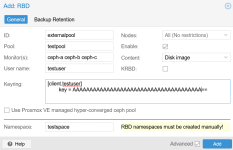
I want to connect my PVE datacenter to an external Ceph storage. On a pool on the external Ceph cluster, I created a namespace. Let's say my pool is called `testpool`, my namespace is called `testspace` and my user is called `testuser`.
So what i did on my Ceph cluster is
and then
Then I added a RBD storage via the Proxmox GUI.
I guess that worked, because `pvesm status` on my Proxmox nodes shows me an active status of the external Ceph storage. However, when I click the storage in the Proxmox GUI and select "VM Disks", I get the following error message: "rbd error: rbd: listing images failed: (1) Operation not permitted (500)"
Now, my question is: Did I do something wrong with my configuration, or does Proxmox VE not fully support Ceph namespaces?
(I'm using PVE version 8.4.17.)
So what i did on my Ceph cluster is
Code:
rbd namespace create testpool/testspaceand then
Code:
ceph auth get-or-create client.testuser mon 'allow r' osd 'allow rw pool=testpool namespace=testspace'Then I added a RBD storage via the Proxmox GUI.
I guess that worked, because `pvesm status` on my Proxmox nodes shows me an active status of the external Ceph storage. However, when I click the storage in the Proxmox GUI and select "VM Disks", I get the following error message: "rbd error: rbd: listing images failed: (1) Operation not permitted (500)"
Now, my question is: Did I do something wrong with my configuration, or does Proxmox VE not fully support Ceph namespaces?
(I'm using PVE version 8.4.17.)