

You are using an out of date browser. It may not display this or other websites correctly.
You should upgrade or use an alternative browser.
You should upgrade or use an alternative browser.
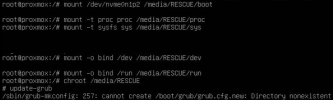

you appear to have done a bind mount on /dev and /run, but not on /boot so there is not /boot.
Are you following a guide in your steps? If not - you should pick one.
Blockbridge : Ultra low latency all-NVME shared storage for Proxmox - https://www.blockbridge.com/proxmox
Are you following a guide in your steps? If not - you should pick one.
Blockbridge : Ultra low latency all-NVME shared storage for Proxmox - https://www.blockbridge.com/proxmox
I entered the commands by looking at the page here https://pve.proxmox.com/wiki/Recover_From_Grub_Failureyou appear to have done a bind mount on /dev and /run, but not on /boot so there is not /boot.
Are you following a guide in your steps? If not - you should pick one.
Blockbridge : Ultra low latency all-NVME shared storage for Proxmox - https://www.blockbridge.com/proxmox
Code:
sudo vgscan
sudo vgchange -ay
sudo mkdir /media/RESCUE
sudo mount /dev/pve/root /media/RESCUE/
sudo mount /dev/nvme0n1p2 /media/RESCUE/boot
sudo mount -t proc proc /media/RESCUE/proc
sudo mount -t sysfs sys /media/RESCUE/sys
sudo mount -o bind /dev /media/RESCUE/dev
sudo mount -o bind /run /media/RESCUE/runAre you sure you are using grub?
See conversation here: https://forum.proxmox.com/threads/grub-not-updating-with-update-grub.68699/#post-307970
Blockbridge : Ultra low latency all-NVME shared storage for Proxmox - https://www.blockbridge.com/proxmox
See conversation here: https://forum.proxmox.com/threads/grub-not-updating-with-update-grub.68699/#post-307970
Blockbridge : Ultra low latency all-NVME shared storage for Proxmox - https://www.blockbridge.com/proxmox
Are you sure you are using grub?
See conversation here: https://forum.proxmox.com/threads/grub-not-updating-with-update-grub.68699/#post-307970
Blockbridge : Ultra low latency all-NVME shared storage for Proxmox - https://www.blockbridge.com/proxmox
I solved update-grub problem but Im receiving another error on grub-install
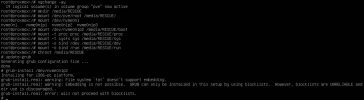

Don't install GRUB on a partition like /dev/nvme0n1p2 (or /dev/sda2); use
grub-install /dev/nvme0n1 and it will use the less than 1MB between the partition table and the partitions, as usual.