Backup to NFS share spikes IO delay, locks up hypervisor.

rslippers

New Member
Oct 19, 2024
5
0
1
Hi all,

I'm trying to wrap my head around an issue that I've been experiencing for a while now, some progress has been made by accident.

My single-node Proxmox server hosts a TrueNAS Scale VM, which has a HBA passed through to it, with 5 disks attached. This hosts, among other things, an NFS share for the Proxmox host to place backups upon. I've not been able to reliably use this, as every time I do, the host falls over with the biggest symptom being the very high IO delay on the disk which Proxmox is installed upon.

By chance, I connected a run of the mill SSD to the host, and configured it as a Directory on the Proxmox host, and have specified it as a backup repository within the Proxmox UI. I've now been able to successfully backup containers to it. Previously, this would have caused the hypervisor to fall over.

What can I provide to shed some more light into this?

Edit:
Keen to add that from within the Dashboard, I can see that running a backup to the TrueNAS NFS share spikes the following:
- IO Pressure Stall,
- Memory Pressure Stall,
- CPU IO Delay.
 
Last edited:
Hi, I am facing the same issues:
I am running a Nextcloud Container, accessing files on a local SSD and a NFS Share. During high IO (Reindexing, Backup) i can see that the iodelay is rising up to 80%. I am also looking to an option to prevent this.
 
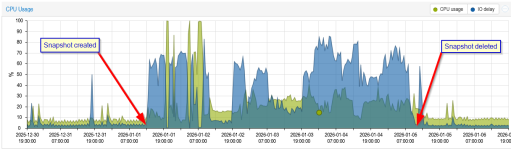
Yes, I did. I have currently in my Proxmox Server 8 VM and 21 LXC running, and the iodelay is between 0 and 5 %. One of my Containers is hosting a Nextcloud Instance with 14 GB RAM, 4 GB Swap and 8 CPU including a FulltextSearch. For testing some config changes I created last week a Snapshot, and this was causing the whole system to rise the iodelay up to 85%.

When I was deleting the Snapshot from this VM, the iodelay was immediately going back down to normal mode. Attached a picture showing the impact when creating a snapshot and when deleting it.

PVE_Snapshot.png

Now I know that on LXC with disk disk usage a SNapshot should only be used for a short amount of time (Do a test, when successful delete Snapshot, if not revert and then delete Snapshot), I am now using hourly backups using a PBS which is only taking 20 seconds but not having such a bad impact to the system.
 
This sounds like a recursive I/O dependency loop. What I think is happening:

1. Proxmox starts a backup and generates data to write to NFS
2. Since your NFS target is a TrueNAS VM running on the same host, TrueNAS tries to take CPU, memory, and I/O from the host to accept and commit the writes
3. The more backup data generated, the more resources the VM needs
4. The VM competing for host resources slows NFS writes
5. Slow NFS causes backup processes to block, buffers to fill, and memory pressure builds until the host starts thrashing and everything stalls

The local SSD works because it removes the VM from the critical path entirely. No circular dependency. You generally shouldn't back up to storage that depends on the same host you're backing up. If you can't backup to a physically separate device, use the local SSD as primary backup target, then replicate to TrueNAS asynchronously.
 
  • Like
Reactions: Coffee_N_Cream
Can you explain a little bit more of your setup?
Sure.

I believe i am on pve 9.1? Will check when I get home.

I have around 10 containers, and a VM(truenas) running on 2 sockets, 40 total cores and 96gb ram.

The containers are hosting game servers, and other services.

Pretty much the same symptoms as others. Using snapshots directed at the VM causes the system to increase io pressure until stalling entirely. Only recovery has been power cycling the system.


I am about 2 weeks into this whole journey, and the learning curve has been pretty steep. Ive never used linux until I was gifted this hardware.

Just crawling through these forums during troubleshooting.
 
I would try what is Happening when a VM or container does not have any snapshot. In my setup I am using a qnap with raid1 as nfs target, no problem here.
 
I would try what is Happening when a VM or container does not have any snapshot. In my setup I am using a qnap with raid1 as nfs target, no problem here.
Yeah. No snapshot and everything is all good.

Might need to find another way to backup data haha
 
Good find!
Experienced same thing today, cleaned out old snapshots, and we'll see.
However I do rely on frequent snapshotting a lot, as Sanoid runs hourly on several machines. IO delay isn't seriously impacted on those.
Any thoughts?
 
Attached one more thing I recognized today:
My Proxmox Host is having 64 GB of RAM, so I decided to disable Swap on all my LXC Containers - they should use RAM. My hope was to reduce load to the SSD. But - the opposite happened - IODELY was exploding again, even after rebooting every single container.

When enabling Swap again (512MB per LXC), the Load was going down again. How can this be?
1767858354571.png
 
This sounds like a recursive I/O dependency loop. What I think is happening:

1. Proxmox starts a backup and generates data to write to NFS
2. Since your NFS target is a TrueNAS VM running on the same host, TrueNAS tries to take CPU, memory, and I/O from the host to accept and commit the writes
3. The more backup data generated, the more resources the VM needs
4. The VM competing for host resources slows NFS writes
5. Slow NFS causes backup processes to block, buffers to fill, and memory pressure builds until the host starts thrashing and everything stalls

The local SSD works because it removes the VM from the critical path entirely. No circular dependency. You generally shouldn't back up to storage that depends on the same host you're backing up. If you can't backup to a physically separate device, use the local SSD as primary backup target, then replicate to TrueNAS asynchronously.
I have a similar configuration and suffer the same problem. What did it for me was to set the bwlimit on vzdump. It slows down the backup, but at least it doesn't crash my host.
 
Attached one more thing I recognized today:
My Proxmox Host is having 64 GB of RAM, so I decided to disable Swap on all my LXC Containers - they should use RAM. My hope was to reduce load to the SSD. But - the opposite happened - IODELY was exploding again, even after rebooting every single container.

When enabling Swap again (512MB per LXC), the Load was going down again. How can this be?
Disabling swap removes Linux’s “pressure valve.” When memory gets tight, the kernel can’t move cold pages out, so it drops page cache and forces reclaim/writeback, which increases real disk IO. More IO wait shows up as higher Proxmox IO delay and higher load average. Giving each LXC even 512 MB of swap prevents reclaim storms, preserves cache, and reduces latency, often lowering total IO despite some swapping. Better options: keep small swap plus low swappiness, or use zswap/zram to cut SSD writes.