

Backup Problem mit einem Container

struppu

New Member
Dec 4, 2025
9
0
1
Ich habe gestern Proxmox von 8 auf 9 upgedatet, heute in der Nacht hat dann bei einem Container das Backup nicht mehr funktioniert

Fehlermeldung:
Code:
INFO: starting new backup job: vzdump 101 --all 0 --prune-backups 'keep-daily=7,keep-monthly=12,keep-weekly=4,keep-yearly=999' --mode snapshot --storage duckpbs --notes-template '{{guestname}}' --node duckmox --fleecing 0 --notification-mode notification-system
INFO: Starting Backup of VM 101 (lxc)
INFO: Backup started at 2025-12-29 12:59:10
INFO: status = running
INFO: CT Name: duckcloud
INFO: including mount point rootfs ('/') in backup
INFO: including mount point mp0 ('/srv') in backup
INFO: found old vzdump snapshot (force removal)
  Logical volume "snap_vm-101-disk-0_vzdump" successfully removed.
INFO: backup mode: snapshot
INFO: ionice priority: 7
INFO: suspend vm to make snapshot
INFO: create storage snapshot 'vzdump'
  Logical volume "snap_vm-101-disk-0_vzdump" created.
zfs_mount_at() failed: directory is not emptyumount: /mnt/vzsnap0/srv: not mounted.
command 'umount -l -d /mnt/vzsnap0/srv' failed: exit code 32
INFO: resume vm
INFO: guest is online again after <1 seconds
ERROR: Backup of VM 101 failed - command 'mount -o ro -t zfs zfs_storage/subvol-101-disk-0@vzdump /mnt/vzsnap0//srv' failed: exit code 2
INFO: Failed at 2025-12-29 12:59:10
INFO: Backup job finished with errors
INFO: notified via target `mail-to-root`
TASK ERROR: job errors

Backups meiner anderen Container die auch einen Mountpoint auf zfs_storage haben funktionieren ohne Proleme.

Irgendjemand eine Idee, ich kann mit der Fehlermeldung nämlich nicht viel anfangen

Danke im voraus
 
ein Proxmox Backp Server der in einem TruneNAS Container läuft. Platz ist genug und auch die sonstigen Backups funktionieren, nur der eine Container zickt herum - das TrueNAS ist im selben LAN
 
Last edited:
Ja alles da, wenn ich über die Shell im Conatainer auf /srv gehe ist alles da, und auch der Container eine nextcloud Instanz funktioniert einwandfrei (soweit ich das feststellen kann)
 
ok, ist das noch gemountet
Code:
findmnt | grep vzsnap0
Wenn dort noch Daten/Dirs liegen, ist das ein Hinweis auf einen hängengebliebenen früheren Snapshot‑Mount, das was ich schon vermutet habe
 
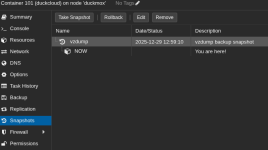
nein das liefert nix, allerdings gibt es einen Snapshot (vzdump) wenn man beim Container auf Snapshots geht (siehe Bild)
 

Attachments

  • snapshot.png
    snapshot.png
    34.2 KB · Views: 2
Last edited:
Was mir gerade noch aufgefallen ist:
Warum will proxmox den snapshot unter /mnt/vzdump0/srv mounten?

Ist das weil der mountpoint im container als /srv gemounted ist?

Bei zwei meiner drei andern container ist das nämlich auch der Fall, bei denen läuft das backup allerdings ohne probleme durch.

Ich habe auch versucht das verzeichnis /srv unter /mnt/vzdump0 zu erstellen das hat allerdings nur einen anderen Fehler getriggert


Code:
INFO: starting new backup job: vzdump 101 --storage duckpbs --mode snapshot
INFO: Starting Backup of VM 101 (lxc)
INFO: Backup started at 2025-12-30 00:15:42
INFO: status = running
INFO: CT Name: duckcloud
INFO: including mount point rootfs ('/') in backup
INFO: including mount point mp0 ('/srv') in backup
INFO: found old vzdump snapshot (force removal)
  Logical volume "snap_vm-101-disk-0_vzdump" successfully removed.
ERROR: Backup of VM 101 failed - mount point '/mnt/vzsnap0' not empty
INFO: Failed at 2025-12-30 00:15:42
INFO: Backup job finished with errors
INFO: notified via target `mail-to-root`
job errors

mount point '/mnt/vzsnap0' not empty

Ich habe noch versucht den container zu klonen und den klon zu backupen - das hat ohne probleme funktioniert, jetzt bin ich noch mehr verwirrt, denn sollte nicht der klon das selbe problem wie das original haben?

Da der Klon beim backup gestoppt war habe ich es auch im laufenden Zustand probiert mit dem selben Ergebnis, wie beim originalcontainer

das Problem ist also, dass der container nur im gestoppten zustand gebackupt werden kann, allerdings erst seit ich proxmox von 8.4 auf 9.1 geupdatet habe
 
Last edited: