

Any guest OS support matrix on Proxmox?
- Thread starter stevenyiu
- Start date
You are using an out of date browser. It may not display this or other websites correctly.
You should upgrade or use an alternative browser.
You should upgrade or use an alternative browser.

A good start:
https://linux-kvm.org/page/Guest_Support_Status
Win 2003 is out of support and not the best OS nowadays, just to note.
https://linux-kvm.org/page/Guest_Support_Status
Win 2003 is out of support and not the best OS nowadays, just to note.

I'm running a Windows XP Home Edition 2002 SP3 (32-bit) on my fully updated PVE environment without issue.Windows 2003 32-Bit
On a 32-bit OS there will be different RAM constraints than a 64-bit OS.

Support does not mean that things that are not supported will not run. The guest support ist mainly up to the guest OS. Running DOS will also work, yet you will not have any guest integration and problems shutting down the VM from the outside (not stopping and not from the inside), yet the "VM experience" is not on par with e.g. modern OSes.I'm running a Windows XP Home Edition 2002 SP3 (32-bit) on my fully updated PVE environment without issue.
On a 32-bit OS there will be different RAM constraints than a 64-bit OS.
EDIT: Also things like PCIe passthrough will not work on XP or any other non-UEFI-OS
I fully agree with your statement & will only add that my above posted statement does not implicitly or otherwise mention any type of support.Support does not mean that things that are not supported will not run. The guest support ist mainly up to the guest OS. Running DOS will also work, yet you will not have any guest integration and problems shutting down the VM from the outside (not stopping and not from the inside), yet the "VM experience" is not on par with e.g. modern OSes.
You'd think that the qemu guest agent would be fairly easy to port to FreeDOS, but I guess it's a niche-use case and not enough demand for itSupport does not mean that things that are not supported will not run. The guest support ist mainly up to the guest OS. Running DOS will also work, yet you will not have any guest integration and problems shutting down the VM from the outside (not stopping and not from the inside), yet the "VM experience" is not on par with e.g. modern OSes.
EDIT: Also things like PCIe passthrough will not work on XP or any other non-UEFI-OS
DOS doesn't multi-task so it would have to be a terminate-and-stay-resident program. Might be a bigger change than one would think. Plus there's no demand .You'd think that the qemu guest agent would be fairly easy to port to FreeDOS, but I guess it's a niche-use case and not enough demand for it
and you would need to implement a driver for the PCI serial port that is normally used for communicationDOS doesn't multi-task so it would have to be a terminate-and-stay-resident program. Might be a bigger change than one would think. Plus there's no demand .

The biggest problem I’ve found dealing with DOS is finding a compiler tool chain that will target 80286/8086 level CPU. You also need to emulate some ancient hardware. There are surprisingly still new devices being sold with MS-DOS software but most of the code is based on Borland tools (Pascal) and not C.
A good start:
https://linux-kvm.org/page/Guest_Support_Status
Win 2003 is out of support and not the best OS nowadays, just to note.
Thanks for your info. based on the provided website, i found that "Red Hat Linus 8" will crash? So, is it mean Proxmox NOT support RHL 8 anymore? Or it depends on OS patch level....etc?
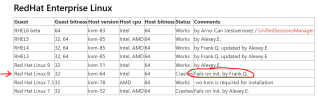
I don't believe that list is to be considered completely authoritative & comprehensive - it is just a "crash-report" AFAIK, (but I may be wrong as IDNK how/who the list is/was compiled).i found that "Red Hat Linus 8" will crash?
(Also "Fails on init" maybe something specialized being used for creation that fails - you'd have to ask that to Frank.Q.?).
Search these forums for users successfully running RHEL 8 VMs or derivatives thereof. Again, I'm not sure exactly what your OP "supporting Guest OS" means to you.
I am running latest Proxmox VE 9 .1 but no idea which OS version (Linux and windows) to use as Guest OS.
Not able to find any official support/compatibility matrix for this.
Any input on this will be very helpful.
Not able to find any official support/compatibility matrix for this.
Any input on this will be very helpful.

Hi @pbujarbarua , welcome to the forum.I am running latest Proxmox VE 9 .1 but no idea which OS version (Linux and windows) to use as Guest OS.
Not able to find any official support/compatibility matrix for this.
Any input on this will be very helpful.
You should use the OS that fulfills your goal requirements.
Blockbridge : Ultra low latency all-NVME shared storage for Proxmox - https://www.blockbridge.com/proxmox
Basically any operating system which is able to run on a modern x86/64 system should run in ProxmoxVE too. Depending on the usecase and specific os there might be some other considerations, for examples Redhat and Co (Alma/Rocky) demands that the CPU type in the vm configuration is at least , x86-64-v3 (Intel Haswell, AMD Excavator or newer see https://brentk.io/thoughts/qemu-and-kvm/making-sense-of-qemu-cpu-types.html ) or compatible. On a single node or in a homogenous cluster usually the cpu type host will yield best performance for non-Windows-workloads. For Windows it's more complicated due to security mitigations which can have a huge performance hit with cpu type host. This can be avoided by disabling the cpu flag for Nested Virtualization, selecting x86-64-v3 or (preffered) the smallest common generic-type in the cluster. You can determine it with https://github.com/credativ/ProxCLMC
You also need the virtio drivers for best storage/network performance: https://pve.proxmox.com/wiki/Windows_2022_guest_best_practices
In some cases (e.G. NAS operating systems like TrueNAS or a firewall appilance like OPNSense ) you might also need to take other factors in consideration. For example for virtualizing TrueNAS it's recommended to have a dedicated storage hba passed through to the vm: https://www.truenas.com/community/r...guide-to-not-completely-losing-your-data.212/
For possible caveats of virtualizing a firewall see https://forum.opnsense.org/index.php?topic=44159.0
tldnr: Every modern OS for x86/64 should work but they might need extra work. For Linux just use your favourite Linux distribution and you will be fine Personally I'm quite happy with Debian Stable cloud images as base for my vms
You also need the virtio drivers for best storage/network performance: https://pve.proxmox.com/wiki/Windows_2022_guest_best_practices
In some cases (e.G. NAS operating systems like TrueNAS or a firewall appilance like OPNSense ) you might also need to take other factors in consideration. For example for virtualizing TrueNAS it's recommended to have a dedicated storage hba passed through to the vm: https://www.truenas.com/community/r...guide-to-not-completely-losing-your-data.212/
For possible caveats of virtualizing a firewall see https://forum.opnsense.org/index.php?topic=44159.0
tldnr: Every modern OS for x86/64 should work but they might need extra work. For Linux just use your favourite Linux distribution and you will be fine
Personally I'm quite happy with Debian Stable cloud images as base for my vms
Last edited:
Any x86 (Intel) OS with BIOS or UEFI support should work. Theoretically you could emulate almost any other known CPU as well, but that gets tricky.
You can reference other hypervisors like Nutanix, Red Hat, Canonical as well as documentation from the OS (eg Microsoft) for those to see what specific settings they recommend, as they all use the same technology.
You can reference other hypervisors like Nutanix, Red Hat, Canonical as well as documentation from the OS (eg Microsoft) for those to see what specific settings they recommend, as they all use the same technology.