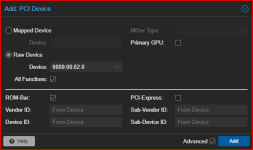
Hi.
Very new to Proxmox and not a linux head.
I'm trying to pass-through an Intel iGPU (P530). CPU and MSI motherboard both support VT-d and is enabled in the BIOS but it just has not worked. "No IOMMU detected. Please activate it."
Read guides here. https://pve.proxmox.com/wiki/PCI_Passthrough - and here - https://peanut-tech.com/how-to-pass-through-intel-igpu-to-proxmox-virtual-machine/
I also searched the forum a bunch but none seem to be the problem I have.
Here are the steps I took:
1) updated grub with - GRUB_CMDLINE_LINUX_DEFAULT="quiet intel_iommu=on iommu=pt"
2) Ctrl + O, Ctrl + X, update-grub
3) reboot
4) updated vfio modules
vfio
vfio_iommu_type1
vfio_pci
5) update-initramfs -u -k all
6) reboot
7) dmesg | grep -e DMAR -e IOMMU - confirms DMAR:IOMMU enabled
Go to the VM to add the PCI device and ....
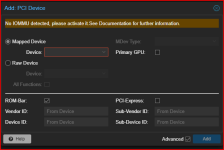
I just don't understand what I am doing wrong. Hoping someone can help me out. Thanks.
Very new to Proxmox and not a linux head.
I'm trying to pass-through an Intel iGPU (P530). CPU and MSI motherboard both support VT-d and is enabled in the BIOS but it just has not worked. "No IOMMU detected. Please activate it."
Read guides here. https://pve.proxmox.com/wiki/PCI_Passthrough - and here - https://peanut-tech.com/how-to-pass-through-intel-igpu-to-proxmox-virtual-machine/
I also searched the forum a bunch but none seem to be the problem I have.
Here are the steps I took:
1) updated grub with - GRUB_CMDLINE_LINUX_DEFAULT="quiet intel_iommu=on iommu=pt"
2) Ctrl + O, Ctrl + X, update-grub
3) reboot
4) updated vfio modules
vfio
vfio_iommu_type1
vfio_pci
5) update-initramfs -u -k all
6) reboot
7) dmesg | grep -e DMAR -e IOMMU - confirms DMAR:IOMMU enabled
Go to the VM to add the PCI device and ....
| CPU(s) 8 x Intel(R) Xeon(R) CPU E3-1275 v5 @ 3.60GHz (1 Socket) |
| Kernel Version Linux 6.5.13-5-pve (2024-04-05T11:03Z) |
| Boot Mode EFI |
| Manager Version pve-manager/8.1.10/4b06efb5db453f29 |
| Repository Status Proxmox VE updates Non production-ready repository enabled! |
I just don't understand what I am doing wrong. Hoping someone can help me out. Thanks.