An easy one, for a change! [Solved]

SpongeRob

Active Member
Nov 29, 2021
32
5
28
Co. Donegal, Eire
Hello again helpful community. Today I have a rather easy question for you all!

I am trying to restore a VM on a newly installed instance of PVE 9.1.7, however before I can restore it I need to copy over the backup files (45GB). The problem is that ProxMox is installed on a 120GB SSD, leaving me with 40GB free space on local drive. So I thought, it's OK, I'll just install another 120GB SSD and use that as a scratch drive.

Maybe I've done this wrong, but I installed the scratch drive, mounted it, formatted it via Shell to EXT4 and then went into Datacenter, Storage and added the scratch drive via 'Directory' then I edited the local drive to ISOs only and the scratch drive for everything else.

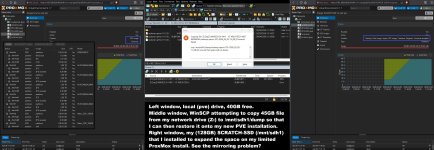
If you see my screenshot, both the scratch drive and the local drive rise in disk usage when the file transfer occurs. I understand that it's probably saving the data somewhere until the transfer is completed. So then I went down the route of editing the /etc/vzdump.conf and changing the first entry specifically to the path of the scratch drive. I don't know that I did this correctly because still the local drives disk space decreases along with the scratch drive?

Basically I am asking how can I copy this file over please! Thank-you in advance.problem.jpg
 
Hello again helpful community. Today I have a rather easy question for you all!

I am trying to restore a VM on a newly installed instance of PVE 9.1.7, however before I can restore it I need to copy over the backup files (45GB). The problem is that ProxMox is installed on a 120GB SSD, leaving me with 40GB free space on local drive. So I thought, it's OK, I'll just install another 120GB SSD and use that as a scratch drive.

Maybe I've done this wrong, but I installed the scratch drive, mounted it, formatted it via Shell to EXT4 and then went into Datacenter, Storage and added the scratch drive via 'Directory' then I edited the local drive to ISOs only and the scratch drive for everything else.

If you see my screenshot, both the scratch drive and the local drive rise in disk usage when the file transfer occurs. I understand that it's probably saving the data somewhere until the transfer is completed. So then I went down the route of editing the /etc/vzdump.conf and changing the first entry specifically to the path of the scratch drive. I don't know that I did this correctly because still the local drives disk space decreases along with the scratch drive?

Basically I am asking how can I copy this file over please! Thank-you in advance.View attachment 97075
Hi, SCP copies files directly to the intended destination. But from what I can see your scratch drive is the same size as the local directory. Is it mounted properly or you're just copying to the unmounted directory? Please show the output of df and mount
 
  • Like
Reactions: Johannes S
Hello again helpful community. Today I have a rather easy question for you all!

I am trying to restore a VM on a newly installed instance of PVE 9.1.7, however before I can restore it I need to copy over the backup files (45GB). The problem is that ProxMox is installed on a 120GB SSD, leaving me with 40GB free space on local drive. So I thought, it's OK, I'll just install another 120GB SSD and use that as a scratch drive.

Maybe I've done this wrong, but I installed the scratch drive, mounted it, formatted it via Shell to EXT4 and then went into Datacenter, Storage and added the scratch drive via 'Directory' then I edited the local drive to ISOs only and the scratch drive for everything else.

Instead of mounting it by hand and formatting it as well, let the PVE do it for you, then configure it from there.
After that you only need to SCP the backup into it:
scp root@PVE:/path/to/storage/filen.name
 
Ok, as you may of noticed from previous posts from me, I'm not that familiar with Linux, but I try.

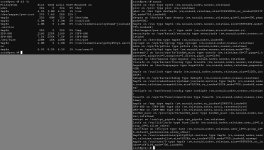
Hi, SCP copies files directly to the intended destination. But from what I can see your scratch drive is the same size as the local directory. Is it mounted properly or you're just copying to the unmounted directory? Please show the output of df and mount
Attached, thank-you for your reply.

Instead of mounting it by hand and formatting it as well, let the PVE do it for you, then configure it from there.
After that you only need to SCP the backup into it:
scp root@PVE:/path/to/storage/filen.name
I'm a little lost with your reply sorry. My WinSCP is the correct destination path I believe? mnt/sdh1/dump/ ??
 

Attachments

  • answer.jpg
    answer.jpg
    240 KB · Views: 3
You're writing to /mnt/sdh1 directory which is a normal dir - nothing mounted there. You have to mount the disk first.
 
  • Like
Reactions: SpongeRob
That's the probable issue that you first tried to mount unformatted file system. Based on the output of df/mount you sent nothing is mounted in the /mnt/sdh1 directory.
 
  • Like
Reactions: SpongeRob
OK, yes that does kinda fit and sound about right to me.. so I should wipe the Scratch drive and let ProxMox do everything instead of me manually doing it.. OK, lets give that a try... Or should I now try to just mount it?

EDIT : So I just mounted it, using 'mount /dev/sdh1 /mnt/sdh1' and looking at the the Scratch-SSD usage increasing and the the local usage not moving we're definitely good. Feeling stupid but that's what I need to feel in order to learn. Thanking all you guys for the support. Told you it was an easy one but definitely appreciated. Thanks again guys, Croit, Onslow :cool::cool:
 
Last edited: