Accidentally increased size of a disk for a client. How do I decrease?

gctwnl

Member
Aug 24, 2022
95
17
13
I was trying to increase/decrease the sizes of two LVs in PVE but not succeeding. That is, using the command line with lvresize, I succeeded at decreasing a LV that is mounted inside the PVE host from a VG/LVM on an external LUKS-encrypted) disk, but I did not succeed in increasing another LV that is assigned to a client VM (not running at the moment). I had various problems on the command line e.g. that the LV wasn't activated.

Then I noticed that the GUI has a a disk action 'resize' for the client VM. So, I tried to increase it there, and this succeeded. However, I made a mistake and increased another one (in another VG too). So, I would like to repair that and decrease its size again. I tried entering a negative number in the GUI, but that did not work.

If I try this on the command line on PVE, I get:

Code:
root@pve:~# lvresize --size -500GB --resizefs pve/vm-100-disk-2
fsadm: Cannot get FSTYPE of "/dev/mapper/pve-vm--100--disk--2".
  Filesystem check failed.

pve/vm-100-disk-2 was 500GB, I accidentally increased it to 700GB, but I would like to shrink it by 300GB, so my current resize wish is -500GB. It is scsi3 (/dev/sdd) in the Ubuntu client. I haven't restarted the VM yet, or rebooted the PVE host.
 
@gctwnl
I'm quite confused by your story.
1) Disk was 500 GB. You increased it to 700 GB. Now you would like to shrink it by 300 GB. That would give 700-300=400 GB.
500 != 400.
2) BUT it the command you quote, you're trying to remove 500 GB.
300 != 500.
3) Did you increase the filesystem in the VM as well? If yes, you can't make it lesser than it was, so the failure.
If not, there's no need to use --resizefs option.
4) What is the filesystem type?

So we have at least four mysteries.

Anyway, you may find e.g. this thread useful: https://forum.proxmox.com/threads/shrink-vm-disk.169576/

And, quoting LnxBil: As always: have backups ready! :)
 
  • Like
Reactions: Johannes S
Sorry, I was not perfectly clear. The disk was 500GB and I wanted to reduce it to 200GB (there is 40GB data on it after 3 years), so initially I wanted a 300GB reduction. But I accidentally increased it (via the PVE Web GUI) by 200GB to 700GB (thinking it to be another disk). To get to the desired 200GB, I need to go from 700GB now to 200GB, which is minus 500GB from its current size.

The file system type is ext4

Yes, I did use --resizefs on all my command line attempts

I did increase it from 500GB to 700GB through the PVE Web GUI (VM -> Hardware -> DIsk Action), and I don't know if the GUI uses --resizefs in the background (I assumed it would, but now that I think about it that is silly). I could try to start the VM and try a resize2fs from there, maybe. But that still doesn't get me back from 700GB to the desired 200GB. Starting the VM will make attempts to use the file system, and I am uncertain in which state it is.

I have backups. But having to rebuild data is of course a bit of a pain.
 
AFAIU, you increased using PVE's GUI. If yes, the fs in the VM wasn't increased. Which is good :). Don't start the VM for now.
Now be warned: make yourself very sure which "giga"bytes are used by the GUI and which ones by the lvresize! Binary or decimal? Giga or gibi. You don't want to remove more that you added!

First return to the stable state of the previous size, using lvresize without --resizefs.
Just in case first remove only 100 and see in the GUI what size it'll result with.

Then: to be on the safe side, remove less than intended.

Only when you reach the previous state (or a little bigger disk), you can continue with what you wanted in the first place.

I'm not sure if lvresize with --resizefs supports decreasing the LV.
I would reduce the filesystem by other means, before using lvresize.
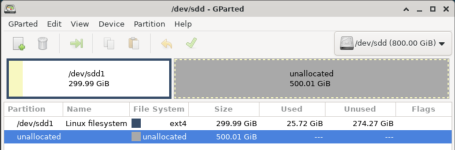
I suggest booting the VM with some "live CD" image containing Gparted and decreasing the filesystem.
If successfully, later decrease the LV.
 
AFAIU, you increased using PVE's GUI. If yes, the fs in the VM wasn't increased. Which is good :). Don't start the VM for now.
...
Thanks for helping out, @Onslow.

On PVE, lvdisplay says about the device:
Code:
  --- Logical volume ---
  LV Path                /dev/pve/vm-100-disk-2
  LV Name                vm-100-disk-2
  VG Name                pve
  LV UUID                Wm8zj1-l4Ou-JJgN-riEf-Yo09-Hslx-kENWau
  LV Write Access        read/write
  LV Creation host, time pve, 2023-02-27 23:42:08 +0100
  LV Pool name           data
  LV Status              available
  # open                 0
  LV Size                700.00 GiB
  Mapped size            66.46%
  Current LE             179200
  Segments               1
  Allocation             inherit
  Read ahead sectors     auto
  - currently set to     256
  Block device           252:8

In the GUI, it shows up for the VM as:
Screenshot 2026-01-02 at 21.00.59.png
Inside (Ubuntu) VM, this is mounted on some mount point and used by the VM. Now, the bad news is, this is the main data 'disk' for the Ubuntu client. So, starting that VM will result in a mess (containers etc. starting without access to their data)

So, if I understand it correctly, the resize by the PVE Web GUI has increased the LV but not increased the FS.

On PVE, the lvs entry is:
Code:
  LV              VG          Attr       LSize    Pool Origin Data%  Meta%  Move Log Cpy%Sync Convert
  vm-100-disk-2   pve         Vwi-a-tz--  700.00g data        66.46

What I would like to do is without starting the VM (which mounts this from /dev/sdd ) downsize the FS with resize2fs, then downsize the LV with lvresize.

lsblk says:
Code:
root@pve:~# lsblk
NAME                                          MAJ:MIN RM   SIZE RO TYPE  MOUNTPOINTS
sda                                             8:0    0   1.7T  0 disk 
`-sda1                                          8:1    0   1.7T  0 part 
  `-luks-fa1483bd-f599-4dcf-9732-c09069472150 252:9    0   1.7T  0 crypt
    `-rna--mepdm--1-rna--pbs--mepdm--1        252:11   0   200G  0 lvm   /mnt/pbs-backup-1
nvme0n1                                       259:0    0 931.5G  0 disk 
|-nvme0n1p1                                   259:1    0  1007K  0 part 
|-nvme0n1p2                                   259:2    0   512M  0 part  /boot/efi
`-nvme0n1p3                                   259:3    0   931G  0 part 
  |-pve-swap                                  252:0    0     8G  0 lvm   [SWAP]
  |-pve-root                                  252:1    0    96G  0 lvm   /
  |-pve-data_tmeta                            252:2    0   8.1G  0 lvm   
  | `-pve-data-tpool                          252:4    0 794.8G  0 lvm   
  |   |-pve-data                              252:5    0 794.8G  1 lvm   
  |   |-pve-vm--100--disk--0                  252:6    0    32G  0 lvm   
  |   |-pve-vm--100--disk--1                  252:7    0    32G  0 lvm   
  |   `-pve-vm--100--disk--2                  252:8    0   700G  0 lvm   
  `-pve-data_tdata                            252:3    0 794.8G  0 lvm   
    `-pve-data-tpool                          252:4    0 794.8G  0 lvm   
      |-pve-data                              252:5    0 794.8G  1 lvm   
      |-pve-vm--100--disk--0                  252:6    0    32G  0 lvm   
      |-pve-vm--100--disk--1                  252:7    0    32G  0 lvm   
      `-pve-vm--100--disk--2                  252:8    0   700G  0 lvm

Is there a way I can do this on PVE without booting the VM (with a live image? After all, both are Ubuntus, right? (I am not very deeply experienced with Linux).
 
On PVE, lvdisplay says about the device:
...
LV Size 700.00 GiB

In the GUI, it shows up for the VM as:
View attachment 94570
So they use the same units, fine.
Anyway, don't remove full 200 GiB, just in case. You'll be trying to decrease it more, later, anyway.

Inside (Ubuntu) VM, this is mounted on some mount point and used by the VM. Now, the bad news is, this is the main data 'disk' for the Ubuntu client. So, starting that VM will result in a mess (containers etc. starting without access to their data)
Not really. The data is still there. But as I wrote, don't start it.
So, if I understand it correctly, the resize by the PVE Web GUI has increased the LV but not increased the FS.
Yes, that's what I wrote.
On PVE, the lvs entry is:
Code:
  LV              VG          Attr       LSize    Pool Origin Data%  Meta%  Move Log Cpy%Sync Convert
  vm-100-disk-2   pve         Vwi-a-tz--  700.00g data        66.46

What I would like to do is without starting the VM (which mounts this from /dev/sdd )
I'm a little bit unclear whether this is the same disk...
The VM seems to have 3 "disks" from the PVE: pve-vm--100--disk--0, ...1, ...2.
So why /dev/sdd inside the VM, not /dev/sdc? Maybe "disk" ...2 has two partitions (from the VM's point of view, I don't know). You'll have to inspect it all while booted from live image.

Edit: not rather. Partitions would be sdc1, sdc2 etc. So it doesn't explain why sdd.
You'll have to check it carefully examining from live image session.

downsize the FS with resize2fs, then downsize the LV with lvresize.
Yes.
Is there a way I can do this on PVE without booting the VM (with a live image? After all, both are Ubuntus, right? (I am not very deeply experienced with Linux).
As I wrote: boot the VM with a "live image" having Gparted. I can see Gparted has its own live images at gparted.org (I usually use SystemRescueCd which contains Gparted, among other things).

In case you'll need more assistance, ask. If not I, someone else here surely will help you.
 
Last edited:
I'm a little bit unclear whether this is the same disk...
The VM seems to have 3 "disks" from the PVE: pve-vm--100--disk--0, ...1, ...2.
So why /dev/sdd inside the VM, not /dev/sdc? Maybe "disk" ...2 has two partitions (from the VM's point of view, I don't know). You'll have to inspect it all while booted from live image.
Thanks.

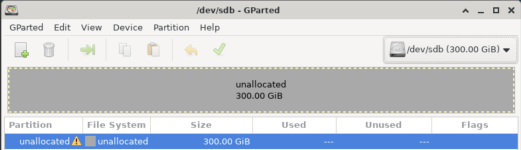
sdb is from a different VG on a different disk (external RAID1). This is earlier on the client when it was still running:
Code:
$ lsblk
NAME                      MAJ:MIN RM  SIZE RO TYPE MOUNTPOINTS
sda                         8:0    0   32G  0 disk
├─sda1                      8:1    0    1M  0 part
├─sda2                      8:2    0    2G  0 part /boot
└─sda3                      8:3    0   30G  0 part
  └─ubuntu--vg-ubuntu--lv 253:0    0   15G  0 lvm  /
sdb                         8:16   0  500G  0 disk
└─sdb1                      8:17   0  500G  0 part /mnt/ServerBackup
sdc                         8:32   0   32G  0 disk
└─sdc1                      8:33   0   32G  0 part /var/lib/docker
sdd                         8:48   0  500G  0 disk
└─sdd1                      8:49   0  500G  0 part /mnt/ServerData

I will follow your suggestion and use SystemRescue. I have already uploaded it to proxmox and put in on CD in the hardware for the VM and made the CD the first in boot order, so I guess it will boot from that SystemRescue iso. That's going to wait for tomorrow.

I do have a question. There is something I can't get my head around (and makes me worry that I don't understand this correctly and can make big mistakes). As I understand it the whole PV/VG/LV structure exists at host (pve) level. On the client the LVs are SCSI devices. How is it then possible to use a client to resize LVs that live at the host level (or use parted for that matter)?
 
How is it then possible to use a client to resize LVs that live at the host level (or use parted for that matter)?
It isn't :). From the VM's point of view, it's a disk. The VM doesn't know that's a LV and it doesn't care.

In the VM you'll shrink the filesystem which during the normal work is mounted at /mnt/ServerData but during the live image session will not be mounted at all (don't mount it anywhere).
Then you'll shrink /dev/sdd1 partition.
In practice Gparted will do these two operations seemingly together. You'll move the bar, click "apply" or similar.

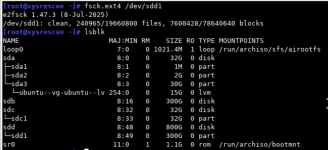
To make sure that the filesystem is in a good condition, you can fsck.ext4 /dev/sdd1 before shrinking and repeat it after the shrinking.

After that, the partition /dev/sdd1 will be decreased but the disk /dev/sdd will be of the same size as before.
You'll be able to verify that with fdisk -l or lsblk
Then you can shutdown the live image session.

Shrinking the disk (i.e. the LV) you'll do from the PVE level with lvresize.
Be cautious here! You can't make it lesser than the partition /dev/sdd1 or you'll damage the data. In practice, it's always good to leave some security margin.

After executing lvresize you can boot the VM from the live image once again and confirm the "disk" /dev/sdd is in fact decreased.

If all is OK, you will be able to start the VM in the normal way.

If you need more help, you can ask.
Don't act in hurry with such operations.
Make notes what you're doing. If you encounter a problem, we will need the details to be able to help you.
If you don't encounter a problem, the notes will be a valuable help for you in future.

Even if you spoil the VM or the data, it's not a disaster because you have backup.
(Of course don't try doing such changes without having a fresh good backup). :)

Good luck!
 
Last edited: