A fix for "QEMU Guest Agent is Not Running" on HA VE?

houser

New Member
Sep 13, 2026
6
0
1
This morning my Home Assistant VE installed via the community script under Proxmox 9 did not start.
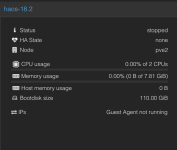
After some fixing and deleting other VE.s it starts again but I now get the dreaded “QEMU Guest Agent is Not Running”.
I assume the VE is corrupted somewhat and possibly by temporary lack of diskspace.

Is there a fix for this, to repair the Qemu install on the HA guest VA in order to attempt to get the HA VE up and running again?

I have checked and unchecked the qemu option in the Proxmox GUI.
I can start and stop the VE via qm start/stop <ID> but I can no longer get to the Home Assistant VE console, as there is no network.
I have installed another HA VE that works fine, so the Proxmox host seems ok.

Any help or hints much appreciated!
 
Last edited:
If you have shell access to the Proxmox host, could you post the output of the following commands?

This may not identify the exact root cause, but it should help rule out obvious Proxmox-side issues such as VM configuration, boot order, network settings, or storage/capacity problems.


qm config <VMID> --current
qm status <VMID>
df -h
pvesm status
 
Last edited:
If you have shell access to the Proxmox host, could you post the output of the following commands?

This may not identify the exact root cause, but it should help rule out obvious Proxmox-side issues such as VM configuration, boot order, network settings, or storage/capacity problems.


qm config <VMID> --current
qm status <VMID>
df -h
pvesm status
Thanks very much for your reply. This is the output to that command for the VE in question:

Code:
root@pve2:~# qm config 104 --current
qm status 104
df -h
pvesm status
agent: 1,type=virtio
bios: ovmf
boot: order=scsi0
cores: 2
description: <div align='center'>%0A  <a href='https://community-scripts.org' target='_blank' rel='noopener noreferrer'>%0A    <img src='https://raw.githubusercontent.com/community-scripts/ProxmoxVE/main/misc/images/logo-81x112.png' alt='Logo' style='width%3A81px;height%3A112px;'/>%0A  </a>%0A%0A  <h2 style='font-size%3A 24px; margin%3A 20px 0;'>Homeassistant OS VM</h2>%0A%0A  <p style='margin%3A 16px 0;'>%0A    <a href='https://ko-fi.com/community_scripts' target='_blank' rel='noopener noreferrer'>%0A      <img src='https://img.shields.io/badge/&#x2615;-Buy us a coffee-blue' alt='spend Coffee' />%0A    </a>%0A  </p>%0A%0A  <span style='margin%3A 0 10px;'>%0A    <i class="fa fa-github fa-fw" style="color%3A #f5f5f5;"></i>%0A    <a href='https://github.com/community-scripts/ProxmoxVE' target='_blank' rel='noopener noreferrer' style='text-decoration%3A none; color%3A #00617f;'>GitHub</a>%0A  </span>%0A  <span style='margin%3A 0 10px;'>%0A    <i class="fa fa-comments fa-fw" style="color%3A #f5f5f5;"></i>%0A    <a href='https://github.com/community-scripts/ProxmoxVE/discussions' target='_blank' rel='noopener noreferrer' style='text-decoration%3A none; color%3A #00617f;'>Discussions</a>%0A  </span>%0A  <span style='margin%3A 0 10px;'>%0A    <i class="fa fa-exclamation-circle fa-fw" style="color%3A #f5f5f5;"></i>%0A    <a href='https://github.com/community-scripts/ProxmoxVE/issues' target='_blank' rel='noopener noreferrer' style='text-decoration%3A none; color%3A #00617f;'>Issues</a>%0A  </span>%0A</div>
efidisk0: local-lvm:vm-104-disk-1,efitype=4m,size=4M
localtime: 1
machine: q35
memory: 8000
meta: creation-qemu=11.0.0,ctime=1786113608
name: haos-18.2
net0: virtio=02:48:7F:8D:09:0A,bridge=vmbr0
onboot: 1
ostype: l26
parent: error_state_sept_13
scsi0: local-lvm:vm-104-disk-0,discard=on,size=110G,ssd=1
scsihw: virtio-scsi-pci
serial0: socket
smbios1: uuid=761b08a6-753f-43c6-ae19-9ea9f9308f89
tablet: 0
tags: community-script
usb0: host=10c4:ea60
usb1: host=3-2
vga: none
vmgenid: 9e33a1fe-e553-430c-a2fa-8d2b10c307f8
status: running
Filesystem            Size  Used Avail Use% Mounted on
udev                  6.8G     0  6.8G   0% /dev
tmpfs                 1.6G  3.1M  1.6G   1% /run
/dev/mapper/pve-root   94G   62G   28G  69% /
tmpfs                 7.7G   46M  7.7G   1% /dev/shm
efivarfs              192K  107K   81K  57% /sys/firmware/efi/efivars
tmpfs                 5.0M     0  5.0M   0% /run/lock
tmpfs                 1.0M     0  1.0M   0% /run/credentials/systemd-journald.service
/dev/sda2            1022M  9.1M 1013M   1% /boot/efi
tmpfs                 7.7G   48K  7.7G   1% /tmp
/dev/fuse             128M   24K  128M   1% /etc/pve
tmpfs                 1.0M     0  1.0M   0% /run/credentials/getty@tty1.service
tmpfs                 1.6G  4.0K  1.6G   1% /run/user/0
Name             Type     Status     Total (KiB)      Used (KiB) Available (KiB)        %
local             dir     active        98497780        64144464        29303768   65.12%
local-lvm     lvmthin     active       364797952        75732054       289065897   20.76%
root@pve2:~#
 
Last edited:
Please use code blocks so this is readable. Can't you restore a snapshot/backup of the VM?
 
Please use code blocks so this is readable. Can't you restore a snapshot/backup of the VM?
Thanks. Fixed the code block was using ``<>````that I thought was applicable here. Apologies. New to Proxmox and would really like to know if this is an error that is fixable if it happens again. Can I add back the QEMU Guest Agent functionality?
 
Last edited:
I'd check systemctl status qemu-guest.service in the VM's Shell. You might have to enter login or log in as root first.
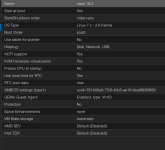
Generally HAOS is an appliance that is not really meant to be managed/fixed. Can you also share the VM's Summary and Options tabs?
 
What did systemctl status qemu-guest.service say?
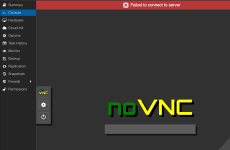
I am unable to use the VM console at this time, as the VM is not getting an IP. So a little Catch 22. But I will try anything as I have some files in there that I really would like to get to.
 
You don't need an ip to use the VM's Console. What do you see in the Console tab?