

Proxmox Virtual Environment 9.0 released!

  • Like
Reactions: RobFantini
I updated several systems - all successful except two. Both are Dell micro PCs. Both did not reboot PVE after the update - jumping into BIOS setup instead.
After booting from install media (advanced/rescue mode), I found that efibootmgr -v did not show a proper boot entry.
pve-efiboot-tool init /dev/nvme0n1p2 and pve-efiboot-tool refresh did the job and both systems boot normal again.
 
  • Like
Reactions: empirical6355
You might try turning on csm and legacy boot in BIOS to see if you can get it booted that way. If that works, check this thread.

https://forum.proxmox.com/threads/help-with-uefi-boot-issue-after-pve-9-upgrade.169796/

I had boot mode set to 'dual', tried it set to both legacy, and only uefi and still same problem - 'Welcome to grub' and reboot into bios.
I created a pve installation and was able to do a rescue boot successfully.
efibootmgr -v looked normal as far as I could tell
Running proxmox-boot-tool status shows 'E: /etc/kernel/proxmox-boot-uuids does not exist.'
I followed the instructions here: https://github.com/jacrook/PVE8-9

# Fix UEFI boot problems
echo 'grub-efi-amd64 grub2/force_efi_extra_removable boolean true' | debconf-set-selections -v
apt install --reinstall grub-efi-amd64

....and this solved my boot issues

A pain, but rescued
 
Thx for the (smooth) update!

I encountered two minor issues with the new HA affinity rules in PVE Web UI, can someone confirm?
- Selecting an existing HA rule, the Edit-Button stays disabled, although I can edit the rule by double clicking it. I expected the edit-Button to be enabled.
- Editing a HA rule, I can use Umlaute (e.g., ä) in the comment field. After saving it is displayed as �. There seems to be an encoding/utf-8 problem. I expected it to be displayed as ä.
 
- Selecting an existing HA rule, the Edit-Button stays disabled, although I can edit the rule by double clicking it. I expected the edit-Button to be enabled.

Afaict, the patch is not applied yet.
 
  • Like
Reactions: sjjh
Hi, I am trying to get ready to upgrade to version 9. Currently on 8.4.11. But pve8to9 is reporting a fail:

Code:
FAIL: systemd-boot meta-package installed. This will cause problems on upgrades of other boot-related packages. Remove 'systemd-boot' See https://pve.proxmox.com/wiki/Upgrade_from_8_to_9#sd-boot-warning for more information.

I've seen others reporting to have warnings that systems-boot was installed but not used. In my case it seems it is used. I'm not an expert and don't want to leave the system unable to boot. Seems like I should fix the boot method before I go on, but am unable to find pointers on how to do that. Any tips would be greatly appreciated.
 
Has anyone else noticed yet in 9.0 the web UI feels so much snappier?! It loads instantly and feels faster to navigate and load various sections and pop-ups.

Great job! Very appreciated.
 
  • Like
Reactions: empirical6355
# Fix UEFI boot problems
echo 'grub-efi-amd64 grub2/force_efi_extra_removable boolean true' | debconf-set-selections -v
apt install --reinstall grub-efi-amd64
the latest version of `pve8to9` should warn you in that situation - anyways - glad you resolved your issue!
 
- Editing a HA rule, I can use Umlaute (e.g., ä) in the comment field. After saving it is displayed as �. There seems to be an encoding/utf-8 problem. I expected it to be displayed as ä.
Nobody who can confirm this issue? Anyone having an idea what's wrong on my side? :) Have tried it with Firefox & Chromium.
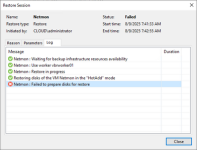
 
We're testing pve 9.0 and are having trouble restoring backups form veeam. I know there's a workaround for changing the machine hardware from the latest version to e.g. 9.2, and that helps with creating backups. However, when we have a VMware backup and want to inject it into the pve 9 environment, the hardware modification is blocked immediately after creating a new VM. I can't change this parameter, and Veeam aborts the restore. Does anyone have a workaround for this?
 

Attachments

  • 705-veeam-error-restoring-VMware-disks-to-a-Proxmox-host.png
    705-veeam-error-restoring-VMware-disks-to-a-Proxmox-host.png
    51.1 KB · Views: 30
Hi all, thanks to the team for its hard work.

I noticed that in roadmap "VM snapshots on thick-provisioned LVM storages with snapshots as volume chains" are still marked as "technology preview" but in every other place this feature Is reported without warnings.
Is this feature production ready or Is still a technology preview?
I think it was announced as a "technology preview" in the initial press release.

I don't believe that the PVE/PBS dev teams put those sorts of warnings in the actual product GUIs.
 
Have upgraded my 3-node cluster just fine, at least it looks like, all VM's and CT's are running.
But I get lots of errors like this now for various actions:
Code:
/etc/ssh/ssh_config line 55: Bad key types '+ssh-rsa,ssh-dss'.
/etc/ssh/ssh_config: terminating, 1 bad configuration options

This is happening when opening a shell on another node then logged in, opening a VM console on another node then logged in, trying to migrate machines between nodes etc.
The etc/ssh/ssh_config on the nodes don't even have a line 55, they have only 53. Did I miss something here? Have choosen to keep using the installed etc/ssh/ssh_config. Any idea how to resolve this?
 
Last edited:
I don't believe that the PVE/PBS dev teams put those sorts of warnings in the actual product GUIs.
They do. For example btrfs is still in this state allthough it was introduced years ago.
I would never trust the Internet if the official docs say something different.
 
Last edited:
I think it was announced as a "technology preview" in the initial press release.

I don't believe that the PVE/PBS dev teams put those sorts of warnings in the actual product GUIs.
Ok, I but i need to know if this feature is still a technology preview or if is enough mature to be considered "production ready" also in very large deployment with tens or hundreds nodes.
 
Have upgraded my 3-node cluster just fine, at least it looks like, all VM's and CT's are running.
But I get lots of errors like this now for various actions:
/etc/ssh/ssh_config line 55: Bad key types '+ssh-rsa,ssh-dss'. /etc/ssh/ssh_config: terminating, 1 bad configuration options
This is happening when opening a shell on another node then logged in, opening a VM console on another node then logged in, trying to migrate machines between nodes etc.
The etc/ssh/ssh_config on the nodes don't even have a line 55, they have only 53. Did I miss something here? Have choosen to keep using the installed etc/ssh/ssh_config. Any idea how to resolve this?
hmm - check if there are some files in `/etc/ssh/ssh_config.d/` - or even a bit more general run - `grep -rE 'ssh-dss' /etc/` - check this on all nodes in your cluster!

if that does not point to the issue - please open a new thread (feel free to mention me with @Stoiko Ivanov) - and share the output of `ssh -vv root@<other-node-in-your-cluster` ( after checking the output for sensitive data)