[SOLVED] GPU issues, no nvidia in /dev

jonwade92

New Member
Mar 10, 2025
7
0
1
Just had to fresh install proxmox 9 after an upgrade attempt caused a kernel panic. I tried restoring my docker-frigate LXC but the restore is skipping a bunch of files so I decided to pull the config files from the backup and start fresh.

Got nvidia drivers installed on proxmox and started setting up passthrough and realized there's no trace of nvidia inside /dev. The gpu is recognized by the system as present, nvidia smi shows the correct card, and I can pass it through to VMs and LXCs by ID, but because of the missing entry in /dev I'm at a loss as to how to pass the device to the docker container inside the lxc or vm (I've tried both). I haven't found anything about Debian Trixie/proxmox 9 changing how gpus are handled in that regard so I'm kind of at a loss as to what to do next
 
solved: nvidiafb was blacklisted automatically by something along the way. # out the entry in pve-blacklist
 
Hey,
PM newbie here,
how exactly did you fix this?
bc my 1060 is showing up in the pci list, but every script/installer says that the host machine is missing the nvidia drivers, even if the nouveau drivers are loaded.....
(and the official doc for pcie passthrough seems outdated, or at least the config files it mentions to are, just wantet to add that...)

thanks in advance!
 
Last edited:
  • Like
Reactions: jonwade92
Hey,
PM newbie here,
how exactly did you fix this?
bc my 1060 is showing up in the pci list, but every script/installer says that the host machine is missing the nvidia drivers, even if the nouveau drivers are loaded.....
(and the official doc for pcie passthrough seems outdated, or at least the config files it mentions to are, just wantet to add that...)

thanks in advance!
install the official drivers from nvidia. I have mine working now without any blacklisting of nouveau but the nvidia installer might just do it for you. Not sure if it's recommended on proxmox 9 or if that's outdated. A lot of tutorials are obsolete and have a bunch of unnecessary or even impossible steps with the current version
 
dpkg -l "*nvidia*" and then apt purge --auto-remove ....
That's not the section I linked though.

I read that it is not recommended to install Nvidia drivers for the Tesla M40 on Proxmox
Why and where?
 
Last edited:
dpkg -l "*nvidia*" and then apt purge --auto-remove ....
That's not the section I linked though.


Why and where?
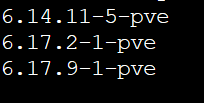
Well i am trying the whole day to install the Nvidia drivers on Proxmox, but no success till now. It breaks up halfway with DKMS errors. I downgraded the kernel to 6.14, but nothing helps. I tried Apt update, and I tried .run, but nothing worked 1772048842594.png
 
I can't tell you much without seeing the error. I also don't have experience with this card. Seems like driver support stopped. Please don't quote unneccessarily.
 
Last edited: