Proxmox VE 9.1.1 – Windows Server / SQL Server issues

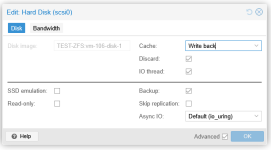
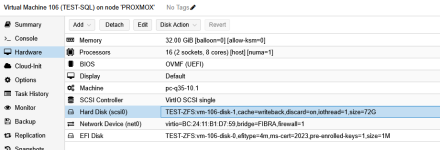
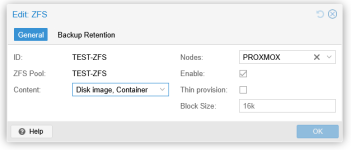
thanks guys, I changed the block size on zfs, I attach an image of both the machine I tested and the zfs settings
That's not really what i meant you should reverse that to 16K (default) because that's a pool wide setting; I've checked on how to do this because PVE created the virtual disks for you with default 16K setting.

I have prepared here an example VM for SQL, virtio0 will be for my OS:
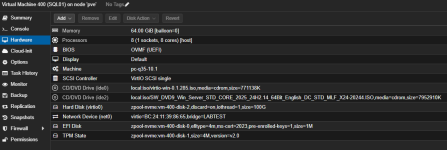
1769512206122.png

You'll want to separate SQL data on another virtual disk, so we'll add it:
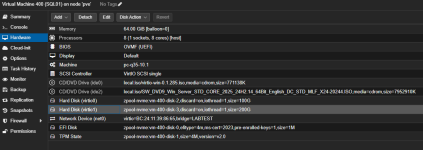
1769512311916.png

Disk (virtio1) will have 16K volblocksize which you do not want, you can verify this in PVE shell:

1769512404813.png

We cannot change the property anymore because this is a readonly property once the disk is created, so we'll need to recreate it:
commands used:
# zfs get volblocksize <zpool>/<disk-name>
# zfs destroy <zpool>/<disk-name>
# zfs create -V 200G -b 8K <zpool>/<disk-name>
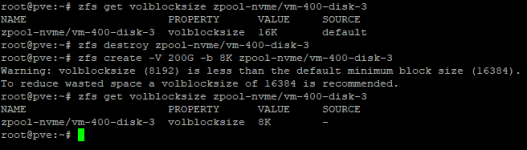
1769512515931.png

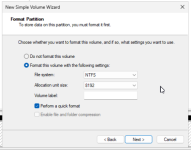
And finally in your OS (my example runs Windows Server 2025):
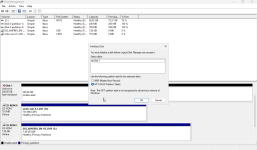
1769513395555.png
1769513432891.png

That should set you on your way, also as suggested above you could also test with other filesystems to see if it is ZFS related or not.
 
Last edited:
On Saturday, I want to delete the partition on the 1.8TB disks and create RAID 1 from the Dell server, then install the ZFS filesystem on RAID 1.
What option should I disable on the ZFS filesystem since the ZFS-managed RAID isn't working at this point?
Thanks everyone for your support.
 
On Saturday, I want to delete the partition on the 1.8TB disks and create RAID 1 from the Dell server, then install the ZFS filesystem on RAID 1.
What option should I disable on the ZFS filesystem since the ZFS-managed RAID isn't working at this point?
Thanks everyone for your support.
I am not really sure what you mean by this...
If you currently have 2x 1.8TB disks (SSD?) and they are already in a zpool (raid1 / mirror) then you do not need to delete everything and start over, what I did was creating a block device (zvol) on an already existing pool with different settings than you have on your parent pool, because everything you create here datasets or zvols inherits the settings of the parent.

I think the problem with database application is that they are very sensitive to read/write amplification by misalignment of the sector size which causes performance issues, some people notice some don't depending on multiple factors.

How does your current configuration exactly look at this moment? maybe we can start from here to correct one and other unless this system is not running anything in production yet (which I hope).
 
Thanks Steven, no the server is currently being tested but they are pressuring me to resolve the problem.Now the disks are not configured as RAID they are single which is why I was waiting before configuring them as raid1 on the dell server.Today they tested well and it seems that they are happy with the configuration but if I can squeeze it out a little more it would be the best.Tell me if you need to see the current configuration of the 2 disks.1 is like ZFS and 1 is like lVM-ThinThanks so much for your help
 
1769763729130.png
1769763832924.png
1769763873537.png
This is the ZFS configuration that works well from what they tell me
 
Last edited:
View attachment 95308
View attachment 95309
View attachment 95310
This is the ZFS configuration that works well from what they tell me
Ok, but cache=writeback is something you need to be very carefull with.

You have your disks passed through directly to ZFS without HBA or RAID controllers which is considered best practice but:
In a classic setup with a RAID controller some of them support a Cache Vault (a battery that keeps the volatile cache powered on the controller) so you don't lose data when there is a power outage; though this has its limits offcourse... and what HBA's concern most of them don't have cache they just passthrough disk depending in what mode they are some of them do support RAID.

Now in your situation; if you set write back everything goes to memory and gets flushed once in a while, it does boost performance because the OS is tricked into thinking the data is on disk (acknowledged) but that ain't the case... the data is actually in memory which is a lot faster than your storage.
In case of a power outage there is a risk of data loss this way unless you have a UPS well configured to shut everything down before the battery depletes.

If you don't have a UPS and if power goes out you risk database corruption...
From what I can tell your scsi0 is also your OSE and installed with Microsoft SQL Server inclusive its database all on the same disk, i would separate this by default even if I would not align for the 8KB pages SQL server use.

I would not take such risk, and I suggest you would not either cause this are things that could get your ass fired... especially if its really important data.
There are some considerations / trade-offs to be made; ZFS is a great filesystem and I use it everywhere BUT its not the fastest and sometimes it needs some tweaking etc. on the other hand you do get some very nice features other filesystems do not provide.
 
Thanks Steven, no the server is currently being tested but they are pressuring me to resolve the problem.Now the disks are not configured as RAID they are single which is why I was waiting before configuring them as raid1 on the dell server.Today they tested well and it seems that they are happy with the configuration but if I can squeeze it out a little more it would be the best.Tell me if you need to see the current configuration of the 2 disks.1 is like ZFS and 1 is like lVM-ThinThanks so much for your help
To "squeeze" it out as much as possible:

Change SCSI to VirtIO.
Seperate your SQL data on separated virtual disks (OS, Data, Log, TempDB) with alignement for SQL Server (8KB pages)
And please put your disks in a mirror before going into a production environment.
 
To "squeeze" it out as much as possible:

Change SCSI to VirtIO.
Seperate your SQL data on separated virtual disks (OS, Data, Log, TempDB) with alignement for SQL Server (8KB pages)
And please put your disks in a mirror before going into a production environment.
I actually wanted to use the raid1 controller from the dell server.So you recommend using the scsi control NOT single but normal.The servers are under UPS group.When I create the ZFS filesystem, do I have to use the entire disk or can I split it up?Thank you
 
In your initial post there is a screenshot of the new server; you are not using VirtIO, I quickly deployed a W2K25 install configured with VirtIO for everything while yours display SSD (SAS) for the disk:

View attachment 95245
View attachment 95246

I am pretty sure you are using the following settings (this is from my own environment):
View attachment 95248
View attachment 95249

I'm using version:
View attachment 95250

This "could" cause a performance hit, while i don't think this is the main issue it is always good to use virtio when you can.
I really think you should align the virtual disk volblocksize/recordsize for that specific application (SQL Server) on ZFS level and also in your OS I think this can make a huge difference.

ZFS documentation (though no direct mention of MS SQL server)
https://openzfs.github.io/openzfs-docs/Performance and Tuning/Workload Tuning.html#innodb

Also take a look at:
https://<your-pve-ip>:8006/pve-docs/chapter-qm.html#qm_hard_disk

Please take a look at our VirtIO Windows Drivers wiki page [1]. It says that version 0.1.285 has some performance problems in the troubleshooting section. We recommend to use 0.1.271 at the moment.

[1] https://pve.proxmox.com/wiki/Windows_VirtIO_Drivers
 
Last edited:
Please take a look at our VirtIO Windows Drivers wiki page [1]. It says that version 0.1.285 has some performance problems in the troubleshooting section. We recommend to use 0.1.271 at the moment.

[1] https://pve.proxmox.com/wiki/Windows_VirtIO_Drivers
I did not yet know about this issue, also did not come across any problems yet, need to check which VirtIO version it is running at customers (they have MS SQL but I think not yet fully updated.)

Thanks!
 
I actually wanted to use the raid1 controller from the dell server.So you recommend using the scsi control NOT single but normal.The servers are under UPS group.When I create the ZFS filesystem, do I have to use the entire disk or can I split it up?Thank you
Well it depends on the exact storage config, I am getting a little confused about your setup because earlier your said you have your disk passthrough directly (i'll read entire post again if i have some more time :)).

Example:
RAID Controller with a RAID 1 created on it > do not use ZFS.
RAID Controller with JBOD funtionallity > Put controller in JBOD mode.
Onboard controllers (AHCI) > OK
HBA > OK

Modern servers we use at customers (Intel Xeon 6 / AMD EPYC 5th gen) do not have onboard controllers they just passthrough the storage SATA (HDD/SSD) or NVME U.2 and we can configure these directly with ZFS because ZFS needs direct access to disks.

While it all is technically possible to do all the above I recommend you to stick with best practices to avoid as much problems as you can.
You could split up disk, but you'll probably going to end up in a weird situation you don't wanna be.

So in your new DELL server I would recommend passthrough of the disk, even Proxmox Virtual Environment itself can be installed with ZFS at installation.

But if you are using a RAID controller (which it seems from the answer above) and have created a single or multiple virtual drives on it which expose itself as single disks to the OS than you should not choose ZFS but ext4 or xfs and make sure when this controller does write-back that the volatile cache has a battery unit.

Setting your VM disks from SCSI to VirtIO is how the storage layer interacts with your underlying storage and VirtIO is specifically optimised for this.
 
Don't forget to enable "Max Performance profile" in BIOS
and double check if Disk Writecache is enabled, often it's disabled because designed for RAID embedded cache usage.
BTW, I repeat, try with Lvmthin before all the tuning about ZFS.
It could be that your problem is elsewhere.
 
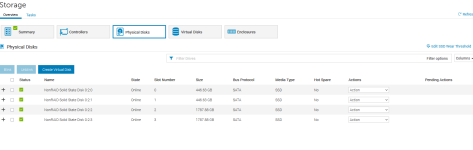
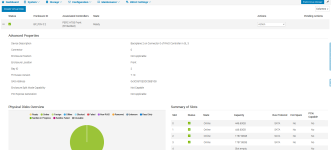
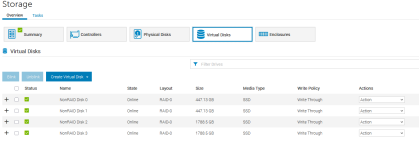
Thanks Gabriele, now there is no raid configured on the Dell server, they are like single disks, I wanted to enable the DELL's RAID 1 hoping to overcome the problem of particular configurations, but it seems that if I want to use ZFS it is better not to configure the server's raid.I'll post a photo of the DELL disks
1769794250801.png
 
Last edited:
Thanks Gabriele, now there is no raid configured on the Dell server, they are like single disks, I wanted to enable the DELL's RAID 1 hoping to overcome the problem of particular configurations, but it seems that if I want to use ZFS it is better not to configure the server's raid.I'll post a photo of the DELL disks
View attachment 95335
Select disk 0 and 1 and click on Create Virtual Disk, and again for disk 2 and 3 (based on slot numbering)
You could have 2x RAID 1 (don't mix them).

If you have an option somewhere to select where to boot from it will probably be listed as VD0 or something like that, I guess in the other tab Virtual Disks. most controllers do this automatically but I had some issues recently with a specific Broadcom controller.

Like @_gabriel said, post more screenshots so we can have a better view.

Do know that when you do this and the VD's will be initialised you will need to reinstall everything so if you do have something on there make sure to create a back-up first! when reinstalling PVE choose ext4 or xfs.
 
I just wanted to create the raid1 of just the 2 1.8TB disks since the VMs will then be allocated there, I didn't want to touch the 2 480GB disks since Proxmox is installed on them.
I believe that this solution is the lesser evil to avoid reinstalling all of proxmox.what do you recommend?
Thank you
 

Attachments

  • dell1.png
    dell1.png
    71.3 KB · Views: 6
  • dell2.png
    dell2.png
    39 KB · Views: 6
Last edited:
then I gave the ZFS filesystem another chance, I mirrored the 2 1.8TB disks NOT from the server controller but from proxmox.
However, I noticed that with the same disk configuration on the VM running Win2025 and Win 2022, the VM with Win2022 performs much better when it comes to file transfer.
Maybe something is missing to change at the shell level?