Proxmox VE 9.1.1 – Windows Server / SQL Server issues

tigro11

New Member
Jun 10, 2025
13
0
1
Good morning,
We have recently resumed work with Proxmox VE 9.1.1. My client is experiencing slow execution of operations on Microsoft SQL Server 2019.
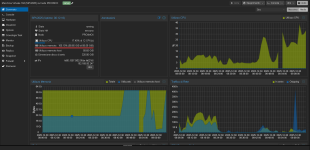
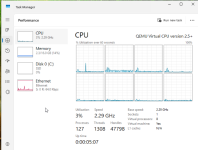
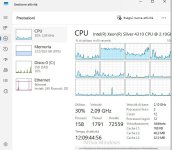
Proxmox behaves strangely, consuming 100% of memory, even though on Windows Server 2025 there is no significant memory usage observed.
Some time ago, I had already opened a ticket regarding the same SQL Server performance issue.
The VM is configured with virtio-win drivers version 0.1.271, as these are reported to be more stable.
Thansk

Valerio
 

Attachments

  • WhatsApp Image 2025-12-30 at 8.44.20 AM.jpeg
    WhatsApp Image 2025-12-30 at 8.44.20 AM.jpeg
    70.4 KB · Views: 26
  • proxmox errore.png
    proxmox errore.png
    201.5 KB · Views: 26
On reflection, storage.cfg doesnt tell us anything useful; instead, post the storage configuration- raid level, disk technology and count, and subrank block size (eg, if you have a striped mirror using 4k disks, subrank size will be 4k; if you have a 10 drive raid6, block size will be 32k, etc.)

Lastly, I suppose a definition of "slow" would be useful as well. do you have benchmarks to share?
 
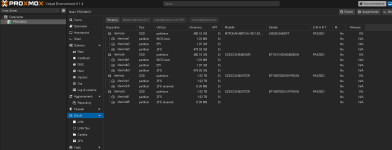
The disks are configured with ZFS without any hardware RAID. The slowness is due to the slowness in processing SQL commands. On the other older server, VMware ESXi 6.7 performs much better.
I'll post a photo of the disks on Proxmox.
Thanks for your help.
 

Attachments

  • dischi.png
    dischi.png
    45.2 KB · Views: 23
Assuming you really do have a multi-socketed (host) server; try enabling NUMA for that VM.
 
post /etc/pve/qemu-server/104.conf
in tags please.
agent: 1
balloon: 0
bios: ovmf
boot: order=scsi0;net0;ide2
cores: 6
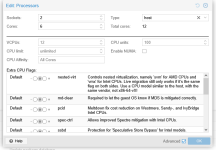
cpu: host
efidisk0: MACCHINE:vm-104-disk-0,efitype=4m,pre-enrolled-keys=1,size=1M
ide2: none,media=cdrom
machine: pc-q35-9.2+pve1
memory: 60000
meta: creation-qemu=10.0.2,ctime=1760697723
name: SRV2025
net0: virtio=BC:24:11:50:2A:AC,bridge=FIBRA,firewall=1
numa: 1
onboot: 1
ostype: win11
scsi0: MACCHINE:vm-104-disk-1,discard=on,iothread=1,size=320G,ssd=1
scsihw: virtio-scsi-single
smbios1: uuid=db4847f0-e135-48e9-9a2e-03a853999a7b
sockets: 2
tags: server
tpmstate0: MACCHINE:vm-104-disk-2,size=4M,version=v2.0
 
Last edited:
Without knowing what's causing the bottleneck on Windows, I don't think we can verify it.

Just saying the SQL query is slow doesn't tell us anything.
 
Without knowing what's causing the bottleneck on Windows, I don't think we can verify it.

Just saying the SQL query is slow doesn't tell us anything.
I'll ask the SQL engine manager for some details. I'll update you as soon as I have any news.

Thanks for your help.
 
Try changing the CPU away from Host:
(and other threads)
 
The slowness is due to the slowness in processing SQL commands.
I'm confused. were you not asking for help troubleshooting this?

SQL performance is a function of two things- query efficiency and disk IO latency and IOPs. since we know your queries are the same, what remains is the storage.

On the other older server, VMware ESXi 6.7 performs much better.
How did you have the storage configured on your ESX environment?

You have three different models of drive in your config. I assume the micron 480 + Samsung 480 are the boot device and so will be ignored (if the "MACCHINE" datastore is using those, move the vm disk to the other drives. you can also just attach another virtual disk and move your sql data there. The intel drives are old but as long as they have life left are not bad. Assuming "MACCHINE" is the datastore using the intel drives in a mirror, you should optimize recordsize (8k,) ARC size (as your memory allows,) enable compression (this can help a LOT) and MOST IMPORTANTLY make sure the pool isnt anywhere NEAR full.
 
Here I am, so from the tests I've done, I'm having a slow hard drive access problem. When I try to run a small query, it takes 5 seconds. However, if I run the same query while it's saving a 15GB file to another folder on the same disk, it takes 35 seconds and the machine freezes. Even opening an editor and trying to save the file freezes. If you have any suggestions to try to resolve this problem, I'd be grateful.
Thanks
Valerio