Proxmox is destroying my NVMEs

Well, I'm keen to read @IsThisThingOn's reply. Here is my idea:

Without PLP a sync (!) write is delivered to the final storage cell. When the system call returns the final state is reached.

With PLP the data lands in DRAM. The software flow returns to the caller stating "everything is written to disk". Some time after this the data is a) transferred from Ram to the storage cell and b) written there. Both a) and b) may run into an error. I think.

In this picture the pure presence of two additional "hidden" steps after the fact show that there is an additional risk.

That said... of course it is recommended to use PLP nevertheless - for the known reasons and possibly because "Enterprise Class has better quality" - whatever that actually means... ;-)
 
Its not just for sync writes. Even when data isn't being written, an SSD is continuously performing internal operations involving its NAND flash memory. These include:
  • Updating the Flash Translation Layer (FTL), which maps logical addresses to physical NAND locations.
  • Performing garbage collection and relocating data.
  • Erasing and programming NAND blocks.
  • Maintaining internal metadata and mapping tables.
  • Bad block management and ECC bookkeeping
These operations can be interrupted by an unexpected power failure. Journaling doesn't cover the data that is in flight internally.
 
Adding PLP is like adding a parachute when jumping out of a plane. Yes it saves you, but that does not make it more secure vs. simply not jumping out of a plane.
Thats.... a take.

Interruptions to the pipeline from initiator to target can be interrupted at many stages. The only way to make certain that interruptions dont lead to data loss is to not acknowledge writes until they've been verified- but this is slow. Caching on fast nand or faster dram is the obvious remedy, but the initial problem remains; how to you prevent an interruption from corrupting data? Batteries/Capacitors are a simple and effective safety net; they act as the "permanent" backing to guarantee writes.

For an SSD, this certainly does impact performance, potentially quite a bit since it allows fully cached writes. Without plp, the drive firmware will either end up with data corruption OR slow writes. I'm not sure how this applies to your analogy; I think its more fair to say that PLP lets you jump out of the plane and get there in minutes, and no PLP means you need to land the plane. either will get you to the ground. You dont really have the option to jump out without the parachute unless you hack the SSD firmware.

In the broader sense, "fast" and "slow" are entirely arbitrary, since performance that exceeds your workload is not a meaningful beneficial.
 
Perhaps your thoughts are not translating clearly enough to English and I am missing your point. But I fail to see how reducing the probability of data loss or corruption from an unexpected power interruption (which PLP absolutely does) is not safer.
Because it doesn’t differ from a normal SSD.

There is only one situation where you would profit from having a PLP drive:
You have a file server. That file server has no UPS and no redundant PSU so a power loss would actually be possible. In addition to that, a system halt could happen. Never happened to me in over a century but fine.

Now if you do an async write, a PLP could protect you. But that is just for async writes. I would argue that this isn’t important. My Mysql DB will not profit from it. My Word document also not really, since it has internal checksums and will detect the corruption.

Either way, if you don’t like that, you can force everything to be sync. That way a PLP drive will offer 0 security advantages. Nothing.

That is why I say PLP doesn’t provide any additional security. Because it only does in the extremely unlikely case of a system halt, for only unimportant async writes.

And even that situation you can avoid by forcing everything to be sync.

And if we now circle back to your original posts about SLOG, we see that PLP drives can’t even offer a security advantage, since they will only ever see sync writes. So you can say that PLP for your pool offers a security advantage in the special case described above. But not for SLOG.
Since Intel 3D and PLP drives are the only good SLOG drives anyway, you still should get a PLP drive of course. But it doesn’t offer security.


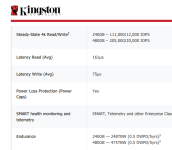
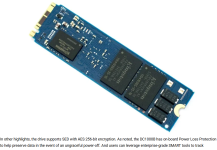
Kingston and the likes started to sell none capacitors drives (DC1000) as PLP drives, because they guarantee no in flight data corruption. They call that firmware or “on-board PLP”. But that is not traditional PLP.
 
Last edited:
With PLP the data lands in DRAM. The software flow returns to the caller stating "everything is written to disk". Some time after this the data is a) transferred from Ram to the storage cell and b) written there. Both a) and b) may run into an error. I think.
No, with on-board DRAM the data lands in DRAM, and PLP is there to mitigate the risk of losing that data in the event of a sudden power loss. ;)
Kingston and the likes started to sell none capacitors drives (DC1000) as PLP drives, because they guarantee no in flight data corruption. They call that firmware or “on-board PLP”. But that is not traditional PLP.
That's actually a pretty bad example, because there are quite a few prosumer drives that perform significantly better, which doesn't really support your "PLP is only about performance" argument. For example, models like the Samsung Pro series or the WD Black SN850X can perform better. However, they can also potentially lose data in the event of a sudden power loss because they don't have PLP, which means any data that happens to be in the DRAM cache at that point might be lost.
That said... of course it is recommended to use PLP nevertheless - for the known reasons and possibly because "Enterprise Class has better quality" - whatever that actually means... ;-)
Exactly. Advanced features like PLP are generally only found in enterprise models, which on average also tend to have higher endurance and often better performance than consumer models.

However, that doesn't mean that every enterprise SSD with PLP will outperform every prosumer model. Performance can vary significantly depending on the workload the drive is designed for. What enterprise drives almost always offer, though, is higher endurance and more consistent performance.

But that's not because of PLP. It's simply that most SSDs with those characteristics also happen to have PLP. If you took the same SSD with the same hardware and firmware and removed PLP, it wouldn't suddenly perform worse. The only thing you'd lose is the protection against power loss.

So yes, PLP is for power-loss protection, nothing more and nothing less. It isn't a performance feature.
 
Last edited:
All the enterprise SSD manufacturers appear to state that their drives acknowledge the write once the data is in PLP-protected DRAM and this isn't a setting that can be changed. Even manufacturers such as Dell/IBM/HPE where they could be running a slightly tweaked firmware on the drives and RAID controller only allow adjusting the disk cache setting on HDDs. For SSDs it's not presented or is ignored. Granted, I'm sure for large customers any custom design could be possible...

PLP definitely improves performance due to the faster write ack, but also endurance, such as coalescing writes in DRAM before writing to NAND to limit partially-written pages. Really all internal SSD operations are going to be improved since the firmware is going to take full advantage of that capacitor-backed non-volatile DRAM. How exactly is going to be dependent on the SSD manufacturer and how smart their engineers are.

Ultimately, features found in the enterprise space like PLP have sprung up for a reason.
 
  • Like
Reactions: UdoB
PLP definitely improves performance due to the faster write ack, but also endurance, such as coalescing writes in DRAM before writing to NAND to limit partially-written pages. Really all internal SSD operations are going to be improved since the firmware is going to take full advantage of that capacitor-backed non-volatile DRAM. How exactly is going to be dependent on the SSD manufacturer and how smart their engineers are.
Again, it's the onboard DRAM, not PLP, that allows for the benefits you mentioned. It's just that practically all enterprise-class SSDs with DRAM also come with PLP.

In case that wasn't clear in my previous post: Of course, there are also SSDs with DRAM but without PLP. Nearly all higher-end consumer SSDs or prosumer drives (e.g., Samsung Pro series, higher-end WD Blacks, etc.) have onboard DRAM but no PLP.

EDIT
Btw, if these prosumer drives with DRAM still perform worse in certain server workloads or have lower endurance, it's not because they lack PLP. It's more likely due to differences in DRAM cache size and usage, focus on peak performance rather than endurance, NAND cells, firmware, etc.

PLP is a data protection and data loss prevention feature, not a performance feature.
 
Last edited:
Samsung Pro and similar with DRAM but not PLP don't use the DRAM for a write cache, so no, those "benefits" I mentioned aren't available.

A consumer SSD typically dynamically allocates some of its NAND as SLC for faster writes. That is why a lot of consumer SSDs slow down after some amount of sustained writes. It's definitely a balance of cost/performance/endurance/marketing and why there are so many models to choose from. Select your desired attributes.
 
Samsung Pro and similar with DRAM but not PLP don't use the DRAM for a write cache, so no, those "benefits" I mentioned aren't available.
Yeah, that makes sense, because when using it that way, the risk of data loss would be too high without PLP. Nevertheless, the benefits come from DRAM and how it is used, not from PLP. PLP is simply necessary to use DRAM that way without risking data loss in the event of a sudden power loss.

And yes, you could naturally conclude from that that SSDs with PLP generally perform better and last longer than those without it, which is probably true on average in practice. However, PLP itself isn't the cause of the better performance or higher endurance.;)

A consumer SSD typically dynamically allocates some of its NAND as SLC for faster writes. That is why a lot of consumer SSDs slow down after some amount of sustained writes. It's definitely a balance of cost/performance/endurance/marketing and why there are so many models to choose from. Select your desired attributes.

Yep, but in a homelab scenario, that's often good enough. And honestly, for typical homelab workloads with mostly light, bursty I/O, a pro-sumer drive like a Samsung Pro might even be preferable, thanks to its higher peak performance and strong performance in short bursts, while still easily lasting 10 years. Meanwhile, the rather "slow" DC1000 someone posted as an example might be a better fit for sustained, write-intensive server workloads, where consistent performance under load and high endurance matter more. It might even last 30 years in a homelab. But it also costs at least two or three times as much as the Samsung Pro, doesn't it? You'll never get your money's worth out of that extra endurance in a typical homelab. ;)
 
Last edited:
The tweak to make consumer drives behave like enterprise in my opinion is actually safer, but I wont disclose how to do it, as it is isnt supported.

But I will try to show 3 flows for synchronous data.

Consumer
Navigates the OS side quickly, sent to disk quickly providing the disk can write quickly, otherwise bottle necked, data isnt reported as written until disk has fully written, can be slow to physically write, extending risk window, and will accelerate wear. This gives assurance that the data is physically written, but it actually also raises the risk window of lost data for loss of power as the data takes longer to write.

Enterprise
Navigates the OS side quickly, sent to disk quickly, disk is allowed to buffer, and optimise for performance, wear levelling, as the drive has PLP, there is no risk introduced.

Consumer with ZFS instructed to not tell the drive to flush sync writes.
Emulates enterprise behaviour, Navigates the OS side quickly, sent to disk quickly, disk is allowed to buffer, and optimise for performance, wear levelling,in theory this carries risk, if the data is in disk cache when power is lost the data is lost, but this risk is still there with stock behaviour on consumer drives, the only difference is that it can happen after the OS has told you its written, that change of behaviour doesnt remove any risk, it just gives consistency on what is reported. The risk is actually lower as the data will be written quicker.
In this mode ZIL is still enabled, sync vs async still has a different path through the OS, dirty cache etc. The change is only on physical storage side.
If you use this with e.g. a UPS I dont see the issue, but it is unsupported by ZFS and Proxmox.

In my data centre instance, I have enterprise NVME so its moot, in my home lab I use consumer SSDs with the tunable applied, home lab also has UPS that will automatically do a safe shutdown if battery goes below 30%.
 
Last edited:
It causes more wear when you do a snyc write and when you change a file, yes.

Source?
You mention pveproxy, but that does not cause siginificant writes.

Either way, both isn't really worth mentioning in normal conditions. We should wait for OP to answer the open questions.
In my case pveproxy change reduced writes by about 40%. But I do leave the GUI open a lot. If the GUI was mostly closed it wouldnt have a lot of writes, if its open, pveproxy writes every few seconds.
 
It's 100% false to claim that disabling ZFS cache flushing "emulates enterprise behaviour". The word you are looking for is "performance", because that is why people do it. Consumer SSDs lack the DRAM and PLP to ack the write quickly, and performance can be unbearably slow in some cases, leading to the search for a "fix." And of course ZFS and PVE explicitly state to not do this due to the unacceptably high risk of catastrophic data loss/corruption.

It's also 100% false to claim that using a consumer SSD with ZFS cache flushing disabled is the same or lower risk than with it enabled and it's only a difference of "reporting." With the default behavior, ZFS waits for the SSD to report back that the write is "durable" before then acknowledging the write itself. With cache flushing disabled, ZFS could provide the ack even when the data is still in a volatile state in the SSD, which is the window where writes can be lost. This is especially bad considering that earlier writes could be lost after later ones, because the writes can be re-ordered before being committed to NAND.
 
Personally, I wouldn't bother with any of those ZFS tuning stunts. From a homelabber's perspective, I really only see two sensible "tuning" options:
  1. Don't use ZFS (although that might only help to a limited extent with really cheap SSDs).
  2. Reduce logging in PVE. (I have no idea how much that actually helps, but it's probably not going to turn a really cheap SSD into an enterprise-endurance drive either.)
In the end, what will really help is buying better SSDs. And no, from my expirience, I still don't think you need enterprise SSDs with PLP in a homelab. But I would strongly recommend going for higher-end consumer drives. At the very least, something like a Samsung EVO or WD/SanDisk SN7100, or better.

Yes, I know storage is expensive these days. ;-)

EDIT:
Also, buying for example a 1TB SSD instead of a 500GB one, or a 2TB one instead of a 1TB one, and not filling it to the top might help with endurance and wear levelling: https://documents.sandisk.com/conte...lution-brief-use-case-impact-ssd-lifespan.pdf

Of course, this also means higher costs. But if it ultimately lasts longer, the extra expense will hopefully pay off.
 
Last edited:
  • Like
Reactions: Johannes S
Kingston DC1000B has capacitors for PLP:
I have that drive. I don't see it on the drive, and I did not find it in any of the links you posted.

That's actually a pretty bad example, because there are quite a few prosumer drives that perform significantly better, which doesn't really support your "PLP is only about performance" argument
Nahh not really. That is just something else again. I should not have brought it up, because these "fake PLP" drives make the already complicated discussion even more complicated.
It performs so bad, because it has no capacitors, so no lying for sync writes that are in DRAM.
It claims that sometimes normal SSD will loose some kind of table and because of that won't be recognized by the system. I personally never had that after a power loss, but ok. But you should for a server never have a powerloss anyway, since you have one PSU on a USV and one PSU connected to the wall.

PLP itself isn't the cause of the better performance
It is. PLP is what a drive lets make use of DRAM and calling sync writes as finished, even though there are only on DRAM yet and not in NAND.
A Samsung 990 Pro also has 4GB DRAM, but is can't lie about sync writes, because it has no PLP.
For an async sequential workload, it will run circles around enterprise drives four times the money.
In my case pveproxy change reduced writes by about 40%.
40% less without stating what 100% was, is not a real number ;)
If it causes writes, tell us how much a day and what size these writes are happening (in case SSD has write amp for small writes).
 
Last edited:
  • Like
Reactions: Johannes S
I have that drive. I don't see it on the drive, and I did not find it in any of the links you posted
Maybe there was no link after all, and I just imagined it. When I search for it on Google, it turns out it's no longer available anyway.

As for the rest, you may be right about everything. Ultimately, though, the discussion is somewhat pointless, because...
  • Enterprise-grade drives have always been too expensive for most home lab users, even when storage prices were still reasonable.
  • They are now even more expensive, in some cases absurdly more expensive than higher-end consumer drives, which are already ridiculously expensive.
  • Most homelabbers use SFF or mini PCs, which generally only have M.2 slots. The selection of enterprise M.2 SSDs has always been rather limited as the enterprise market has directly moved from SAS to U.2 and then U.3.
  • Even if you're a wealthy home user who can afford and is willing to pay the high prices of one of the few existing enterprise M.2 models, they're nowhere near as readily available.

    ;)
 
Last edited:
  • Like
Reactions: 6equj5
A cornerstone of home lab is used enterprise gear! I've been buying it for decades and I've always found it to be reasonably priced.

https://www.ebay.com/itm/336854562937

Even a new drive could fail randomly, so new or used you build in redundancy regardless, and that is why I regularly suggest using PVE with ZFS mirroring & replication.

I did earlier mention that NVMe enterprise was less than ideal since not a lot was made before U.2 took over. One workaround is to leverage multiple SATA drives for more throughput, although there are just rarely any use cases where you need this. Are you really needing 3,000MB/sec NVMe for home lab when you only have 1GbE or even 10GbE? Transferring 1TB @ 10GbE is only about 13 minutes. What are you even doing?

For sure, everyone here has different hardware, finances, priorities, etc. so I am not going to shame someone for making do with what they have. The issue in this thread is that there are some mistakes and so we all need to strive to post correct information.