I'm wondering if there is a better way to do this, though it might be a feature request that needs to be implemented by both LXC upstream and Proxmox afterwards...
I ended up using the
.pve-ignore. file like
@silverstone suggested, so
/etc/network/.pve-ignore.interfaces:
Code:
# https://forum.proxmox.com/threads/how-to-disable-auto-updates-of-etc-hostsname-etc-resolv-conf-maybe-others.76186/
# https://pve.proxmox.com/wiki/Linux_Container#_guest_operating_system_configuration
# DO NOT let Proxmox VE Update /etc/network/interfaces automatically
and
/etc/network/interfaces:
Code:
auto lo
iface lo inet loopback

auto eth0
iface eth0 inet static
        address 10.0.0.10/24
        gateway 10.0.0.1

iface eth0 inet6
        pre-up ip token set ::10 dev $IFACE
For some reason, my
fe80:: address still uses eui64 for it's interface identified though, unlike when I configure virtual machines and hardware hosts with IP-Token, I assume this has something to do with Proxmox managing the container.
It would be nice if when you select SLAAC for a container, there was a field for an IP-Token, either in place of the address field or as an additional field under Advanced. But looking at the LXC docs, I couldn't find a way to pass that through either. Perhaps if they extend an option one day, Proxmox can utilise it
I did it in a different Way.
Note that most of my LXC Containers are Fedora while a few others are Debian (and yet fewer Ubuntu).
I set Network to
Static in the Proxmox VE GUI, at least for what concerns the LXC Containers that I deployed (non-"Templates", see below):
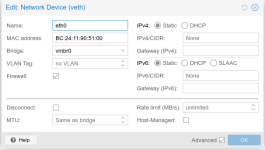
I then use
dhcpcd by configuring
/etc/dhcpcd.conf inside the LXC Container:
Code:
# A sample configuration for dhcpcd.
# See dhcpcd.conf(5) for details.

# Allow users of this group to interact with dhcpcd via the control socket.
# controlgroup wheel

# Inform the DHCP server of our hostname for DDNS.
hostname

# Use the hardware address of the interface for the Client ID.
#clientid
# or
# Use the same DUID + IAID as set in DHCPv6 for DHCPv4 ClientID as per RFC4361.
# Some non-RFC compliant DHCP servers do not reply with this set.
# In this case, comment out duid and enable clientid above.
duid llt

# Persist interface configuration when dhcpcd exits.
persistent

# Rapid commit support.
# Safe to enable by default because it requires the equivalent option set
# on the server to actually work.
option rapid_commit

# vendorclassid is set to blank to avoid sending the default of
# dhcpcd-<version>:<os>:<machine>:<platform>
# vendorclassid

# A list of options to request from the DHCP server.
option domain_name_servers, domain_name, domain_search, host_name
option classless_static_routes

# Respect the network MTU. This is applied to DHCP routes.
option interface_mtu

# Do not use UDEV
nodev

# Request a hostname from the network
# option host_name

# Most distributions have NTP support.
# option ntp_servers

# A ServerID is required by RFC2131.
require dhcp_server_identifier

# Generate SLAAC address using the Hardware Address of the interface
# slaac hwaddr

# OR generate Stable Private IPv6 Addresses based from the DUID
slaac private temporary

# Token-Based Addressing (Persistent & Predictable)
slaac token ::1:123

# Disable routing solicitation / Auto configuration
noipv6rs

# Echo debug messages to the stderr and syslog.
# debug

# Interface Configuration
interface eth0
        # Static IPv4 Configuration
        static ip_address=192.168.1.123/20
        static routers=192.168.1.1
        static domain_name_servers=127.0.0.1

        # Static IPv6 Configuration
        static ip6_address=fdXX:XXXX:XXXX:0001:0000:0000:0001:0123/64

        # Dynamic IPv6 Configuration using DHCPv6 Server
        # enable routing solicitation get the default IPv6 route
        ipv6rs

        # request a normal (IA_NA) IPv6 address with IAID 1
        ia_na 1

        # request a temporary IPv6 address
        # ia_ta 1

        # generate Stable Private IPv6 Addresses based from the DUID
        # ipv6ra_autoconf
        slaac private temporary

        # Token-Based Addressing (Persistent & Predictable)
        slaac token ::1:123
Be sure to enable & restart dhcpcd inside the Container:
Code:
systemctl daemon-reload
systemctl enable dhcpcd.service
systemctl restart dhcpcd.service
If after a Reboot you get some Permission Errors, it might be that you need to do
chmod on
/etc/systemd/resolved.conf and/or make sure that
/etc/resolv.conf properly symlinks to
other (if applicable):
Code:
[root@lxc-container ~]# ls -l /etc/resolv.conf
lrwxrwxrwx 1 root root 39 Jul 12 14:01 /etc/resolv.conf -> ../run/systemd/resolve/stub-resolv.conf

[root@lxc-container ~]# ls -l /etc/systemd/resolved.conf
-rw-r--r-- 1 root root 1522 Feb 20  2026 /etc/systemd/resolved.conf
On the other Hand, my "Templates" (live CTs that I install custom Packages & Configuration on, which I then deploy as needed) are actually using
DHCP in Proxmox VE GUI, though they could as well be set to
Static instead and let
dhcpcd inside the Container handle the Stuff:
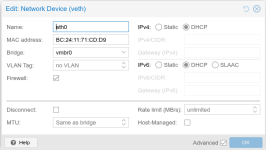
For Debian LXC Guests, which I admin I have almost none using dhcpc, you should probably set the IP Configuration to either
manual or
static in
/etc/network/interfaces (IIRC you can set a static IP Address defined in
/etc/network/interfaces and then
dhcpcd will take over basically based on
/etc/dhcpcd.conf Configuration).
EDIT 1: about the Link-Local IPv6 Address (
fe80::) I believe that will always be based off the MAC Address. I have the same also with
dhcpcd inside of my LXC Guest. This is probably due to the fact that the Link-Local IPv6 Address must exist no matter what, as soon as IPv6 is enabled, and must NOT depend upon an IP assignment (Static, SLAAC or DHCP).



