proxmox (VSphere VMWare to Proxmox migration)

sachinh

New Member
Oct 7, 2025
6
0
1
proxmox (VSphere VMWare to Proxmox migration)

Hello,

We are in the process of migrating our existing VMWare VSphere VMs to proxmox environment. All our VMs disks are placed under common storage across esxi.
As per the documentation, already done these steps,

No vCenter is available.

Shutdown VM (SuSE Linux 10)
Convert the .vmdk disk file to the proxmox compatible .qcow2 image. ( qemu-img convert -p -f vmdk -O qcow2 "<Name>.vmdk" "<Name>.qcow2)
Then attach this .qcow2 image to a new VM created.
Disk controller set to SCSI0
Set the boot order to scsi0
And tried to boot
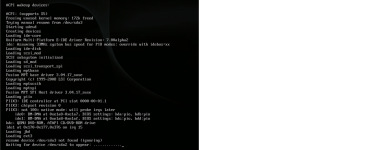
The grub menu is displayed and the VM started booting but fails as it can not find /dev/sda2 the root disk

Following is already been tried,

Tried different Disk controllers. LSI 53C895A, VirtIO SCSI, VirtIO SCSI Single
But nothing seem to detect the sda.
One observation is, With LSI 53C895a and Disk added as ide0, the system fails to detect sda but if i searched under ls /dev/ i can see the disk is recognised as hda2 , hda3 etc... that's it.

What could be the reason? or how do i resolve this issue with Proxmox. For historical reasons we have to continue running old SLES10 Operating systems in our envionment.

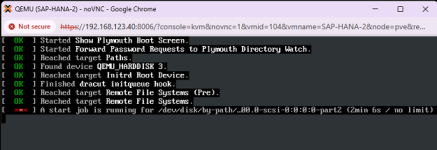
Update: Other SLES15 Systems faced similar problem but after adding the disk with ide0 and not scsi, the system could boot successfully. But with older OS like SLES10 , this method does not seem to work. I have attached the error i get after booting. Also attached the .vmx file of the VM in the VSphere environment.

Thanks.
Regards.
 

Attachments

Take a look at this thread, there may be some useful information there for you:


Blockbridge : Ultra low latency all-NVME shared storage for Proxmox - https://www.blockbridge.com/proxmox
 
Thank you but i have already gone through that post. Even that user did not get any relevant solution. :( are we really dealing with any new Problems? I highly doubt.
 
Thank you but i have already gone through that post. Even that user did not get any relevant solution. :( are we really dealing with any new Problems? I highly doubt
That user never came back to report on their progress or lack thereof. My recommendation to try a new OS install still stands.
Using recovery boot is another option that previous reported was not quiet comfortable with.
Proxmox team does not test all OS/Virtualization options. If you don't get input from the community , you may need to be the one doing the discovery and helping others down the road.

Cheers


Blockbridge : Ultra low latency all-NVME shared storage for Proxmox - https://www.blockbridge.com/proxmox
 
I can surely try a fresh install but then what? Are you suggesting to test the plain SLES10 Installation on Proxmox Host first? Then i can try that. But what if it works? What are the next steps.

Regarding trying out things, I am open to it. But just wonder how come noone else faced this issue so far. And not that i have so far nothings tried. If you read my post , i could get newer SuSE to work by manually modifying certain parameters. This should be helpful to those who are facing similar issues.
Thanks
 
I can surely try a fresh install but then what?
If it were me, I would use it to confirm that the hardware is broadly compatible (for example SCSI controllers, graphics adapters, and similar devices). It could also help identify which kernel modules are being loaded and potentially highlight modules that may be missing from your current installation.

In other words, it would provide useful information to help move your migration effort forward, rather than waiting for someone who has performed a similar SUSE migration to happen across this thread.

Surely you realize that SUSE represents only a small percentage of the environments discussed on this forum.


Blockbridge : Ultra low latency all-NVME shared storage for Proxmox - https://www.blockbridge.com/proxmox
 
This is not a PVE, or even Linux/SLES problem.

This is linux troubleshooting 101.

You have a hanging task on the 2nd partition (presumably root) which gives you two vectors of troubleshooting-
1. host bus- change the host bus for your root drive to SATA. does it boot now?
2. partition corruption- boot with a livecd. can you fsck/mount the partition?
 
Thanks for reply. Hostbus change is what very obvious thing to try. As same problem was resolved with new Linux Version i.e. by changing the Hostbus to IDE as I mentioned in my first post. But that solution is not working here anymore. Actually tries all the Bushost types that Proxmox offers. :(
 
I've encountered the same error several times. The problem is basically that on the SUSE machine in VMware, the disk is named SDA, for example. When you migrate it to Proxmox, the disk controller assigns it a different name, for example, HDA. Then the SUSE GRUB keeps looking for SDA, which is why it won't boot. If you access it in secure boot mode, you can access the GRUB and modify the disk names so it boots normally.I hope this solution helps you.
In the grub configuration, look for something similar.

linuxefi /vmlinuz-5.3.18-24.75-default root=/dev/mapper/VG_SYS-LV_ROOT splash=silent resume=/dev/disk/by-label/SWAP quiet numa_balancing=disable transparent_hugepage=never intel_idle.max_cstate=1 processor.max_cstate=1 mitigations=auto

Replace it with this

linuxefi /vmlinuz-5.3.18-24.75-default root=/dev/mapper/VG_SYS-LV_ROOT rd.break=pre-mount nomodeset debug

Change the
set root='hd0,gpt2'

For
set root='scsi0,gpt2'

I hope this solution helps you.
 
  • Like
Reactions: sachinh
Thanks for reply. Hostbus change is what very obvious thing to try. As same problem was resolved with new Linux Version i.e. by changing the Hostbus to IDE as I mentioned in my first post. But that solution is not working here anymore. Actually tries all the Bushost types that Proxmox offers. :(
If it were me, I would use it to confirm that the hardware is broadly compatible (for example SCSI controllers, graphics adapters, and similar devices). It could also help identify which kernel modules are being loaded and potentially highlight modules that may be missing from your current installation.

In other words, it would provide useful information to help move your migration effort forward, rather than waiting for someone who has performed a similar SUSE migration to happen across this thread.

Surely you realize that SUSE represents only a small percentage of the environments discussed on this forum.


Blockbridge : Ultra low latency all-NVME shared storage for Proxmox - https://www.blockbridge.com/proxmox
I am open for testing. No issues. I will get back with my feedback. Thanks again.
I've encountered the same error several times. The problem is basically that on the SUSE machine in VMware, the disk is named SDA, for example. When you migrate it to Proxmox, the disk controller assigns it a different name, for example, HDA. Then the SUSE GRUB keeps looking for SDA, which is why it won't boot. If you access it in secure boot mode, you can access the GRUB and modify the disk names so it boots normally.I hope this solution helps you.
In the grub configuration, look for something similar.

linuxefi /vmlinuz-5.3.18-24.75-default root=/dev/mapper/VG_SYS-LV_ROOT splash=silent resume=/dev/disk/by-label/SWAP quiet numa_balancing=disable transparent_hugepage=never intel_idle.max_cstate=1 processor.max_cstate=1 mitigations=auto

Replace it with this

linuxefi /vmlinuz-5.3.18-24.75-default root=/dev/mapper/VG_SYS-LV_ROOT rd.break=pre-mount nomodeset debug

Change the
set root='hd0,gpt2'

For
set root='scsi0,gpt2'

I hope this solution helps you.
I have tried until now the mkinitrd so that kernel has correct drivers. But that did not help. I shall try your suggestions. thanks.