Error when backing up 1 out of 4 vms only.timesout

mason64

Active Member
Apr 18, 2022
50
5
28
Hi all

I have been backing up 4 vms from a Proxmox server to a proxmox backup server for months now with no errors, over the last few weeks 4 or 5 times a week i get an error (See the log below) only on 1 out of the 4 vms that i backup, i run two backups a day sometimes both error sometimes only 1 and sometimes the backup completes. If i run a manually backup it works every time.


Code:
201: 2026-04-09 22:30:07 INFO: Starting Backup of VM 201 (qemu)
201: 2026-04-09 22:30:07 INFO: status = running
201: 2026-04-09 22:30:07 INFO: VM Name: lwportal-web-server
201: 2026-04-09 22:30:07 INFO: include disk 'sata0' 'VMStorage:vm-201-disk-0' 1000G
201: 2026-04-09 22:30:07 INFO: backup mode: snapshot
201: 2026-04-09 22:30:07 INFO: ionice priority: 7
201: 2026-04-09 22:30:07 INFO: creating Proxmox Backup Server archive 'vm/201/2026-04-09T21:30:07Z'
201: 2026-04-09 22:30:07 INFO: issuing guest-agent 'fs-freeze' command
201: 2026-04-09 22:30:08 INFO: issuing guest-agent 'fs-thaw' command
201: 2026-04-09 22:30:08 INFO: started backup task '4c98baae-0b8f-4c5d-992a-8ba09629eeff'
201: 2026-04-09 22:30:08 INFO: resuming VM again
201: 2026-04-09 22:30:08 INFO: sata0: dirty-bitmap status: OK (28.1 GiB of 1000.0 GiB dirty)
201: 2026-04-09 22:30:08 INFO: using fast incremental mode (dirty-bitmap), 28.1 GiB dirty of 1000.0 GiB total
201: 2026-04-09 22:30:11 INFO:   2% (700.0 MiB of 28.1 GiB) in 3s, read: 233.3 MiB/s, write: 216.0 MiB/s
201: 2026-04-09 22:30:14 INFO:   4% (1.3 GiB of 28.1 GiB) in 6s, read: 217.3 MiB/s, write: 217.3 MiB/s
201: 2026-04-09 22:30:17 INFO:   7% (2.0 GiB of 28.1 GiB) in 9s, read: 228.0 MiB/s, write: 228.0 MiB/s
201: 2026-04-09 22:30:20 INFO:   9% (2.6 GiB of 28.1 GiB) in 12s, read: 222.7 MiB/s, write: 210.7 MiB/s
201: 2026-04-09 22:30:23 INFO:  11% (3.3 GiB of 28.1 GiB) in 15s, read: 225.3 MiB/s, write: 218.7 MiB/s
201: 2026-04-09 22:30:26 INFO:  14% (4.1 GiB of 28.1 GiB) in 18s, read: 277.3 MiB/s, write: 153.3 MiB/s
201: 2026-04-09 22:30:29 INFO:  17% (4.9 GiB of 28.1 GiB) in 21s, read: 257.3 MiB/s, write: 172.0 MiB/s
201: 2026-04-09 22:30:32 INFO:  20% (5.8 GiB of 28.1 GiB) in 24s, read: 316.0 MiB/s, write: 85.3 MiB/s
201: 2026-04-09 22:30:35 INFO:  23% (6.6 GiB of 28.1 GiB) in 27s, read: 264.0 MiB/s, write: 113.3 MiB/s
201: 2026-04-09 22:30:38 INFO:  26% (7.3 GiB of 28.1 GiB) in 30s, read: 257.3 MiB/s, write: 109.3 MiB/s
201: 2026-04-09 22:30:41 INFO:  27% (7.8 GiB of 28.1 GiB) in 33s, read: 153.3 MiB/s, write: 153.3 MiB/s
201: 2026-04-09 22:30:44 INFO:  29% (8.2 GiB of 28.1 GiB) in 36s, read: 134.7 MiB/s, write: 134.7 MiB/s
201: 2026-04-09 22:30:47 INFO:  30% (8.5 GiB of 28.1 GiB) in 39s, read: 120.0 MiB/s, write: 120.0 MiB/s
201: 2026-04-09 22:30:50 INFO:  31% (8.8 GiB of 28.1 GiB) in 42s, read: 112.0 MiB/s, write: 112.0 MiB/s
201: 2026-04-09 22:30:53 INFO:  32% (9.2 GiB of 28.1 GiB) in 45s, read: 116.0 MiB/s, write: 116.0 MiB/s
201: 2026-04-09 22:30:56 INFO:  34% (9.7 GiB of 28.1 GiB) in 48s, read: 176.0 MiB/s, write: 170.7 MiB/s
201: 2026-04-09 22:30:59 INFO:  36% (10.3 GiB of 28.1 GiB) in 51s, read: 216.0 MiB/s, write: 210.7 MiB/s
201: 2026-04-09 22:31:02 INFO:  38% (10.9 GiB of 28.1 GiB) in 54s, read: 198.7 MiB/s, write: 198.7 MiB/s
201: 2026-04-09 22:31:05 INFO:  40% (11.5 GiB of 28.1 GiB) in 57s, read: 197.3 MiB/s, write: 197.3 MiB/s
201: 2026-04-09 22:31:08 INFO:  43% (12.3 GiB of 28.1 GiB) in 1m, read: 268.0 MiB/s, write: 160.0 MiB/s
201: 2026-04-09 22:31:11 INFO:  46% (13.0 GiB of 28.1 GiB) in 1m 3s, read: 237.3 MiB/s, write: 26.7 MiB/s
201: 2026-04-09 22:41:46 ERROR: VM 201 qmp command 'query-backup' failed - got timeout
201: 2026-04-09 22:41:46 INFO: aborting backup job
201: 2026-04-09 22:47:01 INFO: resuming VM again
201: 2026-04-09 22:47:01 ERROR: Backup of VM 201 failed - VM 201 qmp command 'query-backup' failed - got timeout


Any reason why it would get timed out? Anything i can do to fix this. The vm is running a web server and when it times out the web server also is not accessable for that time out time.
Thank you.
 
Last edited:
Any reason why it would get timed out? Anything i can do to fix this. The vm is running a web server and when it times out the web server also is not accessable for that time out time.
Please check the backup task log and systemd journal on the PBS for errors. Also, do you see high IO delay or load on the PBS during backup failures? Any other IO heavy tasks such as verification or garbage collection which run in parallel? Further, in order to decouple VM I/O from the backup task, using backup fleecing is recommended, see https://pve.proxmox.com/pve-docs/pve-admin-guide.html#_vm_backup_fleecing
 
Hi @Chris

Thanks for the quick reply, Can i just check where do i look for the backup task log? and look for IO delays do i check that on the PBS or PVE server?

Thanks
 
Hi @Chris

Thanks for the quick reply, Can i just check where do i look for the backup task log? and look for IO delays do i check that on the PBS or PVE server?
You should check the IO delay and load on the PBS, the task logs you can find under Administration > Tasks
 
Thanks @Chris for the reply. The task logs say this when it fails

Code:
2026-04-09T22:30:07+01:00: starting new backup on datastore 'id0-disk7-8' from ::ffff:192.168.1.9: "vm/201/2026-04-09T21:30:07Z"
2026-04-09T22:30:07+01:00: download 'index.json.blob' from previous backup 'vm/201/2026-04-09T01:30:09Z'.
2026-04-09T22:30:07+01:00: register chunks in 'drive-sata0.img.fidx' from previous backup 'vm/201/2026-04-09T01:30:09Z'.
2026-04-09T22:30:07+01:00: download 'drive-sata0.img.fidx' from previous backup 'vm/201/2026-04-09T01:30:09Z'.
2026-04-09T22:30:08+01:00: created new fixed index 1 ("vm/201/2026-04-09T21:30:07Z/drive-sata0.img.fidx")
2026-04-09T22:30:08+01:00: add blob "/mnt/datastore/id0-disk7-8/vm/201/2026-04-09T21:30:07Z/qemu-server.conf.blob" (404 bytes, comp: 404)
2026-04-09T22:47:30+01:00: backup failed: connection error
2026-04-09T22:47:30+01:00: removing failed backup
2026-04-09T22:47:30+01:00: removing backup snapshot "/mnt/datastore/id0-disk7-8/vm/201/2026-04-09T21:30:07Z"
2026-04-09T22:47:30+01:00: POST /fixed_chunk: 400 Bad Request: error reading a body from connection
2026-04-09T22:47:30+01:00: TASK ERROR: connection error: connection reset
 
Hi,


This usually happens when the server is a bit busy during the scheduled backup time.


Since manual backups work fine, the issue is likely due to higher load when the automatic backups run.


You can try running backups at a different time or avoid running multiple backups together.
 
Hi,


This usually happens when the server is a bit busy during the scheduled backup time.


Since manual backups work fine, the issue is likely due to higher load when the automatic backups run.


You can try running backups at a different time or avoid running multiple backups together.
I
Thanks for the help, i did think of doing that and will do that now and see what happens. I will keep you updated.
 
Hi,


This usually happens when the server is a bit busy during the scheduled backup time.


Since manual backups work fine, the issue is likely due to higher load when the automatic backups run.


You can try running backups at a different time or avoid running multiple backups together.
It seems to fail now when doing manual backups too. it failed the last 2 automated backups yesterday and then i tried a manual backup today but it failed at 45% error
Code:
201: 2026-04-30 07:58:43 INFO:  43% (41.6 GiB of 96.7 GiB) in 3m 39s, read: 249.0 MiB/s, write: 222.0 MiB/s
201: 2026-04-30 07:58:47 INFO:  44% (42.7 GiB of 96.7 GiB) in 3m 43s, read: 264.0 MiB/s, write: 244.0 MiB/s
201: 2026-04-30 07:58:51 INFO:  45% (43.5 GiB of 96.7 GiB) in 3m 47s, read: 222.0 MiB/s, write: 222.0 MiB/s
201: 2026-04-30 08:09:37 ERROR: VM 201 qmp command 'query-backup' failed - got timeout
201: 2026-04-30 08:09:37 INFO: aborting backup job
201: 2026-04-30 08:14:51 INFO: resuming VM again
201: 2026-04-30 08:14:51 ERROR: Backup of VM 201 failed - VM 201 qmp command 'query-backup' failed - got timeout

the other 4 vms backup fine, they are not as big as this one but still back up.

i have two data stores on my pbs so am going to see if it backs up to the other datastore,

If it fails would it be an issue with the VM and not the backup server as i have around 11 vms backing up to this server and the only problem i get is with the web server, The strange thing is when it hangs it stops the web server from working to a point where the site wont load on the url beta.domain.com but the alma linux default page does load on domain.com

Thinking could the database causing vm not to back up if its busy? which it is a lot of the time.

Thanks
 
Last edited:
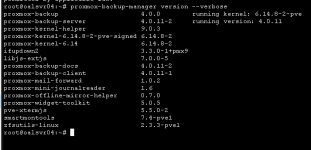
Did you already try with backup fleecing as suggested above? Also, please post the output of proxmox-backup-manager version --verbose from the PBS and pve-version -v from the PVE host.
 
Hi,
please share the VM configuration qm config 201 and output of pveversion -v. Are you using IO thread for your VM disks? That is highly recommended. Since the query-backup QMP command fails, it likely means that the QEMU instance is overloaded. Is there anything in the Proxmox VE system logs/journal around the time the issue happens? Please check the IO pressure and try using a bandwidth limit and fleecing als already suggested by @Chris
 
Did you already try with backup fleecing as suggested above? Also, please post the output of proxmox-backup-manager version --verbose from the PBS and pve-version -v from the PVE host.

sorry I have had to take screen shots as its on a remote server please see below

PBS server

1777541114039.png

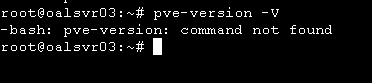
for the host i get

1777541252845.png
EDIT sorry i put a - between pve and version the output is

Code:
proxmox-ve: 9.0.0 (running kernel: 6.14.8-2-pve)
pve-manager: 9.0.5 (running version: 9.0.5/9c5600b249dbfd2f)
proxmox-kernel-helper: 9.0.3
proxmox-kernel-6.14.8-2-pve-signed: 6.14.8-2
proxmox-kernel-6.14: 6.14.8-2
ceph-fuse: 19.2.3-pve1
corosync: 3.1.9-pve2
criu: 4.1.1-1
frr-pythontools: 10.3.1-1+pve4
ifupdown2: 3.3.0-1+pmx9
intel-microcode: 3.20250512.1
ksm-control-daemon: 1.5-1
libjs-extjs: 7.0.0-5
libproxmox-acme-perl: 1.7.0
libproxmox-backup-qemu0: 2.0.1
libproxmox-rs-perl: 0.4.1
libpve-access-control: 9.0.3
libpve-apiclient-perl: 3.4.0
libpve-cluster-api-perl: 9.0.6
libpve-cluster-perl: 9.0.6
libpve-common-perl: 9.0.9
libpve-guest-common-perl: 6.0.2
libpve-http-server-perl: 6.0.4
libpve-network-perl: 1.1.6
libpve-rs-perl: 0.10.10
libpve-storage-perl: 9.0.13
libspice-server1: 0.15.2-1+b1
lvm2: 2.03.31-2+pmx1
lxc-pve: 6.0.4-2
lxcfs: 6.0.4-pve1
novnc-pve: 1.6.0-3
proxmox-backup-client: 4.0.14-1
proxmox-backup-file-restore: 4.0.14-1
proxmox-backup-restore-image: 1.0.0
proxmox-firewall: 1.1.1
proxmox-kernel-helper: 9.0.3
proxmox-mail-forward: 1.0.2
proxmox-mini-journalreader: 1.6
proxmox-offline-mirror-helper: 0.7.0
proxmox-widget-toolkit: 5.0.5
pve-cluster: 9.0.6
pve-container: 6.0.9
pve-docs: 9.0.8
pve-edk2-firmware: 4.2025.02-4
pve-esxi-import-tools: 1.0.1
pve-firewall: 6.0.3
pve-firmware: 3.16-3
pve-ha-manager: 5.0.4
pve-i18n: 3.5.2
pve-qemu-kvm: 10.0.2-4
pve-xtermjs: 5.5.0-2
qemu-server: 9.0.18
smartmontools: 7.4-pve1
spiceterm: 3.4.0
swtpm: 0.8.0+pve2
vncterm: 1.9.0
zfsutils-linux: 2.3.3-pve1

Sorry i totally forgot, should i try this now " Did you already try with backup fleecing as suggested above?"
 
Last edited:
Hi,
please share the VM configuration qm config 201 and output of pveversion -v. Are you using IO thread for your VM disks? That is highly recommended. Since the query-backup QMP command fails, it likely means that the QEMU instance is overloaded. Is there anything in the Proxmox VE system logs/journal around the time the issue happens? Please check the IO pressure and try using a bandwidth limit and fleecing als already suggested by @Chris

qm config 201 =
Code:
root@oalsvr03:~# qm config 201
agent: 1
boot: order=sata0;ide2;net0
cores: 8
cpu: host
ide2: local:iso/AlmaLinux-10.0-x86_64-dvd.iso,media=cdrom,size=7150528K
memory: 32768
meta: creation-qemu=10.0.2,ctime=1760384587
name: lwportal-web-server
net0: virtio=BC:24:11:0D:6E:97,bridge=vmbr0,firewall=1
numa: 0
onboot: 1
ostype: l26
sata0: VMStorage:vm-201-disk-0,size=1000G
scsihw: virtio-scsi-single
smbios1: uuid=536c62f5-f1eb-4532-b30e-4ff09aedf7d0
sockets: 2
vmgenid: c9fdc5e0-de37-4123-aa82-1dc8950a10bb
root@oalsvr03:~#

and pveversion -v =

Code:
root@oalsvr03:~# pveversion -v
proxmox-ve: 9.0.0 (running kernel: 6.14.8-2-pve)
pve-manager: 9.0.5 (running version: 9.0.5/9c5600b249dbfd2f)
proxmox-kernel-helper: 9.0.3
proxmox-kernel-6.14.8-2-pve-signed: 6.14.8-2
proxmox-kernel-6.14: 6.14.8-2
ceph-fuse: 19.2.3-pve1
corosync: 3.1.9-pve2
criu: 4.1.1-1
frr-pythontools: 10.3.1-1+pve4
ifupdown2: 3.3.0-1+pmx9
intel-microcode: 3.20250512.1
ksm-control-daemon: 1.5-1
libjs-extjs: 7.0.0-5
libproxmox-acme-perl: 1.7.0
libproxmox-backup-qemu0: 2.0.1
libproxmox-rs-perl: 0.4.1
libpve-access-control: 9.0.3
libpve-apiclient-perl: 3.4.0
libpve-cluster-api-perl: 9.0.6
libpve-cluster-perl: 9.0.6
libpve-common-perl: 9.0.9
libpve-guest-common-perl: 6.0.2
libpve-http-server-perl: 6.0.4
libpve-network-perl: 1.1.6
libpve-rs-perl: 0.10.10
libpve-storage-perl: 9.0.13
libspice-server1: 0.15.2-1+b1
lvm2: 2.03.31-2+pmx1
lxc-pve: 6.0.4-2
lxcfs: 6.0.4-pve1
novnc-pve: 1.6.0-3
proxmox-backup-client: 4.0.14-1
proxmox-backup-file-restore: 4.0.14-1
proxmox-backup-restore-image: 1.0.0
proxmox-firewall: 1.1.1
proxmox-kernel-helper: 9.0.3
proxmox-mail-forward: 1.0.2
proxmox-mini-journalreader: 1.6
proxmox-offline-mirror-helper: 0.7.0
proxmox-widget-toolkit: 5.0.5
pve-cluster: 9.0.6
pve-container: 6.0.9
pve-docs: 9.0.8
pve-edk2-firmware: 4.2025.02-4
pve-esxi-import-tools: 1.0.1
pve-firewall: 6.0.3
pve-firmware: 3.16-3
pve-ha-manager: 5.0.4
pve-i18n: 3.5.2
pve-qemu-kvm: 10.0.2-4
pve-xtermjs: 5.5.0-2
qemu-server: 9.0.18
smartmontools: 7.4-pve1
spiceterm: 3.4.0
swtpm: 0.8.0+pve2
vncterm: 1.9.0
zfsutils-linux: 2.3.3-pve1

I will look a like at the I/O now and logs (sorry new to proxmox).
 
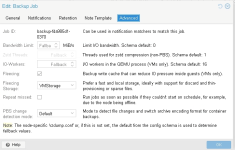
sorry for another post, i did enable fleecing but it was not on the same storage as vm201 which i am having issues with, i have now ticked the box for this and will try another backup after 6pm when they stop using the server
1777542447531.png
 
EDIT: Ah, sorry. I forgot that SATA does not support the IO thread setting. So you would need to switch the bus to SCSI or VirtIO block first (don't forget to change the boot order under the VM Options if you do so).

As a first step, please enable IO Thread for the sata0 disk (in the advanced settings). Without IO thread, the QEMU main thread can easily be overloaded by IO and that is the most likely cause of your issues. You need to stop+start the VM or use the Reboot UI button for the change to apply.
 
Last edited: