

Hey fellas, looking for the guidance for this issue.
We previously saw VSS errors in Windows Event Viewer. After updating to a newer qemu-guest-agent version (QEMU Guest Agent 110.1.0), those Windows Event Viewer errors are no longer present.
However, during backups we now see this Proxmox log message:
"unable to freeze guest fs - Command guest-fsfreeze-freeze has been disabled: the command is not allowed"
Before taking a snapshot in Proxmox, I run these commands to confirm the QEMU Guest Agent is responding: • qm guest ping • qm guest cmd fsfreeze-freeze • qm guest cmd fsfreeze-thaw
At the same timestamp in Windows Event Viewer, qemu-ga shows entries like:
Has anyone seen this behavior, and is there a known fix or resolution for the Proxmox “command is not allowed” freeze message?
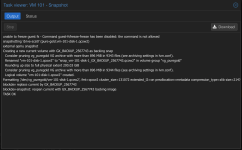
I found this forum link that may be related to the issue.
Additional links:
https://forum.proxmox.com/threads/virtio-and-qemu-ga.57599/
https://gitlab.com/qemu-project/qemu/-/issues/3286
https://gitlab.com/qemu-project/qemu/-/issues/3318
https://bugzilla.proxmox.com/show_bug.cgi?id=7383
We previously saw VSS errors in Windows Event Viewer. After updating to a newer qemu-guest-agent version (QEMU Guest Agent 110.1.0), those Windows Event Viewer errors are no longer present.
However, during backups we now see this Proxmox log message:
"unable to freeze guest fs - Command guest-fsfreeze-freeze has been disabled: the command is not allowed"
Before taking a snapshot in Proxmox, I run these commands to confirm the QEMU Guest Agent is responding: • qm guest ping • qm guest cmd fsfreeze-freeze • qm guest cmd fsfreeze-thaw
At the same timestamp in Windows Event Viewer, qemu-ga shows entries like:
- guest-fsfreeze-freeze called
- Writer completes (e.g., MSMQ: “backup completed successfully”)
- guest-fsfreeze-thaw called
- guest-ping called
- guest-fsfreeze-freeze called
- guest-fsfreeze-thaw called
- Writer completes (e.g., MSMQ: “backup completed successfully”)
Has anyone seen this behavior, and is there a known fix or resolution for the Proxmox “command is not allowed” freeze message?
I found this forum link that may be related to the issue.
Additional links:
https://forum.proxmox.com/threads/virtio-and-qemu-ga.57599/
https://gitlab.com/qemu-project/qemu/-/issues/3286
https://gitlab.com/qemu-project/qemu/-/issues/3318
https://bugzilla.proxmox.com/show_bug.cgi?id=7383
Attachments
Last edited:
