Nvidia driver install cant find header

nemlehet4

New Member
Mar 3, 2026
4
1
3
Hello All,

I'm a bit lost, I'm trying to install the nvidia driver on my NAS to have GPU acceleration in some containers, but I ran into this problem while the apt installer tries to build the DKMS files:

relevant part from the logs:

Code:
Setting up nvidia-kernel-dkms (550.163.01-2) ...
Loading new nvidia-current/550.163.01 DKMS files...
WARNING: No kernel headers were found, skipping module build.
To get the headers for the running kernel (6.14.11-5-pve)
please install the linux-headers-6.14.11-5-pve package.

The header is installed already:

Code:
root@nas:~# apt-get install linux-headers-6.14.11-5-pve
Reading package lists... Done
Building dependency tree... Done
Reading state information... Done
Note, selecting 'linux-headers-6.14.11-5-pve-amd64' for regex 'linux-headers-6.14.11-5-pve'
Note, selecting 'proxmox-headers-6.14.11-5-pve' instead of 'linux-headers-6.14.11-5-pve-amd64'
proxmox-headers-6.14.11-5-pve is already the newest version (6.14.11-5).
0 upgraded, 0 newly installed, 0 to remove and 24 not upgraded.

Checking the installed headers I can see the same:
Code:
root@nas:~# dpkg -l | grep headers-$(uname -r)
ii  proxmox-headers-6.14.11-5-pve       6.14.11-5                            amd64        Proxmox Kernel Headers

I tried to search for a solution but nothing really came up. Can you offer me some guidance what to look up or what I'm doing wrong?

My hunch is either somehow the headers are not defined somewhere where the nvidia installer pulls from or the driver installer needs some kind of argument to know to the proxmox-headers-6.14.11-5-pve.
 
nas is the node? Also try this.
Yes, nas is the node.

Returns this:
Code:
root@nas:~# apt install -y proxmox-default-headers proxmox-headers-$(uname -r) gcc make dkms
proxmox-default-headers is already the newest version (2.0.2).
proxmox-headers-6.14.11-5-pve is already the newest version (6.14.11-5).
gcc is already the newest version (4:14.2.0-1).
make is already the newest version (4.4.1-2).
dkms is already the newest version (3.2.2-1~deb13u1).
Summary:
  Upgrading: 0, Installing: 0, Removing: 0, Not Upgrading: 0

root@nas:~# ./$(ls -t NVIDIA*.run | head -n 1) --dkms --disable-nouveau --kernel-module-type proprietary --no-install-libglvnd
Verifying archive integrity... OK
Uncompressing NVIDIA Accelerated Graphics Driver for Linux-x86_64 550.163.01........................................................................................................................................................................................................................................................................................................................................................................................................................................................................................................................................................................................................................................................................................................................................................................................................................................................................................................................................................................................................................................................................................................................................................................
./nvidia-installer: unrecognized option: "--kernel-module-type"

ERROR: Invalid commandline, please run `./nvidia-installer --help` for usage information.

root@nas:~# ./nvidia-installer --help
-bash: ./nvidia-installer: No such file or directory

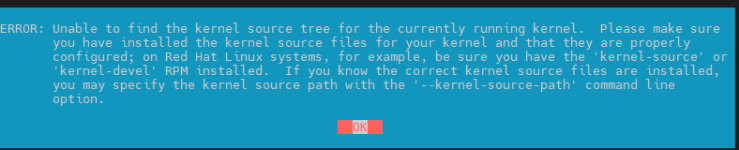
Tried to remove --kernel-module-type proprietary just to see what happens:
kernel.png
 
Weird. Have you tried with a more recent driver? Just out of curiousity, what's uname -a say?
The content of /var/log/nvidia-installer.log might be interesting too. You can also try to give it this but it really shouldn't be necessary
Bash:
--kernel-source-path /usr/src/linux-headers-$(uname -r)
You can get the path via this, by the way
Bash:
dpkg -L proxmox-headers-$(uname -r)
 
Last edited:
Weird. Have you tried with a more recent driver? Just out of curiousity, what's uname -a say?
Code:
root@nas:~# uname -a
Linux nas 6.14.11-5-pve #2 SMP PREEMPT_DYNAMIC PMX 6.14.11-5 (2025-12-15T08:44Z) x86_64 GNU/Linux

Tried 570.211 driver same problem. Its an 1650 so I'm not sure how newer can I try, the latest 590 driver doesnt support it anymore.

I found a thread on the nvidia forum for a different issue, but lead me to find --kernel-source-path parameter it seems to help with finding the header, but there is still an error see attached, the installer still cant find some files it needs.


Attachments

Code:
error while loading shared libraries: libdw.so.1: cannot open shared object file: No such file or directory
It's part of the libdw1t64 package. I never had to manually install that though. I'd generally not mix the .run file with the NVIDIA repo's packages and would uninstall all nvidia related stuff first. The old driver might also just not be compatible with your kernel in the end.
 
Last edited:
Code:
error while loading shared libraries: libdw.so.1: cannot open shared object file: No such file or directory
It's part of the libdw1t64 package. I never had to manually install that though. I'd generally not mix the .run file with the NVIDIA repo's packages and would uninstall all nvidia related stuff first. The old driver might also just not be compatible with your kernel in the end.
This actually helped more than you would think :D I managed to make it work, here is everything, maybe it can help someone in the future.


so first I purged all nvidia drivers:
sudo apt-get remove --purge '^nvidia-.*'
sudo apt-get purge "^libnvidia-.*"
Of course how you would do it depends on how you originally installed it.

I installed the missing package. This is something I probably accidentally deleted while trying different kernels and drivers. Not sure exactly why I was missing this.
sudo apt install libdw1t64

Then the driver finally installed by specifying the --kernel-source-path:
./$(ls -t NVIDIA*.run | head -n 1) --dkms --disable-nouveau --no-install-libglvnd --kernel-source-path /usr/src/linux-headers-6.14.11-5-pve

I got 2 warnings:
Warning 1:
xorg warning.png
I didnt do anything with this, so far not causing any issues.

Warning 2:
link warning.png
Easy fix with:
ln -sf /usr/lib/x86_64-linux-gnu/libGL.so.1 /usr/lib/libGL.so.1

I also installed the nvidia CTK so I can generate the CDI definition for docker to pass the GPU:
apt-get install nvidia-container-toolkit-base

The auto-cdi definition worked without doing anything.

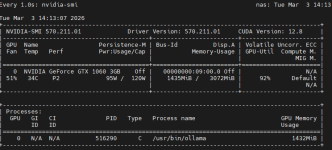
Everything seem to be working, tested by running deepseek in Ollama:
nvidia-smi.png
 
  • Like
Reactions: Impact