GMKTEC K12 | Ryzen 7 H 255 | Problem with IGPU

Przesłałem mój VBIOS i plik ROM dla H255 do https://cloud.catacombs.de/s/5JRq7JLSz92zmGk

Jak dotąd odkryłem, że wyjście HDMI działa tylko wtedy, gdy wyłączam kartę graficzną w menedżerze urządzeń, ale nie wtedy, gdy jest wyłączona.
And where did you get the entire BIOS to create the ROM?
Because look what's showing up on my screen, as if it were just a BIOS patch and not the whole thing.

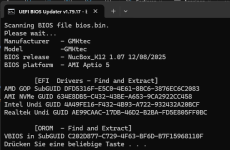
Code:
Scanning BIOS file bios.bin.
Please wait...
Manufacturer   - GMKtec
Model          -GMKtec
BIOS release   - NucBox_K12 1.07 12/08/2025
BIOS platform  - AMI Aptio 5

        [EFI  Drivers - Find and Extract]
The system cannot find the file Files\Workfiles\_List_Extra.txt.

        [OROM  - Find and Extract]
VBIOS in SubGUID C202D877-C729-4F63-BF6D-B7F15968110F
The system cannot find the file Files\Intel\lan\orom\obacl.txt.
The system cannot find the file Files\Intel\lan\orom\obage.txt.
The system cannot find the file Files\Intel\lan\orom\obaxe.txt.
Press any key to continue . . .


Code:
                      Main Menu
            [Current version in BIOS file]
1 - Disk Controller
2 - Video OnBoard
The system cannot find the file Files\amd\vbios\_List_vbios.txt.
     OROM VBIOS Unknown          - 022.012.000.027.000001
3 - Network
4 - Other SATA Controller
5 - CPU MicroCode
     View/Extract/Search/Replace
S - AMI Setup IFR Extractor
0 - Exit
RS - Re-Scanning
A - About
Choice:

Code:
                Video OnBoard
        [Current version]
The system cannot find the file Files\amd\vbios\_List_vbios.txt.
     OROM VBIOS Unknown          - 022.012.000.027.000001

        [Available version]
The system cannot find the file Files\amd\vbios\_List_vbios.txt.

0 - Exit to Main Menu
Choice:

1766403286904.png
 
Last edited:
that is the whole bios. there is no such thing as bios patches.
you are doing something wrong with the software since its throwing errors about not finding textfiles.
it doesnt do that for me:

1766403471674.png
 
that is the whole bios. there is no such thing as bios patches.
you are doing something wrong with the software since its throwing errors about not finding textfiles.
it doesnt do that for me:

View attachment 94279
Would you be so kind as to record a video showing how you download the BIOS and run it in this program? To extract the EFI?
 
no, im not recoding a video of that.
did you download the whole archive as in all the files from that github?
i downloaded the zip (about 44MB in size when you download in from github), extracted it, copied the biosfile there, renamed it to bios.bin and ran the batchfile. it just works.

1766405040492.png
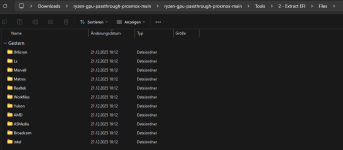
you might be missing the "Files" folder that comes with the software if you downloaded everything.
the files folder contains all the things the software needs to identify the components of the bios:
1766406557325.png
the errors suggest that.
 
Last edited:
Where did you get the Files folder? I don't have anything like that, no matter how I downloaded it.
I can even record a video for you, no problem, just tell me, does this Files folder create itself or do you download it? Can you also share it so I can copy it?
 
Oh my god... now I understand, inside it was another folder that was already correct with files and corrections...


Code:
                      Main Menu
            [Current version in BIOS file]
1 - Disk Controller
     EFI NVMe Driver present
2 - Video OnBoard
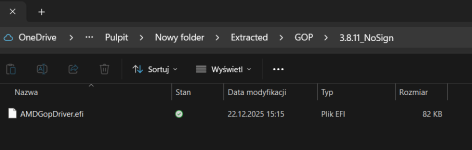
     EFI AMD GOP Driver          - 3.8.11_NoSign
     OROM VBIOS Phoenix          - 022.012.000.027.000001
3 - Network
     EFI Intel PRO2500 Driver    - 0.8.05
     EFI Realtek UNDI Driver     - 2.063
4 - Other SATA Controller
5 - CPU MicroCode
     View/Extract/Search/Replace
S - AMI Setup IFR Extractor
0 - Exit
RS - Re-Scanning
A - About
Choice:

My bad sorry......
1766413022556.png
 
Last edited:
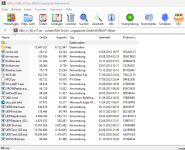
my mistake. i forgot that the files folder is inside the rar archive that sits in the main folder:

1766414420553.png

i just extracted the files folder and placed it in the same folder as the ubu.bat.

im sorry about that. totally slipped my mind. i did so many things lately trying to make it work that i forgot.
 
Okay, now everything is fine and everything is okay on my end too. Tell me what you have set in the VM configuration?
Which AMD driver did you install? And did you install radeonbugfix?
 
ah i downloaded the driver for the ryzen 7 hx 370.
doesnt really matter, as long as its a somewhat current model (the exe is actually the same for all of them).
so the driver for the 8845hs will work just fine.
 
Ok, today/tomorrow I'll sit down and figure it out, I'll let you know how my screen is doing and what I did 1:1.

If you could send me the entire VM config, I'd be grateful. I'll do it my way, just like I did for GMKTEC M5 PRO, but maybe I'll find something interesting in yours.
 
sure. here is my current config:

Code:
agent: 1
args: -cpu 'host,+hv-emsr-bitmap,+hv-frequencies,+hv-reenlightenment,+hv-tlbflush-direct,hv_ipi,hv_relaxed,hv_reset,hv_runtime,hv_spinlocks=0x1fff,hv_stimer,hv_synic,hv_time,hv_vapic,hv_vendor_id=intel,hv_vpindex,-hypervisor,+invtsc,kvm=off,+kvm_pv_eoi,+kvm_pv_unhalt,host-phys-bits=true'
bios: ovmf
boot: order=scsi0;ide2;ide0;net0
cores: 8
cpu: host
efidisk0: nfs-pool1:111/vm-111-disk-0.raw,efitype=4m,pre-enrolled-keys=1,size=528K
hostpci0: mapping=Radeon-GPU,pcie=1,romfile=vbios_7xxx.bin,x-vga=1
hostpci1: mapping=Radeon-Audio,pcie=1,romfile=AMDGopDriver_7840hs.rom
ide0: none,media=cdrom
ide2: none,media=cdrom
machine: pc-q35-10.0+pve1
memory: 8192
meta: creation-qemu=10.0.2,ctime=1756562095
name: W11EntLTSC-Denis-2
net0: virtio=BC:24:11:37:0A:C9,bridge=vmbr0
numa: 0
onboot: 1
ostype: win11
scsi0: nfs-pool1:111/vm-111-disk-1.raw,discard=on,iothread=1,size=120G,ssd=1
scsihw: virtio-scsi-single
smbios1: uuid=235ec88e-0134-4a15-8b45-aa38ccea041e
sockets: 1
tpmstate0: nfs-pool1:111/vm-111-disk-2.raw,size=4M,version=v2.0
vga: none
vmgenid: 0fd5caaf-f34e-49f5-93c6-fb2604781b70


pretty standard stuff with exception of the hyperv-enlightenments which i have added after someone else suggested it
 
sure. here is my current config:

Code:
agent: 1
args: -cpu 'host,+hv-emsr-bitmap,+hv-frequencies,+hv-reenlightenment,+hv-tlbflush-direct,hv_ipi,hv_relaxed,hv_reset,hv_runtime,hv_spinlocks=0x1fff,hv_stimer,hv_synic,hv_time,hv_vapic,hv_vendor_id=intel,hv_vpindex,-hypervisor,+invtsc,kvm=off,+kvm_pv_eoi,+kvm_pv_unhalt,host-phys-bits=true'
bios: ovmf
boot: order=scsi0;ide2;ide0;net0
cores: 8
cpu: host
efidisk0: nfs-pool1:111/vm-111-disk-0.raw,efitype=4m,pre-enrolled-keys=1,size=528K
hostpci0: mapping=Radeon-GPU,pcie=1,romfile=vbios_7xxx.bin,x-vga=1
hostpci1: mapping=Radeon-Audio,pcie=1,romfile=AMDGopDriver_7840hs.rom
ide0: none,media=cdrom
ide2: none,media=cdrom
machine: pc-q35-10.0+pve1
memory: 8192
meta: creation-qemu=10.0.2,ctime=1756562095
name: W11EntLTSC-Denis-2
net0: virtio=BC:24:11:37:0A:C9,bridge=vmbr0
numa: 0
onboot: 1
ostype: win11
scsi0: nfs-pool1:111/vm-111-disk-1.raw,discard=on,iothread=1,size=120G,ssd=1
scsihw: virtio-scsi-single
smbios1: uuid=235ec88e-0134-4a15-8b45-aa38ccea041e
sockets: 1
tpmstate0: nfs-pool1:111/vm-111-disk-2.raw,size=4M,version=v2.0
vga: none
vmgenid: 0fd5caaf-f34e-49f5-93c6-fb2604781b70
pretty standard stuff with exception of the hyperv-enlightenments which i have added after someone else suggested it
I'll tell you something strange.
When I bought the GMKTEC K12, I had igpu and audio set to
0000:06:00 and 0000:06:00, and I think the BIOS was from September.
You sent me that link to the BIOS, because I couldn't find it for the life of me. I did an update on Windows, and thanks to you, I also exported the vbios and rom files, and did the rest from the ISC30 1:1 guide, and magically everything works.
I installed a clean Windows 11 PRO on this Atlas OS, all the latest updates and drivers using Driver Booster Pro, and Parsec works on the “SYSTEM” not on the user, so it's great, as is the image on the monitor. Even better, the KVM switch works on 3 monitors and switches nicely between GMKTEC K12 and my computer.
The only thing I noticed was that after the BIOS update, everything restarted (meaning the entire BIOS), and the IGPU and Audio devices changed to:
0000:65:00 and 0000:65:00. I don't know if this is important or not, but now everything seems to be working.
Previously, I had problems with the host freezing, the screen turning green and flashing until I turned off the entire mini PC.
I am currently testing it because it used to happen randomly, sometimes after 2 hours, sometimes after 12 hours, so I will tell you exactly what I found out.
I thought it might help someone, so I'll leave my vbios and rom here.
 
i didnt actually flash the bios as my k12 was on 1.07 already.
maybe i will flash that bios file just in case there is any difference.
if it works for you, it should work for me.

please post your vm config
 
i just flashed the bios, but im still having the issue that my display becomes a garbled mess once the amd driver becomes active. before that i have a display.
 
i just flashed the bios, but im still having the issue that my display becomes a garbled mess once the amd driver becomes active. before that i have a display.
You know what, I uploaded the latest BIOS from December and extracted both the VBIOS and ROM from it, so that should help you.

Additionally, try uploading Parsec, but for the entire system, not just for the user + the virtual display. My monitor is connected via an HDMI to VGA adapter because it is an older VGA monitor in the server cabinet.

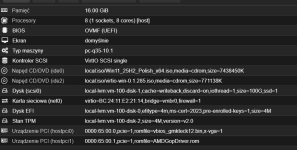
Config VM:
Code:
args: -cpu 'host,-hypervisor,kvm=off'
bios: ovmf
boot: order=scsi0;ide2;ide0;net0
cores: 8
cpu: host
efidisk0: local-lvm:vm-100-disk-0,efitype=4m,ms-cert=2023,pre-enrolled-keys=1,size=4M
hostpci0: 0000:65:00.0,pcie=1,romfile=vbios_gmkteck12.bin,x-vga=1
hostpci1: 0000:65:00.1,pcie=1,romfile=AMDGopDriver.rom
ide0: local:iso/Win11_25H2_Polish_x64.iso,media=cdrom,size=7438450K
ide2: local:iso/virtio-win-0.1.285.iso,media=cdrom,size=771138K
machine: pc-q35-10.1
memory: 16384
meta: creation-qemu=10.1.2,ctime=1766441318
name: Windows11PROVM
net0: virtio=BC:24:11:E2:21:14,bridge=vmbr0,firewall=1
numa: 0
ostype: win11
scsi0: local-lvm:vm-100-disk-1,cache=writeback,discard=on,iothread=1,size=100G,ssd=1
scsihw: virtio-scsi-single
smbios1: uuid=9913c9fd-73da-4b89-9087-300b4ce7eb6e
sockets: 1
tpmstate0: local-lvm:vm-100-disk-2,size=4M,version=v2.0
vmgenid: 376d102e-df05-42d5-a78e-c0465ea6a22a

I don't know if it matters, but I have the display set to none and I enabled the primary GPU in IGPU like this.

1766488348774.png
 
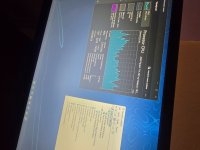
And as you can see, I have the image on my monitor and through Parsec, and I see the same thing on both :)

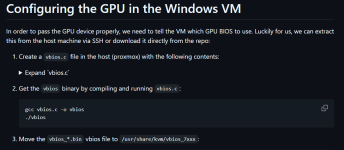
And tell me, did you extract the Vbios using this?
1766488637104.png
 

Attachments

  • 20251223_121436.jpg
    20251223_121436.jpg
    1.1 MB · Views: 4
Last edited: