Windows 11 guest doesn't shutdown but reboots

Colin 't Hart

Renowned Member
Jan 20, 2017
72
13
73
52
Frösön, Sweden
hiawathaavenue.com
Windows 11 24H2 guest on Proxmox 8.2.7
On shutdown it goes through the whole shutdown process but then the UEFI just boots it again...

Under VirtualBox 7.1.4 on macOS 15.0.1 Windows 11 23H2 shuts down as expected.

Where should I start looking?
 
I'm just trying to install w11-24h2 on prox 827 ... Have you used kvm-virtio drivers ? ... which version ?

thank you
 
status update : !'ve successfully installed w11 24H2 + virtio-win-0.1.262.iso (disk + net + vga-spice) ... VM shuts down as expected!
 
Last edited:
My Windows11 VM updated itself to 24H2 today and after that I can't shut it down, it will always restart instead. I did install virtio-win-0.1.262 but no change. How can I fix this?

No HA configured btw.
 
Last edited:
  • Like
Reactions: Colin 't Hart
I am experiencing this too. Latest virtio drivers and guest tools. Would be nice to have a fix rather than just hiding the symptoms.
 
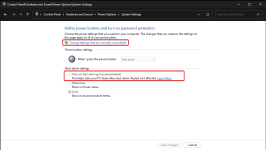
Fast start-up hibernates Windows instead fully shutdown which is not recommended.
Disabling whole hibernation disables Fast start-up too
Within any Windows guest, CMD as Admin
powercfg -h off
btw, IRC, hibernation is available only with GPU passthrough, as virtual display doesn't support hibernation.
 
  • Like
Reactions: EllerholdAG
The only way I could solve this problem was to take the Win11 install ISO and use Rufus to make a bootable USB key with all of the secure boot stuff and UEFI stuff disabled. You also have to set the USB drive to MBR in Rufus and that will change it so that it won't use secure boot. Then make a VM with SeaBIOS and then install the VirtIO drivers and guest tools, then shutdowns from within Win11 on Proxmox stays off. I've tried this many ways, with many versions of the VirtIO drivers and I could never get this solved with all of that secure boot stuff with TPM, etc in place. I'm on Proxmox 9.1. But now with using SeaBIOS and all of that stuff off, it just works as expected. I'm guessing theres some bug somewhere with all of it that's causing this to happen when you have all of that stuff enabled.
 
This started to happen again with this new VM that I have. I figured out that this was happening because I added it to the HA group and it was set to started. So when it would see it shut down, HA services in Proxmox would restart it. The best thing to do here is to set it to either Ignored or just not add it to the HA configuration.