

TrueNAS Storage Plugin

I have just reinstalled my test system as well, I am alos on the "alpha" branch. I have currently only setup NVME connectivity for testing.

I have a single test host with 2 x 10g SFP interfaces - wired to redundant switching - to a TrueNAS mirrored vdev's. in theory with multipathing... haven't fully tested that yet, but set it up.


My /etc/pve/storage.cfg

truenasplugin: truenas-nvme
api_host 10.10.5.10
api_key 3-vVeJEyC29sGwNEjpCfVnRBjHOKei8F3TekksP6bbr1NlStP4OHQ48UVmXl2laDiI
dataset tank/proxmox-nvme
transport_mode nvme-tcp
subsystem_nqn nqn.2011-06.com.truenas:uuid:279fe462-e1d3-4d01-9ce6-05b989731872:proxmox-nvme
api_insecure 1
shared 1
discovery_portal 10.10.5.10:4420
zvol_blocksize 16K
tn_sparse 1
portals 10.10.6.10:4420
hostnqn nqn.2011-06.com.truenas:uuid:279fe462-e1d3-4d01-9ce6-05b989731872
content images


FIO test from the install diagnostics:

FIO Storage Benchmark

Running benchmark on storage: truenas-nvme

FIO installation: ✓ fio-3.39
Storage configuration: ✓ Valid (nvme-tcp mode)
Finding available VM ID: ✓ Using VM ID 990
Allocating 10GB test volume: ✓ truenas-nvme:vol-fio-bench-1764783729-nsa58d227d-01de-4ece-aa57-96b859d97f57
Waiting for device (5s): ✓ Ready
Detecting device path: ✓ /dev/nvme1n1
Validating device is unused: ✓ Device is safe to test

Starting FIO benchmarks (30 tests, 25-30 minutes total)...

Transport mode: nvme-tcp (testing QD=1, 16, 32, 64, 128)

Sequential Read Bandwidth Tests: [1-5/30]
Queue Depth = 1: ✓ 537.10 MB/s
Queue Depth = 16: ✓ 1.10 GB/s
Queue Depth = 32: ✓ 1.10 GB/s
Queue Depth = 64: ✓ 1.10 GB/s
Queue Depth = 128: ✓ 1.10 GB/s

Sequential Write Bandwidth Tests: [6-10/30]
Queue Depth = 1: ✓ 472.18 MB/s
Queue Depth = 16: ✓ 451.78 MB/s
Queue Depth = 32: ✓ 358.25 MB/s
Queue Depth = 64: ✓ 362.28 MB/s
Queue Depth = 128: ✓ 363.43 MB/s

Random Read IOPS Tests: [11-15/30]
Queue Depth = 1: ✓ 5,786 IOPS
Queue Depth = 16: ✓ 78,306 IOPS
Queue Depth = 32: ✓ 103,105 IOPS
Queue Depth = 64: ✓ 112,326 IOPS
Queue Depth = 128: ✓ 122,474 IOPS

Random Write IOPS Tests: [16-20/30]
Queue Depth = 1: ✓ 6,769 IOPS
Queue Depth = 16: ✓ 30,142 IOPS
Queue Depth = 32: ✓ 25,217 IOPS
Queue Depth = 64: ✓ 25,425 IOPS
Queue Depth = 128: ✓ 25,737 IOPS

Random Read Latency Tests: [21-25/30]
Queue Depth = 1: ✓ 175.82 µs
Queue Depth = 16: ✓ 200.85 µs
Queue Depth = 32: ✓ 301.12 µs
Queue Depth = 64: ✓ 531.54 µs
Queue Depth = 128: ✓ 1.01 ms

Mixed 70/30 Workload Tests: [26-30/30]
Queue Depth = 1: ✓ R: 4,289 / W: 1,834 IOPS
Queue Depth = 16: ✓ R: 54,862 / W: 23,532 IOPS
Queue Depth = 32: ✓ R: 63,986 / W: 27,431 IOPS
Queue Depth = 64: ✓ R: 64,147 / W: 27,500 IOPS
Queue Depth = 128: ✓ R: 63,898 / W: 27,393 IOPS

━━━━━━━━━━━━━━━━━━━━━━━━━━━━━━━━━━━━━━━━━━━━━━
Benchmark Summary
━━━━━━━━━━━━━━━━━━━━━━━━━━━━━━━━━━━━━━━━━━━━━━

Total tests run: 30
Completed: 30

Top Performers:

Sequential Read: 1.10 GB/s (QD=16 )
Sequential Write: 472.18 MB/s (QD=1 )
Random Read IOPS: 122,474 IOPS (QD=128)
Random Write IOPS: 30,142 IOPS (QD=16 )
Lowest Latency: 175.82 µs (QD=1 )

━━━━━━━━━━━━━━━━━━━━━━━━━━━━━━━━━━━━━━━━━━━━━━
Press Enter to return to diagnostics menu...


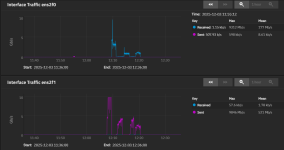
Here is the reports from the truenas 10g nics, it more or less proves the multipath is working, interesting that one is always send, and the other recieve...
1764794334968.png
 
would you be able to share the MPIO configuration ? i.e. a "safe" output of your /etc/network/interfaces
Here is the network interfaces on the proxmox server:

I don't have anything specificly configured other than IP / info... VLANs are done at the switching level.

Code:
root@bob:~# cat /etc/network/interfaces
# network interface settings; autogenerated
# Please do NOT modify this file directly, unless you know what
# you're doing.
#
# If you want to manage parts of the network configuration manually,
# please utilize the 'source' or 'source-directory' directives to do
# so.
# PVE will preserve these directives, but will NOT read its network
# configuration from sourced files, so do not attempt to move any of
# the PVE managed interfaces into external files!

auto lo
iface lo inet loopback

auto

iface enp87s0 inet manual

auto

iface enp88s0 inet manual

auto enp2s0f0np0
iface enp2s0f0np0 inet static
        address 10.10.5.11/24
#vlan5

auto enp2s0f1np1
iface enp2s0f1np1 inet static
        address 10.10.6.11/24
#vlan6

iface wlp89s0 inet manual

auto vmbr0
iface vmbr0 inet static
        address 192.168.239.112/24
        gateway 192.168.239.1
        bridge-ports enp87s0
        bridge-stp off
        bridge-fd 0

source /etc/network/interfaces.d/*
 
  • Like
Reactions: jt_telrite
Here is the network interfaces on the proxmox server:

I don't have anything specificly configured other than IP / info... VLANs are done at the switching level.

Code:
root@bob:~# cat /etc/network/interfaces
# network interface settings; autogenerated
# Please do NOT modify this file directly, unless you know what
# you're doing.
#
# If you want to manage parts of the network configuration manually,
# please utilize the 'source' or 'source-directory' directives to do
# so.
# PVE will preserve these directives, but will NOT read its network
# configuration from sourced files, so do not attempt to move any of
# the PVE managed interfaces into external files!

auto lo
iface lo inet loopback

auto

iface enp87s0 inet manual

auto

iface enp88s0 inet manual

auto enp2s0f0np0
iface enp2s0f0np0 inet static
        address 10.10.5.11/24
#vlan5

auto enp2s0f1np1
iface enp2s0f1np1 inet static
        address 10.10.6.11/24
#vlan6

iface wlp89s0 inet manual

auto vmbr0
iface vmbr0 inet static
        address 192.168.239.112/24
        gateway 192.168.239.1
        bridge-ports enp87s0
        bridge-stp off
        bridge-fd 0

source /etc/network/interfaces.d/*
is there any other configurations required ? I see several Multipath configuration documents... not sure if they apply here.
 
Last edited:
The only configuration that I have done other than configure appropriate network information is install multipath, and nvme-cli.
I don't know what I am doing wrong
root@dlk0entpve801:~# ip a
1: lo: <LOOPBACK,UP,LOWER_UP> mtu 65536 qdisc noqueue state UNKNOWN group default qlen 1000
link/loopback 00:00:00:00:00:00 brd 00:00:00:00:00:00
inet 127.0.0.1/8 scope host lo
valid_lft forever preferred_lft forever
inet6 ::1/128 scope host noprefixroute
valid_lft forever preferred_lft forever
2: eno1: <NO-CARRIER,BROADCAST,MULTICAST,UP> mtu 1500 qdisc mq state DOWN group default qlen 1000
link/ether d8:9d:67:23:53:40 brd ff:ff:ff:ff:ff:ff
altname enp3s0f0
3: eno2: <NO-CARRIER,BROADCAST,MULTICAST,UP> mtu 1500 qdisc mq state DOWN group default qlen 1000
link/ether d8:9d:67:23:53:41 brd ff:ff:ff:ff:ff:ff
altname enp3s0f1
4: eno3: <NO-CARRIER,BROADCAST,MULTICAST,SLAVE,UP> mtu 1500 qdisc mq master bond1 state DOWN group default qlen 1000
link/ether d8:9d:67:23:53:42 brd ff:ff:ff:ff:ff:ff
altname enp3s0f2
5: eno4: <BROADCAST,MULTICAST,SLAVE,UP,LOWER_UP> mtu 1500 qdisc mq master bond1 state UP group default qlen 1000
link/ether d8:9d:67:23:53:42 brd ff:ff:ff:ff:ff:ff permaddr d8:9d:67:23:53:43
altname enp3s0f3
6: ens2f0: <BROADCAST,MULTICAST,SLAVE,UP,LOWER_UP> mtu 1500 qdisc mq master bond0 state UP group default qlen 1000
link/ether 48:df:37:04:9c:2c brd ff:ff:ff:ff:ff:ff
altname enp7s0f0
7: ens2f1: <BROADCAST,MULTICAST,SLAVE,UP,LOWER_UP> mtu 1500 qdisc mq master bond0 state UP group default qlen 1000
link/ether 48:df:37:04:9c:2c brd ff:ff:ff:ff:ff:ff permaddr 48:df:37:04:9c:2d
altname enp7s0f1
8: ens3f0: <BROADCAST,MULTICAST,UP,LOWER_UP> mtu 9216 qdisc mq state UP group default qlen 1000
link/ether 34:64:a9:91:83:84 brd ff:ff:ff:ff:ff:ff
altname enp10s0f0
inet 172.16.80.181/24 scope global ens3f0
valid_lft forever preferred_lft forever
inet6 fe80::3664:a9ff:fe91:8384/64 scope link
valid_lft forever preferred_lft forever
9: ens3f1: <BROADCAST,MULTICAST,UP,LOWER_UP> mtu 9216 qdisc mq state UP group default qlen 1000
link/ether 34:64:a9:91:83:85 brd ff:ff:ff:ff:ff:ff
altname enp10s0f1
inet 172.16.81.181/24 scope global ens3f1
valid_lft forever preferred_lft forever
inet6 fe80::3664:a9ff:fe91:8385/64 scope link
valid_lft forever preferred_lft forever
12: bond0: <BROADCAST,MULTICAST,MASTER,UP,LOWER_UP> mtu 1500 qdisc noqueue master vmbr0 state UP group default qlen 1000
link/ether 48:df:37:04:9c:2c brd ff:ff:ff:ff:ff:ff
13: vmbr0: <BROADCAST,MULTICAST,UP,LOWER_UP> mtu 1500 qdisc noqueue state UP group default qlen 1000
link/ether 48:df:37:04:9c:2c brd ff:ff:ff:ff:ff:ff
inet 10.20.35.11/22 scope global vmbr0
valid_lft forever preferred_lft forever
inet6 fe80::4adf:37ff:fe04:9c2c/64 scope link
valid_lft forever preferred_lft forever
14: bond1: <BROADCAST,MULTICAST,MASTER,UP,LOWER_UP> mtu 1500 qdisc noqueue master vmbr1 state UP group default qlen 1000
link/ether d8:9d:67:23:53:42 brd ff:ff:ff:ff:ff:ff
15: vmbr1: <BROADCAST,MULTICAST,UP,LOWER_UP> mtu 1500 qdisc noqueue state UP group default qlen 1000
link/ether d8:9d:67:23:53:42 brd ff:ff:ff:ff:ff:ff
inet6 fe80::da9d:67ff:fe23:5342/64 scope link
valid_lft forever preferred_lft forever
16: tap220101i0: <BROADCAST,MULTICAST,PROMISC,UP,LOWER_UP> mtu 1500 qdisc pfifo_fast master vmbr0 state UNKNOWN group default qlen 1000
link/ether 42:ba:f7:7d:34:e5 brd ff:ff:ff:ff:ff:ff
17: tap256803i0: <BROADCAST,MULTICAST,PROMISC,UP,LOWER_UP> mtu 1500 qdisc pfifo_fast master vmbr0 state UNKNOWN group default qlen 1000
link/ether 7e:24:9a:4a:1d:bd brd ff:ff:ff:ff:ff:ff
root@dlk0entpve801:~#

truenasplugin: dev-stor
api_host 172.16.80.1
api_key 3-KenjZNNxD0dv7XSuv4KqDeCyxcEfvZLyugeRE6BKcSlemTCWSe4WLKwJUyLMy5u3
api_transport ws
api_scheme wss
api_port 443
dataset dev-stor/vm
target_iqn iqn.2005-10.org.freenas.ctl:vm
api_insecure 1
shared 1
discovery_portal 172.16.80.1:3260
zvol_blocksize 128K
tn_sparse 1
use_multipath 1
content images
vmstate_storage local

truenas_admin@dlk0entsto801[~]$ ip a
1: lo: <LOOPBACK,UP,LOWER_UP> mtu 65536 qdisc noqueue state UNKNOWN group default qlen 1000
link/loopback 00:00:00:00:00:00 brd 00:00:00:00:00:00
inet 127.0.0.1/8 scope host lo
valid_lft forever preferred_lft forever
inet6 ::1/128 scope host noprefixroute
valid_lft forever preferred_lft forever
2: eno1: <BROADCAST,MULTICAST,UP,LOWER_UP> mtu 1500 qdisc mq state UP group default qlen 1000
link/ether 2c:44:fd:88:b5:58 brd ff:ff:ff:ff:ff:ff
altname enp3s0f0
inet 10.20.35.12/22 brd 10.20.35.255 scope global eno1
valid_lft forever preferred_lft forever
inet6 fe80::2e44:fdff:fe88:b558/64 scope link proto kernel_ll
valid_lft forever preferred_lft forever
3: eno2: <BROADCAST,MULTICAST> mtu 1500 qdisc noop state DOWN group default qlen 1000
link/ether 2c:44:fd:88:b5:59 brd ff:ff:ff:ff:ff:ff
altname enp3s0f1
4: eno3: <BROADCAST,MULTICAST> mtu 1500 qdisc noop state DOWN group default qlen 1000
link/ether 2c:44:fd:88:b5:5a brd ff:ff:ff:ff:ff:ff
altname enp3s0f2
5: eno4: <BROADCAST,MULTICAST> mtu 1500 qdisc noop state DOWN group default qlen 1000
link/ether 2c:44:fd:88:b5:5b brd ff:ff:ff:ff:ff:ff
altname enp3s0f3
6: ens2f0: <BROADCAST,MULTICAST,UP,LOWER_UP> mtu 9216 qdisc mq state UP group default qlen 1000
link/ether 48:df:37:35:8b:38 brd ff:ff:ff:ff:ff:ff
altname enp7s0f0
inet6 fe80::4adf:37ff:fe35:8b38/64 scope link proto kernel_ll
valid_lft forever preferred_lft forever
7: ens2f1: <BROADCAST,MULTICAST,UP,LOWER_UP> mtu 9216 qdisc mq state UP group default qlen 1000
link/ether 48:df:37:35:8b:39 brd ff:ff:ff:ff:ff:ff
altname enp7s0f1
inet6 fe80::4adf:37ff:fe35:8b39/64 scope link proto kernel_ll
valid_lft forever preferred_lft forever
10: vlan11@ens2f0: <BROADCAST,MULTICAST,UP,LOWER_UP> mtu 9216 qdisc noqueue state UP group default qlen 1000
link/ether 48:df:37:35:8b:38 brd ff:ff:ff:ff:ff:ff
inet 172.16.80.1/24 brd 172.16.80.255 scope global vlan11
valid_lft forever preferred_lft forever
inet6 fe80::4adf:37ff:fe35:8b38/64 scope link proto kernel_ll
valid_lft forever preferred_lft forever
11: vlan21@ens2f1: <BROADCAST,MULTICAST,UP,LOWER_UP> mtu 9216 qdisc noqueue state UP group default qlen 1000
link/ether 48:df:37:35:8b:39 brd ff:ff:ff:ff:ff:ff
inet 172.16.81.1/24 brd 172.16.81.255 scope global vlan21
valid_lft forever preferred_lft forever
inet6 fe80::4adf:37ff:fe35:8b39/64 scope link proto kernel_ll
valid_lft forever preferred_lft forever
truenas_admin@dlk0entsto801[~]$
 
I don't know what I am doing wrong
root@dlk0entpve801:~# ip a
1: lo: <LOOPBACK,UP,LOWER_UP> mtu 65536 qdisc noqueue state UNKNOWN group default qlen 1000
link/loopback 00:00:00:00:00:00 brd 00:00:00:00:00:00
inet 127.0.0.1/8 scope host lo
valid_lft forever preferred_lft forever
inet6 ::1/128 scope host noprefixroute
valid_lft forever preferred_lft forever
2: eno1: <NO-CARRIER,BROADCAST,MULTICAST,UP> mtu 1500 qdisc mq state DOWN group default qlen 1000
link/ether d8:9d:67:23:53:40 brd ff:ff:ff:ff:ff:ff
altname enp3s0f0
3: eno2: <NO-CARRIER,BROADCAST,MULTICAST,UP> mtu 1500 qdisc mq state DOWN group default qlen 1000
link/ether d8:9d:67:23:53:41 brd ff:ff:ff:ff:ff:ff
altname enp3s0f1
4: eno3: <NO-CARRIER,BROADCAST,MULTICAST,SLAVE,UP> mtu 1500 qdisc mq master bond1 state DOWN group default qlen 1000
link/ether d8:9d:67:23:53:42 brd ff:ff:ff:ff:ff:ff
altname enp3s0f2
5: eno4: <BROADCAST,MULTICAST,SLAVE,UP,LOWER_UP> mtu 1500 qdisc mq master bond1 state UP group default qlen 1000
link/ether d8:9d:67:23:53:42 brd ff:ff:ff:ff:ff:ff permaddr d8:9d:67:23:53:43
altname enp3s0f3
6: ens2f0: <BROADCAST,MULTICAST,SLAVE,UP,LOWER_UP> mtu 1500 qdisc mq master bond0 state UP group default qlen 1000
link/ether 48:df:37:04:9c:2c brd ff:ff:ff:ff:ff:ff
altname enp7s0f0
7: ens2f1: <BROADCAST,MULTICAST,SLAVE,UP,LOWER_UP> mtu 1500 qdisc mq master bond0 state UP group default qlen 1000
link/ether 48:df:37:04:9c:2c brd ff:ff:ff:ff:ff:ff permaddr 48:df:37:04:9c:2d
altname enp7s0f1
8: ens3f0: <BROADCAST,MULTICAST,UP,LOWER_UP> mtu 9216 qdisc mq state UP group default qlen 1000
link/ether 34:64:a9:91:83:84 brd ff:ff:ff:ff:ff:ff
altname enp10s0f0
inet 172.16.80.181/24 scope global ens3f0
valid_lft forever preferred_lft forever
inet6 fe80::3664:a9ff:fe91:8384/64 scope link
valid_lft forever preferred_lft forever
9: ens3f1: <BROADCAST,MULTICAST,UP,LOWER_UP> mtu 9216 qdisc mq state UP group default qlen 1000
link/ether 34:64:a9:91:83:85 brd ff:ff:ff:ff:ff:ff
altname enp10s0f1
inet 172.16.81.181/24 scope global ens3f1
valid_lft forever preferred_lft forever
inet6 fe80::3664:a9ff:fe91:8385/64 scope link
valid_lft forever preferred_lft forever
12: bond0: <BROADCAST,MULTICAST,MASTER,UP,LOWER_UP> mtu 1500 qdisc noqueue master vmbr0 state UP group default qlen 1000
link/ether 48:df:37:04:9c:2c brd ff:ff:ff:ff:ff:ff
13: vmbr0: <BROADCAST,MULTICAST,UP,LOWER_UP> mtu 1500 qdisc noqueue state UP group default qlen 1000
link/ether 48:df:37:04:9c:2c brd ff:ff:ff:ff:ff:ff
inet 10.20.35.11/22 scope global vmbr0
valid_lft forever preferred_lft forever
inet6 fe80::4adf:37ff:fe04:9c2c/64 scope link
valid_lft forever preferred_lft forever
14: bond1: <BROADCAST,MULTICAST,MASTER,UP,LOWER_UP> mtu 1500 qdisc noqueue master vmbr1 state UP group default qlen 1000
link/ether d8:9d:67:23:53:42 brd ff:ff:ff:ff:ff:ff
15: vmbr1: <BROADCAST,MULTICAST,UP,LOWER_UP> mtu 1500 qdisc noqueue state UP group default qlen 1000
link/ether d8:9d:67:23:53:42 brd ff:ff:ff:ff:ff:ff
inet6 fe80::da9d:67ff:fe23:5342/64 scope link
valid_lft forever preferred_lft forever
16: tap220101i0: <BROADCAST,MULTICAST,PROMISC,UP,LOWER_UP> mtu 1500 qdisc pfifo_fast master vmbr0 state UNKNOWN group default qlen 1000
link/ether 42:ba:f7:7d:34:e5 brd ff:ff:ff:ff:ff:ff
17: tap256803i0: <BROADCAST,MULTICAST,PROMISC,UP,LOWER_UP> mtu 1500 qdisc pfifo_fast master vmbr0 state UNKNOWN group default qlen 1000
link/ether 7e:24:9a:4a:1d:bd brd ff:ff:ff:ff:ff:ff
root@dlk0entpve801:~#

truenasplugin: dev-stor
api_host 172.16.80.1
api_key 3-KenjZNNxD0dv7XSuv4KqDeCyxcEfvZLyugeRE6BKcSlemTCWSe4WLKwJUyLMy5u3
api_transport ws
api_scheme wss
api_port 443
dataset dev-stor/vm
target_iqn iqn.2005-10.org.freenas.ctl:vm
api_insecure 1
shared 1
discovery_portal 172.16.80.1:3260
zvol_blocksize 128K
tn_sparse 1
use_multipath 1
content images
vmstate_storage local

truenas_admin@dlk0entsto801[~]$ ip a
1: lo: <LOOPBACK,UP,LOWER_UP> mtu 65536 qdisc noqueue state UNKNOWN group default qlen 1000
link/loopback 00:00:00:00:00:00 brd 00:00:00:00:00:00
inet 127.0.0.1/8 scope host lo
valid_lft forever preferred_lft forever
inet6 ::1/128 scope host noprefixroute
valid_lft forever preferred_lft forever
2: eno1: <BROADCAST,MULTICAST,UP,LOWER_UP> mtu 1500 qdisc mq state UP group default qlen 1000
link/ether 2c:44:fd:88:b5:58 brd ff:ff:ff:ff:ff:ff
altname enp3s0f0
inet 10.20.35.12/22 brd 10.20.35.255 scope global eno1
valid_lft forever preferred_lft forever
inet6 fe80::2e44:fdff:fe88:b558/64 scope link proto kernel_ll
valid_lft forever preferred_lft forever
3: eno2: <BROADCAST,MULTICAST> mtu 1500 qdisc noop state DOWN group default qlen 1000
link/ether 2c:44:fd:88:b5:59 brd ff:ff:ff:ff:ff:ff
altname enp3s0f1
4: eno3: <BROADCAST,MULTICAST> mtu 1500 qdisc noop state DOWN group default qlen 1000
link/ether 2c:44:fd:88:b5:5a brd ff:ff:ff:ff:ff:ff
altname enp3s0f2
5: eno4: <BROADCAST,MULTICAST> mtu 1500 qdisc noop state DOWN group default qlen 1000
link/ether 2c:44:fd:88:b5:5b brd ff:ff:ff:ff:ff:ff
altname enp3s0f3
6: ens2f0: <BROADCAST,MULTICAST,UP,LOWER_UP> mtu 9216 qdisc mq state UP group default qlen 1000
link/ether 48:df:37:35:8b:38 brd ff:ff:ff:ff:ff:ff
altname enp7s0f0
inet6 fe80::4adf:37ff:fe35:8b38/64 scope link proto kernel_ll
valid_lft forever preferred_lft forever
7: ens2f1: <BROADCAST,MULTICAST,UP,LOWER_UP> mtu 9216 qdisc mq state UP group default qlen 1000
link/ether 48:df:37:35:8b:39 brd ff:ff:ff:ff:ff:ff
altname enp7s0f1
inet6 fe80::4adf:37ff:fe35:8b39/64 scope link proto kernel_ll
valid_lft forever preferred_lft forever
10: vlan11@ens2f0: <BROADCAST,MULTICAST,UP,LOWER_UP> mtu 9216 qdisc noqueue state UP group default qlen 1000
link/ether 48:df:37:35:8b:38 brd ff:ff:ff:ff:ff:ff
inet 172.16.80.1/24 brd 172.16.80.255 scope global vlan11
valid_lft forever preferred_lft forever
inet6 fe80::4adf:37ff:fe35:8b38/64 scope link proto kernel_ll
valid_lft forever preferred_lft forever
11: vlan21@ens2f1: <BROADCAST,MULTICAST,UP,LOWER_UP> mtu 9216 qdisc noqueue state UP group default qlen 1000
link/ether 48:df:37:35:8b:39 brd ff:ff:ff:ff:ff:ff
inet 172.16.81.1/24 brd 172.16.81.255 scope global vlan21
valid_lft forever preferred_lft forever
inet6 fe80::4adf:37ff:fe35:8b39/64 scope link proto kernel_ll
valid_lft forever preferred_lft forever
truenas_admin@dlk0entsto801[~]$


What is the problem your having?

Can you independently ping each interface ip from proxmox to truenas to prove your VLAN / network configuration is correct?
 
What is the problem your having?

Can you independently ping each interface ip from proxmox to truenas to prove your VLAN / network configuration is correct?
that's exactly the issue... I can't ping the truenas
I don't have a CIsco contact but chatGPT\Gemini say that I have MPIO configured correctly for both the switches and the TrueNAS server
 
that's exactly the issue... I can't ping the truenas
I don't have a CIsco contact but chatGPT\Gemini say that I have MPIO configured correctly for both the switches and the TrueNAS server
Ok, well if you can't ping then you have a networking issue somewhere.

I don't often use cisco gear anymore, but you will need to ensure that your ports are properly setup in appropriate VLAN's.

E.g.

Proxmox Storage NIC A ----- Switch A port 1 VLANx ---- Switch A port 2 VLANx ----- TrueNAS NIC

and

Proxmox Storage NIC A ----- Switch B port 1 VLANx ---- Switch B port 2 VLANx ----- TrueNAS NIC

Technically it can be the same switch for testing but in production it should be a second switch.

It may be that if the switch is seeing all the NIC's on the same VLAN or if the switch ports have multiple VLANs on them RSTP/STP protocol may be disabling the ports to keep a loop from occuring.

I may be able to help further if you provide your switch config...
 
What is the problem your having?

Can you independently ping each interface ip from proxmox to truenas to prove your VLAN / network configuration is correct?

I was reviewing your storage config and it also seems you may have an issue there.

Here is your config:

truenasplugin: dev-stor
api_host 172.16.80.1
api_key 3-KenjZNNxD0dv7XSuv4KqDeCyxcEfvZLyugeRE6BKcSlemTCWSe4WLKwJUyLMy5u3
api_transport ws
api_scheme wss
api_port 443
dataset dev-stor/vm
target_iqn iqn.2005-10.org.freenas.ctl:vm
api_insecure 1
shared 1
discovery_portal 172.16.80.1:3260
zvol_blocksize 128K
tn_sparse 1
use_multipath 1
content images
vmstate_storage local

Here is my config for iscsi in my test:

truenasplugin: truenas-iscsi
api_host 10.10.5.10
api_key 3-vVeJEyC29sGwNEjpCfVnRBjHOKei8F3TekksP6bbr1NlStP4OHQ48UVmXl2laDiI
dataset tank/proxmox-iscsi
target_iqn iqn.2005-10.org.freenas.ctl:proxmox-iscsi
api_insecure 1
shared 1
discovery_portal 10.10.5.10:3260
zvol_blocksize 4k
tn_sparse 1
use_multipath 1
portals 10.10.6.10:3260
content images


In yours you are only listing one portal rather than two differnt portal ip's so there would be no ability for the plugin to use two paths I believe...
 
@c
I was reviewing your storage config and it also seems you may have an issue there.

Here is your config:


Here is my config for iscsi in my test:


In yours you are only listing one portal rather than two differnt portal ip's so there would be no ability for the plugin to use two paths I believe...
I have most of it, I can ping the truenas from proxmox and configure the plugin to attach. but now I can't find any portals.
TY !
root@dlk0entpve801:~# pvesm scan iscsi 172.16.81.1
iscsiadm: No portals found
root@dlk0entpve801:~# sudo iscsiadm -m session
iscsiadm: No active sessions.
root@dlk0entpve801:~#

I am getting this error:
TASK ERROR: storage migration failed: Volume created but device not accessible after 5 seconds LUN: 1 Target IQN: iqn.2005-10.org.freenas.ctl:vm Dataset: dev-stor/vm/vm-220101-disk-0 Disk name: vm-220101-disk-0 The zvol and iSCSI configuration were created successfully, but the Linux block device did not appear on this node. Common causes: 1. iSCSI session not logged in or stale -> Check: iscsiadm -m session -> Fix: iscsiadm -m node -T iqn.2005-10.org.freenas.ctl:vm -p 172.16.80.1:3260 --login 2. udev rules preventing device creation -> Check: ls -la /dev/disk/by-path/ | grep iqn.2005-10.org.freenas.ctl:vm 3. Multipath misconfiguration (if enabled) -> Check: multipath -ll 4. Firewall blocking iSCSI traffic (port 3260) -> Check: iptables -L | grep 3260 The volume exists on TrueNAS but needs manual cleanup or re-login to iSCSI target to become accessible.
 
Last edited:
@c

I have most of it, I can ping the truenas from proxmox and configure the plugin to attach. but now I can't find any portals.
TY !
root@dlk0entpve801:~# pvesm scan iscsi 172.16.81.1
iscsiadm: No portals found
root@dlk0entpve801:~# sudo iscsiadm -m session
iscsiadm: No active sessions.
root@dlk0entpve801:~#

I am getting this error:
TASK ERROR: storage migration failed: Volume created but device not accessible after 5 seconds LUN: 1 Target IQN: iqn.2005-10.org.freenas.ctl:vm Dataset: dev-stor/vm/vm-220101-disk-0 Disk name: vm-220101-disk-0 The zvol and iSCSI configuration were created successfully, but the Linux block device did not appear on this node. Common causes: 1. iSCSI session not logged in or stale -> Check: iscsiadm -m session -> Fix: iscsiadm -m node -T iqn.2005-10.org.freenas.ctl:vm -p 172.16.80.1:3260 --login 2. udev rules preventing device creation -> Check: ls -la /dev/disk/by-path/ | grep iqn.2005-10.org.freenas.ctl:vm 3. Multipath misconfiguration (if enabled) -> Check: multipath -ll 4. Firewall blocking iSCSI traffic (port 3260) -> Check: iptables -L | grep 3260 The volume exists on TrueNAS but needs manual cleanup or re-login to iSCSI target to become accessible.
Thats interesting... I am having the same problem but it is erratic.

If I use the truenas iscsi wizard, and re-create everything then the portals work again... but I cannot connect to existing extents. I can create new ones.

I have never been able to configure the iscsi share on truenas without the wizard manually and get it to work, I don't know why as yet...

At the moment I am just attempting various setting and see if I can figure out what the issue is.
 
  • Like
Reactions: jt_telrite
@curruscanis @warlocksyno
I have mpio configured , I can ping both truenas IPs \ vlan and have the plugin connected and active. I am having issues with iscsi sessions.

sudo iscsiadm -m session
iscsiadm: No active sessions.

root@dlk0entpve801:~# pvesm scan iscsi 172.16.8.1:3260

root@dlk0entpve801:~# sudo iscsiadm -m node -T "iqn.2005-10.org.freenas.ctl:vm" -p "172.16.8.1:3260" --rescan
iscsiadm: No session found.

Portals
Search
Portal Group ID
Listen
Description
1 172.16.80.1:3260,172.16.81.1:3260,0.0.0.0:3260 DEV

iSCSI Groups
Group 1
Portal Group ID:
1 (DEV)
Initiator Group ID:
1 (ALL Initiators Allowed)
Authentication Method:
NONE
Authentication Group Number:
-

root@dlk0entsto801:/home/truenas_admin# systemctl status iscsi*
● iscsid.socket - Open-iSCSI iscsid Socket
Loaded: loaded (/lib/systemd/system/iscsid.socket; enabled; preset: enabled)
Active: active (listening) since Thu 2025-12-04 11:10:49 PST; 1 day 1h ago
Triggers: ● iscsid.service
Docs: man:iscsid(8)
man:iscsiadm(8)
Listen: @ISCSIADM_ABSTRACT_NAMESPACE (Stream)
CGroup: /system.slice/iscsid.socket

Dec 04 11:10:49 dlk0entsto801 systemd[1]: Listening on iscsid.socket - Open-iSCSI iscsid Socket.
root@dlk0entsto801:/home/truenas_admin# netstat -tuln | grep 3260
tcp 0 0 0.0.0.0:3260 0.0.0.0:* LISTEN
tcp6 0 0 :::3260 :::* LISTEN
root@dlk0entsto801:/home/truenas_admin# systemctl restart iscsid
root@dlk0entsto801:/home/truenas_admin# netstat -tuln | grep 3260
tcp 0 0 0.0.0.0:3260 0.0.0.0:* LISTEN
tcp6 0 0 :::3260 :::* LISTEN
root@dlk0entsto801:/home/truenas_admin#

root@dlk0entpve801:~# iscsiadm -m discovery -t sendtargets --portal 172.16.80.1:3260
172.16.80.1:3260,1 iqn.2005-10.org.freenas.ctl:vm
10.20.35.12:3260,1 iqn.2005-10.org.freenas.ctl:vm
172.16.81.1:3260,1 iqn.2005-10.org.freenas.ctl:vm
root@dlk0entpve801:~# iscsiadm -m session
iscsiadm: No active sessions.

truenasplugin: dev-stor
api_host 172.16.80.1
api_key 1-nC2WluFZCA2cuMDIfCYIwmU7Lbgog2VdfKvbx4fmVfaGwtikjcnJbqlpAfp798Fb
api_transport ws
api_scheme wss
api_port 443
dataset dev-stor/vm
target_iqn iqn.2005-10.org.freenas.ctl:vm
api_insecure 1
shared 1
discovery_portal 172.16.80.1:3260
zvol_blocksize 4K
tn_sparse 1
use_multipath 1
portals 172.16.81.1:3260
content images
vmstate_storage local

I have run the healthcheck:
Running health check on storage: dev-stor

Plugin file: ✓ Installed v1.1.7
Storage configuration: ✓ Configured
Storage status: ✓ Active (0.00GB / 12226.61GB used, 0.00%)
Content type: ✓ images
TrueNAS API: ✓ Reachable on 172.16.80.1:443
Dataset: ✓ dev-stor/vm
Dataset type: ✓ FILESYSTEM (correct)
Target IQN: ✓ iqn.2005-10.org.freenas.ctl:vm
Discovery portal: ✓ 172.16.80.1:3260
iSCSI sessions: ⚠ Not configured for auto-startup
Multipath: ⚠ Enabled but no devices
Orphaned resources: ⚠ Found 6 orphan(s) (use Diagnostics > Cleanup orphans)
PVE daemon: ✓ Running
Weight volume presence: ✓ Present and configured

Health Summary:
Checks passed: 11/14
Status: WARNING (3 warning(s))
When I run the "Cleanup Orphans" ....

Detecting orphaned resources for storage 'dev-stor'...

Fetching iSCSI extents...
Fetching zvols...
Fetching target-extent mappings...

Analyzing resources...

./install.sh: line 3479: [[: 0
0: syntax error in expression (error token is "0")
./install.sh: line 3479: [[: 0
0: syntax error in expression (error token is "0")
./install.sh: line 3479: [[: 0
0: syntax error in expression (error token is "0")
./install.sh: line 3479: [[: 0
0: syntax error in expression (error token is "0")
./install.sh: line 3479: [[: 0
0: syntax error in expression (error token is "0")
./install.sh: line 3479: [[: 0
0: syntax error in expression (error token is "0")
No orphaned resources found
Press Enter to return to diagnostics menu...

What am I missing?
 
Last edited:
@curruscanis @warlocksyno
I have mpio configured , I can ping both truenas IPs \ vlan and have the plugin connected and active. I am having issues with iscsi sessions.

sudo iscsiadm -m session
iscsiadm: No active sessions.

root@dlk0entpve801:~# pvesm scan iscsi 172.16.8.1:3260

root@dlk0entpve801:~# sudo iscsiadm -m node -T "iqn.2005-10.org.freenas.ctl:vm" -p "172.16.8.1:3260" --rescan
iscsiadm: No session found.

Portals
Search
Portal Group ID
Listen
Description
1 172.16.80.1:3260,172.16.81.1:3260,0.0.0.0:3260 DEV

iSCSI Groups
Group 1
Portal Group ID:
1 (DEV)
Initiator Group ID:
1 (ALL Initiators Allowed)
Authentication Method:
NONE
Authentication Group Number:
-

root@dlk0entsto801:/home/truenas_admin# systemctl status iscsi*
● iscsid.socket - Open-iSCSI iscsid Socket
Loaded: loaded (/lib/systemd/system/iscsid.socket; enabled; preset: enabled)
Active: active (listening) since Thu 2025-12-04 11:10:49 PST; 1 day 1h ago
Triggers: ● iscsid.service
Docs: man:iscsid(8)
man:iscsiadm(8)
Listen: @ISCSIADM_ABSTRACT_NAMESPACE (Stream)
CGroup: /system.slice/iscsid.socket

Dec 04 11:10:49 dlk0entsto801 systemd[1]: Listening on iscsid.socket - Open-iSCSI iscsid Socket.
root@dlk0entsto801:/home/truenas_admin# netstat -tuln | grep 3260
tcp 0 0 0.0.0.0:3260 0.0.0.0:* LISTEN
tcp6 0 0 :::3260 :::* LISTEN
root@dlk0entsto801:/home/truenas_admin# systemctl restart iscsid
root@dlk0entsto801:/home/truenas_admin# netstat -tuln | grep 3260
tcp 0 0 0.0.0.0:3260 0.0.0.0:* LISTEN
tcp6 0 0 :::3260 :::* LISTEN
root@dlk0entsto801:/home/truenas_admin#

root@dlk0entpve801:~# iscsiadm -m discovery -t sendtargets --portal 172.16.80.1:3260
172.16.80.1:3260,1 iqn.2005-10.org.freenas.ctl:vm
10.20.35.12:3260,1 iqn.2005-10.org.freenas.ctl:vm
172.16.81.1:3260,1 iqn.2005-10.org.freenas.ctl:vm
root@dlk0entpve801:~# iscsiadm -m session
iscsiadm: No active sessions.

truenasplugin: dev-stor
api_host 172.16.80.1
api_key 1-nC2WluFZCA2cuMDIfCYIwmU7Lbgog2VdfKvbx4fmVfaGwtikjcnJbqlpAfp798Fb
api_transport ws
api_scheme wss
api_port 443
dataset dev-stor/vm
target_iqn iqn.2005-10.org.freenas.ctl:vm
api_insecure 1
shared 1
discovery_portal 172.16.80.1:3260
zvol_blocksize 4K
tn_sparse 1
use_multipath 1
portals 172.16.81.1:3260
content images
vmstate_storage local

I have run the healthcheck:
Running health check on storage: dev-stor

Plugin file: ✓ Installed v1.1.7
Storage configuration: ✓ Configured
Storage status: ✓ Active (0.00GB / 12226.61GB used, 0.00%)
Content type: ✓ images
TrueNAS API: ✓ Reachable on 172.16.80.1:443
Dataset: ✓ dev-stor/vm
Dataset type: ✓ FILESYSTEM (correct)
Target IQN: ✓ iqn.2005-10.org.freenas.ctl:vm
Discovery portal: ✓ 172.16.80.1:3260
iSCSI sessions: ⚠ Not configured for auto-startup
Multipath: ⚠ Enabled but no devices
Orphaned resources: ⚠ Found 6 orphan(s) (use Diagnostics > Cleanup orphans)
PVE daemon: ✓ Running
Weight volume presence: ✓ Present and configured

Health Summary:
Checks passed: 11/14
Status: WARNING (3 warning(s))
When I run the "Cleanup Orphans" ....

Detecting orphaned resources for storage 'dev-stor'...

Fetching iSCSI extents...
Fetching zvols...
Fetching target-extent mappings...

Analyzing resources...

./install.sh: line 3479: [[: 0
0: syntax error in expression (error token is "0")
./install.sh: line 3479: [[: 0
0: syntax error in expression (error token is "0")
./install.sh: line 3479: [[: 0
0: syntax error in expression (error token is "0")
./install.sh: line 3479: [[: 0
0: syntax error in expression (error token is "0")
./install.sh: line 3479: [[: 0
0: syntax error in expression (error token is "0")
./install.sh: line 3479: [[: 0
0: syntax error in expression (error token is "0")
No orphaned resources found
Press Enter to return to diagnostics menu...

What am I missing?
All of a sudden:
create full clone of drive scsi0 (vm_pool:vm-220101-disk-0)
iscsiadm login failed (172.16.81.1:3260): iscsiadm login failed (172.16.81.1:3260): iscsiadm: Could not log into all portals
at /usr/share/perl5/PVE/Storage.pm line 1305.
iscsiadm login failed (172.16.81.1:3260): iscsiadm login failed (172.16.81.1:3260): iscsiadm: Could not log into all portals

root@dlk0entpve801:~# iscsiadm -m session
tcp: [1] 172.16.81.1:3260,1 iqn.2005-10.org.freenas.ctl:vm (non-flash)
root@dlk0entpve801:~#
at /usr/share/perl5/PVE/Storage.pm line 699.
drive mirror is starting for drive-scsi0

Running health check on storage: dev-stor

Plugin file: ✓ Installed v1.1.7
Storage configuration: ✓ Configured
Storage status: ✓ Active (9.84GB / 12226.61GB used, 0.08%)
Content type: ✓ images
TrueNAS API: ✓ Reachable on 172.16.80.1:443
Dataset: ✓ dev-stor/vm
Dataset type: ✓ FILESYSTEM (correct)
Target IQN: ✓ iqn.2005-10.org.freenas.ctl:vm
Discovery portal: ✓ 172.16.80.1:3260
iSCSI sessions: ✓ 1 active session(s)
Multipath: ⚠ Enabled but no devices
Orphaned resources: ✓ None found
PVE daemon: ✓ Running
Weight volume presence: ✓ Present and configured

Health Summary:
Checks passed: 13/14
Status: WARNING (1 warning(s))
 
Last edited:
@curruscanis @warlocksyno
I have mpio configured , I can ping both truenas IPs \ vlan and have the plugin connected and active. I am having issues with iscsi sessions.

sudo iscsiadm -m session
iscsiadm: No active sessions.

root@dlk0entpve801:~# pvesm scan iscsi 172.16.8.1:3260

root@dlk0entpve801:~# sudo iscsiadm -m node -T "iqn.2005-10.org.freenas.ctl:vm" -p "172.16.8.1:3260" --rescan
iscsiadm: No session found.

Portals
Search
Portal Group ID
Listen
Description
1 172.16.80.1:3260,172.16.81.1:3260,0.0.0.0:3260 DEV

iSCSI Groups
Group 1
Portal Group ID:
1 (DEV)
Initiator Group ID:
1 (ALL Initiators Allowed)
Authentication Method:
NONE
Authentication Group Number:
-

root@dlk0entsto801:/home/truenas_admin# systemctl status iscsi*
● iscsid.socket - Open-iSCSI iscsid Socket
Loaded: loaded (/lib/systemd/system/iscsid.socket; enabled; preset: enabled)
Active: active (listening) since Thu 2025-12-04 11:10:49 PST; 1 day 1h ago
Triggers: ● iscsid.service
Docs: man:iscsid(8)
man:iscsiadm(8)
Listen: @ISCSIADM_ABSTRACT_NAMESPACE (Stream)
CGroup: /system.slice/iscsid.socket

Dec 04 11:10:49 dlk0entsto801 systemd[1]: Listening on iscsid.socket - Open-iSCSI iscsid Socket.
root@dlk0entsto801:/home/truenas_admin# netstat -tuln | grep 3260
tcp 0 0 0.0.0.0:3260 0.0.0.0:* LISTEN
tcp6 0 0 :::3260 :::* LISTEN
root@dlk0entsto801:/home/truenas_admin# systemctl restart iscsid
root@dlk0entsto801:/home/truenas_admin# netstat -tuln | grep 3260
tcp 0 0 0.0.0.0:3260 0.0.0.0:* LISTEN
tcp6 0 0 :::3260 :::* LISTEN
root@dlk0entsto801:/home/truenas_admin#

root@dlk0entpve801:~# iscsiadm -m discovery -t sendtargets --portal 172.16.80.1:3260
172.16.80.1:3260,1 iqn.2005-10.org.freenas.ctl:vm
10.20.35.12:3260,1 iqn.2005-10.org.freenas.ctl:vm
172.16.81.1:3260,1 iqn.2005-10.org.freenas.ctl:vm
root@dlk0entpve801:~# iscsiadm -m session
iscsiadm: No active sessions.

truenasplugin: dev-stor
api_host 172.16.80.1
api_key 1-nC2WluFZCA2cuMDIfCYIwmU7Lbgog2VdfKvbx4fmVfaGwtikjcnJbqlpAfp798Fb
api_transport ws
api_scheme wss
api_port 443
dataset dev-stor/vm
target_iqn iqn.2005-10.org.freenas.ctl:vm
api_insecure 1
shared 1
discovery_portal 172.16.80.1:3260
zvol_blocksize 4K
tn_sparse 1
use_multipath 1
portals 172.16.81.1:3260
content images
vmstate_storage local

I have run the healthcheck:
Running health check on storage: dev-stor

Plugin file: ✓ Installed v1.1.7
Storage configuration: ✓ Configured
Storage status: ✓ Active (0.00GB / 12226.61GB used, 0.00%)
Content type: ✓ images
TrueNAS API: ✓ Reachable on 172.16.80.1:443
Dataset: ✓ dev-stor/vm
Dataset type: ✓ FILESYSTEM (correct)
Target IQN: ✓ iqn.2005-10.org.freenas.ctl:vm
Discovery portal: ✓ 172.16.80.1:3260
iSCSI sessions: ⚠ Not configured for auto-startup
Multipath: ⚠ Enabled but no devices
Orphaned resources: ⚠ Found 6 orphan(s) (use Diagnostics > Cleanup orphans)
PVE daemon: ✓ Running
Weight volume presence: ✓ Present and configured

Health Summary:
Checks passed: 11/14
Status: WARNING (3 warning(s))
When I run the "Cleanup Orphans" ....

Detecting orphaned resources for storage 'dev-stor'...

Fetching iSCSI extents...
Fetching zvols...
Fetching target-extent mappings...

Analyzing resources...

./install.sh: line 3479: [[: 0
0: syntax error in expression (error token is "0")
./install.sh: line 3479: [[: 0
0: syntax error in expression (error token is "0")
./install.sh: line 3479: [[: 0
0: syntax error in expression (error token is "0")
./install.sh: line 3479: [[: 0
0: syntax error in expression (error token is "0")
./install.sh: line 3479: [[: 0
0: syntax error in expression (error token is "0")
./install.sh: line 3479: [[: 0
0: syntax error in expression (error token is "0")
No orphaned resources found
Press Enter to return to diagnostics menu...

What am I missing?

I am using the alpha branch, so I don't know if that would make a difference...