TrueNAS Storage Plugin

@eugenevdm Are you able to reproduce this issue?

I installed Ubuntu 25.10 on the cluster with the NVMe transport type, added 5GB and was still able to write to filesystem. Moved it over to iSCSI and added another 5GB and was still able to write to the filesystem.
 
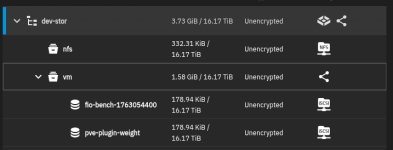
Uhh, yes! This should actually be fixed with the "weight" volume that should be created automatically. This keeps the iSCSI target alive on the TrueNAS side. TrueNAS will turn off it's portal advertising when there's no volume being shared. So the plug is supposed to create a "weight" volume that is always alive to prevent that from happening. Let me know if you see that volume, if not, I will look into why it's not being created.


Yes! That's actually in the works at the moment. I'm updating the storage configuration tool to go step-by-step to pick the pool, create a dataset that's optimal for your setup (or put in manual settings), and then enable iSCSI/NVMe blah blah blah. That way it's basically as easy as configuring pools and then creating an API key in TrueNAS, then from that point on there isn't much of a reason to actually log into TrueNAS any more unless you're needing to do some really manual work.


Hmm, are you saying there's orphaned iSCSI targets that are trying to be logged into?

This should be the only thing you need to do in TrueNAS after setting up the dataset you want:
View attachment 92756

Once the target is created with the Portal Group ID and Initiator ID configured, the plugin should take care of the rest. If not, let me know.

And Alpha branch has the latest and greatest, the beta one will have a more stable updates to it. For now I would use the alpha branch while troubleshooting.


That's interesting you are getting some somewhat okay performance on the writes. Do you have sync=off on your dataset?
yes I see and have that "volume"
1763134920211.png
When I make a mistake in configuration and think I have corrected it, including associating all of the truenas objects as pictured in you iscsi group picture.
this reports no sessions
sudo iscsiadm -m session
this reports none to find
iscsiadm -m discovery -t sendtargets -p 172.16.8.1:3260
some variant of the this is "required"
sudo iscsiadm -m session -r 3
or this
sudo iscsiadm -m node -T "iqn.2005-10.org.freenas.ctl:vm" --op delete
then if it reports a session
sudo iscsiadm -m session
this
sudo iscsiadm -m node -T "iqn.2005-10.org.freenas.ctl:vm" -p "172.16.8.1:3260" --login

this is usually only after I have screwed up , ALOT :D

ALSO, sync=standard (the default)
 
I‘m trying to understand where the value might be for me. I have a Homelab with Proxmox Server , Proxmox Backup Server and TrueNAS Server and one Server who monitors the others ( Grafana , Node etc. ) Proxmox and PBS store everything in a share on the TrueNAS.

What can I achieve with installing this plugin to Proxmox ?
 
What can I achieve with installing this plugin to Proxmox ?

The short of it is you'd be using TrueNAS like a block storage device. There's less overhead than NFS/SMB, so depending on your network you could see a significant performance increase. Especially if you're using NVMe TCP and have some faster networking equipment like 10GbE+.

@bbgeek17 Actually would be able to give you a good run down.

Their product is built on this entire premise and works fantastic.
 
  • Like
Reactions: Johannes S
Hi,

Network is 10GB via DAC Cable.

Are there plans to get it natively integrated into Proxmox ? Or will it always be a plugin via API?
 
I mean, once you install the plugin and get your storage config setup correctly, it makes TrueNAS show up and act almost identical to how you use NFS at the moment. But on the back end the plugin is taking care of everything by sending API calls to Proxmox and to TrueNAS to get them aligned to what you're needing it to do.

AFAIK, eventually, Proxmox Solutions has said they want to have storage plugins configurable via the GUI instead of messing with the storage.cfg file.
 
  • Like
Reactions: Johannes S
Thank you for the kind words @warlocksyno

@Phoenix85 , If you’re asking whether Proxmox GmbH would absorb a third-party–developed plugin for a third-party commercially marketed storage product, the answer is very likely “no.”

Pulling such a plugin into the official distribution would imply that Proxmox becomes fully responsible for its future development, testing, and support.

This situation is precisely why a unified, well-defined storage API exists: it allows storage vendors, who have full understanding and control of their products, to integrate with the virtualization infrastructure.

The support for 3rd party storage plugins will always come from the community or storage vendors directly.

PS I do believe there is some work in progress on the framework that would allow storage plugins to also integrate with UI, by extending the API capabilities. However, we have never seen one-time GUI integration as a show-stopper for implementation.


Blockbridge : Ultra low latency all-NVME shared storage for Proxmox - https://www.blockbridge.com/proxmox
 
Last edited:
  • Like
Reactions: Johannes S
Since @bbgeek17 mentions the role of storage providers: In theory ixsystems (the company behind TrueNAS) could maintain such a plugin. In practice I wouldn't hold my breath though since they also have virtualization and lxc support in their most recent versions of TrueNAS, so I think it's unlikely that they will help their competitor. I would be happy to be wrong though :)


The short of it is you'd be using TrueNAS like a block storage device. There's less overhead than NFS/SMB, so depending on your network you could see a significant performance increase. Especially if you're using NVMe TCP and have some faster networking equipment like 10GbE+.

And in theory you don't even need the plugin you can also do this manually since in the end it uses the ISCSI protocol which is already supported by ProxmoxVE. But the plugin is way easier to setup and gives additional comfort features. For this reason I highly appreciate warlocksyns efforts on the plugin, I'm considering switching my manual setup to it. I'm just ab bit anxious how stable it will be given the fact that ixsystems had a tendency to overhaul major features in the last years on a regular base. I don't want to risc to loose the functionality through a breaking change update of TrueNAS
 
  • Like
Reactions: warlocksyno
And in theory you don't even need the plugin you can also do this manually since in the end it uses the ISCSI protocol which is already supported by ProxmoxVE. But the plugin is way easier to setup and gives additional comfort features. For this reason I highly appreciate warlocksyns efforts on the plugin, I'm considering switching my manual setup to it. I'm just ab bit anxious how stable it will be given the fact that ixsystems had a tendency to overhaul major features in the last years on a regular base. I don't want to risc to loose the functionality through a breaking change update of TrueNAS
Thanks :)

I am keeping in contact with iXSystems about the plugin and it's features. They reached out to talk about what they could do to help with APIs and fixing bugs or features needed for the plugin to function. Hopefully over time I can communicate more with them to head off any issues that may arise.

Personally, the only thing I'm worried about with TrueNAS is their path for containers. Past that, I don't see any reason for them to start limiting API access for datasets and transportation function (NVMe, iSCSI, etc)

And really, if they did start doing stupid stuff - It'll get forked.
 
Yeah, not sure if TrueNAS would really offer their own plugin for Proxmox since that is an iffy place to be. If they plan on expanding into true Hypervisor territory, it'd be a conflict of interest for sure.

But I'd hope they'd stick to just doing what they're good at and prioritizing the storage aspect. If it was storage first and maybe Hypervisor third, sure. It's nice to have if that's all you need.
 
  • Like
Reactions: Johannes S
Uhh, yes! This should actually be fixed with the "weight" volume that should be created automatically. This keeps the iSCSI target alive on the TrueNAS side. TrueNAS will turn off it's portal advertising when there's no volume being shared. So the plug is supposed to create a "weight" volume that is always alive to prevent that from happening. Let me know if you see that volume, if not, I will look into why it's not being created.

@jt_telrite

As a follow up to this, some additions have been made to the plugin to make sure the weight is adhered to and can't easily be deleted. The health check tool will also verify it's existence as well.
 
  • Like
Reactions: Johannes S
Moved the latest beta into the main branch. So any one who is running the 1.0.6 version, please update to the latest 1.1.7 using the installer and let me know how it goes. :)

Lots and lots of bug fixes. And now NVMe support.
 
Moved the latest beta into the main branch. So any one who is running the 1.0.6 version, please update to the latest 1.1.7 using the installer and let me know how it goes. :)

Lots and lots of bug fixes. And now NVMe support.
I just finished re-configuring my DEV ENV. I have 3 HP G8 with 2x10Gib nics in an LACP (LAG)\VLAN connected to 2 Cisco N9k switches and a 4th HP G8 with TrueNAS CE v25 with 4x 10Gib NiCs in an LACP(LAG)VLAN I am fully connected with v1.1.7 . I can run any tests you need as this is truely a DEV environment .
I am on the ALPHA repo.
if you have a moment , I would like to PM with you.
p.s. is this the "best" config?
truenasplugin: dev-stor
api_host 172.16.8.1
api_key 3-KenjZNNxD0dv7XSuv4KqDeCyxcEfvZLyugeRE6BKcSlemTCWSe4WLKwJUyLMy5u3
api_transport ws
api_scheme wss
api_port 443
dataset dev-stor/vm
target_iqn iqn.2005-10.org.freenas.ctl:vm
api_insecure 1
shared 1
discovery_portal 172.16.8.1:3260
zvol_blocksize 128K
tn_sparse 1
use_multipath 0
content images
vmstate_storage local
 
Last edited:
I have just reinstalled my test system as well, I am alos on the "alpha" branch. I have currently only setup NVME connectivity for testing.

I have a single test host with 2 x 10g SFP interfaces - wired to redundant switching - to a TrueNAS mirrored vdev's. in theory with multipathing... haven't fully tested that yet, but set it up.


My /etc/pve/storage.cfg

truenasplugin: truenas-nvme
api_host 10.10.5.10
api_key 3-vVeJEyC29sGwNEjpCfVnRBjHOKei8F3TekksP6bbr1NlStP4OHQ48UVmXl2laDiI
dataset tank/proxmox-nvme
transport_mode nvme-tcp
subsystem_nqn nqn.2011-06.com.truenas:uuid:279fe462-e1d3-4d01-9ce6-05b989731872:proxmox-nvme
api_insecure 1
shared 1
discovery_portal 10.10.5.10:4420
zvol_blocksize 16K
tn_sparse 1
portals 10.10.6.10:4420
hostnqn nqn.2011-06.com.truenas:uuid:279fe462-e1d3-4d01-9ce6-05b989731872
content images


FIO test from the install diagnostics:

FIO Storage Benchmark

Running benchmark on storage: truenas-nvme

FIO installation: ✓ fio-3.39
Storage configuration: ✓ Valid (nvme-tcp mode)
Finding available VM ID: ✓ Using VM ID 990
Allocating 10GB test volume: ✓ truenas-nvme:vol-fio-bench-1764783729-nsa58d227d-01de-4ece-aa57-96b859d97f57
Waiting for device (5s): ✓ Ready
Detecting device path: ✓ /dev/nvme1n1
Validating device is unused: ✓ Device is safe to test

Starting FIO benchmarks (30 tests, 25-30 minutes total)...

Transport mode: nvme-tcp (testing QD=1, 16, 32, 64, 128)

Sequential Read Bandwidth Tests: [1-5/30]
Queue Depth = 1: ✓ 537.10 MB/s
Queue Depth = 16: ✓ 1.10 GB/s
Queue Depth = 32: ✓ 1.10 GB/s
Queue Depth = 64: ✓ 1.10 GB/s
Queue Depth = 128: ✓ 1.10 GB/s

Sequential Write Bandwidth Tests: [6-10/30]
Queue Depth = 1: ✓ 472.18 MB/s
Queue Depth = 16: ✓ 451.78 MB/s
Queue Depth = 32: ✓ 358.25 MB/s
Queue Depth = 64: ✓ 362.28 MB/s
Queue Depth = 128: ✓ 363.43 MB/s

Random Read IOPS Tests: [11-15/30]
Queue Depth = 1: ✓ 5,786 IOPS
Queue Depth = 16: ✓ 78,306 IOPS
Queue Depth = 32: ✓ 103,105 IOPS
Queue Depth = 64: ✓ 112,326 IOPS
Queue Depth = 128: ✓ 122,474 IOPS

Random Write IOPS Tests: [16-20/30]
Queue Depth = 1: ✓ 6,769 IOPS
Queue Depth = 16: ✓ 30,142 IOPS
Queue Depth = 32: ✓ 25,217 IOPS
Queue Depth = 64: ✓ 25,425 IOPS
Queue Depth = 128: ✓ 25,737 IOPS

Random Read Latency Tests: [21-25/30]
Queue Depth = 1: ✓ 175.82 µs
Queue Depth = 16: ✓ 200.85 µs
Queue Depth = 32: ✓ 301.12 µs
Queue Depth = 64: ✓ 531.54 µs
Queue Depth = 128: ✓ 1.01 ms

Mixed 70/30 Workload Tests: [26-30/30]
Queue Depth = 1: ✓ R: 4,289 / W: 1,834 IOPS
Queue Depth = 16: ✓ R: 54,862 / W: 23,532 IOPS
Queue Depth = 32: ✓ R: 63,986 / W: 27,431 IOPS
Queue Depth = 64: ✓ R: 64,147 / W: 27,500 IOPS
Queue Depth = 128: ✓ R: 63,898 / W: 27,393 IOPS

━━━━━━━━━━━━━━━━━━━━━━━━━━━━━━━━━━━━━━━━━━━━━━
Benchmark Summary
━━━━━━━━━━━━━━━━━━━━━━━━━━━━━━━━━━━━━━━━━━━━━━

Total tests run: 30
Completed: 30

Top Performers:

Sequential Read: 1.10 GB/s (QD=16 )
Sequential Write: 472.18 MB/s (QD=1 )
Random Read IOPS: 122,474 IOPS (QD=128)
Random Write IOPS: 30,142 IOPS (QD=16 )
Lowest Latency: 175.82 µs (QD=1 )

━━━━━━━━━━━━━━━━━━━━━━━━━━━━━━━━━━━━━━━━━━━━━━
Press Enter to return to diagnostics menu...

 
@jt_telrite Shoot me a PM if you'd like!

I will say the config looks good, but I think you'd be better off removing the LACP setup and have two separate VLANs. So each interface will have an IP on VLAN10 and VLAN15 for example. Then the same setup on the TrueNAS. That way you can have multiple portals on TrueNAS which will enable multipathing. So instead of getting the max speed of one interface, you can in theory hit the maximum speed of both interfaces combined. In theory you'd be able to hit 20gbps or 2.5GB/s with that. Right now you'll be limited to 1.25GB/s at best.
 
My /etc/pve/storage.cfg

truenasplugin: truenas-nvme
api_host 10.10.5.10
api_key 3-vVeJEyC29sGwNEjpCfVnRBjHOKei8F3TekksP6bbr1NlStP4OHQ48UVmXl2laDiI
dataset tank/proxmox-nvme
transport_mode nvme-tcp
subsystem_nqn nqn.2011-06.com.truenas:uuid:279fe462-e1d3-4d01-9ce6-05b989731872:proxmox-nvme
api_insecure 1
shared 1
discovery_portal 10.10.5.10:4420
zvol_blocksize 16K
tn_sparse 1
portals 10.10.6.10:4420
hostnqn nqn.2011-06.com.truenas:uuid:279fe462-e1d3-4d01-9ce6-05b989731872
content images

Actually, I just noticed you have two separate subnets for the portals. So that should work actually. May just need to add the "use_multipath 1" value to your config.
 
@curruscanis Looks like you'd want to do the same, since technically only one interface can be active on the same subnet by default in Proxmox. TrueNAS straight doesn't allow multiple interfaces on the same subnet.


edit:

I forgot I have an entry for this exact scenario in the wiki haha
https://github.com/WarlockSyno/True...n/wiki/Advanced-Features.md#multipath-io-mpio


My nics are in differnet vlans... the subnets are 10.10.5.x/24 and 10.10.5.x/24.... subnet 255.255.255.0 - I know with the IP's that may have been confusing given that there is not subnet info in the storage config.
 
My nics are in differnet vlans... the subnets are 10.10.5.x/24 and 10.10.5.x/24.... subnet 255.255.255.0 - I know with the IP's that may have been confusing given that there is not subnet info in the storage config.

The Health Check tool in the diag menu should tell you if multipathing is setup, but I guess that is something I should investigate when I get a moment. See how accurately it reports.
 
@jt_telrite Shoot me a PM if you'd like!

I will say the config looks good, but I think you'd be better off removing the LACP setup and have two separate VLANs. So each interface will have an IP on VLAN10 and VLAN15 for example. Then the same setup on the TrueNAS. That way you can have multiple portals on TrueNAS which will enable multipathing. So instead of getting the max speed of one interface, you can in theory hit the maximum speed of both interfaces combined. In theory you'd be able to hit 20gbps or 2.5GB/s with that. Right now you'll be limited to 1.25GB/s at best.
i'm new to configuring CISCO Switches (usually done by someone else) and after a quick search it does show that "multipathing" is better.... Now I have to start over! :(