Super slow, timeout, and VM stuck while backing up, after updated to PVE 9.1.1 and PBS 4.0.20

Is the issue reproducible if stressing the network, e.g. by iperf? iperf -s on the PBS host and iperf -c <PBS-host-IP> -t 600 -i 10 on the backup source.

Edit: Also, do you see high memory pressure on the PBS while this issue appears?

No unfortunately, just tested :

on PVE 8.4.14:

root@apex:~# iperf3 -c 192.168.100.8 -t 600 -i 10
Connecting to host 192.168.100.8, port 5201
[ 5] local 192.168.100.11 port 54128 connected to 192.168.100.8 port 5201
[ ID] Interval Transfer Bitrate Retr Cwnd
[ 5] 0.00-10.00 sec 11.5 GBytes 9.90 Gbits/sec 38 1.72 MBytes
[ 5] 10.00-20.00 sec 11.5 GBytes 9.90 Gbits/sec 1 1.81 MBytes
[ 5] 20.00-30.00 sec 11.5 GBytes 9.90 Gbits/sec 1 1.81 MBytes
[ 5] 30.00-40.00 sec 11.5 GBytes 9.90 Gbits/sec 0 2.84 MBytes
[ 5] 40.00-50.00 sec 11.5 GBytes 9.90 Gbits/sec 0 2.84 MBytes
^C[ 5] 50.00-56.78 sec 7.81 GBytes 9.90 Gbits/sec 0 2.84 MBytes
- - - - - - - - - - - - - - - - - - - - - - - - -
[ ID] Interval Transfer Bitrate Retr
[ 5] 0.00-56.78 sec 65.4 GBytes 9.90 Gbits/sec 40 sender
[ 5] 0.00-56.78 sec 0.00 Bytes 0.00 bits/sec receiver

on PBS

Accepted connection from 192.168.100.11, port 54112
[ 5] local 192.168.100.8 port 5201 connected to 192.168.100.11 port 54128
[ ID] Interval Transfer Bitrate
[ 5] 0.00-1.00 sec 1.15 GBytes 9.83 Gbits/sec
[ 5] 1.00-2.00 sec 1.15 GBytes 9.90 Gbits/sec
[ 5] 2.00-3.00 sec 1.15 GBytes 9.90 Gbits/sec
[ 5] 3.00-4.00 sec 1.15 GBytes 9.90 Gbits/sec
[ 5] 4.00-5.00 sec 1.15 GBytes 9.90 Gbits/sec
[ 5] 5.00-6.00 sec 1.15 GBytes 9.90 Gbits/sec
[ 5] 6.00-7.00 sec 1.15 GBytes 9.90 Gbits/sec
[ 5] 7.00-8.00 sec 1.15 GBytes 9.90 Gbits/sec
[ 5] 8.00-9.00 sec 1.15 GBytes 9.90 Gbits/sec
[ 5] 9.00-10.00 sec 1.15 GBytes 9.90 Gbits/sec
[ 5] 10.00-11.00 sec 1.15 GBytes 9.90 Gbits/sec
[ 5] 11.00-12.00 sec 1.15 GBytes 9.90 Gbits/sec
[ 5] 12.00-13.00 sec 1.15 GBytes 9.90 Gbits/sec
[ 5] 13.00-14.00 sec 1.15 GBytes 9.90 Gbits/sec
[ 5] 14.00-15.00 sec 1.15 GBytes 9.90 Gbits/sec
[ 5] 15.00-16.00 sec 1.15 GBytes 9.90 Gbits/sec
[ 5] 16.00-17.00 sec 1.15 GBytes 9.90 Gbits/sec
[ 5] 17.00-18.00 sec 1.15 GBytes 9.90 Gbits/sec
[ 5] 18.00-19.00 sec 1.15 GBytes 9.90 Gbits/sec
[ 5] 19.00-20.00 sec 1.15 GBytes 9.90 Gbits/sec
[ 5] 20.00-21.00 sec 1.15 GBytes 9.90 Gbits/sec
[ 5] 21.00-22.00 sec 1.15 GBytes 9.90 Gbits/sec
[ 5] 22.00-23.00 sec 1.15 GBytes 9.90 Gbits/sec
[ 5] 23.00-24.00 sec 1.15 GBytes 9.90 Gbits/sec
[ 5] 24.00-25.00 sec 1.15 GBytes 9.90 Gbits/sec
[ 5] 25.00-26.00 sec 1.15 GBytes 9.90 Gbits/sec
[ 5] 26.00-27.00 sec 1.15 GBytes 9.90 Gbits/sec
[ 5] 27.00-28.00 sec 1.15 GBytes 9.90 Gbits/sec
[ 5] 28.00-29.00 sec 1.15 GBytes 9.90 Gbits/sec
[ 5] 29.00-30.00 sec 1.15 GBytes 9.90 Gbits/sec
[ 5] 30.00-31.00 sec 1.15 GBytes 9.90 Gbits/sec
[ 5] 31.00-32.00 sec 1.15 GBytes 9.90 Gbits/sec
[ 5] 32.00-33.00 sec 1.15 GBytes 9.90 Gbits/sec
[ 5] 33.00-34.00 sec 1.15 GBytes 9.90 Gbits/sec
[ 5] 34.00-35.00 sec 1.15 GBytes 9.90 Gbits/sec
[ 5] 35.00-36.00 sec 1.15 GBytes 9.90 Gbits/sec
[ 5] 36.00-37.00 sec 1.15 GBytes 9.90 Gbits/sec
[ 5] 37.00-38.00 sec 1.15 GBytes 9.90 Gbits/sec
[ 5] 38.00-39.00 sec 1.15 GBytes 9.90 Gbits/sec
 
Last edited:
For us it was resolved after disabling JUMBO Frames all good since Sunday.

PBS 4.1 - kernel 6.14 - 2x10Gbit LACP, MTU changed from 9000 to 1500.
PVE 9.1.1 - kernel 6.14 - 4x10Gbit LACP, MTU 9000 (i can't change it now)
Still too slow:

INFO: 43% (25.8 GiB of 60.0 GiB) in 26m 53s, read: 15.3 MiB/s, write: 2.4 MiB/s

PBS is Dell R510 - 2 cpu - 32Gbyte - with 12x8Tbyte drive storage.
 
Here're the results: Everything was running fine, except 1 (104) VM which backup speed was 1/10 of the ususal speed:

Code:
INFO: starting new backup job: vzdump 100 109 104 105 106 107 108 110 111 112 113 114 115 116 117 118 122 102 --quiet 1 --fleecing 0 --storage backup.lorentz.de --notes-template '{{guestname}}' --mode snapshot --prune-backups 'keep-all=1'
INFO: skip external VMs: 102, 105, 106, 107, 108, 109, 111, 112, 115, 118, 122
INFO: Starting Backup of VM 100 (qemu)
INFO: Backup started at 2025-12-02 12:00:02
INFO: status = running
INFO: VM Name: s101-it01
INFO: include disk 'virtio0' 'machines:vm-100-disk-0' 250G
INFO: backup mode: snapshot
INFO: ionice priority: 7
INFO: creating Proxmox Backup Server archive 'vm/100/2025-12-02T11:00:02Z'
INFO: enabling encryption
INFO: issuing guest-agent 'fs-freeze' command
INFO: issuing guest-agent 'fs-thaw' command
INFO: started backup task '66e49414-d85d-4e02-9d13-72c6203a7c17'
INFO: resuming VM again
INFO: virtio0: dirty-bitmap status: OK (33.5 GiB of 250.0 GiB dirty)
INFO: using fast incremental mode (dirty-bitmap), 33.5 GiB dirty of 250.0 GiB total
INFO:   4% (1.4 GiB of 33.5 GiB) in 3s, read: 462.7 MiB/s, write: 454.7 MiB/s
INFO:   7% (2.6 GiB of 33.5 GiB) in 6s, read: 440.0 MiB/s, write: 436.0 MiB/s
INFO:  11% (3.8 GiB of 33.5 GiB) in 9s, read: 385.3 MiB/s, write: 381.3 MiB/s
INFO:  15% (5.3 GiB of 33.5 GiB) in 12s, read: 509.3 MiB/s, write: 505.3 MiB/s
INFO:  20% (6.7 GiB of 33.5 GiB) in 15s, read: 492.0 MiB/s, write: 485.3 MiB/s
INFO:  24% (8.0 GiB of 33.5 GiB) in 18s, read: 457.3 MiB/s, write: 452.0 MiB/s
INFO:  27% (9.4 GiB of 33.5 GiB) in 21s, read: 456.0 MiB/s, write: 442.7 MiB/s
INFO:  32% (10.9 GiB of 33.5 GiB) in 24s, read: 524.0 MiB/s, write: 500.0 MiB/s
INFO:  37% (12.5 GiB of 33.5 GiB) in 27s, read: 530.7 MiB/s, write: 528.0 MiB/s
INFO:  42% (14.1 GiB of 33.5 GiB) in 30s, read: 549.3 MiB/s, write: 538.7 MiB/s
INFO:  46% (15.6 GiB of 33.5 GiB) in 33s, read: 522.7 MiB/s, write: 514.7 MiB/s
INFO:  51% (17.2 GiB of 33.5 GiB) in 36s, read: 526.7 MiB/s, write: 506.7 MiB/s
INFO:  55% (18.5 GiB of 33.5 GiB) in 39s, read: 460.0 MiB/s, write: 448.0 MiB/s
INFO:  59% (19.9 GiB of 33.5 GiB) in 42s, read: 464.0 MiB/s, write: 457.3 MiB/s
INFO:  63% (21.4 GiB of 33.5 GiB) in 45s, read: 513.3 MiB/s, write: 506.7 MiB/s
INFO:  68% (22.9 GiB of 33.5 GiB) in 48s, read: 509.3 MiB/s, write: 501.3 MiB/s
INFO:  72% (24.3 GiB of 33.5 GiB) in 51s, read: 492.0 MiB/s, write: 477.3 MiB/s
INFO:  76% (25.8 GiB of 33.5 GiB) in 54s, read: 497.3 MiB/s, write: 490.7 MiB/s
INFO:  81% (27.2 GiB of 33.5 GiB) in 57s, read: 485.3 MiB/s, write: 476.0 MiB/s
INFO:  85% (28.5 GiB of 33.5 GiB) in 1m, read: 456.0 MiB/s, write: 438.7 MiB/s
INFO:  89% (29.9 GiB of 33.5 GiB) in 1m 3s, read: 464.0 MiB/s, write: 456.0 MiB/s
INFO:  92% (31.1 GiB of 33.5 GiB) in 1m 6s, read: 424.0 MiB/s, write: 401.3 MiB/s
INFO:  97% (32.6 GiB of 33.5 GiB) in 1m 9s, read: 500.0 MiB/s, write: 478.7 MiB/s
INFO: 100% (33.5 GiB of 33.5 GiB) in 1m 12s, read: 321.3 MiB/s, write: 272.0 MiB/s
INFO: backup is sparse: 152.00 MiB (0%) total zero data
INFO: backup was done incrementally, reused 217.34 GiB (86%)
INFO: transferred 33.52 GiB in 72 seconds (476.8 MiB/s)
INFO: adding notes to backup
INFO: Finished Backup of VM 100 (00:01:17)
INFO: Backup finished at 2025-12-02 12:01:19
INFO: Starting Backup of VM 104 (qemu)
INFO: Backup started at 2025-12-02 12:01:19
INFO: status = running
INFO: VM Name: s101-dc02
INFO: include disk 'virtio0' 'machines:vm-104-disk-0' 80G
INFO: backup mode: snapshot
INFO: ionice priority: 7
INFO: creating Proxmox Backup Server archive 'vm/104/2025-12-02T11:01:19Z'
INFO: enabling encryption
INFO: issuing guest-agent 'fs-freeze' command
INFO: issuing guest-agent 'fs-thaw' command
INFO: started backup task '8022893b-62dc-48f1-a49f-3301eb85d28d'
INFO: resuming VM again
INFO: virtio0: dirty-bitmap status: OK (17.4 GiB of 80.0 GiB dirty)
INFO: using fast incremental mode (dirty-bitmap), 17.4 GiB dirty of 80.0 GiB total
INFO:  14% (2.5 GiB of 17.4 GiB) in 3s, read: 860.0 MiB/s, write: 584.0 MiB/s
INFO:  15% (2.6 GiB of 17.4 GiB) in 6s, read: 33.3 MiB/s, write: 26.7 MiB/s
INFO:  16% (2.8 GiB of 17.4 GiB) in 10s, read: 57.0 MiB/s, write: 33.0 MiB/s
INFO:  17% (3.1 GiB of 17.4 GiB) in 13s, read: 77.3 MiB/s, write: 53.3 MiB/s
INFO:  18% (3.3 GiB of 17.4 GiB) in 16s, read: 74.7 MiB/s, write: 41.3 MiB/s
INFO:  20% (3.5 GiB of 17.4 GiB) in 19s, read: 73.3 MiB/s, write: 44.0 MiB/s
INFO:  21% (3.7 GiB of 17.4 GiB) in 22s, read: 60.0 MiB/s, write: 36.0 MiB/s
INFO:  22% (3.9 GiB of 17.4 GiB) in 25s, read: 69.3 MiB/s, write: 46.7 MiB/s
INFO:  23% (4.1 GiB of 17.4 GiB) in 28s, read: 74.7 MiB/s, write: 44.0 MiB/s
INFO:  24% (4.3 GiB of 17.4 GiB) in 31s, read: 77.3 MiB/s, write: 54.7 MiB/s
INFO:  26% (4.6 GiB of 17.4 GiB) in 34s, read: 85.3 MiB/s, write: 34.7 MiB/s
INFO:  27% (4.9 GiB of 17.4 GiB) in 37s, read: 96.0 MiB/s, write: 54.7 MiB/s
INFO:  29% (5.1 GiB of 17.4 GiB) in 40s, read: 96.0 MiB/s, write: 62.7 MiB/s
INFO:  31% (5.6 GiB of 17.4 GiB) in 43s, read: 142.7 MiB/s, write: 72.0 MiB/s
INFO:  32% (5.8 GiB of 17.4 GiB) in 46s, read: 68.0 MiB/s, write: 53.3 MiB/s
INFO:  34% (6.0 GiB of 17.4 GiB) in 49s, read: 98.7 MiB/s, write: 61.3 MiB/s
INFO:  35% (6.2 GiB of 17.4 GiB) in 52s, read: 70.7 MiB/s, write: 41.3 MiB/s
INFO:  37% (6.5 GiB of 17.4 GiB) in 55s, read: 76.0 MiB/s, write: 49.3 MiB/s
INFO:  39% (6.9 GiB of 17.4 GiB) in 58s, read: 146.7 MiB/s, write: 98.7 MiB/s
INFO:  41% (7.2 GiB of 17.4 GiB) in 1m 1s, read: 109.3 MiB/s, write: 78.7 MiB/s
INFO:  43% (7.6 GiB of 17.4 GiB) in 1m 4s, read: 112.0 MiB/s, write: 80.0 MiB/s
INFO:  45% (7.9 GiB of 17.4 GiB) in 1m 7s, read: 104.0 MiB/s, write: 72.0 MiB/s
INFO:  46% (8.1 GiB of 17.4 GiB) in 1m 10s, read: 88.0 MiB/s, write: 49.3 MiB/s
INFO:  47% (8.3 GiB of 17.4 GiB) in 1m 13s, read: 62.7 MiB/s, write: 45.3 MiB/s
INFO:  49% (8.6 GiB of 17.4 GiB) in 1m 16s, read: 105.3 MiB/s, write: 64.0 MiB/s
INFO:  50% (8.9 GiB of 17.4 GiB) in 1m 19s, read: 94.7 MiB/s, write: 65.3 MiB/s
INFO:  53% (9.2 GiB of 17.4 GiB) in 1m 22s, read: 124.0 MiB/s, write: 62.7 MiB/s
INFO:  55% (9.6 GiB of 17.4 GiB) in 1m 25s, read: 120.0 MiB/s, write: 66.7 MiB/s
INFO:  56% (9.8 GiB of 17.4 GiB) in 1m 28s, read: 74.7 MiB/s, write: 52.0 MiB/s
INFO:  57% (10.1 GiB of 17.4 GiB) in 1m 31s, read: 88.0 MiB/s, write: 45.3 MiB/s
INFO:  58% (10.3 GiB of 17.4 GiB) in 1m 34s, read: 73.3 MiB/s, write: 48.0 MiB/s
INFO:  61% (10.7 GiB of 17.4 GiB) in 1m 37s, read: 141.3 MiB/s, write: 65.3 MiB/s
INFO:  63% (11.1 GiB of 17.4 GiB) in 1m 40s, read: 136.0 MiB/s, write: 74.7 MiB/s
INFO:  65% (11.4 GiB of 17.4 GiB) in 1m 43s, read: 94.7 MiB/s, write: 56.0 MiB/s
INFO:  66% (11.7 GiB of 17.4 GiB) in 1m 46s, read: 97.3 MiB/s, write: 52.0 MiB/s
INFO:  69% (12.1 GiB of 17.4 GiB) in 1m 49s, read: 153.3 MiB/s, write: 54.7 MiB/s
INFO:  71% (12.4 GiB of 17.4 GiB) in 1m 52s, read: 94.7 MiB/s, write: 41.3 MiB/s
INFO:  74% (13.0 GiB of 17.4 GiB) in 1m 55s, read: 224.0 MiB/s, write: 77.3 MiB/s
INFO:  77% (13.4 GiB of 17.4 GiB) in 1m 58s, read: 132.0 MiB/s, write: 54.7 MiB/s
INFO:  81% (14.1 GiB of 17.4 GiB) in 2m 1s, read: 241.3 MiB/s, write: 86.7 MiB/s
INFO:  83% (14.6 GiB of 17.4 GiB) in 2m 4s, read: 169.3 MiB/s, write: 66.7 MiB/s
INFO:  86% (15.1 GiB of 17.4 GiB) in 2m 7s, read: 164.0 MiB/s, write: 78.7 MiB/s
INFO:  87% (15.3 GiB of 17.4 GiB) in 2m 10s, read: 57.3 MiB/s, write: 37.3 MiB/s
INFO:  89% (15.6 GiB of 17.4 GiB) in 2m 13s, read: 96.0 MiB/s, write: 58.7 MiB/s
INFO:  91% (15.9 GiB of 17.4 GiB) in 2m 16s, read: 110.7 MiB/s, write: 46.7 MiB/s
INFO:  93% (16.2 GiB of 17.4 GiB) in 2m 20s, read: 91.0 MiB/s, write: 43.0 MiB/s
INFO:  94% (16.5 GiB of 17.4 GiB) in 2m 23s, read: 90.7 MiB/s, write: 68.0 MiB/s
INFO:  95% (16.7 GiB of 17.4 GiB) in 2m 26s, read: 68.0 MiB/s, write: 68.0 MiB/s
INFO:  96% (16.9 GiB of 17.4 GiB) in 2m 29s, read: 61.3 MiB/s, write: 61.3 MiB/s
INFO:  97% (17.1 GiB of 17.4 GiB) in 2m 32s, read: 68.0 MiB/s, write: 68.0 MiB/s
INFO:  99% (17.3 GiB of 17.4 GiB) in 2m 35s, read: 73.3 MiB/s, write: 42.7 MiB/s
INFO: 100% (17.4 GiB of 17.4 GiB) in 2m 38s, read: 46.7 MiB/s, write: 37.3 MiB/s
INFO: backup is sparse: 1.69 GiB (9%) total zero data
INFO: backup was done incrementally, reused 69.79 GiB (87%)
INFO: transferred 17.44 GiB in 159 seconds (112.3 MiB/s)
INFO: adding notes to backup
INFO: Finished Backup of VM 104 (00:02:50)
INFO: Backup finished at 2025-12-02 12:04:09
INFO: Starting Backup of VM 110 (qemu)
INFO: Backup started at 2025-12-02 12:04:14
INFO: status = running
INFO: VM Name: s102-vpn01
INFO: include disk 'virtio0' 'machines:vm-110-disk-0' 64G
INFO: backup mode: snapshot
INFO: ionice priority: 7
INFO: creating Proxmox Backup Server archive 'vm/110/2025-12-02T11:04:14Z'
INFO: enabling encryption
INFO: issuing guest-agent 'fs-freeze' command
INFO: issuing guest-agent 'fs-thaw' command
INFO: started backup task '22c5bc08-0b93-4014-85fa-f18d706fd4a1'
INFO: resuming VM again
INFO: virtio0: dirty-bitmap status: OK (152.0 MiB of 64.0 GiB dirty)
INFO: using fast incremental mode (dirty-bitmap), 152.0 MiB dirty of 64.0 GiB total
INFO: 100% (152.0 MiB of 152.0 MiB) in 1s, read: 152.0 MiB/s, write: 152.0 MiB/s
INFO: backup was done incrementally, reused 63.85 GiB (99%)
INFO: transferred 152.00 MiB in 1 seconds (152.0 MiB/s)
INFO: adding notes to backup
INFO: Finished Backup of VM 110 (00:00:01)
INFO: Backup finished at 2025-12-02 12:04:15
INFO: Starting Backup of VM 113 (qemu)
INFO: Backup started at 2025-12-02 12:04:15
INFO: status = running
INFO: VM Name: s101-wgendpoint01
INFO: include disk 'virtio0' 'machines:vm-113-disk-0' 32G
INFO: backup mode: snapshot
INFO: ionice priority: 7
INFO: pending configuration changes found (not included into backup)
INFO: creating Proxmox Backup Server archive 'vm/113/2025-12-02T11:04:15Z'
INFO: enabling encryption
INFO: issuing guest-agent 'fs-freeze' command
INFO: issuing guest-agent 'fs-thaw' command
INFO: started backup task 'e3944508-87e7-4c8a-90a1-d85f3a0cb9bf'
INFO: resuming VM again
INFO: virtio0: dirty-bitmap status: OK (220.0 MiB of 32.0 GiB dirty)
INFO: using fast incremental mode (dirty-bitmap), 220.0 MiB dirty of 32.0 GiB total
INFO: 100% (220.0 MiB of 220.0 MiB) in 1s, read: 220.0 MiB/s, write: 220.0 MiB/s
INFO: backup was done incrementally, reused 31.79 GiB (99%)
INFO: transferred 220.00 MiB in 1 seconds (220.0 MiB/s)
INFO: adding notes to backup
INFO: Finished Backup of VM 113 (00:00:02)
INFO: Backup finished at 2025-12-02 12:04:17
INFO: Starting Backup of VM 114 (qemu)
INFO: Backup started at 2025-12-02 12:04:17
INFO: status = running
INFO: VM Name: s101-print
INFO: include disk 'virtio0' 'machines:vm-114-disk-0' 40G
INFO: backup mode: snapshot
INFO: ionice priority: 7
INFO: creating Proxmox Backup Server archive 'vm/114/2025-12-02T11:04:17Z'
INFO: enabling encryption
INFO: issuing guest-agent 'fs-freeze' command
INFO: issuing guest-agent 'fs-thaw' command
INFO: started backup task 'c72062a7-1cb9-4359-9eaa-a4cb7442fc10'
INFO: resuming VM again
INFO: virtio0: dirty-bitmap status: OK (12.5 GiB of 40.0 GiB dirty)
INFO: using fast incremental mode (dirty-bitmap), 12.5 GiB dirty of 40.0 GiB total
INFO:  14% (1.9 GiB of 12.5 GiB) in 3s, read: 636.0 MiB/s, write: 409.3 MiB/s
INFO:  27% (3.4 GiB of 12.5 GiB) in 6s, read: 536.0 MiB/s, write: 421.3 MiB/s
INFO:  37% (4.7 GiB of 12.5 GiB) in 9s, read: 421.3 MiB/s, write: 386.7 MiB/s
INFO:  49% (6.2 GiB of 12.5 GiB) in 12s, read: 510.7 MiB/s, write: 421.3 MiB/s
INFO:  60% (7.6 GiB of 12.5 GiB) in 15s, read: 490.7 MiB/s, write: 465.3 MiB/s
INFO:  70% (8.8 GiB of 12.5 GiB) in 18s, read: 409.3 MiB/s, write: 406.7 MiB/s
INFO:  85% (10.7 GiB of 12.5 GiB) in 21s, read: 658.7 MiB/s, write: 381.3 MiB/s
INFO:  98% (12.3 GiB of 12.5 GiB) in 24s, read: 548.0 MiB/s, write: 438.7 MiB/s
INFO: 100% (12.5 GiB of 12.5 GiB) in 25s, read: 204.0 MiB/s, write: 128.0 MiB/s
INFO: backup is sparse: 72.00 MiB (0%) total zero data
INFO: backup was done incrementally, reused 30.12 GiB (75%)
INFO: transferred 12.54 GiB in 25 seconds (513.4 MiB/s)
INFO: adding notes to backup
INFO: Finished Backup of VM 114 (00:00:27)
INFO: Backup finished at 2025-12-02 12:04:44
INFO: Starting Backup of VM 116 (qemu)
INFO: Backup started at 2025-12-02 12:04:44
INFO: status = running
INFO: VM Name: sap-tool
INFO: include disk 'scsi0' 'machines:vm-116-disk-0' 80G
INFO: backup mode: snapshot
INFO: ionice priority: 7
INFO: pending configuration changes found (not included into backup)
INFO: creating Proxmox Backup Server archive 'vm/116/2025-12-02T11:04:44Z'
INFO: enabling encryption
INFO: issuing guest-agent 'fs-freeze' command
INFO: issuing guest-agent 'fs-thaw' command
INFO: started backup task '86d68150-b8d2-4c5e-abaa-88ae50c5f455'
INFO: resuming VM again
INFO: scsi0: dirty-bitmap status: OK (1.0 GiB of 80.0 GiB dirty)
INFO: using fast incremental mode (dirty-bitmap), 1.0 GiB dirty of 80.0 GiB total
INFO: 100% (1.0 GiB of 1.0 GiB) in 3s, read: 353.3 MiB/s, write: 353.3 MiB/s
INFO: backup was done incrementally, reused 78.96 GiB (98%)
INFO: transferred 1.04 GiB in 3 seconds (353.3 MiB/s)
INFO: adding notes to backup
INFO: Finished Backup of VM 116 (00:00:04)
INFO: Backup finished at 2025-12-02 12:04:48
INFO: Starting Backup of VM 117 (qemu)
INFO: Backup started at 2025-12-02 12:04:48
INFO: status = running
INFO: VM Name: s101-fs01
INFO: include disk 'virtio0' 'machines:vm-117-disk-0' 50G
INFO: include disk 'virtio1' 'machines:vm-117-disk-1' 2560G
INFO: backup mode: snapshot
INFO: ionice priority: 7
INFO: creating Proxmox Backup Server archive 'vm/117/2025-12-02T11:04:48Z'
INFO: enabling encryption
INFO: issuing guest-agent 'fs-freeze' command
INFO: issuing guest-agent 'fs-thaw' command
INFO: started backup task 'a51cebe8-b984-4ec3-8b5f-6324586ed1ba'
INFO: resuming VM again
INFO: virtio0: dirty-bitmap status: OK (8.3 GiB of 50.0 GiB dirty)
INFO: virtio1: dirty-bitmap status: OK (9.1 GiB of 2.5 TiB dirty)
INFO: using fast incremental mode (dirty-bitmap), 17.4 GiB dirty of 2.5 TiB total
INFO:  50% (8.9 GiB of 17.4 GiB) in 3s, read: 3.0 GiB/s, write: 352.0 MiB/s
INFO:  60% (10.6 GiB of 17.4 GiB) in 6s, read: 588.0 MiB/s, write: 478.7 MiB/s
INFO:  70% (12.4 GiB of 17.4 GiB) in 9s, read: 604.0 MiB/s, write: 476.0 MiB/s
INFO:  78% (13.8 GiB of 17.4 GiB) in 12s, read: 477.3 MiB/s, write: 436.0 MiB/s
INFO:  89% (15.6 GiB of 17.4 GiB) in 15s, read: 614.7 MiB/s, write: 529.3 MiB/s
INFO:  97% (17.0 GiB of 17.4 GiB) in 18s, read: 505.3 MiB/s, write: 452.0 MiB/s
INFO: 100% (17.4 GiB of 17.4 GiB) in 20s, read: 196.0 MiB/s, write: 140.0 MiB/s
INFO: backup is sparse: 6.92 GiB (39%) total zero data
INFO: backup was done incrementally, reused 2.54 TiB (99%)
INFO: transferred 17.42 GiB in 20 seconds (892.0 MiB/s)
INFO: adding notes to backup
INFO: Finished Backup of VM 117 (00:00:22)
INFO: Backup finished at 2025-12-02 12:05:10
INFO: Backup job finished successfully
INFO: notified via target `mail-to-root`
TASK OK

 
Here're the results: Everything was running fine, except 1 (104) VM which backup speed was 1/10 of the ususal speed:

Code:
INFO: starting new backup job: vzdump 100 109 104 105 106 107 108 110 111 112 113 114 115 116 117 118 122 102 --quiet 1 --fleecing 0 --storage backup.lorentz.de --notes-template '{{guestname}}' --mode snapshot --prune-backups 'keep-all=1'
INFO: skip external VMs: 102, 105, 106, 107, 108, 109, 111, 112, 115, 118, 122
INFO: Starting Backup of VM 100 (qemu)
INFO: Backup started at 2025-12-02 12:00:02
INFO: status = running
INFO: VM Name: s101-it01
INFO: include disk 'virtio0' 'machines:vm-100-disk-0' 250G
INFO: backup mode: snapshot
INFO: ionice priority: 7
INFO: creating Proxmox Backup Server archive 'vm/100/2025-12-02T11:00:02Z'
INFO: enabling encryption
INFO: issuing guest-agent 'fs-freeze' command
INFO: issuing guest-agent 'fs-thaw' command
INFO: started backup task '66e49414-d85d-4e02-9d13-72c6203a7c17'
INFO: resuming VM again
INFO: virtio0: dirty-bitmap status: OK (33.5 GiB of 250.0 GiB dirty)
INFO: using fast incremental mode (dirty-bitmap), 33.5 GiB dirty of 250.0 GiB total
INFO:   4% (1.4 GiB of 33.5 GiB) in 3s, read: 462.7 MiB/s, write: 454.7 MiB/s
INFO:   7% (2.6 GiB of 33.5 GiB) in 6s, read: 440.0 MiB/s, write: 436.0 MiB/s
INFO:  11% (3.8 GiB of 33.5 GiB) in 9s, read: 385.3 MiB/s, write: 381.3 MiB/s
INFO:  15% (5.3 GiB of 33.5 GiB) in 12s, read: 509.3 MiB/s, write: 505.3 MiB/s
INFO:  20% (6.7 GiB of 33.5 GiB) in 15s, read: 492.0 MiB/s, write: 485.3 MiB/s
INFO:  24% (8.0 GiB of 33.5 GiB) in 18s, read: 457.3 MiB/s, write: 452.0 MiB/s
INFO:  27% (9.4 GiB of 33.5 GiB) in 21s, read: 456.0 MiB/s, write: 442.7 MiB/s
INFO:  32% (10.9 GiB of 33.5 GiB) in 24s, read: 524.0 MiB/s, write: 500.0 MiB/s
INFO:  37% (12.5 GiB of 33.5 GiB) in 27s, read: 530.7 MiB/s, write: 528.0 MiB/s
INFO:  42% (14.1 GiB of 33.5 GiB) in 30s, read: 549.3 MiB/s, write: 538.7 MiB/s
INFO:  46% (15.6 GiB of 33.5 GiB) in 33s, read: 522.7 MiB/s, write: 514.7 MiB/s
INFO:  51% (17.2 GiB of 33.5 GiB) in 36s, read: 526.7 MiB/s, write: 506.7 MiB/s
INFO:  55% (18.5 GiB of 33.5 GiB) in 39s, read: 460.0 MiB/s, write: 448.0 MiB/s
INFO:  59% (19.9 GiB of 33.5 GiB) in 42s, read: 464.0 MiB/s, write: 457.3 MiB/s
INFO:  63% (21.4 GiB of 33.5 GiB) in 45s, read: 513.3 MiB/s, write: 506.7 MiB/s
INFO:  68% (22.9 GiB of 33.5 GiB) in 48s, read: 509.3 MiB/s, write: 501.3 MiB/s
INFO:  72% (24.3 GiB of 33.5 GiB) in 51s, read: 492.0 MiB/s, write: 477.3 MiB/s
INFO:  76% (25.8 GiB of 33.5 GiB) in 54s, read: 497.3 MiB/s, write: 490.7 MiB/s
INFO:  81% (27.2 GiB of 33.5 GiB) in 57s, read: 485.3 MiB/s, write: 476.0 MiB/s
INFO:  85% (28.5 GiB of 33.5 GiB) in 1m, read: 456.0 MiB/s, write: 438.7 MiB/s
INFO:  89% (29.9 GiB of 33.5 GiB) in 1m 3s, read: 464.0 MiB/s, write: 456.0 MiB/s
INFO:  92% (31.1 GiB of 33.5 GiB) in 1m 6s, read: 424.0 MiB/s, write: 401.3 MiB/s
INFO:  97% (32.6 GiB of 33.5 GiB) in 1m 9s, read: 500.0 MiB/s, write: 478.7 MiB/s
INFO: 100% (33.5 GiB of 33.5 GiB) in 1m 12s, read: 321.3 MiB/s, write: 272.0 MiB/s
INFO: backup is sparse: 152.00 MiB (0%) total zero data
INFO: backup was done incrementally, reused 217.34 GiB (86%)
INFO: transferred 33.52 GiB in 72 seconds (476.8 MiB/s)
INFO: adding notes to backup
INFO: Finished Backup of VM 100 (00:01:17)
INFO: Backup finished at 2025-12-02 12:01:19
INFO: Starting Backup of VM 104 (qemu)
INFO: Backup started at 2025-12-02 12:01:19
INFO: status = running
INFO: VM Name: s101-dc02
INFO: include disk 'virtio0' 'machines:vm-104-disk-0' 80G
INFO: backup mode: snapshot
INFO: ionice priority: 7
INFO: creating Proxmox Backup Server archive 'vm/104/2025-12-02T11:01:19Z'
INFO: enabling encryption
INFO: issuing guest-agent 'fs-freeze' command
INFO: issuing guest-agent 'fs-thaw' command
INFO: started backup task '8022893b-62dc-48f1-a49f-3301eb85d28d'
INFO: resuming VM again
INFO: virtio0: dirty-bitmap status: OK (17.4 GiB of 80.0 GiB dirty)
INFO: using fast incremental mode (dirty-bitmap), 17.4 GiB dirty of 80.0 GiB total
INFO:  14% (2.5 GiB of 17.4 GiB) in 3s, read: 860.0 MiB/s, write: 584.0 MiB/s
INFO:  15% (2.6 GiB of 17.4 GiB) in 6s, read: 33.3 MiB/s, write: 26.7 MiB/s
INFO:  16% (2.8 GiB of 17.4 GiB) in 10s, read: 57.0 MiB/s, write: 33.0 MiB/s
INFO:  17% (3.1 GiB of 17.4 GiB) in 13s, read: 77.3 MiB/s, write: 53.3 MiB/s
INFO:  18% (3.3 GiB of 17.4 GiB) in 16s, read: 74.7 MiB/s, write: 41.3 MiB/s
INFO:  20% (3.5 GiB of 17.4 GiB) in 19s, read: 73.3 MiB/s, write: 44.0 MiB/s
INFO:  21% (3.7 GiB of 17.4 GiB) in 22s, read: 60.0 MiB/s, write: 36.0 MiB/s
INFO:  22% (3.9 GiB of 17.4 GiB) in 25s, read: 69.3 MiB/s, write: 46.7 MiB/s
INFO:  23% (4.1 GiB of 17.4 GiB) in 28s, read: 74.7 MiB/s, write: 44.0 MiB/s
INFO:  24% (4.3 GiB of 17.4 GiB) in 31s, read: 77.3 MiB/s, write: 54.7 MiB/s
INFO:  26% (4.6 GiB of 17.4 GiB) in 34s, read: 85.3 MiB/s, write: 34.7 MiB/s
INFO:  27% (4.9 GiB of 17.4 GiB) in 37s, read: 96.0 MiB/s, write: 54.7 MiB/s
INFO:  29% (5.1 GiB of 17.4 GiB) in 40s, read: 96.0 MiB/s, write: 62.7 MiB/s
INFO:  31% (5.6 GiB of 17.4 GiB) in 43s, read: 142.7 MiB/s, write: 72.0 MiB/s
INFO:  32% (5.8 GiB of 17.4 GiB) in 46s, read: 68.0 MiB/s, write: 53.3 MiB/s
INFO:  34% (6.0 GiB of 17.4 GiB) in 49s, read: 98.7 MiB/s, write: 61.3 MiB/s
INFO:  35% (6.2 GiB of 17.4 GiB) in 52s, read: 70.7 MiB/s, write: 41.3 MiB/s
INFO:  37% (6.5 GiB of 17.4 GiB) in 55s, read: 76.0 MiB/s, write: 49.3 MiB/s
INFO:  39% (6.9 GiB of 17.4 GiB) in 58s, read: 146.7 MiB/s, write: 98.7 MiB/s
INFO:  41% (7.2 GiB of 17.4 GiB) in 1m 1s, read: 109.3 MiB/s, write: 78.7 MiB/s
INFO:  43% (7.6 GiB of 17.4 GiB) in 1m 4s, read: 112.0 MiB/s, write: 80.0 MiB/s
INFO:  45% (7.9 GiB of 17.4 GiB) in 1m 7s, read: 104.0 MiB/s, write: 72.0 MiB/s
INFO:  46% (8.1 GiB of 17.4 GiB) in 1m 10s, read: 88.0 MiB/s, write: 49.3 MiB/s
INFO:  47% (8.3 GiB of 17.4 GiB) in 1m 13s, read: 62.7 MiB/s, write: 45.3 MiB/s
INFO:  49% (8.6 GiB of 17.4 GiB) in 1m 16s, read: 105.3 MiB/s, write: 64.0 MiB/s
INFO:  50% (8.9 GiB of 17.4 GiB) in 1m 19s, read: 94.7 MiB/s, write: 65.3 MiB/s
INFO:  53% (9.2 GiB of 17.4 GiB) in 1m 22s, read: 124.0 MiB/s, write: 62.7 MiB/s
INFO:  55% (9.6 GiB of 17.4 GiB) in 1m 25s, read: 120.0 MiB/s, write: 66.7 MiB/s
INFO:  56% (9.8 GiB of 17.4 GiB) in 1m 28s, read: 74.7 MiB/s, write: 52.0 MiB/s
INFO:  57% (10.1 GiB of 17.4 GiB) in 1m 31s, read: 88.0 MiB/s, write: 45.3 MiB/s
INFO:  58% (10.3 GiB of 17.4 GiB) in 1m 34s, read: 73.3 MiB/s, write: 48.0 MiB/s
INFO:  61% (10.7 GiB of 17.4 GiB) in 1m 37s, read: 141.3 MiB/s, write: 65.3 MiB/s
INFO:  63% (11.1 GiB of 17.4 GiB) in 1m 40s, read: 136.0 MiB/s, write: 74.7 MiB/s
INFO:  65% (11.4 GiB of 17.4 GiB) in 1m 43s, read: 94.7 MiB/s, write: 56.0 MiB/s
INFO:  66% (11.7 GiB of 17.4 GiB) in 1m 46s, read: 97.3 MiB/s, write: 52.0 MiB/s
INFO:  69% (12.1 GiB of 17.4 GiB) in 1m 49s, read: 153.3 MiB/s, write: 54.7 MiB/s
INFO:  71% (12.4 GiB of 17.4 GiB) in 1m 52s, read: 94.7 MiB/s, write: 41.3 MiB/s
INFO:  74% (13.0 GiB of 17.4 GiB) in 1m 55s, read: 224.0 MiB/s, write: 77.3 MiB/s
INFO:  77% (13.4 GiB of 17.4 GiB) in 1m 58s, read: 132.0 MiB/s, write: 54.7 MiB/s
INFO:  81% (14.1 GiB of 17.4 GiB) in 2m 1s, read: 241.3 MiB/s, write: 86.7 MiB/s
INFO:  83% (14.6 GiB of 17.4 GiB) in 2m 4s, read: 169.3 MiB/s, write: 66.7 MiB/s
INFO:  86% (15.1 GiB of 17.4 GiB) in 2m 7s, read: 164.0 MiB/s, write: 78.7 MiB/s
INFO:  87% (15.3 GiB of 17.4 GiB) in 2m 10s, read: 57.3 MiB/s, write: 37.3 MiB/s
INFO:  89% (15.6 GiB of 17.4 GiB) in 2m 13s, read: 96.0 MiB/s, write: 58.7 MiB/s
INFO:  91% (15.9 GiB of 17.4 GiB) in 2m 16s, read: 110.7 MiB/s, write: 46.7 MiB/s
INFO:  93% (16.2 GiB of 17.4 GiB) in 2m 20s, read: 91.0 MiB/s, write: 43.0 MiB/s
INFO:  94% (16.5 GiB of 17.4 GiB) in 2m 23s, read: 90.7 MiB/s, write: 68.0 MiB/s
INFO:  95% (16.7 GiB of 17.4 GiB) in 2m 26s, read: 68.0 MiB/s, write: 68.0 MiB/s
INFO:  96% (16.9 GiB of 17.4 GiB) in 2m 29s, read: 61.3 MiB/s, write: 61.3 MiB/s
INFO:  97% (17.1 GiB of 17.4 GiB) in 2m 32s, read: 68.0 MiB/s, write: 68.0 MiB/s
INFO:  99% (17.3 GiB of 17.4 GiB) in 2m 35s, read: 73.3 MiB/s, write: 42.7 MiB/s
INFO: 100% (17.4 GiB of 17.4 GiB) in 2m 38s, read: 46.7 MiB/s, write: 37.3 MiB/s
INFO: backup is sparse: 1.69 GiB (9%) total zero data
INFO: backup was done incrementally, reused 69.79 GiB (87%)
INFO: transferred 17.44 GiB in 159 seconds (112.3 MiB/s)
INFO: adding notes to backup
INFO: Finished Backup of VM 104 (00:02:50)
INFO: Backup finished at 2025-12-02 12:04:09
INFO: Starting Backup of VM 110 (qemu)
INFO: Backup started at 2025-12-02 12:04:14
INFO: status = running
INFO: VM Name: s102-vpn01
INFO: include disk 'virtio0' 'machines:vm-110-disk-0' 64G
INFO: backup mode: snapshot
INFO: ionice priority: 7
INFO: creating Proxmox Backup Server archive 'vm/110/2025-12-02T11:04:14Z'
INFO: enabling encryption
INFO: issuing guest-agent 'fs-freeze' command
INFO: issuing guest-agent 'fs-thaw' command
INFO: started backup task '22c5bc08-0b93-4014-85fa-f18d706fd4a1'
INFO: resuming VM again
INFO: virtio0: dirty-bitmap status: OK (152.0 MiB of 64.0 GiB dirty)
INFO: using fast incremental mode (dirty-bitmap), 152.0 MiB dirty of 64.0 GiB total
INFO: 100% (152.0 MiB of 152.0 MiB) in 1s, read: 152.0 MiB/s, write: 152.0 MiB/s
INFO: backup was done incrementally, reused 63.85 GiB (99%)
INFO: transferred 152.00 MiB in 1 seconds (152.0 MiB/s)
INFO: adding notes to backup
INFO: Finished Backup of VM 110 (00:00:01)
INFO: Backup finished at 2025-12-02 12:04:15
INFO: Starting Backup of VM 113 (qemu)
INFO: Backup started at 2025-12-02 12:04:15
INFO: status = running
INFO: VM Name: s101-wgendpoint01
INFO: include disk 'virtio0' 'machines:vm-113-disk-0' 32G
INFO: backup mode: snapshot
INFO: ionice priority: 7
INFO: pending configuration changes found (not included into backup)
INFO: creating Proxmox Backup Server archive 'vm/113/2025-12-02T11:04:15Z'
INFO: enabling encryption
INFO: issuing guest-agent 'fs-freeze' command
INFO: issuing guest-agent 'fs-thaw' command
INFO: started backup task 'e3944508-87e7-4c8a-90a1-d85f3a0cb9bf'
INFO: resuming VM again
INFO: virtio0: dirty-bitmap status: OK (220.0 MiB of 32.0 GiB dirty)
INFO: using fast incremental mode (dirty-bitmap), 220.0 MiB dirty of 32.0 GiB total
INFO: 100% (220.0 MiB of 220.0 MiB) in 1s, read: 220.0 MiB/s, write: 220.0 MiB/s
INFO: backup was done incrementally, reused 31.79 GiB (99%)
INFO: transferred 220.00 MiB in 1 seconds (220.0 MiB/s)
INFO: adding notes to backup
INFO: Finished Backup of VM 113 (00:00:02)
INFO: Backup finished at 2025-12-02 12:04:17
INFO: Starting Backup of VM 114 (qemu)
INFO: Backup started at 2025-12-02 12:04:17
INFO: status = running
INFO: VM Name: s101-print
INFO: include disk 'virtio0' 'machines:vm-114-disk-0' 40G
INFO: backup mode: snapshot
INFO: ionice priority: 7
INFO: creating Proxmox Backup Server archive 'vm/114/2025-12-02T11:04:17Z'
INFO: enabling encryption
INFO: issuing guest-agent 'fs-freeze' command
INFO: issuing guest-agent 'fs-thaw' command
INFO: started backup task 'c72062a7-1cb9-4359-9eaa-a4cb7442fc10'
INFO: resuming VM again
INFO: virtio0: dirty-bitmap status: OK (12.5 GiB of 40.0 GiB dirty)
INFO: using fast incremental mode (dirty-bitmap), 12.5 GiB dirty of 40.0 GiB total
INFO:  14% (1.9 GiB of 12.5 GiB) in 3s, read: 636.0 MiB/s, write: 409.3 MiB/s
INFO:  27% (3.4 GiB of 12.5 GiB) in 6s, read: 536.0 MiB/s, write: 421.3 MiB/s
INFO:  37% (4.7 GiB of 12.5 GiB) in 9s, read: 421.3 MiB/s, write: 386.7 MiB/s
INFO:  49% (6.2 GiB of 12.5 GiB) in 12s, read: 510.7 MiB/s, write: 421.3 MiB/s
INFO:  60% (7.6 GiB of 12.5 GiB) in 15s, read: 490.7 MiB/s, write: 465.3 MiB/s
INFO:  70% (8.8 GiB of 12.5 GiB) in 18s, read: 409.3 MiB/s, write: 406.7 MiB/s
INFO:  85% (10.7 GiB of 12.5 GiB) in 21s, read: 658.7 MiB/s, write: 381.3 MiB/s
INFO:  98% (12.3 GiB of 12.5 GiB) in 24s, read: 548.0 MiB/s, write: 438.7 MiB/s
INFO: 100% (12.5 GiB of 12.5 GiB) in 25s, read: 204.0 MiB/s, write: 128.0 MiB/s
INFO: backup is sparse: 72.00 MiB (0%) total zero data
INFO: backup was done incrementally, reused 30.12 GiB (75%)
INFO: transferred 12.54 GiB in 25 seconds (513.4 MiB/s)
INFO: adding notes to backup
INFO: Finished Backup of VM 114 (00:00:27)
INFO: Backup finished at 2025-12-02 12:04:44
INFO: Starting Backup of VM 116 (qemu)
INFO: Backup started at 2025-12-02 12:04:44
INFO: status = running
INFO: VM Name: sap-tool
INFO: include disk 'scsi0' 'machines:vm-116-disk-0' 80G
INFO: backup mode: snapshot
INFO: ionice priority: 7
INFO: pending configuration changes found (not included into backup)
INFO: creating Proxmox Backup Server archive 'vm/116/2025-12-02T11:04:44Z'
INFO: enabling encryption
INFO: issuing guest-agent 'fs-freeze' command
INFO: issuing guest-agent 'fs-thaw' command
INFO: started backup task '86d68150-b8d2-4c5e-abaa-88ae50c5f455'
INFO: resuming VM again
INFO: scsi0: dirty-bitmap status: OK (1.0 GiB of 80.0 GiB dirty)
INFO: using fast incremental mode (dirty-bitmap), 1.0 GiB dirty of 80.0 GiB total
INFO: 100% (1.0 GiB of 1.0 GiB) in 3s, read: 353.3 MiB/s, write: 353.3 MiB/s
INFO: backup was done incrementally, reused 78.96 GiB (98%)
INFO: transferred 1.04 GiB in 3 seconds (353.3 MiB/s)
INFO: adding notes to backup
INFO: Finished Backup of VM 116 (00:00:04)
INFO: Backup finished at 2025-12-02 12:04:48
INFO: Starting Backup of VM 117 (qemu)
INFO: Backup started at 2025-12-02 12:04:48
INFO: status = running
INFO: VM Name: s101-fs01
INFO: include disk 'virtio0' 'machines:vm-117-disk-0' 50G
INFO: include disk 'virtio1' 'machines:vm-117-disk-1' 2560G
INFO: backup mode: snapshot
INFO: ionice priority: 7
INFO: creating Proxmox Backup Server archive 'vm/117/2025-12-02T11:04:48Z'
INFO: enabling encryption
INFO: issuing guest-agent 'fs-freeze' command
INFO: issuing guest-agent 'fs-thaw' command
INFO: started backup task 'a51cebe8-b984-4ec3-8b5f-6324586ed1ba'
INFO: resuming VM again
INFO: virtio0: dirty-bitmap status: OK (8.3 GiB of 50.0 GiB dirty)
INFO: virtio1: dirty-bitmap status: OK (9.1 GiB of 2.5 TiB dirty)
INFO: using fast incremental mode (dirty-bitmap), 17.4 GiB dirty of 2.5 TiB total
INFO:  50% (8.9 GiB of 17.4 GiB) in 3s, read: 3.0 GiB/s, write: 352.0 MiB/s
INFO:  60% (10.6 GiB of 17.4 GiB) in 6s, read: 588.0 MiB/s, write: 478.7 MiB/s
INFO:  70% (12.4 GiB of 17.4 GiB) in 9s, read: 604.0 MiB/s, write: 476.0 MiB/s
INFO:  78% (13.8 GiB of 17.4 GiB) in 12s, read: 477.3 MiB/s, write: 436.0 MiB/s
INFO:  89% (15.6 GiB of 17.4 GiB) in 15s, read: 614.7 MiB/s, write: 529.3 MiB/s
INFO:  97% (17.0 GiB of 17.4 GiB) in 18s, read: 505.3 MiB/s, write: 452.0 MiB/s
INFO: 100% (17.4 GiB of 17.4 GiB) in 20s, read: 196.0 MiB/s, write: 140.0 MiB/s
INFO: backup is sparse: 6.92 GiB (39%) total zero data
INFO: backup was done incrementally, reused 2.54 TiB (99%)
INFO: transferred 17.42 GiB in 20 seconds (892.0 MiB/s)
INFO: adding notes to backup
INFO: Finished Backup of VM 117 (00:00:22)
INFO: Backup finished at 2025-12-02 12:05:10
INFO: Backup job finished successfully
INFO: notified via target `mail-to-root`
TASK OK

Anything of interest in the syslog at the time of the slow backup? How high was the memory pressure?
 
I can check, but I have no any problem during boot, only slow backups.
Would just be good to know if that changes anything for you, also given that you mentioned that downgrading does not help in your case.
 
Would just be good to know if that changes anything for you, also given that you mentioned that downgrading does not help in your case.

No changes, except for restore that now works; this is the same vm very slow in backup:

progress 100% (read 64424509440 bytes, zeroes = 13% (8841592832 bytes), duration 218 sec)

So, slow backup, fast restore (fast only with 6.14 kernel both on PVE 9.1.1 and PBS 4.1).
 
Also saw problems after upgrading to PVE 9.1 and PBS 4.1 from 9.0 and 4.0 respectively. In our case switching back to the 6.14.x kernel resolved the backup stability issues. PBS is running on a Dell PowerEdge 740XD with the latest bios/firmware updates, using ZFS for the datastore (RAID10 spinning rust + sata SSD special mirror device)
 
No changes, except for restore that now works; this is the same vm very slow in backup:

progress 100% (read 64424509440 bytes, zeroes = 13% (8841592832 bytes), duration 218 sec)

So, slow backup, fast restore (fast only with 6.14 kernel both on PVE 9.1.1 and PBS 4.1).
But... same node, different vm:
INFO: 100% (64.0 GiB of 64.0 GiB) in 5m 40s, read: 508.0 MiB/s, write: 4.0 MiB/s
INFO: backup is sparse: 56.17 GiB (87%) total zero data
 
A

Already tested on my PBS... Not working. :(
Also confirm it !

Just tested:


INFO: starting new backup job: vzdump 400 --remove 0 --node thor --notification-mode auto --mode snapshot --notes-template '{{guestname}}' --storage pbs01
INFO: Starting Backup of VM 400 (qemu)
INFO: Backup started at 2025-12-02 14:15:54
INFO: status = running
INFO: VM Name: dc
INFO: include disk 'scsi0' 'pmoxpool01:vm-400-disk-1' 60G
INFO: include disk 'scsi1' 'pmoxpool01:vm-400-disk-2' 120G
INFO: include disk 'efidisk0' 'pmoxpool01:vm-400-disk-0' 528K
INFO: backup mode: snapshot
INFO: ionice priority: 7
INFO: creating Proxmox Backup Server archive 'vm/400/2025-12-02T13:15:54Z'
INFO: issuing guest-agent 'fs-freeze' command
INFO: issuing guest-agent 'fs-thaw' command
INFO: started backup task 'ed9ab1db-b125-4f5a-9867-f80dec493a2b'
INFO: resuming VM again
INFO: efidisk0: dirty-bitmap status: existing bitmap was invalid and has been cleared
INFO: scsi0: dirty-bitmap status: existing bitmap was invalid and has been cleared
INFO: scsi1: dirty-bitmap status: existing bitmap was invalid and has been cleared
INFO: 0% (816.0 MiB of 180.0 GiB) in 3s, read: 272.0 MiB/s, write: 12.0 MiB/s
INFO: 1% (1.9 GiB of 180.0 GiB) in 10s, read: 167.4 MiB/s, write: 2.9 MiB/s
INFO: 2% (3.7 GiB of 180.0 GiB) in 20s, read: 181.6 MiB/s, write: 8.0 MiB/s
INFO: 3% (5.5 GiB of 180.0 GiB) in 31s, read: 161.8 MiB/s, write: 1.1 MiB/s
INFO: 4% (7.3 GiB of 180.0 GiB) in 42s, read: 170.9 MiB/s, write: 372.4 KiB/s


tried with MTU set to 9000 and 1500 (10Gbit backend), no CPU or MEM issues at all (both about 10% during backup)

reverting quickly to 6.14
 
Last edited:
Also confirm it !

Just tested:


INFO: starting new backup job: vzdump 400 --remove 0 --node thor --notification-mode auto --mode snapshot --notes-template '{{guestname}}' --storage pbs01
INFO: Starting Backup of VM 400 (qemu)
INFO: Backup started at 2025-12-02 14:15:54
INFO: status = running
INFO: VM Name: dc
INFO: include disk 'scsi0' 'pmoxpool01:vm-400-disk-1' 60G
INFO: include disk 'scsi1' 'pmoxpool01:vm-400-disk-2' 120G
INFO: include disk 'efidisk0' 'pmoxpool01:vm-400-disk-0' 528K
INFO: backup mode: snapshot
INFO: ionice priority: 7
INFO: creating Proxmox Backup Server archive 'vm/400/2025-12-02T13:15:54Z'
INFO: issuing guest-agent 'fs-freeze' command
INFO: issuing guest-agent 'fs-thaw' command
INFO: started backup task 'ed9ab1db-b125-4f5a-9867-f80dec493a2b'
INFO: resuming VM again
INFO: efidisk0: dirty-bitmap status: existing bitmap was invalid and has been cleared
INFO: scsi0: dirty-bitmap status: existing bitmap was invalid and has been cleared
INFO: scsi1: dirty-bitmap status: existing bitmap was invalid and has been cleared
INFO: 0% (816.0 MiB of 180.0 GiB) in 3s, read: 272.0 MiB/s, write: 12.0 MiB/s
INFO: 1% (1.9 GiB of 180.0 GiB) in 10s, read: 167.4 MiB/s, write: 2.9 MiB/s
INFO: 2% (3.7 GiB of 180.0 GiB) in 20s, read: 181.6 MiB/s, write: 8.0 MiB/s
INFO: 3% (5.5 GiB of 180.0 GiB) in 31s, read: 161.8 MiB/s, write: 1.1 MiB/s
INFO: 4% (7.3 GiB of 180.0 GiB) in 42s, read: 170.9 MiB/s, write: 372.4 KiB/s


tried with MTU set to 9000 and 1500 (10Gbit backend), no CPU or MEM issues at all (both about 10% during backup)

reverting quickly to 6.14
I don't remember if I asked you this already: do you use LACP, VLAN and MLAG?
 
wtf

reverted to 6.14 and issue here :


INFO: starting new backup job: vzdump 802 --remove 0 --storage pbs01 --mode snapshot --notification-mode auto --notes-template '{{guestname}}' --node apex
INFO: Starting Backup of VM 802 (qemu)
INFO: Backup started at 2025-12-02 14:30:07
INFO: status = running
INFO: VM Name: QLIK
INFO: include disk 'scsi0' 'local-lvm:vm-802-disk-0' 60G
INFO: backup mode: snapshot
INFO: ionice priority: 7
INFO: creating Proxmox Backup Server archive 'vm/802/2025-12-02T13:30:07Z'
INFO: issuing guest-agent 'fs-freeze' command
INFO: issuing guest-agent 'fs-thaw' command
INFO: started backup task 'd2207393-9f1d-41ad-8438-6514d164551e'
INFO: resuming VM again
INFO: scsi0: dirty-bitmap status: existing bitmap was invalid and has been cleared
INFO: 1% (752.0 MiB of 60.0 GiB) in 3s, read: 250.7 MiB/s, write: 237.3 MiB/s
INFO: 2% (1.6 GiB of 60.0 GiB) in 6s, read: 309.3 MiB/s, write: 153.3 MiB/s
INFO: 4% (2.5 GiB of 60.0 GiB) in 9s, read: 296.0 MiB/s, write: 144.0 MiB/s
INFO: 5% (3.3 GiB of 60.0 GiB) in 12s, read: 270.7 MiB/s, write: 192.0 MiB/s
INFO: 7% (4.4 GiB of 60.0 GiB) in 15s, read: 386.7 MiB/s, write: 82.7 MiB/s
INFO: 9% (5.5 GiB of 60.0 GiB) in 18s, read: 380.0 MiB/s, write: 90.7 MiB/s
INFO: 11% (6.7 GiB of 60.0 GiB) in 21s, read: 389.3 MiB/s, write: 85.3 MiB/s
INFO: 13% (7.8 GiB of 60.0 GiB) in 24s, read: 394.7 MiB/s, write: 72.0 MiB/s
INFO: 15% (9.0 GiB of 60.0 GiB) in 27s, read: 398.7 MiB/s, write: 73.3 MiB/s
INFO: 17% (10.2 GiB of 60.0 GiB) in 30s, read: 408.0 MiB/s, write: 48.0 MiB/s
INFO: 18% (11.4 GiB of 60.0 GiB) in 33s, read: 406.7 MiB/s, write: 61.3 MiB/s
INFO: 20% (12.3 GiB of 60.0 GiB) in 36s, read: 302.7 MiB/s, write: 172.0 MiB/s
INFO: 21% (13.0 GiB of 60.0 GiB) in 39s, read: 254.7 MiB/s, write: 86.7 MiB/s
INFO: 23% (14.1 GiB of 60.0 GiB) in 42s, read: 368.0 MiB/s, write: 100.0 MiB/s
INFO: 25% (15.1 GiB of 60.0 GiB) in 45s, read: 346.7 MiB/s, write: 69.3 MiB/s
INFO: 26% (16.1 GiB of 60.0 GiB) in 48s, read: 337.3 MiB/s, write: 74.7 MiB/s
INFO: 28% (17.3 GiB of 60.0 GiB) in 51s, read: 402.7 MiB/s, write: 72.0 MiB/s
INFO: 31% (18.6 GiB of 60.0 GiB) in 54s, read: 446.7 MiB/s, write: 13.3 MiB/s
INFO: 33% (19.9 GiB of 60.0 GiB) in 57s, read: 438.7 MiB/s, write: 34.7 MiB/s
INFO: 35% (21.2 GiB of 60.0 GiB) in 1m, read: 441.3 MiB/s, write: 24.0 MiB/s
INFO: 37% (22.4 GiB of 60.0 GiB) in 1m 3s, read: 420.0 MiB/s, write: 53.3 MiB/s
INFO: 39% (23.7 GiB of 60.0 GiB) in 1m 6s, read: 452.0 MiB/s, write: 13.3 MiB/s
INFO: 41% (25.1 GiB of 60.0 GiB) in 1m 9s, read: 461.3 MiB/s, write: 1.3 MiB/s
INFO: 44% (26.4 GiB of 60.0 GiB) in 1m 12s, read: 453.3 MiB/s, write: 12.0 MiB/s
INFO: 46% (27.6 GiB of 60.0 GiB) in 1m 15s, read: 420.0 MiB/s, write: 24.0 MiB/s
INFO: 48% (28.9 GiB of 60.0 GiB) in 1m 18s, read: 413.3 MiB/s, write: 26.7 MiB/s
INFO: 50% (30.2 GiB of 60.0 GiB) in 1m 21s, read: 453.3 MiB/s, write: 0 B/s
INFO: 52% (31.5 GiB of 60.0 GiB) in 1m 24s, read: 465.3 MiB/s, write: 1.3 MiB/s
INFO: 54% (32.8 GiB of 60.0 GiB) in 1m 27s, read: 428.0 MiB/s, write: 18.7 MiB/s
INFO: 56% (34.1 GiB of 60.0 GiB) in 1m 30s, read: 444.0 MiB/s, write: 22.7 MiB/s
INFO: 59% (35.5 GiB of 60.0 GiB) in 1m 33s, read: 464.0 MiB/s, write: 0 B/s
INFO: 61% (36.8 GiB of 60.0 GiB) in 1m 36s, read: 453.3 MiB/s, write: 0 B/s
INFO: 63% (38.1 GiB of 60.0 GiB) in 1m 39s, read: 454.7 MiB/s, write: 0 B/s
INFO: 65% (39.4 GiB of 60.0 GiB) in 1m 42s, read: 433.3 MiB/s, write: 25.3 MiB/s
INFO: 67% (40.7 GiB of 60.0 GiB) in 1m 45s, read: 449.3 MiB/s, write: 5.3 MiB/s
INFO: 70% (42.1 GiB of 60.0 GiB) in 1m 48s, read: 490.7 MiB/s, write: 0 B/s
INFO: 72% (43.5 GiB of 60.0 GiB) in 1m 52s, read: 346.0 MiB/s, write: 0 B/s
INFO: 74% (44.8 GiB of 60.0 GiB) in 1m 55s, read: 445.3 MiB/s, write: 25.3 MiB/s
INFO: 76% (46.2 GiB of 60.0 GiB) in 1m 58s, read: 461.3 MiB/s, write: 0 B/s
INFO: 79% (47.5 GiB of 60.0 GiB) in 2m 1s, read: 461.3 MiB/s, write: 0 B/s
INFO: 81% (48.8 GiB of 60.0 GiB) in 2m 4s, read: 428.0 MiB/s, write: 20.0 MiB/s
INFO: 83% (50.1 GiB of 60.0 GiB) in 2m 7s, read: 462.7 MiB/s, write: 0 B/s
INFO: 85% (51.5 GiB of 60.0 GiB) in 2m 10s, read: 462.7 MiB/s, write: 0 B/s
INFO: 87% (52.7 GiB of 60.0 GiB) in 2m 13s, read: 429.3 MiB/s, write: 52.0 MiB/s
INFO: 90% (54.1 GiB of 60.0 GiB) in 2m 16s, read: 460.0 MiB/s, write: 1.3 MiB/s
INFO: 92% (55.4 GiB of 60.0 GiB) in 2m 19s, read: 460.0 MiB/s, write: 0 B/s
INFO: 94% (56.8 GiB of 60.0 GiB) in 2m 22s, read: 458.7 MiB/s, write: 0 B/s
INFO: 96% (57.8 GiB of 60.0 GiB) in 2m 25s, read: 353.3 MiB/s, write: 73.3 MiB/s
INFO: 97% (58.5 GiB of 60.0 GiB) in 2m 28s, read: 240.0 MiB/s, write: 153.3 MiB/s
INFO: 99% (59.7 GiB of 60.0 GiB) in 2m 31s, read: 424.0 MiB/s, write: 25.3 MiB/s
INFO: 100% (60.0 GiB of 60.0 GiB) in 2m 34s, read: 86.7 MiB/s, write: 0 B/s
INFO: backup is sparse: 168.00 MiB (0%) total zero data
INFO: backup was done incrementally, reused 52.85 GiB (88%)
INFO: transferred 60.00 GiB in 154 seconds (399.0 MiB/s)
INFO: adding notes to backup
INFO: Finished Backup of VM 802 (00:02:38)
INFO: Backup finished at 2025-12-02 14:32:45
INFO: Backup job finished successfully
INFO: notified via target `mail-to-root`
TASK OK


so issue not strictly related to kernel changes at this time !!!!
 
Mmm... Heracleos said to have the problem with LAGG and MTU 1500...
No sorry, on my previous message i was wrong, it is MTU 9000 actually....
This is my PVE lan config:
Code:
auto lo
iface lo inet loopback

auto eno1np0
iface eno1np0 inet manual

auto eno2np1
iface eno2np1 inet manual

auto eno3np2
iface eno3np2 inet manual
        mtu 9000

auto eno4np3
iface eno4np3 inet manual
        mtu 9000

auto enp130s0f0np0
iface enp130s0f0np0 inet manual

auto enp130s0f1np1
iface enp130s0f1np1 inet manual

auto bond0
iface bond0 inet static
        address 192.168.20.10/24
        bond-slaves eno3np2 eno4np3
        bond-miimon 100
        bond-mode 802.3ad
        bond-xmit-hash-policy layer3+4
        mtu 9000
#Ceph_Bond

auto bond1
iface bond1 inet manual
        bond-slaves enp130s0f0np0 enp130s0f1np1
        bond-miimon 100
        bond-mode 802.3ad
        bond-xmit-hash-policy layer3+4
#VMs_Bond

auto bond2
iface bond2 inet manual
        bond-slaves eno1np0 eno2np1
        bond-miimon 100
        bond-mode 802.3ad
        bond-xmit-hash-policy layer3+4
        mtu 9000
#Admin_Bond

auto vmbr0
iface vmbr0 inet static
        address 192.168.10.10/24
        gateway 192.168.10.254
        bridge-ports bond2
        bridge-stp off
        bridge-fd 0
        mtu 9000
#Admin_Public_ProxMox

auto vmbr1
iface vmbr1 inet manual
        bridge-ports bond1
        bridge-stp off
        bridge-fd 0
#VMs_Lan

Anyway it seems to be an intermittent problem. It doesn't always happen.
Today, for example, it seems to have slowed down only with backing up my container, while all VMs, on all nodes, were backed up in a few seconds.
Code:
VMID     Name                Status     Time     Size         Filename
108     DockerSrv01         ok         11s     64 GiB         vm/108/2025-12-02T08:00:08Z
301     zabbix                 ok         36m 53s 4.756 GiB     ct/301/2025-12-02T08:00:19Z
302     CloudflareTunnelGW     ok         3s         24 GiB         vm/302/2025-12-02T08:37:12Z


Code:
301: 2025-12-02 02:00:19 INFO: Starting Backup of VM 301 (lxc)
301: 2025-12-02 02:00:19 INFO: status = running
301: 2025-12-02 02:00:19 INFO: CT Name: zabbix
301: 2025-12-02 02:00:19 INFO: including mount point rootfs ('/') in backup
301: 2025-12-02 02:00:19 INFO: backup mode: snapshot
301: 2025-12-02 02:00:19 INFO: ionice priority: 7
301: 2025-12-02 02:00:19 INFO: create storage snapshot 'vzdump'
301: 2025-12-02 02:00:22 INFO: creating Proxmox Backup Server archive 'ct/301/2025-12-02T08:00:19Z'
301: 2025-12-02 02:00:22 INFO: set max number of entries in memory for file-based backups to 1048576
301: 2025-12-02 02:00:22 INFO: run: lxc-usernsexec -m u:0:100000:65536 -m g:0:100000:65536 -- /usr/bin/proxmox-backup-client backup --crypt-mode=none pct.conf:/var/tmp/vzdumptmp1632266_301/etc/vzdump/pct.conf root.pxar:/mnt/vzsnap0 --include-dev /mnt/vzsnap0/./ --skip-lost-and-found --exclude=/tmp/?* --exclude=/var/tmp/?* --exclude=/var/run/?*.pid --backup-type ct --backup-id 301 --backup-time 1764662419 --entries-max 1048576 --repository root@pam@pbs.clu.heracleos.com:BackupRepository
301: 2025-12-02 02:00:22 INFO: Starting backup: ct/301/2025-12-02T08:00:19Z 
301: 2025-12-02 02:00:22 INFO: Client name: pve01 
301: 2025-12-02 02:00:22 INFO: Starting backup protocol: Tue Dec  2 02:00:22 2025 
301: 2025-12-02 02:00:23 INFO: Downloading previous manifest (Mon Dec  1 02:00:13 2025) 
301: 2025-12-02 02:00:23 INFO: Upload config file '/var/tmp/vzdumptmp1632266_301/etc/vzdump/pct.conf' to 'root@pam@pbs.clu.heracleos.com:8007:BackupRepository' as pct.conf.blob 
301: 2025-12-02 02:00:23 INFO: Upload directory '/mnt/vzsnap0' to 'root@pam@pbs.clu.heracleos.com:8007:BackupRepository' as root.pxar.didx 
301: 2025-12-02 02:01:23 INFO: processed 860.534 MiB in 1m, uploaded 0 B
301: 2025-12-02 02:02:23 INFO: processed 2.504 GiB in 2m, uploaded 786.28 MiB
301: 2025-12-02 02:03:23 INFO: processed 3.007 GiB in 3m, uploaded 1.19 GiB
301: 2025-12-02 02:04:23 INFO: processed 3.452 GiB in 4m, uploaded 1.608 GiB
301: 2025-12-02 02:05:23 INFO: processed 3.523 GiB in 5m, uploaded 1.674 GiB
301: 2025-12-02 02:06:23 INFO: processed 3.733 GiB in 6m, uploaded 1.765 GiB
301: 2025-12-02 02:07:23 INFO: processed 3.733 GiB in 7m, uploaded 1.765 GiB
301: 2025-12-02 02:08:23 INFO: processed 3.733 GiB in 8m, uploaded 1.765 GiB
301: 2025-12-02 02:09:23 INFO: processed 3.849 GiB in 9m, uploaded 1.788 GiB
301: 2025-12-02 02:10:23 INFO: processed 3.849 GiB in 10m, uploaded 1.788 GiB
301: 2025-12-02 02:11:23 INFO: processed 3.849 GiB in 11m, uploaded 1.788 GiB
301: 2025-12-02 02:12:23 INFO: processed 3.849 GiB in 12m, uploaded 1.788 GiB
301: 2025-12-02 02:13:23 INFO: processed 3.932 GiB in 13m, uploaded 1.817 GiB
301: 2025-12-02 02:14:23 INFO: processed 3.932 GiB in 14m, uploaded 1.817 GiB
301: 2025-12-02 02:15:23 INFO: processed 3.932 GiB in 15m, uploaded 1.817 GiB
301: 2025-12-02 02:16:23 INFO: processed 3.932 GiB in 16m, uploaded 1.817 GiB
301: 2025-12-02 02:17:23 INFO: processed 3.938 GiB in 17m, uploaded 1.817 GiB
301: 2025-12-02 02:18:23 INFO: processed 3.938 GiB in 18m, uploaded 1.817 GiB
301: 2025-12-02 02:19:23 INFO: processed 3.938 GiB in 19m, uploaded 1.817 GiB
301: 2025-12-02 02:20:23 INFO: processed 4.117 GiB in 20m, uploaded 1.902 GiB
301: 2025-12-02 02:21:23 INFO: processed 4.15 GiB in 21m, uploaded 1.92 GiB
301: 2025-12-02 02:22:23 INFO: processed 4.169 GiB in 22m, uploaded 1.943 GiB
301: 2025-12-02 02:23:23 INFO: processed 4.169 GiB in 23m, uploaded 1.943 GiB
301: 2025-12-02 02:24:23 INFO: processed 4.169 GiB in 24m, uploaded 1.943 GiB
301: 2025-12-02 02:25:23 INFO: processed 4.203 GiB in 25m, uploaded 1.943 GiB
301: 2025-12-02 02:26:23 INFO: processed 4.297 GiB in 26m, uploaded 1.975 GiB
301: 2025-12-02 02:27:23 INFO: processed 4.311 GiB in 27m, uploaded 2.003 GiB
301: 2025-12-02 02:28:23 INFO: processed 4.42 GiB in 28m, uploaded 2.083 GiB
301: 2025-12-02 02:29:23 INFO: processed 4.42 GiB in 29m, uploaded 2.083 GiB
301: 2025-12-02 02:30:23 INFO: processed 4.42 GiB in 30m, uploaded 2.083 GiB
301: 2025-12-02 02:31:23 INFO: processed 4.42 GiB in 31m, uploaded 2.083 GiB
301: 2025-12-02 02:32:23 INFO: processed 4.567 GiB in 32m, uploaded 2.181 GiB
301: 2025-12-02 02:33:23 INFO: processed 4.666 GiB in 33m, uploaded 2.263 GiB
301: 2025-12-02 02:34:23 INFO: processed 4.666 GiB in 34m, uploaded 2.263 GiB
301: 2025-12-02 02:35:23 INFO: processed 4.666 GiB in 35m, uploaded 2.263 GiB
301: 2025-12-02 02:36:23 INFO: processed 4.666 GiB in 36m, uploaded 2.263 GiB
301: 2025-12-02 02:36:54 INFO: root.pxar: had to backup 2.327 GiB of 4.756 GiB (compressed 503.479 MiB) in 2190.92 s (average 1.088 MiB/s)
301: 2025-12-02 02:36:54 INFO: root.pxar: backup was done incrementally, reused 2.429 GiB (51.1%)
301: 2025-12-02 02:36:54 INFO: Uploaded backup catalog (756.776 KiB)
301: 2025-12-02 02:36:54 INFO: Duration: 2191.43s 
301: 2025-12-02 02:36:54 INFO: End Time: Tue Dec  2 02:36:54 2025 
301: 2025-12-02 02:36:54 INFO: adding notes to backup
301: 2025-12-02 02:36:55 INFO: cleanup temporary 'vzdump' snapshot
301: 2025-12-02 02:37:12 INFO: Finished Backup of VM 301 (00:36:53)

I apologize again for the confusion and incorrect information I wrote in my previous message.

edit:
By the way, I now realize what a mess I've made.
I haven't assigned any MTU to the physical network cards (so it should be 1500 by default).
Code:
auto eno1np0
iface eno1np0 inet manual

auto eno2np1
iface eno2np1 inet manual

but, I've assigned MTU 9000 to both Bond and Vmbr.
Code:
auto bond2
iface bond2 inet manual
        bond-slaves eno1np0 eno2np1
        bond-miimon 100
        bond-mode 802.3ad
        bond-xmit-hash-policy layer3+4
        mtu 9000
#Admin_Bond

auto vmbr0
iface vmbr0 inet static
        address 192.168.10.10/24
        gateway 192.168.10.254
        bridge-ports bond2
        bridge-stp off
        bridge-fd 0
        mtu 9000
#Admin_Public_ProxMox

Theoretically, should run to 1500, since the physical NICs haven't specified any MTU.
 
Last edited:
wtf

reverted to 6.14 and issue here :


INFO: starting new backup job: vzdump 802 --remove 0 --storage pbs01 --mode snapshot --notification-mode auto --notes-template '{{guestname}}' --node apex
INFO: Starting Backup of VM 802 (qemu)
INFO: Backup started at 2025-12-02 14:30:07
INFO: status = running
INFO: VM Name: QLIK
INFO: include disk 'scsi0' 'local-lvm:vm-802-disk-0' 60G
INFO: backup mode: snapshot
INFO: ionice priority: 7
INFO: creating Proxmox Backup Server archive 'vm/802/2025-12-02T13:30:07Z'
INFO: issuing guest-agent 'fs-freeze' command
INFO: issuing guest-agent 'fs-thaw' command
INFO: started backup task 'd2207393-9f1d-41ad-8438-6514d164551e'
INFO: resuming VM again
INFO: scsi0: dirty-bitmap status: existing bitmap was invalid and has been cleared
INFO: 1% (752.0 MiB of 60.0 GiB) in 3s, read: 250.7 MiB/s, write: 237.3 MiB/s
INFO: 2% (1.6 GiB of 60.0 GiB) in 6s, read: 309.3 MiB/s, write: 153.3 MiB/s
INFO: 4% (2.5 GiB of 60.0 GiB) in 9s, read: 296.0 MiB/s, write: 144.0 MiB/s
INFO: 5% (3.3 GiB of 60.0 GiB) in 12s, read: 270.7 MiB/s, write: 192.0 MiB/s
INFO: 7% (4.4 GiB of 60.0 GiB) in 15s, read: 386.7 MiB/s, write: 82.7 MiB/s
INFO: 9% (5.5 GiB of 60.0 GiB) in 18s, read: 380.0 MiB/s, write: 90.7 MiB/s
INFO: 11% (6.7 GiB of 60.0 GiB) in 21s, read: 389.3 MiB/s, write: 85.3 MiB/s
INFO: 13% (7.8 GiB of 60.0 GiB) in 24s, read: 394.7 MiB/s, write: 72.0 MiB/s
INFO: 15% (9.0 GiB of 60.0 GiB) in 27s, read: 398.7 MiB/s, write: 73.3 MiB/s
INFO: 17% (10.2 GiB of 60.0 GiB) in 30s, read: 408.0 MiB/s, write: 48.0 MiB/s
INFO: 18% (11.4 GiB of 60.0 GiB) in 33s, read: 406.7 MiB/s, write: 61.3 MiB/s
INFO: 20% (12.3 GiB of 60.0 GiB) in 36s, read: 302.7 MiB/s, write: 172.0 MiB/s
INFO: 21% (13.0 GiB of 60.0 GiB) in 39s, read: 254.7 MiB/s, write: 86.7 MiB/s
INFO: 23% (14.1 GiB of 60.0 GiB) in 42s, read: 368.0 MiB/s, write: 100.0 MiB/s
INFO: 25% (15.1 GiB of 60.0 GiB) in 45s, read: 346.7 MiB/s, write: 69.3 MiB/s
INFO: 26% (16.1 GiB of 60.0 GiB) in 48s, read: 337.3 MiB/s, write: 74.7 MiB/s
INFO: 28% (17.3 GiB of 60.0 GiB) in 51s, read: 402.7 MiB/s, write: 72.0 MiB/s
INFO: 31% (18.6 GiB of 60.0 GiB) in 54s, read: 446.7 MiB/s, write: 13.3 MiB/s
INFO: 33% (19.9 GiB of 60.0 GiB) in 57s, read: 438.7 MiB/s, write: 34.7 MiB/s
INFO: 35% (21.2 GiB of 60.0 GiB) in 1m, read: 441.3 MiB/s, write: 24.0 MiB/s
INFO: 37% (22.4 GiB of 60.0 GiB) in 1m 3s, read: 420.0 MiB/s, write: 53.3 MiB/s
INFO: 39% (23.7 GiB of 60.0 GiB) in 1m 6s, read: 452.0 MiB/s, write: 13.3 MiB/s
INFO: 41% (25.1 GiB of 60.0 GiB) in 1m 9s, read: 461.3 MiB/s, write: 1.3 MiB/s
INFO: 44% (26.4 GiB of 60.0 GiB) in 1m 12s, read: 453.3 MiB/s, write: 12.0 MiB/s
INFO: 46% (27.6 GiB of 60.0 GiB) in 1m 15s, read: 420.0 MiB/s, write: 24.0 MiB/s
INFO: 48% (28.9 GiB of 60.0 GiB) in 1m 18s, read: 413.3 MiB/s, write: 26.7 MiB/s
INFO: 50% (30.2 GiB of 60.0 GiB) in 1m 21s, read: 453.3 MiB/s, write: 0 B/s
INFO: 52% (31.5 GiB of 60.0 GiB) in 1m 24s, read: 465.3 MiB/s, write: 1.3 MiB/s
INFO: 54% (32.8 GiB of 60.0 GiB) in 1m 27s, read: 428.0 MiB/s, write: 18.7 MiB/s
INFO: 56% (34.1 GiB of 60.0 GiB) in 1m 30s, read: 444.0 MiB/s, write: 22.7 MiB/s
INFO: 59% (35.5 GiB of 60.0 GiB) in 1m 33s, read: 464.0 MiB/s, write: 0 B/s
INFO: 61% (36.8 GiB of 60.0 GiB) in 1m 36s, read: 453.3 MiB/s, write: 0 B/s
INFO: 63% (38.1 GiB of 60.0 GiB) in 1m 39s, read: 454.7 MiB/s, write: 0 B/s
INFO: 65% (39.4 GiB of 60.0 GiB) in 1m 42s, read: 433.3 MiB/s, write: 25.3 MiB/s
INFO: 67% (40.7 GiB of 60.0 GiB) in 1m 45s, read: 449.3 MiB/s, write: 5.3 MiB/s
INFO: 70% (42.1 GiB of 60.0 GiB) in 1m 48s, read: 490.7 MiB/s, write: 0 B/s
INFO: 72% (43.5 GiB of 60.0 GiB) in 1m 52s, read: 346.0 MiB/s, write: 0 B/s
INFO: 74% (44.8 GiB of 60.0 GiB) in 1m 55s, read: 445.3 MiB/s, write: 25.3 MiB/s
INFO: 76% (46.2 GiB of 60.0 GiB) in 1m 58s, read: 461.3 MiB/s, write: 0 B/s
INFO: 79% (47.5 GiB of 60.0 GiB) in 2m 1s, read: 461.3 MiB/s, write: 0 B/s
INFO: 81% (48.8 GiB of 60.0 GiB) in 2m 4s, read: 428.0 MiB/s, write: 20.0 MiB/s
INFO: 83% (50.1 GiB of 60.0 GiB) in 2m 7s, read: 462.7 MiB/s, write: 0 B/s
INFO: 85% (51.5 GiB of 60.0 GiB) in 2m 10s, read: 462.7 MiB/s, write: 0 B/s
INFO: 87% (52.7 GiB of 60.0 GiB) in 2m 13s, read: 429.3 MiB/s, write: 52.0 MiB/s
INFO: 90% (54.1 GiB of 60.0 GiB) in 2m 16s, read: 460.0 MiB/s, write: 1.3 MiB/s
INFO: 92% (55.4 GiB of 60.0 GiB) in 2m 19s, read: 460.0 MiB/s, write: 0 B/s
INFO: 94% (56.8 GiB of 60.0 GiB) in 2m 22s, read: 458.7 MiB/s, write: 0 B/s
INFO: 96% (57.8 GiB of 60.0 GiB) in 2m 25s, read: 353.3 MiB/s, write: 73.3 MiB/s
INFO: 97% (58.5 GiB of 60.0 GiB) in 2m 28s, read: 240.0 MiB/s, write: 153.3 MiB/s
INFO: 99% (59.7 GiB of 60.0 GiB) in 2m 31s, read: 424.0 MiB/s, write: 25.3 MiB/s
INFO: 100% (60.0 GiB of 60.0 GiB) in 2m 34s, read: 86.7 MiB/s, write: 0 B/s
INFO: backup is sparse: 168.00 MiB (0%) total zero data
INFO: backup was done incrementally, reused 52.85 GiB (88%)
INFO: transferred 60.00 GiB in 154 seconds (399.0 MiB/s)
INFO: adding notes to backup
INFO: Finished Backup of VM 802 (00:02:38)
INFO: Backup finished at 2025-12-02 14:32:45
INFO: Backup job finished successfully
INFO: notified via target `mail-to-root`
TASK OK
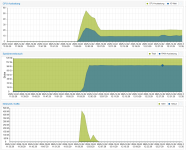

so issue not strictly related to kernel changes at this time !!!!

those numbers seem fine? note that the bitmap was cleared, so the backup had to read the full disk contents (and did so at roughly 400MB/s!)