Proxmox 9.1.1 FC Storage via LVM

ertanerbek

Well-Known Member
Mar 29, 2019
108
8
58
44
Hello,

Has anyone successfully implemented a professional Proxmox setup with Fibre Channel (FC) SAN storage? I am not referring to IPSAN, but specifically FC-based SAN.

In a clustered environment, I am experiencing significant issues, particularly during cloning, wipe disk operations. The lock mechanisms appear problematic, and Proxmox seems unable to handle them reliably. In my test environment, when I attempt to delete or move disks simultaneously from different nodes, the system begins to encounter errors.

My current setup is as follows:

  • Proxmox 9.1.1
  • QCOW2 disk format
  • Huawei 5000v3 SAN Storage → HBA → Linux Multipath → LVM → Proxmox (2 node cluster with qdevice)
This raises the question: Should Proxmox’s LVM support be configured with CLVM? It feels as though standard LVM is not functioning correctly in this scenario. Regardless of whether I use RAW or QCOW, disk deletion and migration operations consistently cause problems.

If anyone has managed to run this configuration stably, could you share documentation or insights on how you achieved it? The storage lock issues are proving to be a major challenge.

Nov 26 11:59:38 PVE1 pvedaemon[94779]: lvremove 'STR-5TB-HUAWEI-NVME-045/vm-103-disk-0' error: 'storage-STR-5TB-HUAWEI-NVME-045'-locked command timed out - aborting
Nov 26 11:59:38 PVE1 pvedaemon[72268]: <root@pam> end task UPID:PVE1:0001723B:000F6884:6926C13E:imgdel:103@STR-5TB-HUAWEI-NVME-045:root@pam: lvremove 'STR-5TB-HUAWEI-NVME-045/vm-103-disk-0' error: 'storage-STR-5TB-HUAWEI-NVME-045'-locked command timed out - aborting
 
This setup should be stable, here's the documentation for multipath:
https://pve.proxmox.com/wiki/Multipath

Related information can be found here as well:
https://pve.proxmox.com/wiki/Migrate_to_Proxmox_VE#Storage_boxes_(SAN/NAS)


The error you get is due to a hard timeout of 60s for operation includes volume allocation on shared storage's. you need to make sure your storage is fast enough:
https://forum.proxmox.com/threads/u...-command-timed-out-aborting.98274/post-424883
https://forum.proxmox.com/threads/e...mage-got-lock-timeout-aborting-command.65786/
 
This raises the question: Should Proxmox’s LVM support be configured with CLVM?
CLVM championed by RedHat at one point, seems to have fallen out of favor, so taking on support for it might be quiet a tall task
https://salsa.debian.org/lvm-team/l...vmoved LVs.-,Remove clvmd,-Remove lvmlib (api
https://askubuntu.com/questions/1241259/clvm-package-in-repo
https://www.sourceware.org/cluster/clvm/

@bkry is correct, simultaneous operations on a shared storage where there are metadata consistency requirements must be serialized. It is quiet easy to overrun the timeout on such operations as "wipe".
https://github.com/proxmox/pve-cluster/blob/master/src/PVE/Cluster.pm#L642


Blockbridge : Ultra low latency all-NVME shared storage for Proxmox - https://www.blockbridge.com/proxmox
 
Hello Friends,


First of all, thank you for your answers. However, there is a point we overlooked in the LVM LUN part: this is not a file system, but block storage. Also, LVM thin is not being used in this section. Essentially, the host’s RAM does not hold metadata here (since I use direct sync in the cache part). I also tested with RAW disks instead of qcow.


At this point, it seems that Proxmox is not handling this disk as it should. When a LUN is created, isn’t its address range defined on both sides? After all, there is no issue with which block the created LUN maps to, because it creates a tick. It’s just that while it is active on one host, it is inactive on another.


You can also feel this when writing data on the guests. Under heavy and intensive usage, I have serious doubts that unpleasant results may occur. I will try to understand the situation more clearly with different tests soon. Of course, I first need to create a proper test procedure.


My SAN storage device is quite fast. Even though my HBAs are 8 Gigabit, they run in dual mode. This means I can reach 2 Gigabytes of bandwidth per LUN and achieve 50,000 Random Read I/O and 50,000 Random Write I/O with a 50% RW mix.


I don’t think the issue lies on the LUN side, because when I access the LUNs at the operating system level (Debian), there is no problem. The issue only occurs when operating through Proxmox guests.
 
However, there is a point we overlooked in the LVM LUN part: this is not a file system, but block storage.
I think most people in this forum are aware of LVM being block storage.
Also, LVM thin is not being used in this section.
You'd be surprise with some wild experiments that were attempted/reported here before. There should always be a healthy dose of skepticism about taking posts at face value.
Essentially, the host’s RAM does not hold metadata here (since I use direct sync in the cache part).
This depends on the overall system state. You may be interested in this article we posted recently: https://kb.blockbridge.com/technote/proxmox-qemu-cache-none-qcow2/

Additionally, when an LV is created within the VG on host1, host2 does not immediately become aware of it. In PVE case a lock is taken to insure that two hosts do not attempt to create the LVs at the same time. When the create is finished - other hosts rescan VG restructure to lean about the metadata changes.
At this point, it seems that Proxmox is not handling this disk as it should. When a LUN is created,
LUN is a SCSI concept. In your case there are no LUNs being created, only LVM LVs. There are other storage types where a LUN is created for each Virtual Disk. Those storage systems typically do NOT use LVM.
After all, there is no issue with which block the created LUN maps to, because it creates a tick.
We successfully caused data corruption by timing LVM LV creation on two hosts by bypassing PVE cluster lock for an experiment.
LVM was never meant to be used with shared storage. CLVM was an addon/afterthought. PVE takes on the functionality of the CLVM by using its own cluster-wide locks during dangerous operations.
The issue only occurs when operating through Proxmox guests.
Perhaps your storage/client is not optimized. You may find this article interesting:
https://kb.blockbridge.com/technote/proxmox-tuning-low-latency-storage


Blockbridge : Ultra low latency all-NVME shared storage for Proxmox - https://www.blockbridge.com/proxmox
 
It’s an interesting way of answering, maybe it’s just because we speak different languages.

Anyway, at the end of the day the situation doesn’t really change. When I work directly with LVM and LVs via direct storage or OCFS2, I don’t encounter the same problems—there’s an ownership aspect here, and these are not thin.

If the same issues occurred when working directly with LVM, I could easily say that the problem lies in the LVM layer or that there’s a structural corruption. But unfortunately, there’s no issue at that layer.

The only thing that can really be said here is, just like other folks on the forum have noticed, without running wild tests, when using Proxmox it’s best not to use any Cluster Aware system other than CEPH.
 
General system info :

CLONE Speed limit : 300MB/s
Wipe Removed Volumes was not selected


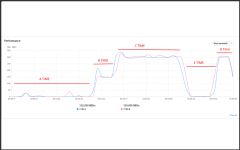
A time

At this point I cloned two machines while DISCARD was enabled on their disks. As shown, the storage wrote very little data, which is normal because TRIM was performed during the transfer. However, the disks’ utilization reached 100% during this, which caused other systems to be affected.
B time

At this point I requested cloning of a machine from a single node with DISCARD disabled. The overall cloning limit is 300 MB/s, which was split evenly between the two storage controller , and the cloning proceeded normally.

C time

At this point I requested the second node to clone the same disk for a machine with DISCARD disabled. They started cloning without any issues and without affecting other systems. Because my total cloning limit is 300 MB/s per node, each node used 300 MB/s and together they cloned at 600 MB/s using both storage controllers. Other systems were unaffected; the LUN was accessible and the PVE hosts responded.

D time

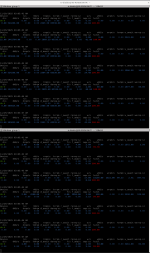
I asked the system to delete a machine I had previously cloned while other machines were being cloned. DISCARD was not selected and Wipe Removed Volumes was not selected. As you can see, the system immediately experienced problems. The attached iostat output corresponds to this period and the disks’ UTIL jumped to 100% instantly.

E time

The deletion finished and the nodes returned to normal; cloning continued without any further issues.

1764375991169.png


E time IO Stat

1764376027275.png


The issue with discard is expected — it generates a lot of I/O (in fact, this may not be reflected on the storage and likely remains on the Linux side). However, issuing a LUN destroy command alone, when neither Discard nor Wipe Removed Volumes is selected, should not have to result in this level of impact.
 
Hi, have you also tried cache=none with raw images ?

I tried this as well, since I thought the issue might exist across all cache systems, so I also tested with directsync, but the problem remained the same. The issue lies in the Lock mechanism applied at the Proxmox layer. It’s not only in this part—if you use OCFS2 underneath, you also introduce it to Proxmox as a folder and need to mark it as shared, and that’s exactly when the problems begin. In fact, OCFS2 already has its own Lock mechanism, and having two mechanisms in place causes conflicts

I am aware that without a LOCK mechanism, the system cannot be used. The LVM lock mechanism is essential; without it, the system does not function correctly and can lead to errors. However, when using any cluster-aware systems in this part, additional issues arise because they operate together with the Proxmox cluster system.

In fact, it would be great if Proxmox started supporting GFS2, since its entire mechanism is already compatible with the Proxmox cluster system. Instead of encountering problems with LUN-based setups, GFS2 would provide a better solution for SAN storage users.

I initially considered OCFS2, but GFS2 offers more features
 
In fact, it would be great if Proxmox started supporting GFS2, since its entire mechanism is already compatible with the Proxmox cluster system. Instead of encountering problems with LUN-based setups, GFS2 would provide a better solution for SAN storage users.
I think this will never happen - the vendor (Red Hat) has already dropped GFS2 support in RHEL10 ... so I assume that other distros will remove GFS2 also sooner or later or put it in "legacy mode"
imho ocfs2 would be the better approach - at least performance/feature wise - but looks like it has also issues on bigger clusters - and of course it's also not officially supported on Proxmox VE. In general - it looks like that shared storage cluster filesystems are not the future for such environments
 
Last edited:
  • Like
Reactions: Johannes S
Using block storage is a dead horse but no horse can be so dead that we can no longer ride it. We instruct the rider to remain seated until the horse gets up again, we establish a goal agreement with the rider regarding riding dead horses and we grant the rider a performance bonus to increase their motivation.
 
  • Like
Reactions: alma21
yes - true - I assume ~80% of VMWare customers are riding this dead horse also with VMFS/VMDK :)
I mean still a valid approach would be if Proxmox as company would hire/pay some core/veteran developers of OCFS2 or 3rd party to integrate it better with PVE and solve the rough edges of this solution and then provide official support together - this would mean ~ feature parity of OCFS2/QCOW2/RAW with VMFS/VMDK (thin, snapshot, clustering, support...)

then for sure the Proxmox customer base would increase maybe with some high 5 digits counts
 
Last edited:
I think this will never happen - the vendor (Red Hat) has already dropped GFS2 support in RHEL10 ... so I assume that other distros will remove GFS2 also sooner or later or put it in "legacy mode"
imho ocfs2 would be the better approach - at least performance/feature wise - but looks like it has also issues on bigger clusters - and of course it's also not officially supported on Proxmox VE. In general - it looks like that shared storage cluster filesystems are not the future for such environments


Years ago, when I wrote about the potential issues of VSAN, many people on the VMware side told me I was talking nonsense. However, developments have shown that SDS architectures are not very suitable for virtualization environments. In a serious enterprise, where several million I/O operations may be required, SDS architectures cannot handle this—they are more suited to distributed I/O requests in cloud-like environments.

Therefore, it is unlikely that these architectures will simply disappear. On the OCFS2 side, Oracle has taken a different approach, which is why they are no longer actively developing OCFS2. In contrast, GFS2 still receives occasional updates, but if Red Hat decides to phase it out, the reason would likely be their shift away from RHEL Enterprise Virtualization toward the cloud-oriented OpenShift platform.

That said, for server virtualization systems, VDI solutions, and monolithic applications, SAN storage remains the best option. Microservices also have their own inherent issues, which is why hybrid architectures are emerging—and this means there is still hope for SAN. One of VMware’s strongest features is undoubtedly VMFS.
 
Using block storage is a dead horse but no horse can be so dead that we can no longer ride it. We instruct the rider to remain seated until the horse gets up again, we establish a goal agreement with the rider regarding riding dead horses and we grant the rider a performance bonus to increase their motivation.

Most of my 25-year professional career has been spent working with storage devices. A large portion of that involved projects at the government level. I can confidently say that the SAN storage architecture cannot simply disappear. Even today, the largest companies are investing in SDS storage, and the S3 protocol is becoming widespread—but these are generally used for backup or big data projects. For virtualization, the death of SAN storage architecture is highly unlikely.

In virtualization, access time and I/O performance are critical, and achieving this outside of FC (Fibre Channel) is extremely difficult. Ethernet technology has advanced significantly and, in terms of bandwidth, it surpassed Infiniband and FC long ago. However, the reason SAN is still needed is latency and I/O performance. For this reason, it is unlikely to disappear, since there is no alternative technology that can replace it.
 
  • Like
Reactions: alma21
Each disk is block storage, what I mean is the direct usage of block storage from an application side. We will see in 10years.
 
  • Like
Reactions: ertanerbek
Most of my 25-year professional career has been spent working with storage devices. A large portion of that involved projects at the government level. I can confidently say that the SAN storage architecture cannot simply disappear. Even today, the largest companies are investing in SDS storage, and the S3 protocol is becoming widespread—but these are generally used for backup or big data projects. For virtualization, the death of SAN storage architecture is highly unlikely.

In virtualization, access time and I/O performance are critical, and achieving this outside of FC (Fibre Channel) is extremely difficult. Ethernet technology has advanced significantly and, in terms of bandwidth, it surpassed Infiniband and FC long ago. However, the reason SAN is still needed is latency and I/O performance. For this reason, it is unlikely to disappear, since there is no alternative technology that can replace it.
Well, different approaches are beeing worked on, nvme-oF that tries to reduce latency
 
  • Like
Reactions: ertanerbek
Well, different approaches are beeing worked on, nvme-oF that tries to reduce latency


RDM, TCP Offload, RoCE, NVMe-OF, NVMe-oF + RDMA, and Serv-IO (for Ethernet) are all excellent technologies with many benefits. They reduce CPU load and lower access times. However, no matter what they achieve, the real issue is not the connection type or the flow of data, but rather the Ethernet terminology itself and the TCP/UDP structure. The packetization technology used for disks does not work properly with this kind of setup. Fibre Channel (FC) is a system specifically designed for this purpose, with packet sizes, device communication, packet integrity checks, and data validation mechanisms tailored for storage.

In short, as long as these performance-enhancing or latency-reducing technologies rely on Ethernet terminology, they will always remain behind Fibre Channel.

Of course, these technologies have their areas of use, especially in container-based cloud systems where they can have a significant impact. They enable efficient utilization of compute resources and allow cached data in memory to be quickly synchronized by CPUs. However, in server and VDI virtualization, the main issue is disk access time. Within a container, you can cache your website in RAM and use write-through to achieve high access speeds and support large numbers of users. But if you try to generate a report from your database using last year’s data, you will inevitably need to access your disk.
 
Hi @ertanerbek,


I’m running a three-node Proxmox VE 9.1.1 cluster connected to a Huawei Dorado 5000, but using iSCSI + Linux Multipath + LVM (shared).


In my setup, I haven’t encountered any problems during simultaneous “Move Storage” operations, parallel cloning, or disk deletions, even when multiple nodes operate on the same shared LUN. Everything has been stable so far, and I haven’t seen the lock timeouts you are experiencing on FC.


If you’d like to compare configurations, just tell me what would help.
I can share:
  • my iSCSI + multipath configuration
  • LVM/VG layout
  • Proxmox storage.cfg
  • multipath.conf, including queue-depth settings
  • kernel parameters
  • or anything else you want to cross-check
Happy to help if it can give you additional insight into the locking behaviour.

Clone exemple :
create full clone of drive scsi0 (LUN_WORKPLACE_01:vm-103-disk-0.qcow2)
Rounding up size to full physical extent <85.02 GiB
Logical volume "vm-135-disk-0.qcow2" created.
Formatting '/dev/LUN_WORKPLACE_01/vm-135-disk-0.qcow2', fmt=qcow2 cluster_size=65536 extended_l2=off preallocation=metadata compression_type=zlib size=91268055040 lazy_refcounts=off refcount_bits=16
drive mirror is starting for drive-scsi0
all 'mirror' jobs are ready
freeze filesystem
mirror-scsi0: Cancelling block job
mirror-scsi0: Done.
unfreeze filesystem
TASK OK

Move :
create full clone of drive scsi0 (LUN_WORKPLACE_01:vm-101-disk-0.qcow2)
Rounding up size to full physical extent 74.01 GiB
Logical volume "vm-101-disk-1.qcow2" created.
Formatting '/dev/LUN_WORKPLACE_02/vm-101-disk-1.qcow2', fmt=qcow2 cluster_size=65536 extended_l2=off preallocation=metadata compression_type=zlib size=79456894976 lazy_refcounts=off refcount_bits=16
drive mirror is starting for drive-scsi0
all 'mirror' jobs are ready
mirror-scsi0: Completing block job...
mirror-scsi0: Completed successfully.
mirror-scsi0: mirror-job finished
Logical volume "vm-101-disk-0.qcow2" successfully removed.
TASK OK

Another simultanously move :
create full clone of drive scsi0 (LUN_WORKPLACE_01:vm-102-disk-0.qcow2)
Rounding up size to full physical extent 150.02 GiB
Logical volume "vm-102-disk-0.qcow2" created.
Formatting '/dev/LUN_WORKPLACE_02/vm-102-disk-0.qcow2', fmt=qcow2 cluster_size=65536 extended_l2=off preallocation=metadata compression_type=zlib size=161061273600 lazy_refcounts=off refcount_bits=16
drive mirror is starting for drive-scsi0
all 'mirror' jobs are ready
mirror-scsi0: Completing block job...
mirror-scsi0: Completed successfully.
mirror-scsi0: mirror-job finished
can't deactivate LV '@pve-vm-102-disk-0.qcow2': Logical volume LUN_WORKPLACE_02/vm-102-disk-0.qcow2 in use.
volume deactivation failed: LUN_WORKPLACE_01:vm-102-disk-0.qcow2
TASK OK
 
  • Like
Reactions: ertanerbek
Hi @ertanerbek,


I’m running a three-node Proxmox VE 9.1.1 cluster connected to a Huawei Dorado 5000, but using iSCSI + Linux Multipath + LVM (shared).


In my setup, I haven’t encountered any problems during simultaneous “Move Storage” operations, parallel cloning, or disk deletions, even when multiple nodes operate on the same shared LUN. Everything has been stable so far, and I haven’t seen the lock timeouts you are experiencing on FC.


If you’d like to compare configurations, just tell me what would help.
I can share:
  • my iSCSI + multipath configuration
  • LVM/VG layout
  • Proxmox storage.cfg
  • multipath.conf, including queue-depth settings
  • kernel parameters
  • or anything else you want to cross-check
Happy to help if it can give you additional insight into the locking behaviour.

Hi Tibo,

If possible, could you share everything? If you have a successful implementation, it could also help others who face issues in the future.

By the way, why did you have to tweak the queue-depth and kernel parameters? Do we really need something like that?

Also, my issue occurs with the lock mechanism on the Proxmox side. It’s interesting that you don’t have this problem. Did you do a clean installation or upgrade from 8 to 9?
 
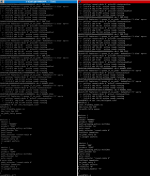
I am sharing my multipath configuration and multipath output also storage file,

1764615391548.png

1764615610661.png


I’m also using OCFS2, and it’s almost perfect. In fact, OCFS2 itself is excellent, but Proxmox forces me to use its own lock mechanism. At the operating system level, OCFS knows these disks are cluster disks, but if I don’t select “shared” in the Proxmox interface, parallel access from nodes is not allowed. If I do select it, then many operations become very slow due to the lock mechanisms.

As you can see, I configured it to panic in case of an error, so data corruption is hardly possible because the node will immediately switch to panic mode. The kernel parameter is set to 20 seconds, which is too short for any corruption to occur. However, on the Proxmox side, I’m forced to use their lock mechanism.


1764616042370.png


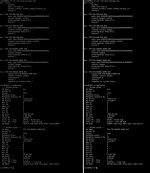
As you can see, my test servers have multiple HBAs. The reason is that sometimes I virtualize Proxmox and assign HBAs to these servers to analyze the situation and identify stability issues. Because of this, my disk names change, while my DM and Multipath names remain constant. Therefore, it’s not really possible for me to make queue or kernel adjustments on a per-disk basis. Maybe I could write a startup script… but I’m not sure.

1764616299422.png
 
Last edited: