

Hi @ertanerbek,
No problem — here is our full setup in detail.
We are running a three-node Proxmox cluster, and each node has two dedicated network interfaces for iSCSI.
These two NICs are configured as separate iSCSI interfaces using:
iscsiadm -m iface
Both interfaces are set with MTU 9000.
iSCSI Discovery & Storage Topology
For each interface, we performed a full discovery to every logical port exposed by our Huawei Dorado arrays.
We are in a HA environment: two Dorado systems located in two datacenters operating in Active/Active via HyperMetro.
Multipath is configured with:
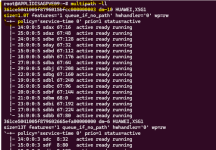
All configuration files are attached to this post.
We applied a few kernel tunings and adjusted queue_depth, mainly to optimize latency and improve the behaviour under high I/O load.
Once everything was configured, each node’s iSCSI initiator was added on both Dorado arrays.
From there, the PVs and LVs became visible in Proxmox.
Proxmox configuration
In Proxmox, each LV was simply added under Datacenter → Storage with:
2 NICs per node × 4 logical ports per Dorado array × 2 arrays.
We performed multiple tests (performance, latency, failover) using VDBench, and the results are quite good:
Additional HA component
The only custom addition is a storage HA script we developed.
It monitors the number of available paths for each LUN and, if this count ever drops to 0, the script automatically fences the node to avoid corruption.
Just to clarify — I’m not using OCFS2 at all in my setup.
From what you’re describing, I really think this is the root of your issue.
OCFS2 has its own distributed lock manager, and Proxmox also applies its own locking layer on top of the storage.
So when both mechanisms coexist (OCFS2 locks + Proxmox locks), they tend to conflict, slow down operations, and trigger timeouts during clone/move/delete operations. Proxmox is not designed to work with cluster file systems like OCFS2 or GFS2, and this often leads to exactly the kind of behaviour you’re seeing.
In my case, since I’m only using LVM on top of iSCSI + multipath, there is no additional filesystem-level locking, which is why I don’t encounter the same issues.
If you remove OCFS2 from the equation and rely on standard LVM instead, you will likely see much more stable behaviour on the Proxmox side.
As mentioned, all the scripts and configuration files are attached for reference.
Feel free to ask if you want extra details — happy to help compare setups.
No problem — here is our full setup in detail.
We are running a three-node Proxmox cluster, and each node has two dedicated network interfaces for iSCSI.
These two NICs are configured as separate iSCSI interfaces using:
iscsiadm -m iface
Both interfaces are set with MTU 9000.
iSCSI Discovery & Storage Topology
For each interface, we performed a full discovery to every logical port exposed by our Huawei Dorado arrays.
We are in a HA environment: two Dorado systems located in two datacenters operating in Active/Active via HyperMetro.
Multipath configuration
Multipath is configured with:
- path_grouping_policy = multibus
- path_selector = service-time 0
All configuration files are attached to this post.
Kernel & Queue-Depth optimizations
We applied a few kernel tunings and adjusted queue_depth, mainly to optimize latency and improve the behaviour under high I/O load.
ACTION=="add|change", SUBSYSTEM=="block", KERNEL=="sd*", ATTR{device/vendor}=="HUAWEI", ATTR{device/queue_depth}="512"Once everything was configured, each node’s iSCSI initiator was added on both Dorado arrays.
From there, the PVs and LVs became visible in Proxmox.
Proxmox configuration
In Proxmox, each LV was simply added under Datacenter → Storage with:
- Shared = Yes
- snapshot-as-volume-chain = enabled
2 NICs per node × 4 logical ports per Dorado array × 2 arrays.
Performance & Testing
We performed multiple tests (performance, latency, failover) using VDBench, and the results are quite good:
- around 150–200K IOPS in 8K or 16K
- stable latency
- no locking or migration issues so far
Additional HA component
The only custom addition is a storage HA script we developed.
It monitors the number of available paths for each LUN and, if this count ever drops to 0, the script automatically fences the node to avoid corruption.
Just to clarify — I’m not using OCFS2 at all in my setup.
From what you’re describing, I really think this is the root of your issue.
OCFS2 has its own distributed lock manager, and Proxmox also applies its own locking layer on top of the storage.
So when both mechanisms coexist (OCFS2 locks + Proxmox locks), they tend to conflict, slow down operations, and trigger timeouts during clone/move/delete operations. Proxmox is not designed to work with cluster file systems like OCFS2 or GFS2, and this often leads to exactly the kind of behaviour you’re seeing.
In my case, since I’m only using LVM on top of iSCSI + multipath, there is no additional filesystem-level locking, which is why I don’t encounter the same issues.
If you remove OCFS2 from the equation and rely on standard LVM instead, you will likely see much more stable behaviour on the Proxmox side.
As mentioned, all the scripts and configuration files are attached for reference.
Feel free to ask if you want extra details — happy to help compare setups.
Attachments
Last edited:


