Thanks for posting these, baffling proxmox didnt post their own preview of this on wiki,Updated my 5 node cluster (all mini PCs) - All seems well so far. Two observations on the new dashboard metrics -
1) When switching between Maximum and Average views - nothing happens ?!?
2) Depending on time span, I get NO data in Memory Pressure Stall or Network Traffic ?!?
View attachment 88923View attachment 88924


Proxmox Virtual Environment 9.0 released!
- Thread starter t.lamprecht
- Start date
You are using an out of date browser. It may not display this or other websites correctly.
You should upgrade or use an alternative browser.
You should upgrade or use an alternative browser.


https://bugzilla.proxmox.com/show_bug.cgi?id=6654It appears thatfwupddoes not honor theEspLocationsetting anymore (when added to the now emptyfwupd.confinstead ofdaemon.conf).
I am seeing something odd since updating to 9.0. Currently on 9.0.4.
I don't have both storage options like I used to on 8. LXCs are only showing this:
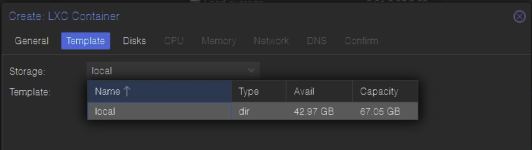
While VMs are showing this:
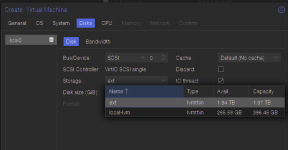
Any ideas what's going on? Before the upgrade, I didn't have local, just had ext and local-lvm. Not sure where local is coming from and it's the only option for new LXCs. Did repairing my lvm pool during the upgrade cause this? How do I get it back to how it was?
I don't have both storage options like I used to on 8. LXCs are only showing this:
While VMs are showing this:
Any ideas what's going on? Before the upgrade, I didn't have local, just had ext and local-lvm. Not sure where local is coming from and it's the only option for new LXCs. Did repairing my lvm pool during the upgrade cause this? How do I get it back to how it was?
Last edited:

check your storage config and which content types are set. Those decide which storages are shown, depending on the use-case.Any ideas what's going on?
Did you change anything like "systemd.unified_cgroup_hierarchy=0" ? Or is that not necessary?Yes, i'm running with with newer systemd
Since Centos7 is EOL I wouldn't run it in containers (way to less isolation for my paranoid mind) but in strictly secured VMs. Another reason for VMs: They will even work when containers with CentOs7 won't anymore (which will be the case at some future update). Even better would be to migrate your applications from Centos7 to a distribution which isn't EOL e.g. Rocky Linux or Almalinux (they seem to be the next best thing)Is it still possible to run Centos7 containers on Proxmox 9? With a fix?
No, systemd is newer,nothing else in the grub.Did you change anything like "systemd.unified_cgroup_hierarchy=0" ? Or is that not necessary?

Hi,
please note that this is not supported in PVE 9 anymore: https://pve.proxmox.com/wiki/Upgrade_from_8_to_9#cgroup_V1_RemovalDid you change anything like "systemd.unified_cgroup_hierarchy=0" ? Or is that not necessary?
Hello Proxmoxers and Proxmox team!
Thank you for all your hard work and this wonderful product!
I apologize in advance if this is not a thread for the bug reports (which was my initial motive to finally open an account here ;-) ). TBH, it is not entirely related to reporting bugs but I would like to ask a few questions as well!
In v9 of Proxmox I noticed the following:
Datacenter --> HA: I add all VM resources I need and then go to the new HA --> Affinity rules --> HA Resources Affinity rules.
There I can define a rule and it works as expected (Proxmox re-schedules VMs according to the rule defined). However, if the rule is highlighted, the Edit button stays gray and it cannot be activated (you cannot click on the button). The only way to do so is to double-click on the rule in order to edit it. That's all on the bug side. Not much but I felt obliged to report it ;-) .
I have been looking into Proxmox roadmap and some other nice features here and there - pretty much every time when Proxmox releases a major version of it. I have a few qustions:
- Project "Cattle and Pets" - would you be willing to consider including an "instance/flavor" into Proxmox mimicing Openstack/Openshift/A public cloud well-known feature? A user would be able to define the properties of a VM (vCPU, RAM, disk) instead of defining everything in the wizard all the time unless it is really necessary. I believe it would also benefit everyone in general, including mass-provisioning of VMs on a large Proxmox cluster (via tofu/terraform for example). This would, I believe, enable users to provision VMs faster.
- https://pve.proxmox.com/wiki/Automated_Installation - It is still not possible to define a management vlan during automated, mass Proxmox installation/provisioning which would make things easier during a large BM provisioning. Any thoughts on that?
- Dynamic VM scheduler (or whatever you wish to call it) ;-) Somehow I believe it will happen in Proxmox VE 9. Am I right? ;-)
Thank you for reading this and best wishes in the feature endeavours!
Thank you for all your hard work and this wonderful product!
I apologize in advance if this is not a thread for the bug reports (which was my initial motive to finally open an account here ;-) ). TBH, it is not entirely related to reporting bugs but I would like to ask a few questions as well!
In v9 of Proxmox I noticed the following:
Datacenter --> HA: I add all VM resources I need and then go to the new HA --> Affinity rules --> HA Resources Affinity rules.
There I can define a rule and it works as expected (Proxmox re-schedules VMs according to the rule defined). However, if the rule is highlighted, the Edit button stays gray and it cannot be activated (you cannot click on the button). The only way to do so is to double-click on the rule in order to edit it. That's all on the bug side. Not much but I felt obliged to report it ;-) .
I have been looking into Proxmox roadmap and some other nice features here and there - pretty much every time when Proxmox releases a major version of it. I have a few qustions:
- Project "Cattle and Pets" - would you be willing to consider including an "instance/flavor" into Proxmox mimicing Openstack/Openshift/A public cloud well-known feature? A user would be able to define the properties of a VM (vCPU, RAM, disk) instead of defining everything in the wizard all the time unless it is really necessary. I believe it would also benefit everyone in general, including mass-provisioning of VMs on a large Proxmox cluster (via tofu/terraform for example). This would, I believe, enable users to provision VMs faster.
- https://pve.proxmox.com/wiki/Automated_Installation - It is still not possible to define a management vlan during automated, mass Proxmox installation/provisioning which would make things easier during a large BM provisioning. Any thoughts on that?
- Dynamic VM scheduler (or whatever you wish to call it) ;-) Somehow I believe it will happen in Proxmox VE 9. Am I right? ;-)
Thank you for reading this and best wishes in the feature endeavours!
Last edited:
Hi,
thank you for the report! Proposed fix: https://lore.proxmox.com/pve-devel/20250814143425.357868-1-f.ebner@proxmox.com/T/Datacenter --> HA: I add all VM resources I need and then go to the new HA --> Affinity rules --> HA Resources Affinity rules.
There I can define a rule and it works as expected (Proxmox re-schedules VMs according to the rule defined). However, if the rule is highlighted, the Edit button stays gray and it cannot be activated (you cannot click on the button). The only way to do so is to double-click on the rule in order to edit it. That's all on the bug side. Not much but I felt obliged to report it ;-) .
How do I do that?check your storage config and which content types are set. Those decide which storages are shown, depending on the use-case.

I had a similar experience today on a remote backup server. Luckily I had IPMI on this one and logged in and found it booted into BIOS. After fiddling around for a while I enabled CSM and Legacy boot and changed the boot drive to use the non-UEFI entry and got it booted. I still need to figure this out because it was definitely booted in UEFI mode previously and my other primary server which is identical hardware is still booted in UEFI mode. I need to understand this better before I pull the trigger on updating the primary. It feels like going backwards to legacy mode might not be the best idea but for now it's fine on my backup server.Updated remotely today, didn't get any error. Decided to do a full reboot and the server didn't come back up.
Just an FYI.
Guess I'll be up late tonight!

I am seeing something odd since updating to 9.0. Currently on 9.0.4.
I don't have both storage options like I used to on 8. LXCs are only showing this:
View attachment 89412
While VMs are showing this:
View attachment 89411
Any ideas what's going on? Before the upgrade, I didn't have local, just had ext and local-lvm. Not sure where local is coming from and it's the only option for new LXCs. Did repairing my lvm pool during the upgrade cause this? How do I get it back to how it was?
You are confusing the template/ISO/etc storage in your LXC screenshot with the vDisk storage in your VM screenshot.
In the LXC creation wizard, go to the "Disks" tab and you will most likely see your other storages there too.
Hi,
I have sucessfully upgraded my 3 node test cluster and so far everything seems working.
What I really hoped coming to this version, that you don't need to specify anymore the target node, when creating a VM or bulk migrate them away.
I'm migrating away from Red Hat Virtualization and I never had to think about, where a VM lives. I have shared storage, so also Proxmox should not care, where a VM is running.
This feels a bit weird for a shared storage cluster, where 100s of VMs are running, that I have always to chose a host to migrate to or where a VM is being created.
Everyhting else, great job and Proxmox is really running great!
I have sucessfully upgraded my 3 node test cluster and so far everything seems working.
What I really hoped coming to this version, that you don't need to specify anymore the target node, when creating a VM or bulk migrate them away.
I'm migrating away from Red Hat Virtualization and I never had to think about, where a VM lives. I have shared storage, so also Proxmox should not care, where a VM is running.
This feels a bit weird for a shared storage cluster, where 100s of VMs are running, that I have always to chose a host to migrate to or where a VM is being created.
Everyhting else, great job and Proxmox is really running great!
I got nowhere. A few power cycles and no POST. It can't be related... could it?! I had to spend the night packing for a trip but should have enough time to try a CMOS reset before I'm gone for a week, stewing on the beach in my failures.I had a similar experience today on a remote backup server. Luckily I had IPMI on this one and logged in and found it booted into BIOS. After fiddling around for a while I enabled CSM and Legacy boot and changed the boot drive to use the non-UEFI entry and got it booted. I still need to figure this out because it was definitely booted in UEFI mode previously and my other primary server which is identical hardware is still booted in UEFI mode. I need to understand this better before I pull the trigger on updating the primary. It feels like going backwards to legacy mode might not be the best idea but for now it's fine on my backup server.
Thankfully I made sure all my containers had a fresh backup on a separate disk. Maybe a new server will wash up on the beach!
My 3 node setup, one supermicro and two lenovo tinys, one of the lil guys didnt reboot, had to download the newest version to a usb and do a fresh install...I got nowhere. A few power cycles and no POST. It can't be related... could it?! I had to spend the night packing for a trip but should have enough time to try a CMOS reset before I'm gone for a week, stewing on the beach in my failures.
Thankfully I made sure all my containers had a fresh backup on a separate disk. Maybe a new server will wash up on the beach!