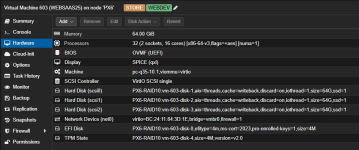
CPU types, word of caution

Nov 26, 2021
515
301
88
Hi everyone,

This is just in case someone stumbles upon the same error while troubleshooting.
I am not asking for help, though I’m open to explanations if anyone has one.

Roughly two years ago, I created a new Proxmox host with VMs.
Two weeks ago, I read about CPU types—something I had never looked into before—and realized I had been using the default x86-64-v2.
Since I don’t run a cluster, I thought it was time to switch to the host CPU type to take advantage of that sweet ZFS speed.

Unfortunately, setting the CPU type to host made some Windows 11 VMs extremely slow—clicks in Explorer or network drives became sluggish.
Strangely, a newer Windows 11 VM (created a few months ago) was unaffected.
I didn’t notice any difference in performance for the Linux VMs.

Switching back to x86-64-v2 made everything speedy again.
Setting it to x86-64-v4 didn’t work for my Intel Xeon E-2236 (which seems odd), but x86-64-v3 worked perfectly fine.

So, if your Windows VMs are acting up, try experimenting with different CPU types :)

BTW: I also just ran some PVE updates that did not ask for a reboot but affected QEMU. No idea if that is somehow related.
 
Windows server 2025 and possibly win 11 are slow when using cpu model host, atleast here on a Xeon E5-2697V3.

Try and disable nested virualization on your host:

add kvm-intel.conf to /etc/modprobe.d/ containing
Code:
options kvm-intel nested=N

Don't forget to reboot after.

Performance should then be back to normal.
 
This is because the Xeon E-2236 does not support AVX512. x86-64-v4 basically adds AVX512 instructions.
Ahh that makes sense.

How did I not find these threads?! :)

Money quote:

First pic x86-64-v2-AES : Windows detects VM (Virtual machine = Yes) so no nested Hyper-V running (required for VBS )
Second pic "host" : Windows doesn't detect VM ( Virtualisation = Enabled ) suggest Hyper-V or WSL enabled within Windows guest and/or optionnal args used ( hidden=off or kvm=off )

Thank you @steve72 for your input.
Feels strange to set this in the Hypervisor and not the host :)

Do I loose anything by doing that? For example, maybe I want to run Linux plus some Docker containers later, do they need some kind of virtualization support? Or does that only apply for Docker on Windows, because there is no native support?
I am sometimes surprised how much stuff nowadays is running in some kind of sandbox or VM, without me as a user even knowing.

This is probably irrational, but somehow I feel saver setting the CPU type to v3-aes than tinkering with modprobe.
 
Last edited:
For those who are running Linux VMs...

I don't consider any variance < 10% to be significant given the inherit variability of benchmarks. I used sysbench v1.0.20

BIOS vs UEFI: BIOS is faster but UEFI is becoming the norm. Less than 10% difference.

Host vs. x86-64-v4: All sysbench benchmarks were about the same except for the threads test which was 3x faster!

Just a quick look.
 
Hi,

I'am really lost here :rolleyes:
I have a host r740 with SKylake cpu Intel Gold 6138
What type of cpu should i select to run Windows Server 2025 correctly ?
Should i add this line too ?
options kvm-intel nested=N to the host ?

Thanks

Here is what i do so far
1765728476317.png
 
Last edited:
I have a Gold 6248R, which if I run `/usr/lib64/ld-linux-x86-64.so.2 --help` returns supported for x86-64-v4, but when I tried using it in 2025 and I think 2022, it crashes lockups. Not sure if there's a upcoming fix for the issue from qemu or not, for now I'm setting all VMs to x86-64-v3, so far it's been stable, so I would use x86-64-v3, it's worth noting, x86-64-v3 includes aes flag by default, so you don't need to specifically set it.

If I remember correctly one of them boots with v4, the other doesn't but then once you login, various services, file explorer is doesn't work correctly, or fails to start services. I was scratching my head for ages on a clean install.

Not sure if Proxmox Support have any insights to the v4 issue.
 
I have a Gold 6248R, which if I run `/usr/lib64/ld-linux-x86-64.so.2 --help` returns supported for x86-64-v4, but when I tried using it in 2025 and I think 2022, it crashes lockups.
Which output do you get if you use https://github.com/credativ/ProxCLMC to determine the generic CPU type? Btw: For Windows CPU type with disabled "nested virt" flag should yield the best performance. If you need nested virt try configuring a custom cpu type as described in this post: https://forum.proxmox.com/threads/t...-when-the-cpu-type-is-host.163114/post-851969


Not sure if Proxmox Support have any insights to the v4 issue.

Create a bug ticket at https://bugzilla.proxmox.com and you will find out.
 
Which output do you get if you use https://github.com/credativ/ProxCLMC to determine the generic CPU type? Btw: For Windows CPU type with disabled "nested virt" flag should yield the best performance. If you need nested virt try configuring a custom cpu type as described in this post: https://forum.proxmox.com/threads/t...-when-the-cpu-type-is-host.163114/post-851969


Create a bug ticket at https://bugzilla.proxmox.com and you will find out.
Code:
Detected nodes:
virt-1 | 10.11.17.11 | x86-64-v4
virt-2 | 10.11.17.12 | x86-64-v4
virt-3 | 10.11.17.13 | x86-64-v4

Cluster CPU type: x86-64-v4

Good point with the nested virt but that would probably break the VBS security stuff sadly, I think it needs those instruction sets