

import linux-kvm .img to KVM
- Thread starter tsaenger
- Start date
You are using an out of date browser. It may not display this or other websites correctly.
You should upgrade or use an alternative browser.
You should upgrade or use an alternative browser.
Hi,Hello,
i got an image createt with linux-kvm called test.img .
If i extract this image i get 3 files called 1.img 2.img and 2.
Is it possible to import this images to proxmox?
What do i have to do?
Thanks a lot.
Tobias
what kind of file is it?
If you look on pve (or another linux box) with "file 1.img" what output do you get?
Udo
Hi,
i got:
btw:
Thanks for help
i got:
Code:
proxmoxx:/csd# file hw-test-template.img
hw-test-template.img: x86 boot sector; partition 1: ID=0x83, starthead 1, startsector 63, 33555249 sectors; partition 2: ID=0x82, starthead 15, startsector 33555312, 7403760 sectors
proxmoxx:/csd#
btw:
Code:
proxmoxx:/csd# file 1.img
1.img: Linux/i386 swap file (new style), version 1 (4K pages), size 925469 pages, no label, UUID=36f686e8-227f-4077-8c23-d66fc6baaa52

file 0.img
0.img; Linux rev 1.0 ext3 filesystem data (needs journal recovery) (large files)
Thanks for help
Last edited:
Hello,
i have some more information about the img-File:
i have some more information about the img-File:
Code:
proxmoxx:/# fdisk -ul -hw-test-template.img
You must set cylinders.
You can do this from the extra functions menu.

Disk csd-hw-test-template.img: 0 MB, 0 bytes
16 heads, 63 sectors/track, 0 cylinders, total 0 sectors
Units = sectors of 1 * 512 = 512 bytes
Disk identifier: 0x682eeefc

                   Device Boot      Start         End      Blocks   Id  System
hw-test-template.img1              63    33555311    16777624+  83  Linux
Partition 1 has different physical/logical endings:
     phys=(1023, 15, 63) logical=(33288, 15, 63)
hw-test-template.img2        33555312    40959071     3701880   82  Linux swap / Solaris
Partition 2 has different physical/logical beginnings (non-Linux?):
     phys=(1023, 15, 63) logical=(33289, 0, 1)
Partition 2 has different physical/logical endings:
phys=(1023, 15, 63) logical=(40633, 15, 63)Hi,
i got:
Code:proxmoxx:/csd# file hw-test-template.img hw-test-template.img: x86 boot sector; partition 1: ID=0x83, starthead 1, startsector 63, 33555249 sectors; partition 2: ID=0x82, starthead 15, startsector 33555312, 7403760 sectors proxmoxx:/csd#
btw:
Code:proxmoxx:/csd# file 1.img 1.img: Linux/i386 swap file (new style), version 1 (4K pages), size 925469 pages, no label, UUID=36f686e8-227f-4077-8c23-d66fc6baaa52 file 0.img 0.img; Linux rev 1.0 ext3 filesystem data (needs journal recovery) (large files)
Thanks for help
Hi,
this shows that the files are normal raw-files from an hdd.
Just create harddisks to an VM (same size or a little bit bigger if you use lvm) and copy the file (with dd if you have lvm-storage).
That's all.
Udo

Hi,
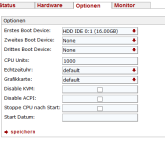
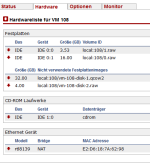
i made some screenshots of the configuration.
root@proxmox-23 /var/lib/vz/images/100 # file 0.img
0.img: Linux rev 1.0 ext3 filesystem data, UUID=e8c60808-f80b-4d4f-b15c-cd4a96e55442 (needs journal recovery) (large files)
root@proxmox-23 /var/lib/vz/images/100 # file 1.img
1.img: Linux/i386 swap file (new style), version 1 (4K pages), size 925469 pages, no label, UUID=36f686e8-227f-4077-8c23-d66fc6baaa52
maybe i did some thing worng.
Thanks for help
Tobias
i made some screenshots of the configuration.
root@proxmox-23 /var/lib/vz/images/100 # file 0.img
0.img: Linux rev 1.0 ext3 filesystem data, UUID=e8c60808-f80b-4d4f-b15c-cd4a96e55442 (needs journal recovery) (large files)
root@proxmox-23 /var/lib/vz/images/100 # file 1.img
1.img: Linux/i386 swap file (new style), version 1 (4K pages), size 925469 pages, no label, UUID=36f686e8-227f-4077-8c23-d66fc6baaa52
maybe i did some thing worng.
Thanks for help
Tobias