

You are using an out of date browser. It may not display this or other websites correctly.
You should upgrade or use an alternative browser.
You should upgrade or use an alternative browser.

Hey,
I'm not sure I understand what you want to do, but as long as you can reach the PVE API over the network it doesn't matter where you send requests from.
I'm not sure I understand what you want to do, but as long as you can reach the PVE API over the network it doesn't matter where you send requests from.
Hey,
I'm not sure I understand what you want to do, but as long as you can reach the PVE API over the network it doesn't matter where you send requests from.
Python:
@app.route("/stats")
def stats():
    names = []
    vmid = []
    status = []
    cpus = []
    for pve_node in proxmox.nodes.get():
        print("{0}:".format(pve_node['node']))
    for container in proxmox.nodes(pve_node['node']).lxc.get():
        names.append(container['name'])
        vmid.append(container['vmid'])
        status.append(container['status'])
        cpus.append(container['cpus'])
        print(container)
    return render_template("stats.html",names=names,vmid=vmid,status=status,cpus=cpus)
HTML:
<!DOCTYPE html>
<html lang="en">
<head>
    <meta charset="UTF-8">
    <title>Title</title>
</head>
<body>
<table>
  <thead>
    <th>VMID</th>
    <th>NAME</th>
    <th>STATUS</th>
    <th>CPUS</th>
    <th>START</th>
  </thead>

  <tbody>
  {% for i in range(vmid|length) %}
    <tr>
        <td>{{vmid[i]}}</td>
        <td>{{names[i]}}</td>
        <td>{{status[i]}}</td>
        <td>{{cpus[i]}}</td>
        <td><button type="button">{{names[i]}}</button></td>
    </tr>
  {% endfor %}
  </tbody>
</table>
</body>
</html>
Above as you can see is the route to get the containers all working ok and the jinja template also working.
What i am getting confused about is how to send the request with python for example while using the proxmoxer api i had a look in the docs but can't find an example of how this is done?
proxmox.nodes(pve_node['node']).lxc.get() this is sending the request, more specifically proxmoxer, among probably also other things, sends a request to [1] and gives you the result. Or do you mean you want to send a request to your
GET /stats endpoint? In that case you wouldn't use proxmoxer since you are interacting with your own API, not the PVE one.[1] https://pve.proxmox.com/pve-docs/api-viewer/index.html#/nodes/{node}/lxc
hmm, sorry i am still confused. getting the status is fine, the above python route and template returns this:proxmox.nodes(pve_node['node']).lxc.get()this is sending the request, more specifically proxmoxer, among probably also other things, sends a request to [1] and gives you the result.
Or do you mean you want to send a request to yourGET /statsendpoint? In that case you wouldn't use proxmoxer since you are interacting with your own API, not the PVE one.
so all is good, my question is what needs to be sent to start container 100 (CT100) with proxmoxer api from flask?
Python:
@app.route("/startContainer")
def start():
    # what do i call here to start CT100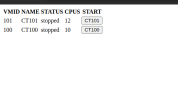
aaaaa, I see. I'm not 100% sure but it should look something like this
the endpoint it'll end up using is [1].
[1] https://pve.proxmox.com/pve-docs/api-viewer/index.html#/nodes/{node}/lxc/{vmid}/status/start
Code:
proxmox.nodes('node_name').lxc(vmid).status.start.post()[1] https://pve.proxmox.com/pve-docs/api-viewer/index.html#/nodes/{node}/lxc/{vmid}/status/start

thank you that did the trick:aaaaa, I see. I'm not 100% sure but it should look something like this
the endpoint it'll end up using is [1].Code:proxmox.nodes('node_name').lxc(vmid).status.start.post()
[1] https://pve.proxmox.com/pve-docs/api-viewer/index.html#/nodes/{node}/lxc/{vmid}/status/start
Python:
@app.route("/start")
def start():
    proxmox.nodes('pve').lxc(100).status.start.post()
    return redirect('/stats')
Thank you very much.