Latest activity
-
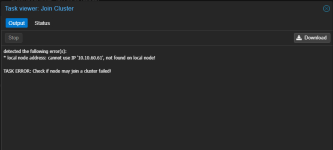
Bbellaireroad posted the thread Cluster Formation Fail in Proxmox VE: Installation and configuration.I'm receiving an error when adding a 3rd node to a new cluster. X11A has the IP address 10.10.60.61. When I add the 3rd node X12 with IP address 10.10.60.41 the error is generated. Apparently cluster manager thinks I am adding X11A again and...
-
-
 EllerholdAG reacted to t.lamprecht's post in the thread Is there a mod repository ? How to make mods ? with
 Like.
What are you talking about? All our code is fully open source, we encourage and support upstream contributions to actually make things better for all by default over some third party modification hacks. So posting fixes to our official submission...
Like.
What are you talking about? All our code is fully open source, we encourage and support upstream contributions to actually make things better for all by default over some third party modification hacks. So posting fixes to our official submission... -
Ssomeguyinfl replied to the thread Opt-in Linux 7.0 Kernel for Proxmox VE 9 available.Not Proxmox staff, just another X550 user on 7.0.14-23-pve who dug into this. 1) Yes, 6.17.13-21-pve has the same code. The MDD handling arrived upstream in v6.17 and ixgbe_check_mdd_event() is unchanged through 7.0 and mainline; the compiled...
-
JJohannes S replied to the thread Migrate to a new cluster.Related reading ( including the discussion, not everybody agreed with all of Udos points) by @UdoB https://forum.proxmox.com/threads/fabu-can-i-use-ceph-in-a-_very_-small-cluster.159671/
-
JAs a proof of concept, I did go ahead and set up my three-node "test" OptiPlex Micro cluster with one 512GB NVMe consumer SSD and one 800GB Enterprise SATA SSD, mirrored boot, EFI, ZFS and swap partitions, then used the remaining space on each...
-
JJohannes S reacted to drnicolas's post in the thread Nach BIOS Reset - massive Probleme (storage mit Fragezeichen und Web-GUI leer) with Like.
Okay, das hat funktioniert. Der sorage mit ? ist wieder da
-
JJohannes S reacted to celemine1gig's post in the thread MARVELL 9230 und VT-d - gibt es dafür eine Lösung? with Like.
Wenn du den Marvell als Einsteckkarte besitzt, oder ihn auf deinem Mainboard deaktivieren und durch eine externe Karte ersetzen kannst, wird das vermutlich die einfachste Lösung sein. Das Letzte Mal, als ich von (=über) Marvell SATA Controllern...
-
 SteveITS reacted to Johannes S's post in the thread Windows VM Software Update on Proxmox 7 with Like.
Is the actual hardware (so the real CPU) even supported by Windows11? CPU type host doesn't do much expect directly passing your host CPU to the guest os, so if your guest host doesn't support your CPU in the first place I wouldn't be surprised...
SteveITS reacted to Johannes S's post in the thread Windows VM Software Update on Proxmox 7 with Like.
Is the actual hardware (so the real CPU) even supported by Windows11? CPU type host doesn't do much expect directly passing your host CPU to the guest os, so if your guest host doesn't support your CPU in the first place I wouldn't be surprised... -
Ttemplar reacted to t.lamprecht's post in the thread Proxmox Virtual Environment now available for 64-bit ARM (arm64)! with Like.
We are excited to announce the first release of Proxmox Virtual Environment with official support for a second CPU architecture: 64-bit ARM (arm64/aarch64). Until now, Proxmox VE was available for x86-64 (amd64) only. Proxmox VE 9.2 for arm64...
-
JJohannes S replied to the thread How Much ARC RAM To Assign?.Why do you want to use ProxmoxVE for this? Ubuntu with virtualbox, virt-manager or incus/lxd would propably be a better fit. For zfs following writeup by @chrcoluk should answer your questions...
-
AAN00b reacted to meyergru's post in the thread accidentally increased the proxmox host sda3 to max with Like.
Your LVM layout looks perfectly normal for a standard Proxmox installation. The 793.8 GiB mentioned earlier is the size of the thin pool, not the physical volume. Your PV is approximately 930 GiB, with 16 GiB of unallocated space remaining in...
-
Cccnet replied to the thread Error on S3 datastore during backup.Hi, i look at the link you provide for patching. I'm sorry, i'm not aware on howto use this. A documentation to learn howto use it ? Not qualified in this field.
-
Ttemplar replied to the thread Q: PDM LXC migration drama moving container from Prox9<>Prox8 sanity checking.I've just had have this issue with PVE Nodes both 9.2.21 and PDM 1.1.7. But the migrated LXC itself was made long before PVE 9.x, and even in PBS it is stored so.
-
Ttemplar reacted to fortechitsolutions's post in the thread Q: PDM LXC migration drama moving container from Prox9<>Prox8 sanity checking with Like.
Yes, for sure. EOL is EOL. Hopefully to some extent, the only other side benefit of the thread here, is that google indexing will find it, and if someone else is in the same boat in a few months they will find this discussion possibly / see the...
-
JJohannes S reacted to meyergru's post in the thread accidentally increased the proxmox host sda3 to max with Like.
Your LVM layout looks perfectly normal for a standard Proxmox installation. The 793.8 GiB mentioned earlier is the size of the thin pool, not the physical volume. Your PV is approximately 930 GiB, with 16 GiB of unallocated space remaining in...
-
Mmeyergru replied to the thread accidentally increased the proxmox host sda3 to max.Your LVM layout looks perfectly normal for a standard Proxmox installation. The 793.8 GiB mentioned earlier is the size of the thin pool, not the physical volume. Your PV is approximately 930 GiB, with 16 GiB of unallocated space remaining in...
-
AAN00b replied to the thread accidentally increased the proxmox host sda3 to max.thanks, i t was around 6am when i did this....freaked me out for a minute ignore th issue with vm-110; i was tryng to to fix when i messed up; its been restored from a backup ~# pvs -o pv_name,pv_size,pv_free PV PSize PFree...
-
AAN00b reacted to Impact's post in the thread accidentally increased the proxmox host sda3 to max with Like.
I can see the partition is 930.5G while the PV is 793.8G. Since this is LVM pvs might be of interest as well. This shouldn't really hurt anything but if it bothers you you should be able to shrink the partition to slighly bigger than the PV if...
-
AAN00b reacted to meyergru's post in the thread accidentally increased the proxmox host sda3 to max with Like.
As long as you have only enlarged the partition, no harm has been done. LVM would require a separate pvresize command to make use of the additional space. However, I strongly suspect that you haven't actually changed anything. By default...
-
JJohannes S replied to the thread Windows VM Software Update on Proxmox 7.Is the actual hardware (so the real CPU) even supported by Windows11? CPU type host doesn't do much expect directly passing your host CPU to the guest os, so if your guest host doesn't support your CPU in the first place I wouldn't be surprised...