Latest activity
-
Ddc-pe replied to the thread Proxmox im RZ - pfSense VM oder Linux NAT.ob opnsense oder pfsense werde ich dann nochmal schauen müssen bisher immer pfsense im einsatz aber da das Setup doch übersichtlich ist wäre ein wechseln nicht das größe problem. Ja dachte nur für so einen übersichtliche Node es so einfach wie...
-
Jjklocker replied to the thread Backups not timing out./etc/vzdump.conf uses colon-separated syntax - option: value. See https://pve.proxmox.com/wiki/Backup_and_Restore#vzdump_configuration. Values for lockwait and stopwait are in minutes, not seconds. Also timeout isn't a valid option.
-
Aabador replied to the thread Proxmox 9.2 installer hangs: waiting for /dev to be fully populated.Ok the fix was fairly easy : Scroll down to the line starting with linux. Press the right arrow key to go to the very end of that line, and add nomodeset (ensure there is a space separating it from the previous parameter). No other changes...
-
 dakralex reacted to drbeam's post in the thread CRS und Backups - CRS schiebt VM während Backup weg -> Job schlägt fehl with
 Like.
Erledigt: https://bugzilla.proxmox.com/show_bug.cgi?id=7622 Keine Ahnung, warum ich nicht an Bugzilla gedacht habe - ist halt Sonntag :)
Like.
Erledigt: https://bugzilla.proxmox.com/show_bug.cgi?id=7622 Keine Ahnung, warum ich nicht an Bugzilla gedacht habe - ist halt Sonntag :) -
 also statt pfsense würde ich eher opnsense empfehlen, weil das kostenlose pfsense kaum noch gepflegt wird. aus sicherheitssicht dürfte sich da nicht so viel tun, aber grundsätzlich ist so eine dedizierte security appliance da schon der bessere weg
 -
 RolandK replied to the thread Proxmox im RZ - pfSense VM oder Linux NAT.also statt pfsense würde ich eher opnsense empfehlen, weil das kostenlose pfsense kaum noch gepflegt wird. aus sicherheitssicht dürfte sich da nicht so viel tun, aber grundsätzlich ist so eine dedizierte security appliance da schon der bessere weg
 -
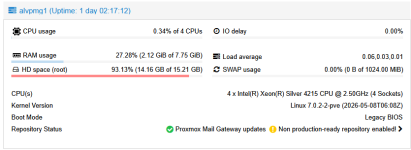
AHallo zusammen, wir haben bei uns ein PM Mailgateway laufen, der uns ein paar Mails von internen Servern an unsere Firewall weitergibt. Nun ist uns aufgefallen, das 93% Speicher von den 16 GB voll sind. Ich muss allerdings zugeben, das wir nach...
-
-
Aawado reacted to UdoB's post in the thread [SOLVED] Kein TOTP-Login mehr möglich nach Zeitfehler with Like.
Du kannst bitte noch diesen Thread auf "Solved" setzen - oben rechts ist ein "Edit thread" button.
-
AAlterSchwede replied to the thread Proxmox Virtual Environment 9.2 available!.Hi, many thanks for the new release. Since PVE 9.0, snapshots on LVM (e.g. on an iSCSI LUN) are supported. This is great because we have migrated from VMware which was connected to a huge iSCSI storage system. Unfortunately, the snapshot feature...
-
Ffranko5 replied to the thread [SOLVED] Console Timeout.Thanks for hint. In my situation this was the problem. Not having a reverse proxy but using <IPv4>:8006 directly. After disabling ipv6 console access works again properly.
-
FLike I said. That probably has nothing to do with Proxmox. Try disabling IPv6 and/or check you DNS.
-
 ggoller reacted to Flocki's post in the thread [SOLVED] SDN Fabric issues since update 9.1.14 with Like.
Figured out the same thing also like 2 minutes ago. There is a file "/etc/sysctl.d/99-proxmox-arp.conf", last modified May, 13th with the following contents: net.ipv4.conf.all.arp_ignore=2 net.ipv4.conf.all.arp_announce=2 Pretty sure I did not...
ggoller reacted to Flocki's post in the thread [SOLVED] SDN Fabric issues since update 9.1.14 with Like.
Figured out the same thing also like 2 minutes ago. There is a file "/etc/sysctl.d/99-proxmox-arp.conf", last modified May, 13th with the following contents: net.ipv4.conf.all.arp_ignore=2 net.ipv4.conf.all.arp_announce=2 Pretty sure I did not... -
UdoB replied to the thread [SOLVED] Kein TOTP-Login mehr möglich nach Zeitfehler.Du kannst bitte noch diesen Thread auf "Solved" setzen - oben rechts ist ein "Edit thread" button.
-
UdoB reacted to awado's post in the thread [SOLVED] Kein TOTP-Login mehr möglich nach Zeitfehler with Like.
Ok, dank KI & OpenCode konnte ich die Ursache jetzt doch selbst finden (lassen): In "/etc/pve/priv/tfa.cfg" wurde der Zugang gesperrt mit …"totp-locked":true… . Wenn man dort das auf "false" setzt, geht es wieder. Ich lass den Post mal so stehen...
-
SSunilkumar reacted to fiona's post in the thread After PVE 8to9 upgrade, unable to check guest fs freeze status with Like.
The status command was not used previously, but that doesn't explain why your guest agent claims the commands are disabled. You can check the commandline the qemu-ga process was invoked with with ps aux | grep qemu-ga. What does cat...
-
SSunilkumar reacted to OhmEye's post in the thread After PVE 8to9 upgrade, unable to check guest fs freeze status with Like.
Looks like it's consistent with the error when run manually: root@redacted:~# qm guest cmd 101 fsfreeze-status { "error" : { "class" : "CommandNotFound", "desc" : "The command guest-fsfreeze-status has been disabled for this...
-
SSunilkumar reacted to fiona's post in the thread After PVE 8to9 upgrade, unable to check guest fs freeze status with Like.
Doesn't seem to be blocked in the config, but 5.0.1 is a rather old version. Does it work if you manually run qm guest cmd 101 fsfreeze-status?
-
SSunilkumar reacted to OhmEye's post in the thread After PVE 8to9 upgrade, unable to check guest fs freeze status with Like.
Thanks for the reply! I admit I hadn't investigated the agent due to it working with no errors for years... root@redacted[~]# qemu-ga -V QEMU Guest Agent 5.0.1 root@redacted[~]# qemu-ga -D [general] daemon=false method=isa-serial...
-
SSunilkumar reacted to OhmEye's post in the thread After PVE 8to9 upgrade, unable to check guest fs freeze status with Like.
Thanks for the reply! I admit I hadn't investigated the agent due to it working with no errors for years... root@redacted[~]# qemu-ga -V QEMU Guest Agent 5.0.1 root@redacted[~]# qemu-ga -D [general] daemon=false method=isa-serial...
-
SSunilkumar reacted to fiona's post in the thread After PVE 8to9 upgrade, unable to check guest fs freeze status with Like.
Hi, what version of the guest agent are you running in the VM? What does qemu-ga -D inside the VM say?