

Hello,
I'm running Proxmox VE 9.2.25 on a two-node cluster with ZFS storage and scheduled VM replication.
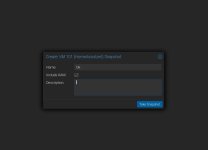
I encountered an issue with VM 101 (Home Assistant) after creating a snapshot using the default GUI settings, which include the VM's RAM state.
The procedure was straightforward:
101-0: start replication job
101-0: guest => VM 101, running => 1856
101-0: volumes => local-zfs:vm-101-disk-0,
local-zfs:vm-101-disk-1,local-zfs:vm-101-state-Ok
101-0: end replication job with error:
No common base snapshot on volume(s) local-zfs:vm-101-state-Ok
Please remove the problematic volume(s) from the replication target or delete and re-create the whole job 101-0
The two virtual disks were replicated normally in previous runs. The problem was caused by the additional VM state volume created by the snapshot.
I eventually resolved the issue by disabling the replication job, removing the snapshot (which I no longer needed), and re-enabling the replication job. Replication then completed successfully.
My questions and suggestions:
I believe a preventive warning, or better integration between snapshot management and replication, would significantly improve the user experience and prevent unnecessary replication failures.
Thank you for your feedback.
I'm running Proxmox VE 9.2.25 on a two-node cluster with ZFS storage and scheduled VM replication.
I encountered an issue with VM 101 (Home Assistant) after creating a snapshot using the default GUI settings, which include the VM's RAM state.
The procedure was straightforward:
- Created a snapshot named Ok using the Proxmox GUI, leaving the default RAM inclusion option enabled.
- Performed a VM update.
- The next scheduled replication job failed with the following error:
101-0: start replication job
101-0: guest => VM 101, running => 1856
101-0: volumes => local-zfs:vm-101-disk-0,
local-zfs:vm-101-disk-1,local-zfs:vm-101-state-Ok
101-0: end replication job with error:
No common base snapshot on volume(s) local-zfs:vm-101-state-Ok
Please remove the problematic volume(s) from the replication target or delete and re-create the whole job 101-0
The two virtual disks were replicated normally in previous runs. The problem was caused by the additional VM state volume created by the snapshot.
I eventually resolved the issue by disabling the replication job, removing the snapshot (which I no longer needed), and re-enabling the replication job. Replication then completed successfully.
My questions and suggestions:
- Is this behaviour expected when creating a snapshot with RAM enabled on a VM configured for ZFS replication?
- Why doesn't Proxmox automatically handle or exclude the temporary VM state volume from replication?
- Could the snapshot creation dialog detect an existing replication job and warn the administrator that including RAM may cause subsequent replication failures?
- Could this limitation be documented more explicitly?
I believe a preventive warning, or better integration between snapshot management and replication, would significantly improve the user experience and prevent unnecessary replication failures.
Thank you for your feedback.
Attachments
Last edited:

 ).
