Hello,
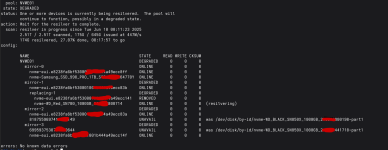
I had a drive disappear from my ZFS pool (1 failed drive), so I decided to replace it. After the replacement, I rebooted the system and the pool came online successfully. However, when I ran zpool status to list all pools and disks, I noticed that two of the disks were not recognized by their IDs, even though I originally created the pool using /dev/disk/by-id (these were not the drives with the error but 2 different ones). (ZFS can still see the disk but not by their ids and it shows the error/warning "was /dev/disk/by-id/diskID") see image as reference
The pool still appears to function correctly
What can I do about this?
Any input is appreciated.
Thanks
I had a drive disappear from my ZFS pool (1 failed drive), so I decided to replace it. After the replacement, I rebooted the system and the pool came online successfully. However, when I ran zpool status to list all pools and disks, I noticed that two of the disks were not recognized by their IDs, even though I originally created the pool using /dev/disk/by-id (these were not the drives with the error but 2 different ones). (ZFS can still see the disk but not by their ids and it shows the error/warning "was /dev/disk/by-id/diskID") see image as reference
The pool still appears to function correctly
What can I do about this?
Any input is appreciated.
Thanks