ZFS - Massive Pool Fragmentation

Nov 25, 2023
32
7
13
I have a pool made up of 4x NVMe drives, each with a capacity of 960GB, and two VDEVS each with a two-way mirror. The filesystem containing my VMs have a record size property of 64k, while the pool's ashift size is 12. Other than the massive fragmentation the pool is showing, I see a pretty startling disparity between what is showing as "free" capacity at the pool level, and what is "free" at the file system level. In this instance, I trust what the filesystem allocation stats show, because I have tested the capacity limits with a failed VM migration that exceeded available capacity of 23.G.

I am assuming that this disparity is owed to the high fragmenation, and if so, I am at a loss to explain the severity of the fragmentation. Its a fairly new pool, less that a few months old, very little data churn, and the bulk of the heavier IO has been migrating VMs off of a legacy ESXi host onto the new Promox host. Having said that, I have had a pretty low success rate importing the VMS due to various IO related errors (presumably on the ESXI side).

I have never seen this degree of fragmentation before on ZFS, nor the disparity in reported available capacity, so I am at a loss as to what might be behind these issues. Note that I have already ran a manual trim job and that autotrim is set to its default of off.

To resolve the current fragmentation issue, I can backup and recreate the pool to take care of the fragmentation, but until I know what is causing this, I won't bother.

root@pve0:~# zpool list
NAME SIZE ALLOC FREE CKPOINT EXPANDSZ FRAG CAP DEDUP HEALTH ALTROOT
pve0-pool1 1.73T 546G 1.20T - - 42% 30% 1.00x ONLINE -

root@pve0:~# zfs list pve0-pool1/vm
NAME USED AVAIL REFER MOUNTPOINT
pve0-pool1/vm 1.66T 23.5G 96K /pve0-pool1/vm
 
Please share this in code blocks
Bash:
lsblk -e230 -o+FSTYPE,LABEL,MODEL
zpool status -vtLP
zfs list -tall -ospace,quota,refquota refreservation,volblocksize,recordsize
 
Last edited:
Sure, thank you.

Bash:
[CODE]lsblk -e230 -o+FSTYPE,LABEL,MODEL
NAME         MAJ:MIN RM   SIZE RO TYPE MOUNTPOINTS FSTYPE      LABEL      MODEL
sda            8:0    0 447.1G  0 disk                                    MTFDDAK480TGB-1BC1ZABDA
sdb            8:16   0 447.1G  0 disk                                    MTFDDAK480TGB-1BC1ZABDA
nvme0n1      259:0    0 894.3G  0 disk                                    Dell DC NVMe ISE 7450 RI U.2 960GB
├─nvme0n1p1  259:1    0 894.2G  0 part             zfs_member  pve0-pool1
└─nvme0n1p9  259:2    0     8M  0 part
nvme4n1      259:3    0 894.3G  0 disk                                    Dell DC NVMe ISE 7450 RI U.2 960GB
├─nvme4n1p1  259:9    0 894.2G  0 part             zfs_member  pve0-pool1
└─nvme4n1p9  259:10   0     8M  0 part
nvme5n1      259:4    0 894.3G  0 disk                                    Dell DC NVMe ISE 7450 RI U.2 960GB
nvme2n1      259:5    0 894.3G  0 disk                                    Dell DC NVMe ISE 7450 RI U.2 960GB
├─nvme2n1p1  259:14   0 894.2G  0 part             zfs_member  pve0-pool1
└─nvme2n1p9  259:15   0     8M  0 part
nvme1n1      259:6    0 894.3G  0 disk                                    Dell DC NVMe ISE 7450 RI U.2 960GB
├─nvme1n1p1  259:16   0 894.2G  0 part             zfs_member  pve0-pool1
└─nvme1n1p9  259:17   0     8M  0 part
nvme3n1      259:8    0 953.8G  0 disk                                    Dell BOSS-N1
├─nvme3n1p1  259:11   0  1007K  0 part
├─nvme3n1p2  259:12   0     1G  0 part /boot/efi   vfat
└─nvme3n1p3  259:13   0   952G  0 part             LVM2_member
  ├─pve-swap 252:0    0    16G  0 lvm  [SWAP]      swap
  └─pve-root 252:1    0    96G  0 lvm  /           xfs
[/CODE]

Bash:
root@pve0:~# zpool status -vtLP
  pool: pve0-pool1
 state: ONLINE
  scan: scrub repaired 0B in 00:06:19 with 0 errors on Sat Jul 11 10:34:54 2026
config:


        NAME                STATE     READ WRITE CKSUM
        pve0-pool1          ONLINE       0     0     0
          mirror-0          ONLINE       0     0     0
            /dev/nvme0n1p1  ONLINE       0     0     0  (100% trimmed, completed at Sat Jul 11 10:08:55 2026)
            /dev/nvme1n1p1  ONLINE       0     0     0  (100% trimmed, completed at Sat Jul 11 10:08:55 2026)
          mirror-1          ONLINE       0     0     0
            /dev/nvme2n1p1  ONLINE       0     0     0  (100% trimmed, completed at Sat Jul 11 10:08:54 2026)
            /dev/nvme4n1p1  ONLINE       0     0     0  (100% trimmed, completed at Sat Jul 11 10:08:54 2026)


errors: No known data errors

r
Bash:
oot@pve0:~# zfs list -tall -ospace,refreservation,volblocksize
NAME                                               AVAIL   USED  USEDSNAP  USEDDS  USEDREFRESERV  USEDCHILD  REFRESERV  VOLBLOCK
pve0-pool1                                         23.6G  1.66T        0B     96K             0B      1.66T       none         -
pve0-pool1/base-102-disk-0                         23.6G  6.06M        8K     64K          5.99M         0B         6M       16K
pve0-pool1/base-102-disk-0@__base__                    -     8K         -       -              -          -          -         -
pve0-pool1/vm                                      23.6G  1.66T        0B     96K             0B      1.66T       none         -
pve0-pool1/vm-101-disk-0                           23.6G     6M        0B     64K          5.94M         0B         6M       16K
pve0-pool1/vm/base-102-disk-0                      55.7G  33.8G        8K   1.68G          32.1G         0B      32.1G       64K
pve0-pool1/vm/base-102-disk-0@__base__                 -     8K         -       -              -          -          -         -
pve0-pool1/vm/vm-100-disk-0                        27.1G  4.02G        0B    437M          3.60G         0B      4.02G       64K
pve0-pool1/vm/vm-100-disk-1                        23.6G  6.12M      128K     64K          5.94M         0B         6M       64K
pve0-pool1/vm/vm-100-disk-1@pre_config_restore         -    64K         -       -              -          -          -         -
pve0-pool1/vm/vm-100-disk-1@post_restore_snapshot      -    64K         -       -              -          -          -         -
pve0-pool1/vm/vm-100-disk-2                         360G   734G      149G    249G           336G         0B       502G       64K
pve0-pool1/vm/vm-100-disk-2@pre_config_restore         -  4.64G         -       -              -          -          -         -
pve0-pool1/vm/vm-100-disk-2@post_restore_snapshot      -  3.75G         -       -              -          -          -         -
pve0-pool1/vm/vm-100-disk-3                        27.1G  4.02G        0B    437M          3.60G         0B      4.02G       64K
pve0-pool1/vm/vm-100-disk-4                        27.6G  4.45G      856K    437M          4.02G         0B      4.02G       64K
pve0-pool1/vm/vm-100-disk-4@pre_config_restore         -   496K         -       -              -          -          -         -
pve0-pool1/vm/vm-100-disk-4@post_restore_snapshot      -   344K         -       -              -          -          -         -
pve0-pool1/vm/vm-100-state-post_restore_snapshot   50.6G  32.6G        0B   5.57G          27.0G         0B      32.6G       64K
pve0-pool1/vm/vm-100-state-pre_config_restore      52.3G  32.6G        0B   3.85G          28.8G         0B      32.6G       64K
pve0-pool1/vm/vm-101-disk-0                        40.8G  32.1G        0B   14.9G          17.2G         0B      32.1G       64K
pve0-pool1/vm/vm-103-disk-0                        27.3G  4.02G        0B    281M          3.75G         0B      4.02G       64K
pve0-pool1/vm/vm-103-disk-1                         521G   502G        0B   4.69G           497G         0B       502G       64K
pve0-pool1/vm/vm-104-disk-0                        69.7G  80.3G        0B   34.1G          46.2G         0B      80.3G       64K
pve0-pool1/vm/vm-105-disk-0                        23.6G     3M        0B    136K          2.87M         0B         3M       64K
pve0-pool1/vm/vm-105-disk-1                        57.5G  45.2G        0B   11.2G          33.9G         0B      45.2G       64K
pve0-pool1/vm/vm-105-disk-2                        23.6G     6M        0B     64K          5.94M         0B         6M       64K
pve0-pool1/vm/vm-106-disk-0                        51.7G  45.2G        0B   17.0G          28.2G         0B      45.2G       64K
pve0-pool1/vm/vm-107-disk-0                        51.5G  32.1G        0B   4.20G          27.9G         0B      32.1G       64K
pve0-pool1/vm/vm-108-disk-0                        41.8G  40.2G        0B   21.9G          18.2G         0B      40.2G       64K
pve0-pool1/vm/vm-109-disk-0                        42.3G  45.2G        0B   26.4G          18.7G         0B      45.2G       64K
pve0-pool1/vm/vm-110-disk-0                        48.5G  25.1G        0B    140M          25.0G         0B      25.1G       64K

 
I think it comes down to refreservation here. See here how to fix it for current vdisks: https://forum.proxmox.com/threads/storage-usage.167052/#post-776013
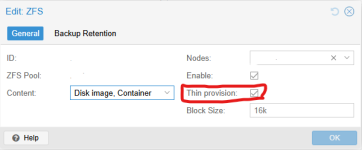
Why? Because you didn't enable Thin Provisioning for the ZFS storage. Enable it so future vdisks have it too
1783801467300.png
VM 100 also has snapshots using some space.
As far as I know fragmentation doesn't affect data like this. Or in other words you can't see it in outputs like this.
 
Last edited:
  • Like
Reactions: UdoB and Johannes S
Ah yes, I thought it might have something to do with refreservation but because I did not intentionally configure that on any of my filesystems I hadn't made the connection, but knowing that the thin-provisioning global feature is directly tied to this now makes sense.

But how does any of this explain the severe fragmentations?

Assuming that I do migrate my existing pool to a temp pool and then destroy, recreate and migrate it back, what are the steps for bringing my VMs back online? Is there any VMware "Add to Inventory" equivalent on Proxmox?

Thanks in advance.
 
But how does any of this explain the severe fragmentations?
It is normal and expected.

The fundamental nature of a Copy-on-Write filesystem is to place modified data inside a large file onto another sector than before --> another segment is born every time.

And just to clarify: FRAG does not tell the fragmentation of the stored data but of the free space.

(( Just looked at my own Homelab: the PVE OS rpool shows 20% while my VM-datapools show up to 67 percent FRAG with only 33% used ... ))
 
Last edited:
  • Like
Reactions: Johannes S and news
Yes I understand the design goals and principles behind copy-on-write file systems, I was just astonished that in so little time, with so little use, the fragmentation level was off the charts. My experience with ZFS has been almost exclusively been with file-based workloads, where fragmentation levels really only accrue over long timelines, when capacity starts to run low. My exposure to zvols is pretty recent.