

I've just had to restore some VMs on PVE due to power outage creating some corruption on my local-lvm array.
When I restored the PBS VM from a recent backup, I noticed a lot of breakages (since fixed), with apparmor not allowing dhclient, python being broken and upgrades not working.
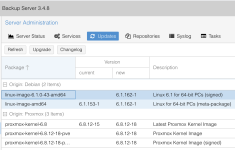
But one of my primary concerns (and causing the package upgrade failures) was that plain linux-kernel was installed from the Debian repos (installing the proxmox-kernel fixed a lot of things).
I have no idea how this got installed, and still lists as an available package install / upgrade. This has been a long-running instance of PBS, installed originally via the PBS installer.
Any ideas how the wrong kernel got installed, and how I can prevent it from being captured in upcoming upgrades?
When I restored the PBS VM from a recent backup, I noticed a lot of breakages (since fixed), with apparmor not allowing dhclient, python being broken and upgrades not working.
But one of my primary concerns (and causing the package upgrade failures) was that plain linux-kernel was installed from the Debian repos (installing the proxmox-kernel fixed a lot of things).
I have no idea how this got installed, and still lists as an available package install / upgrade. This has been a long-running instance of PBS, installed originally via the PBS installer.
Any ideas how the wrong kernel got installed, and how I can prevent it from being captured in upcoming upgrades?
Last edited:

