

Hi,
I recently boldly tried to add an ACME account to my homelab that is not exposed to the internet and after trying to clean up the last few bits, I tried to reissue the Self Signed Certficate using:
As Described in the Documentation and in this Forum Post.
Issue is, after the whole Self Signed SSL thing working again, when I go to my standalone node > System > Certificates, I see a wrong IP next to my correct local DNS names.
Image of "Certificates" Page in the Web-UI:
Output of "pvenode cert info"
Note:
My Hostname configs are all checked, my network config also doesnt show any sort of IP starting with "78.XXX" (checked in "/etc/network/interfaces"), my coronsync is not showing it either. "resolve.conf" is not showing anything suspicious either...
I used ACME with the Namecheap integration and as it seems, my public IP from somewhere. - I deleted the ACME Account, Challange Plugin and so on in "Datacenter > ACME"
Did anybody else run into this so far? What can I do about it?
The worst thing is, that I use this Node in production and wanted to add it as the Main node of a new Cluster (with total of 3 Nodes), somehow, it however picks this Public IP instead of my local one (or the Hostname)...
Any help appreciated
I recently boldly tried to add an ACME account to my homelab that is not exposed to the internet and after trying to clean up the last few bits, I tried to reissue the Self Signed Certficate using:
Code:
pvecm updatecerts -fIssue is, after the whole Self Signed SSL thing working again, when I go to my standalone node > System > Certificates, I see a wrong IP next to my correct local DNS names.
Image of "Certificates" Page in the Web-UI:
The IP beginning with "78.xx.xx.xx" was one of my public IP's - this is the wrong one
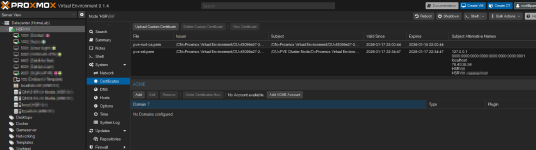
Output of "pvenode cert info"
Code:
root@HSRV01:/usr/share/proxmox-acme# pvenode cert info
┌─────────────────┬──────────────────────────────────────────────────────────────────────────────────────────────────┐
│ filename        │ pve-root-ca.pem                                                                                  │
├─────────────────┼──────────────────────────────────────────────────────────────────────────────────────────────────┤
│ fingerprint     │ 34:C1:ED:F3:C1:DA:FD:0C:13:A2:CF:86:XX:XX:XX:XX:XX:XX:XX:XX:XX:XX:XX:XX:XX:XX:XX:XX:XX:XX:XX:XX │
├─────────────────┼──────────────────────────────────────────────────────────────────────────────────────────────────┤
│ subject         │ /CN=Proxmox Virtual Environment/OU=f3099e27-2e98-4bfb-8baf-be16287120b2/O=PVE Cluster Manager CA │
├─────────────────┼──────────────────────────────────────────────────────────────────────────────────────────────────┤
│ issuer          │ /CN=Proxmox Virtual Environment/OU=f3099e27-2e98-4bfb-8baf-be16287120b2/O=PVE Cluster Manager CA │
├─────────────────┼──────────────────────────────────────────────────────────────────────────────────────────────────┤
│ notbefore       │ 2026-01-17 22:00:44                                                                              │
├─────────────────┼──────────────────────────────────────────────────────────────────────────────────────────────────┤
│ notafter        │ 2036-01-15 22:00:44                                                                              │
├─────────────────┼──────────────────────────────────────────────────────────────────────────────────────────────────┤
│ public-key-type │ rsaEncryption                                                                                    │
├─────────────────┼──────────────────────────────────────────────────────────────────────────────────────────────────┤
│ public-key-bits │ 4096                                                                                             │
├─────────────────┼──────────────────────────────────────────────────────────────────────────────────────────────────┤
│ san             │ []                                                                                               │
└─────────────────┴──────────────────────────────────────────────────────────────────────────────────────────────────┘
┌─────────────────┬──────────────────────────────────────────────────────────────────────────────────────────────────┐
│ filename        │ pve-ssl.pem                                                                                      │
├─────────────────┼──────────────────────────────────────────────────────────────────────────────────────────────────┤
│ fingerprint     │ 8E:9A:86:75:F9:0B:2C:D1:FE:8C:78:63:19:32:CF:66:48:CC:06:0F:D4:90:XX:XX:XX:XX:XX:XX:XX:XX:XX:XX  │
├─────────────────┼──────────────────────────────────────────────────────────────────────────────────────────────────┤
│ subject         │ /OU=PVE Cluster Node/O=Proxmox Virtual Environment/CN=HSRV01.waessa.host                         │
├─────────────────┼──────────────────────────────────────────────────────────────────────────────────────────────────┤
│ issuer          │ /CN=Proxmox Virtual Environment/OU=f3099e27-2e98-4bfb-8baf-be16287120b2/O=PVE Cluster Manager CA │
├─────────────────┼──────────────────────────────────────────────────────────────────────────────────────────────────┤
│ notbefore       │ 2026-01-17 22:34:47                                                                              │
├─────────────────┼──────────────────────────────────────────────────────────────────────────────────────────────────┤
│ notafter        │ 2028-01-17 22:34:47                                                                              │
├─────────────────┼──────────────────────────────────────────────────────────────────────────────────────────────────┤
│ public-key-type │ rsaEncryption                                                                                    │
├─────────────────┼──────────────────────────────────────────────────────────────────────────────────────────────────┤
│ public-key-bits │ 2048                                                                                             │
├─────────────────┼──────────────────────────────────────────────────────────────────────────────────────────────────┤
│ san             │ - 127.0.0.1                                                                                      │
│                 │ - 0000:0000:0000:0000:0000:0000:0000:0001                                                        │
│                 │ - localhost                                                                                      │
│                 │ - 78.XXX.XXX.XXX                                                                                    │
│                 │ - HSRVXXXX                                                                                         │
│                 │ - HSRVXXXX.domain.tld                                                                             │
└─────────────────┴──────────────────────────────────────────────────────────────────────────────────────────────────┘
Note:
My Hostname configs are all checked, my network config also doesnt show any sort of IP starting with "78.XXX" (checked in "/etc/network/interfaces"), my coronsync is not showing it either. "resolve.conf" is not showing anything suspicious either...
I used ACME with the Namecheap integration and as it seems, my public IP from somewhere. - I deleted the ACME Account, Challange Plugin and so on in "Datacenter > ACME"
Did anybody else run into this so far? What can I do about it?
The worst thing is, that I use this Node in production and wanted to add it as the Main node of a new Cluster (with total of 3 Nodes), somehow, it however picks this Public IP instead of my local one (or the Hostname)...
Any help appreciated
On my Second note (not the one I need help with) I changed my local IP - this was resolvable by checking the hosts file, updating this one with correct IP and then reissuing the certificate. I just dont get, why ProxMox is trying to use my Public IP that is shown nowhere else for the Main Node... It must be a setting somewhere I don't see right now
Last edited: