

Hi everyone,
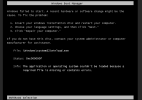
I am encountering an issue while creating a Windows VM on Proxmox using a raw disk image. The VM fails to start, and I get the error code 0xc00000f, with the message "Windows failed to start". I’ve tried troubleshooting, but the problem persists.
Here are the details of my setup and configuration:
If anyone has encountered this issue or has any insights into what might be causing it, I would really appreciate your help!
Thanks in advance.
I am encountering an issue while creating a Windows VM on Proxmox using a raw disk image. The VM fails to start, and I get the error code 0xc00000f, with the message "Windows failed to start". I’ve tried troubleshooting, but the problem persists.
Here are the details of my setup and configuration:
- Proxmox Version:
- proxmox-ve: 7.4-1 (running kernel: 5.15.116-1-pve)
- pve-manager: 7.4-16 (running version: 7.4-16/0f39f621)
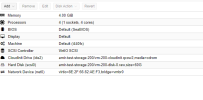
- VM hardware Configuration:
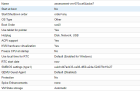
- Options:
- Error page:
If anyone has encountered this issue or has any insights into what might be causing it, I would really appreciate your help!
Thanks in advance.


