Why does PVE 8.4.16 LXC Console show "Connected" but remain a black screen?

Oct 14, 2025
83
23
8
Hi everyone, I'm encountering a strange LXC issue on Proxmox VE 8.4.16. I have several containers running, and the WebUI Console used to work perfectly. However, one day, the console for CT 109 suddenly went pitch black. It shows "Connected" at the top, but no matter what I type or if I hit Enter, there's no response.
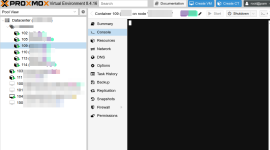
2026-03-10_12-45 console.png

What's weird is that all other CTs are working fine. Also, if I run pct enter 109 from the host node's shell, I can access and manage the system without any issues. This means the container's OS is running fine, but the WebUI terminal display is just not coming through.

2026-03-10_12-46 ts.png

Has anyone experienced this? How can I get the console display back?
 
Hi everyone, I'm encountering a strange LXC issue on Proxmox VE 8.4.16. I have several containers running, and the WebUI Console used to work perfectly. However, one day, the console for CT 109 suddenly went pitch black. It shows "Connected" at the top, but no matter what I type or if I hit Enter, there's no response.

View attachment 96406

What's weird is that all other CTs are working fine. Also, if I run pct enter 109 from the host node's shell, I can access and manage the system without any issues. This means the container's OS is running fine, but the WebUI terminal display is just not coming through.

View attachment 96408

Has anyone experienced this? How can I get the console display back?
In LXC Options, set console mode to /dev/console ; then do a full shutdown of the LXC and reboot
 
  • Like
Reactions: pulipulichen
can you post the config of the container?

Code:
pct config 109
Sure, here is the configuration for container 109:
root@pve:~# pct config 109
arch: amd64
cores: 4
description: ***
features: nesting=1
hostname: dama
memory: 4096
mp0: Data:subvol-109-disk-1,mp=/no-backup,backup=1,size=8G
nameserver: 192.168.50.1
net0: name=eth0,bridge=internal,firewall=1,hwaddr=BC:24:11:ED:B1:D4,ip=dhcp,type=veth
onboot: 1
ostype: centos
rootfs: Data:subvol-109-disk-0,size=8G
swap: 0
unprivileged: 1
Code:
And here is the OS information from inside the container:
[root@ct109 ~]# cat /etc/os-release
NAME="Rocky Linux"
VERSION="9.6 (Blue Onyx)"
ID="rocky"
ID_LIKE="rhel centos fedora"
VERSION_ID="9.6"
PLATFORM_ID="platform:el9"
PRETTY_NAME="Rocky Linux 9.6 (Blue Onyx)"
ANSI_COLOR="0;32"
LOGO="fedora-logo-icon"
CPE_NAME="cpe:/o:rocky:rocky:9::baseos"
HOME_URL="[https://rockylinux.org/](https://rockylinux.org/)"
VENDOR_NAME="RESF"
VENDOR_URL="[https://resf.org/](https://resf.org/)"
BUG_REPORT_URL="[https://bugs.rockylinux.org/](https://bugs.rockylinux.org/)"
SUPPORT_END="2032-05-31"
ROCKY_SUPPORT_PRODUCT="Rocky-Linux-9"
ROCKY_SUPPORT_PRODUCT_VERSION="9.6"
REDHAT_SUPPORT_PRODUCT="Rocky Linux"
REDHAT_SUPPORT_PRODUCT_VERSION="9.6"
Code:
It is a Rocky Linux 9.6 (unprivileged) container. Let me know if you need any other logs or information.
 
In LXC Options, set console mode to /dev/console ; then do a full shutdown of the LXC and reboot

2026-03-11_09-19.png

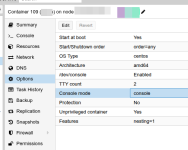
Thank you for the suggestion. I have updated the Console mode to console as you recommended (please see the attached screenshot). I performed a full shutdown of the CT and then rebooted it, but unfortunately, the console still remains unresponsive/black after connecting.

It is worth noting that my other containers are working perfectly fine with the Default (tty) setting. This specific container is running Rocky Linux—could there be a specific configuration within the OS or the PVE options that I might have missed for this type of setup?