

What is the difference between the assignment of the network in proxmox 3 and 5?

Walfrid

New Member
Sep 8, 2014
10
0
1
Hello,
I try to create the same thing than my server proxmox 3 on proxmox 5. But I'm not able to do the same thing.

My Vz 'ref-101' on proxmox 3 have this ip 192.168.101.1 (work fine)
My Vz 'ref-102' on proxmox 3 have this ip 192.168.102.1 (work fine)

I want the same ip on my LXC on another server on Proxmox 5.

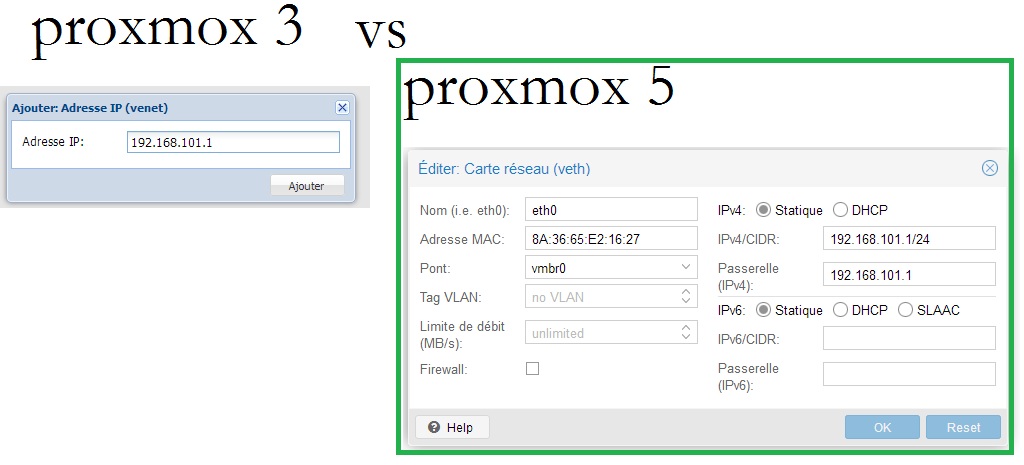
Before on proxmox 3 I give just the ip and it's done,(simple). Now on Proxmox 5 it requires information that I do not know. Can someone explain to me how I should complet it whitout error?
aa10.jpg


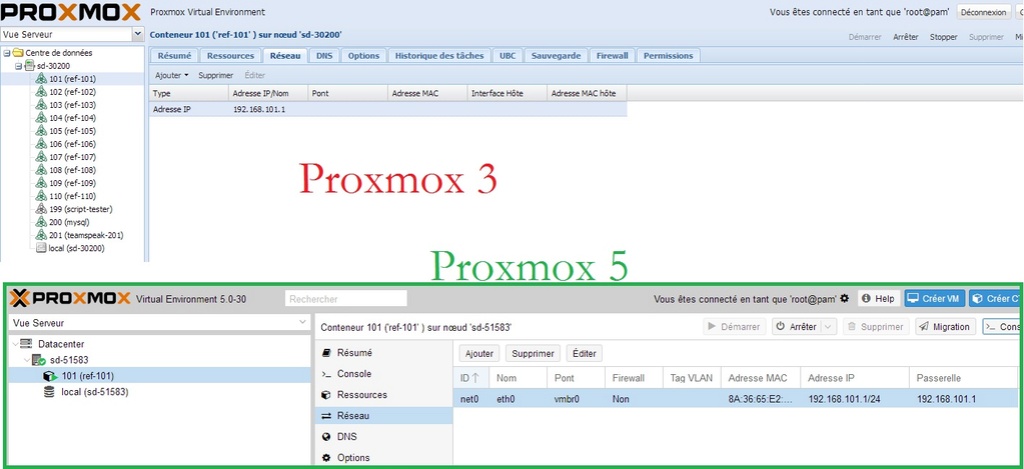
Some exemple of the configuration I have for ref-101 on proxmox 3 and proxmox 5 (green)
how_co11.jpg


Rules iptable:


# ref- 101
# 109.12.32.200 ==> false private ip
iptables -t nat -A PREROUTING -s 109.12.32.200 -i vmbr0 -p tcp --dport 22101 -j DNAT --to-destination 192.168.101.1:22

With that I join the console ssh of ref-101 with the ip of proxmox 3 on the port 22101.

Informations optional:

+I have all my projects running on proxmox 3 for 4 years.
+I have a single ip address for everything.
+I rented a server with proxmox 5 to learn and test. And made a copy of my projects to find out if it is compatible and better.

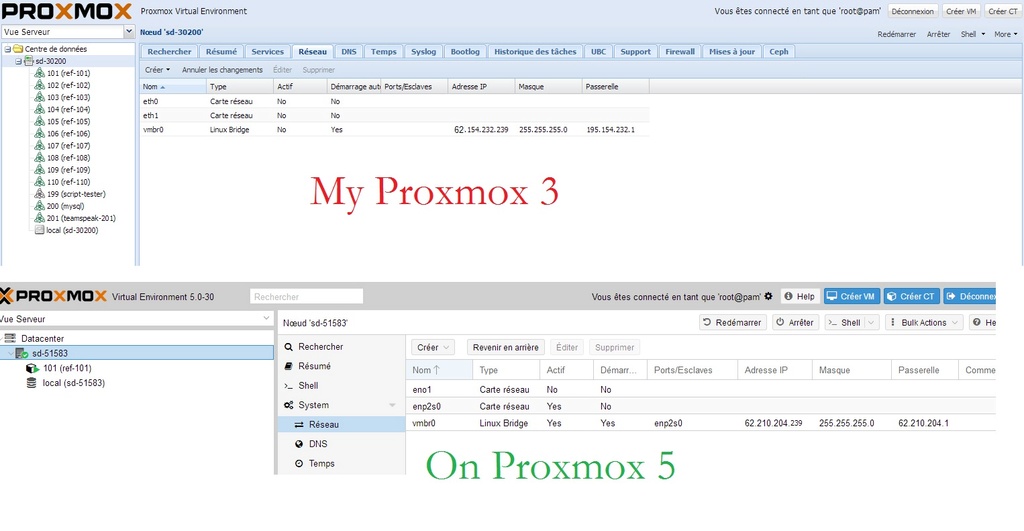
+ Screenshot of Network interface of my two proxmox's
proxre10.jpg
 
Last edited:
What is your error message? Where are you stuck?
PVE 5 has the firewall configuration build into the GUI and CLI.
 
  • Like
Reactions: Walfrid
Hello,

My problem is, I want access on the ssh with putty Like I do on proxmox 3.

The error I have on putty is : Network error: Connection Timed out
 
Besides IP address and gateway you can leave options blank. Also are your containers working without the firewall settings?
 
Sorry for the delay. I have some problems. Now I'm back to work on this problem. I use a firewall. I exported my firewall(iptable setting) of proxmox 3 to proxmox 5. I just edited the ip of the server proxmox.
 
I have not progressed since. This is the configuration of my current server on proxmox3 all work fine with this one. I would like export this on proxmox 5.

My current Server Proxmox 3 (All work fine) ip: xxx.xxx.xxx.xxx

Gameserver1 public ip= xxx.xxx.xxx.xxx:27001 /ip local= 192.168.1.1:27015
Gameserver2 public ip= xxx.xxx.xxx.xxx:27002 /ip local= 192.168.1.2:27015
Gameserver3 public ip= xxx.xxx.xxx.xxx:27003 /ip local= 192.168.1.3:27015
Webserver public ip= xxx.xxx.xxx.xxx:80 /ip local 192.168.1.200:22280
└Service Mysql public ip= xxx.xxx.xxx.xxx:27115 /ip local 192.168.1.200:3306

iptable of proxmox 3: /etc/init.d/firewall
#Gameserver1:

iptables -t nat -A PREROUTING -i vmbr0 -p udp --dport 27001 -j DNAT --to-destination 192.168.1.1
#SSH:
iptables -t nat -A PREROUTING -s "$ipofmyhometoallowonlyme" -i vmbr0 -p tcp --dport 22101 -j DNAT --to-destination 192.168.1.1:22
#Gameserver2:
iptables -t nat -A PREROUTING -i vmbr0 -p udp --dport 27002 -j DNAT --to-destination 192.168.1.2
#SSH:
iptables -t nat -A PREROUTING -s "$ipofmyhometoallowonlyme" -i vmbr0 -p tcp --dport 22102 -j DNAT --to-destination 192.168.1.2:22
#Gameserver3:
iptables -t nat -A PREROUTING -i vmbr0 -p udp --dport 27003 -j DNAT --to-destination 192.168.1.3
#SSH:
iptables -t nat -A PREROUTING -s "$ipofmyhometoallowonlyme" -i vmbr0 -p tcp --dport 22103 -j DNAT --to-destination 192.168.1.3:22
#Mysql+Webserver:
iptables -t nat -A PREROUTING -i vmbr0 -p tcp --dport 22280 -j DNAT --to-destination 192.168.1.200:80
iptables -t nat -A PREROUTING -i vmbr0 -p tcp --dport 22281 -j DNAT --to-destination 192.168.1.200:81
#Requet MYSQL
iptables -t nat -A PREROUTING -s "$myipprivate" -i vmbr0 -p tcp --dport 27115 -j DNAT --to-destination 192.168.1.200:3306
#port ssh
iptables -t nat -A PREROUTING -s "$myipprivate" -i vmbr0 -p tcp --dport 22200 -j DNAT --to-destination 192.168.1.200:22
#NAT IP
iptables -t nat -A POSTROUTING -o vmbr0 -j SNAT --to-source xxx.xxx.xxx.xxx

________________
/etc/network/interfaces

auto lo
iface lo inet loopback
iface eth0 inet manual
iface eth1 inet manual

auto vmbr0
iface vmbr0 inet static
address xxx.xxx.xxx.xxx
netmask 255.255.255.0
gateway xxx.xxx.xxx.1
bridge_ports eth0
bridge_stp off
bridge_fd 0

post-up echo 1 > /etc/sysctl.conf

_____________________________________PROXMOX5__________________________________________
If it's possible in same time I would like hide the ip of my server on proxmox5 xxx.xxx.xxx.xxx with a ip failover. Like this

New server Proxmox 5 ip: xxx.xxx.xxx.xxx + Ip failover install: fff.fff.fff.fff
Proxy on Debian 9+Apache(for the https website) public ip= fff.fff.fff.fff:80 /ip local 192.168.1.200:22280
Gameserver1 public ip= fff.fff.fff.fff:27001 /ip local= 192.168.1.1:27015
Gameserver2 public ip= fff.fff.fff.fff:27002 /ip local= 192.168.1.2:27015
Gameserver3 public ip= fff.fff.fff.fff:27003 /ip local= 192.168.1.3:27015
Webserver public ip= fff.fff.fff.fff:80 /ip local 192.168.1.200:22280
└Service Mysql public ip= fff.fff.fff.fff:27115 /ip local 192.168.1.200:3306