20+ servers with tdp_mmu=N and no crashes, definitely other problem.


VM shutdown, KVM: entry failed, hardware error 0x80000021
- Thread starter tzzz90
- Start date
You are using an out of date browser. It may not display this or other websites correctly.
You should upgrade or use an alternative browser.
You should upgrade or use an alternative browser.


Shutting themselves down or crashing withKVM: entry failed, hardware error 0x80000021are two quite different things, if the PVE host's kernel log doesn't show said error it is definitively another issue and should go in its own thread.
Apologies I should have been more specific defo crashing:
root@prox-lab-host-01:~# uname -a
Linux prox-lab-host-01 5.15.39-1-pve #1 SMP PVE 5.15.39-1 (Wed, 22 Jun 2022 17:22:00 +0200) x86_64 GNU/Linux
root@prox-lab-host-01:~# cat /etc/kernel/cmdline
root=ZFS=rpool/ROOT/pve-1 boot=zfs quiet intel_iommu=on iommu=pt options kvm tdp_mmu=N
root@prox-lab-host-01:~# cat /var/log/syslog | grep 0x80000021
Jul 19 11:48:48 prox-lab-host-01 QEMU[6807]: KVM: entry failed, hardware error 0x80000021
root@prox-lab-host-02:~# cat /var/log/syslog | grep 0x80000021
Jul 18 15:52:54 prox-lab-host-02 QEMU[43162]: KVM: entry failed, hardware error 0x80000021
Last edited:
What type of CPU? It works on aBad news - over the last few days i have had 3 separate instances of win 2022 vms & 1 win 11 vm shutting themselves down with tdp_mmu=N configured on my lab 3 node cluster running kernel 5.15.39-1.
Going to repin kernel 5.13 for now
Intel(R) Xeon(R) CPU E5-2660 v2 at least, on Linux 5.15.35-2-pve #1 SMP PVE 5.15.35-5 (Wed, 08 Jun 2022 15:02:51 +0200) x86_64 GNU/Linux.
My lab hosts are all single socket Intel Xeon E-2186G (12) @ 4.700GHzWhat type of CPU? It works on aIntel(R) Xeon(R) CPU E5-2660 v2at least, on
Linux 5.15.35-2-pve #1 SMP PVE 5.15.35-5 (Wed, 08 Jun 2022 15:02:51 +0200) x86_64 GNU/Linux.
"echo "options kvm tdp_mmu=N" >/etc/modprobe.d/kvm-disable-tdp-mmu.conf" added here as instructed at https://pve.proxmox.com/mediawiki/i...ldid=11400#Older_Hardware_and_New_5.15_Kernel
running Win11 on Xeon E5-2620 v3 with Linux 5.15.39-1-pve and no issues so far. Looking good. (fingers crossed, knock on the wood etc)
running Win11 on Xeon E5-2620 v3 with Linux 5.15.39-1-pve and no issues so far. Looking good. (fingers crossed, knock on the wood etc)
I came across an interesting discovery. I have 2 Proxmox servers with identical CPUs, one had Windows 2022 server VMs randomly crashing on it, sometimes happening a few times a day. I updated that one with tdp_mmu=N and the crashes stopped. A few weeks later, I needed to migrate the VMs from that server to another one, which happened to have the same identical CPU, but this Proxmox server didn't have the ttdp_mmu=N option set. What's interesting is, the VMs have been running stable without any crashes for a few weeks now on this new Proxmox server.
The only difference between the 2 servers is that one was upgraded to Proxmox v7 from v6, while the other was a brand new install of v7. The one upgraded from v6 had random crashes happening. I was puzzled by the difference but was surprised to find everything is running ok, and running well, on the brand new install of v7 without tdp_mmu=N set. I'm not sure why, but that's what I found
The only difference between the 2 servers is that one was upgraded to Proxmox v7 from v6, while the other was a brand new install of v7. The one upgraded from v6 had random crashes happening. I was puzzled by the difference but was surprised to find everything is running ok, and running well, on the brand new install of v7 without tdp_mmu=N set. I'm not sure why, but that's what I found
Last edited:
I agree with you.
We have a Huawei h1288V3(c612) server in company.I can't install pve7 with iso installer, So,I had installed 5.4 and upgrade to 7.0. In four months, it works well.
Yesterday,I upgraded to 7.1 and recived this error.
The same as you. I have two home server which has new installed 7.1 and runing well.
We have a Huawei h1288V3(c612) server in company.I can't install pve7 with iso installer, So,I had installed 5.4 and upgrade to 7.0. In four months, it works well.
Yesterday,I upgraded to 7.1 and recived this error.
The same as you. I have two home server which has new installed 7.1 and runing well.
I came across an interesting discovery. I have 2 Proxmox servers with identical CPUs, one had Windows 2022 server VMs randomly crashing on it, sometimes happening a few times a day. I updated that one with tdp_mmu=N and the crashes stopped. A few weeks later, I needed to migrate the VMs from that server to another one, which happened to have the same identical CPU, but this Proxmox server didn't have the ttdp_mmu=N option set. What's interesting is, the VMs have been running stable without any crashes for a few weeks now on this new Proxmox server.
The only difference between the 2 servers is that one was upgraded to Proxmox v7 from v6, while the other was a brand new install of v7. The one upgraded from v6 had random crashes happening. I was puzzled by the difference but was surprised to find everything is running ok, and running well, on the brand new install of v7 without tdp_mmu=N set. I'm not sure why, but that's what I found

if you add the option to the kernel commandline (as opposed to adding it in a file in /etc/modprobe.d) you need to put a dot between module name and option:kvm tdp_mmu=N
kvm.tdp_mmu=Nyou can verify that the setting is set correctly with
Code:
cat /sys/module/kvm/parameters/tdp_mmuI hope this helps!
Hi Stoiko -if you add the option to the kernel commandline (as opposed to adding it in a file in /etc/modprobe.d) you need to put a dot between module name and option:kvm.tdp_mmu=N
you can verify that the setting is set correctly with
Code:cat /sys/module/kvm/parameters/tdp_mmu
I hope this helps!
You are 100% correct - the kvm.tdp_mmu=N flag wasnt set correctly in /etc/kernel/cmdline
I have now rectified the problem and will monitor:
root@prox-lab-host-02:~# cat /sys/module/kvm/parameters/tdp_mmu
N
Thanks for your assistance
I seem to have the same problem on one of 2 Windows 11 Pro VMs.
The one that has the problem has the following features enabled:
- Virtual Machine Platform
- Windows Hypervisor Platform
- Windows Subsystem for Linux
And the VM that is stable doesn't have those 3 features enabled.
I will soon uninstall those 3 features on the faulty Windows 11 Pro VM and report back in a couple of days.
I will not be disabling -- tdp_mmu -- on my Proxmox server because I want to check if it's really those three features that cause the problem ... because right now those 3 features are the only difference between the 2 Windows 11 Pro VMs.
My Proxmox Host runs on:
- Intel(R) Core(TM) i7-10700F CPU @ 2.90GHz
- Linux 5.15.39-1-pve #1 SMP PVE 5.15.39-1
- 128 GB RAM
- 2 TB Samsung 980 Pro NVME
The one that has the problem has the following features enabled:
- Virtual Machine Platform
- Windows Hypervisor Platform
- Windows Subsystem for Linux
And the VM that is stable doesn't have those 3 features enabled.
I will soon uninstall those 3 features on the faulty Windows 11 Pro VM and report back in a couple of days.
I will not be disabling -- tdp_mmu -- on my Proxmox server because I want to check if it's really those three features that cause the problem ... because right now those 3 features are the only difference between the 2 Windows 11 Pro VMs.
My Proxmox Host runs on:
- Intel(R) Core(TM) i7-10700F CPU @ 2.90GHz
- Linux 5.15.39-1-pve #1 SMP PVE 5.15.39-1
- 128 GB RAM
- 2 TB Samsung 980 Pro NVME

No, currently you need to disable two-dimensional paging for the MMU (Are there any changes to the issue on 5.15.39-2-pve?
tdp_mmu) manually if your setup is affected, or better first check that you have the newest bios/firmware and CPU microcode installed, as then you may not even require the workaround anymore.It's not an easy choice, but that TDP feature brings non-negligible performance gain and works well in most HW (more likely if released in the last 8 to maybe even 10 years), so we want to opt in to that sooner or later anyway. We'll still try to find a better way of making this transparent, as we naturally understand that users ideally wouldn't have to do anything.
I'm also getting constant freezes and lockups on one of my Linux VMs. However I don't see
I made a separate thread with all the details of the problem here.
in logs but the result is the same as people experience in this thread.KVM: entry failed, hardware error 0x80000021
I made a separate thread with all the details of the problem here.
Hi,
I just want to add to this thread:
I'm having the 0x80000021 problem on a new server too.
Only the VM running Windows Server 2022 is crashing, VMs with Windows 10 Pro or Debian had no problems.
BIOS-Update didn't help. Had to disable tdp_mmu as workaround.
Server
20 x Intel(R) Core(TM) i9-10900 CPU @ 2.80GHz (1 Socket), 48 GB RAM
Linux 5.15.39-1-pve #1 SMP PVE 5.15.39-1 (Wed, 22 Jun 2022 17:22:00 +0200)
pve-manager/7.2-7/d0dd0e85
PVE+VM-Storage is a ZFS (Mirror) on 2x Enterprise SSD
VM:
Windows 2022 Server Std, 16 GB RAM, 8 CPUs
After disabling tdp_mmu the Server-VM is running now for a week without crashing.
Best regards,
Tom
I just want to add to this thread:
I'm having the 0x80000021 problem on a new server too.
Only the VM running Windows Server 2022 is crashing, VMs with Windows 10 Pro or Debian had no problems.
BIOS-Update didn't help. Had to disable tdp_mmu as workaround.
Server
20 x Intel(R) Core(TM) i9-10900 CPU @ 2.80GHz (1 Socket), 48 GB RAM
Linux 5.15.39-1-pve #1 SMP PVE 5.15.39-1 (Wed, 22 Jun 2022 17:22:00 +0200)
pve-manager/7.2-7/d0dd0e85
PVE+VM-Storage is a ZFS (Mirror) on 2x Enterprise SSD
VM:
Windows 2022 Server Std, 16 GB RAM, 8 CPUs
After disabling tdp_mmu the Server-VM is running now for a week without crashing.
Best regards,
Tom
Many thanks for such information, this can be valuable on nailing the actual range of models possibly affected and also possibly the underlying issue that could help in either avoiding the bug or atleast automatically disable the new feature.20 x Intel(R) Core(TM) i9-10900 CPU @ 2.80GHz (1 Socket), 48 GB RAM
That said, this is two years old consumer HW, Definitively not bad for home lab usage and also not old, but not exactly new either.
Note also that Comet Lake is also the last iteration of the Sky Lake micro architecture, so it's based on a bit older design (even if it def. went through quite a few evolutionary changes and improvements), so it could seem like all/more of the Sky Lake derived (consumer?) models (6th to 10th gen) may be affected.
I seem to have the same problem on one of 2 Windows 11 Pro VMs.
The one that has the problem has the following features enabled:
- Virtual Machine Platform
- Windows Hypervisor Platform
- Windows Subsystem for Linux
And the VM that is stable doesn't have those 3 features enabled.
I will soon uninstall those 3 features on the faulty Windows 11 Pro VM and report back in a couple of days.
I will not be disabling -- tdp_mmu -- on my Proxmox server because I want to check if it's really those three features that cause the problem ... because right now those 3 features are the only difference between the 2 Windows 11 Pro VMs.
My Proxmox Host runs on:
- Intel(R) Core(TM) i7-10700F CPU @ 2.90GHz
- Linux 5.15.39-1-pve #1 SMP PVE 5.15.39-1
- 128 GB RAM
- 2 TB Samsung 980 Pro NVME
I'm replying to my own message to do a follow up for you guys.
I haven't had another 0x80000021 crash since removing the 3 windows features mentioned I'm my original post.
So I think that the two-dimensional paging problem (TDP) is linked to those windows features ... it's probably all related to nesting virtualization that is causing problems to TDP in the 5.15.x linux kernel.
I'll report back again in a couple of days.
My Proxmox Host runs on:
- Intel(R) Core(TM) i7-10700F CPU @ 2.90GHz
- Linux 5.15.39-1-pve #1 SMP PVE 5.15.39-1
- 128 GB RAM
- 2 TB Samsung 980 Pro NVME
Last edited:
Hello everyone, We have a similar problem with the maj kernel in 5.15.39 and since the MAJ 7.2.7.
I explain myself VMs under Windows server 2019 cut without reason around 22h following a failure of the backup or SQLL maj have you been able to correct this problem?
I explain myself VMs under Windows server 2019 cut without reason around 22h following a failure of the backup or SQLL maj have you been able to correct this problem?
Thanks. I started to check that I installed the latest updates, but apparently I forgot to do a full host reboot and saw the errors. Also, Lenovo, Fujitsu, etc, are blocking drivers/bios/firmware downloads in my country, causing some inconvenience.No, currently you need to disable two-dimensional paging for the MMU (tdp_mmu) manually if your setup is affected, or better first check that you have the newest bios/firmware and CPU microcode installed, as then you may not even require the workaround anymore.
It's not an easy choice, but that TDP feature brings non-negligible performance gain and works well in most HW (more likely if released in the last 8 to maybe even 10 years), so we want to opt in to that sooner or later anyway. We'll still try to find a better way of making this transparent, as we naturally understand that users ideally wouldn't have to do anything.
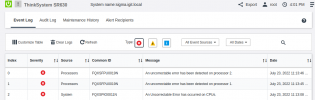
ThinkSystem SR630 (2xCPU 1 Intel(R) Xeon(R) Silver 4110 CPU @ 2.10GHz)
Last edited:
That's pretty huge range and since it also catches most of Silver/Gold Xeons from past few years (almost no company replaces servers every year for newer CPU) it becomes quite a big issue. It definitely needs to be resolved one way or another. Preferably it should be resolved upstream, as I doubt this is acceptable behavior for KVM here on such a huge chunk of CPUs.Many thanks for such information, this can be valuable on nailing the actual range of models possibly affected and also possibly the underlying issue that could help in either avoiding the bug or atleast automatically disable the new feature.
That said, this is two years old consumer HW, Definitively not bad for home lab usage and also not old, but not exactly new either.
Note also that Comet Lake is also the last iteration of the Sky Lake micro architecture, so it's based on a bit older design (even if it def. went through quite a few evolutionary changes and improvements), so it could seem like all/more of the Sky Lake derived (consumer?) models (6th to 10th gen) may be affected.
Also, there
- https://forum.proxmox.com/threads/v...re-error-0x80000021.109410/page-6#post-476432 (i5-11400)
- https://forum.proxmox.com/threads/v...re-error-0x80000021.109410/page-8#post-478903 (i5-12400)
Last edited:
FYI I've been having this issue on 11th gen mobile CPU i5-1145G7 (before the workaround) and no issues on i7-9700. Both have latest proxmox and run Windows server 2022 Standard. The one with 9700 still has no workaround applied and it has been rock solid.Many thanks for such information, this can be valuable on nailing the actual range of models possibly affected and also possibly the underlying issue that could help in either avoiding the bug or atleast automatically disable the new feature.
That said, this is two years old consumer HW, Definitively not bad for home lab usage and also not old, but not exactly new either.
Note also that Comet Lake is also the last iteration of the Sky Lake micro architecture, so it's based on a bit older design (even if it def. went through quite a few evolutionary changes and improvements), so it could seem like all/more of the Sky Lake derived (consumer?) models (6th to 10th gen) may be affected.
Last edited: