VM shutdown, KVM: entry failed, hardware error 0x80000021

We have a Huawei RH2288 v3 rack server with 2x Xeon E5-2680 v4 (Broadwell-EP) running PVE 7.1

BIOS microcode version is 0xb000038

We have an ubuntu server VM have this problem, but Windows server 2019, 2022 do not ran into this.

In detail: this VM will shutdown because of that assertion fail after up about 11-14 hours (or in midnight, not sure which condition is critical).

We have tried these with no luck:

- Tried different pve-kernel releases: 5.13.19-2 5.15.35(latest), 5.13.19-6(mentioned above, after 28 hour, in midnight, it crashed).
- Update microcode to 0xb000040 (intel marked as "with caveats" because of BDX90 (see https://www.intel.com/content/dam/w...cification-updates/xeon-e7-v4-spec-update.pdf))
- `mitigation=off` kernel arguments
- disable nested kvm via kvm module options

So with information in this thread, we guess:

- This problem only occurs in intel broadwell and haswell cpus
- This problem is a kernel (kvm) bug
- After about 12h running / at midnight with low load, the guest kernel try to do some (cpu or power) state change and trigger this bug

Should we just comment that assertion out to "workaround" it?

Further read:

- https://www.reddit.com/r/VFIO/comments/s1k5yg/win10_guest_crashes_after_a_few_minutes/
- https://access.redhat.com/solutions/5749121
- https://gitlab.com/qemu-project/qemu/-/issues/1047 (may not relative)
- https://bugzilla.kernel.org/show_bug.cgi?id=216003 (may not relative)
 
Ok guys. It's work for me 2+ days no crashes.

I want to share My fixing steps with you:

Note: My host : PVE 7.2 (new kernel 5.15.35-1-pve), my guest what crashes randomly: windows server 2022

1. step install Intel-Microcode install steps here: https://wiki.debian.org/Microcode

2. step: set mitigations=off
Code:
nano /etc/default/grub
find&change this line:
  GRUB_CMDLINE_LINUX_DEFAULT="quiet mitigations=off"

update-grub2
reboot

solved my problem.

Please Note that mitigations=off coming with some security issues for the host . look here: https://unix.stackexchange.com/questions/554908/disable-spectre-and-meltdown-mitigations

Another way is downgrade PVE kernel to 5.13 but after some days it can be problem. because PVE's maybe stop old kernel support next releases.


maybe can help you.

Edit: if set mitigations=off, crash during live backup. now best way is old kernel for me

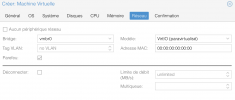
I am running a Windows Server 2022 Standard and have tried the settings of @kyesil for my host. Additionally I have changed the machine version to 6.2 and I am running kernel 5.15.35-2-pve.
1655112367424.png

So far my Windows Server 2022 Standard is running without any crashes for 5 days. Before performing these changes the VM crashed twice a day, for now it is running stable without any issues.

Just be aware, when changing the machine version, my Intel Intel E1000 network device was changed after starting the VM. So I had to assign my IP settings in the network adapter settings again.
 
  • Like
Reactions: rursache
I am on 5.15.35-2 did an apt update and its all up to date.
Did you manually install 5.15.35-5 ?
 
I am on 5.15.35-2 did an apt update and its all up to date.
Did you manually install 5.15.35-5 ?
It seams like, as @nick.kopas is a Proxmox Subscriber, that new kernel versions are available for subscribers alreay.
At the moment the most recent version I am getting (as a non-subscriber) is also 5.15.35-2.
 
5.15.35-5 (which is available in the non-subscription) also comes with this
Code:
  * update to Ubuntu-5.15.0-36.37
Which includes part of this http://changelogs.ubuntu.com/changelogs/pool/main/l/linux/linux_5.15.0-36.37/changelog
Which includes a lot of KVM fixes
Code:
    - KVM: s390: vsie/gmap: reduce gmap_rmap overhead
    - KVM: x86/mmu: Resolve nx_huge_pages when kvm.ko is loaded
    - KVM: x86/pmu: Use different raw event masks for AMD and Intel
    - KVM: SVM: Fix kvm_cache_regs.h inclusions for is_guest_mode()
    - KVM: x86/svm: Clear reserved bits written to PerfEvtSeln MSRs
    - KVM: x86/pmu: Fix and isolate TSX-specific performance event logic
    - KVM: x86/emulator: Emulate RDPID only if it is enabled in guest
    - KVM: SVM: Allow AVIC support on system w/ physical APIC ID > 255
    - KVM: avoid NULL pointer dereference in kvm_dirty_ring_push
    - powerpc/kvm: Fix kvm_use_magic_page
    - KVM: PPC: Fix vmx/vsx mixup in mmio emulation
    - KVM: PPC: Book3S HV: Check return value of kvmppc_radix_init
    - KVM: x86: Fix emulation in writing cr8
    - KVM: x86/emulator: Defer not-present segment check in
    - KVM: x86: Reinitialize context if host userspace toggles EFER.LME
    - KVM: x86/mmu: Move "invalid" check out of kvm_tdp_mmu_get_root()
    - KVM: x86/mmu: Zap _all_ roots when unmapping gfn range in TDP MMU
    - KVM: x86/mmu: Check for present SPTE when clearing dirty bit in TDP MMU
    - KVM: x86: hyper-v: Drop redundant 'ex' parameter from kvm_hv_send_ipi()
    - KVM: x86: hyper-v: Drop redundant 'ex' parameter from kvm_hv_flush_tlb()
    - KVM: x86: hyper-v: Fix the maximum number of sparse banks for XMM fast TLB
    - KVM: x86: hyper-v: HVCALL_SEND_IPI_EX is an XMM fast hypercall
    - KVM: x86: Check lapic_in_kernel() before attempting to set a SynIC irq
    - KVM: x86: Avoid theoretical NULL pointer dereference in
      kvm_irq_delivery_to_apic_fast()
    - KVM: x86: Forbid VMM to set SYNIC/STIMER MSRs when SynIC wasn't activated
    - KVM: Prevent module exit until all VMs are freed
    - KVM: x86: fix sending PV IPI
    - KVM: SVM: fix panic on out-of-bounds guest IRQ
    - KVM: x86/mmu: do compare-and-exchange of gPTE via the user address
    - hv_netvsc: Add check for kvmalloc_array
    - x86/fpu: Move KVMs FPU swapping to FPU core
    - x86/fpu: Replace KVMs home brewed FPU copy from user
    - x86/fpu: Replace KVMs home brewed FPU copy to user
    - x86/fpu: Replace KVMs xstate component clearing
    - x86/KVM: Convert to fpstate
    - x86/fpu: Use fpstate in fpu_copy_kvm_uabi_to_fpstate()
    - x86/fpu: Prepare for sanitizing KVM FPU code
    - x86/fpu: Provide infrastructure for KVM FPU cleanup
    - x86/kvm: Convert FPU handling to a single swap buffer
    - x86/fpu: Remove old KVM FPU interface

So, I'm not sure if it fixes our issue but it may help if any of those issue actually is what we are experiencing...
 
It seams like, as @nick.kopas is a Proxmox Subscriber, that new kernel versions are available for subscribers alreay.
At the moment the most recent version I am getting (as a non-subscriber) is also 5.15.35-2.

Just clearing up a little confusion regarding the version numbers...

Code:
root@pve:~# dpkg --list | grep pve-kernel
Desired=Unknown/Install/Remove/Purge/Hold
| Status=Not/Inst/Conf-files/Unpacked/halF-conf/Half-inst/trig-aWait/Trig-pend
|/ Err?=(none)/Reinst-required (Status,Err: uppercase=bad)
||/ Name                                 Version                        Architecture Description
+++-====================================-==============================-==============-============================================>
ii  pve-firmware                         3.4-2                          all          Binary firmware code for the pve-kernel
ii  pve-kernel-5.13                      7.1-9                          all          Latest Proxmox VE Kernel Image
ii  pve-kernel-5.13.19-2-pve             5.13.19-4                      amd64        The Proxmox PVE Kernel Image
ii  pve-kernel-5.13.19-6-pve             5.13.19-15                     amd64        The Proxmox PVE Kernel Image
ii  pve-kernel-5.15                      7.2-4                          all          Latest Proxmox VE Kernel Image
ii  pve-kernel-5.15.30-2-pve             5.15.30-3                      amd64        The Proxmox PVE Kernel Image
ii  pve-kernel-5.15.35-1-pve             5.15.35-3                      amd64        The Proxmox PVE Kernel Image
ii  pve-kernel-5.15.35-2-pve             5.15.35-5                      amd64        The Proxmox PVE Kernel Image
ii  pve-kernel-helper                    7.2-4                          all          Function for various kernel maintenance tasks.
 
Last edited:
I have the same win11 vm crashed issue, the log is almost the same, but I have already installed the latest kernel, so I am wondering the issue is non related to the kernel or the latest one not fix the bug
You can try installing and pinning the 5.13 kernel...

Code:
apt install pve-kernel-5.13.19-6-pve
proxmox-boot-tool kernel pin 5.13.19-6-pve
 
Sorry, a few days have passed now ... we are waiting for an official fix, can you tell us something please? it seems to me really serious that for a problem like this you have to wait so long for a fixl, what problems are there? why don't you tell us anything? thank you
As the thread shows it seems that disabling mitigations does not fix the issues in all instances - so that path sadly does not seem the (only one) to a solution.

Currently we're working on finding the commit which introduced the issue.
The main issue with this for us is that we cannot reliably trigger the situation:
* We have one (older, with outdated BIOS) host where it occurs sporadically as @tom pointed out earlier - not one single other machine shows that issue here
* It triggers very seldomly - about once every 10 (sometimes it's far more ) Windows installs - so each test takes quite a while.

One thing that would help us here tremendously is if someone having this issue reproducibly (meaning it occurs deterministically on a VM of theirs, when certain actions are performed) - could explain how they arrive there and/or share the VM with us (I'm hoping that the issue does occur on our host as well then)


One further idea that came up in our discussions here:
* could you try to change the CPU type from host to something else (even the same family as your hardware is - e.g. on a SkyLake system don't set the cpu to 'host' but to 'SkyLake') - and see if the issue persists?

I understand that it's frustrating - but as explained we're taking the issue seriously and are putting quite an effort into finding the cause and with that hopefully the path to a fix - we're not waiting with a fix in our hands...
 
Small update... I just applied the latest kernel update (5.15.35-5) and it seems to have resolved my issues running backups. I've leaving the 5.13.19-15 kernel unpinned for now and will see how it goes.
That's good - however - the changes between the 5.15.35 kernels are in areas not touching that code - so it seems a bit odd?
(the changes are a fix for mounting QNAP NFS shares, one for aquantia NICs, some fix for ECC support on a particular AMD/Ryzen system, and the fix for cve-2022-1966 (netfilter+namespace relate))

In any case keep us posted if the issue indeed is gone for you!
 
It seams like, as @nick.kopas is a Proxmox Subscriber, that new kernel versions are available for subscribers alreay.
At the moment the most recent version I am getting (as a non-subscriber) is also 5.15.35-2.
Just for the record - @nick.kopas cleared most of it up I hope by posting the dpkg ouput:
* packages in the public pve-repositories transition from pvetest->pve-no-subscription->pve-enterprise
Thus you will never have a newer version on enterprise than on no-subscription
(and as a result better tested software on enterprise)

I hope this explains it
 
That's good - however - the changes between the 5.15.35 kernels are in areas not touching that code - so it seems a bit odd?
Yeah, my celebration was premature... It crashed again. :(

Previously, running an image backup from within Windows to a network share reliably triggered the crash. It would seem that wasn't as reliable as I thought.
 
  • Like
Reactions: rursache
After changing power plan in windows from balanced to performance I reached 3 days uptime, I will update if there are changes.
 
After changing power plan in windows from balanced to performance I reached 3 days uptime, I will update if there are changes.
Thanks for this tip! I've had issues with Windows 11 VMs for few weeks and looked absolutely everywhere until I found these conversations and saw that I'm not the only one having the issue.

At the time of writing this power plan change on Windows VM side has brought stability back to normal. No microcode update or anything else mentioned here has brought the solution so far for me... We'll see with the time if this is truly the case.
 
One thing that would help us here tremendously is if someone having this issue reproducibly (meaning it occurs deterministically on a VM of theirs, when certain actions are performed) - could explain how they arrive there and/or share the VM with us (I'm hoping that the issue does occur on our host as well then)

Step 1

Load Windows 2022 server iso from Microsoft Eval center and virtio-win iso from federa people onto your pve node

Step 2

Create a new VM via gui

OS tab : Windows iso and and 11/2022 as guest OS

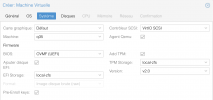
System tab :
Capture d’écran 2022-06-16 à 19.16.46.png

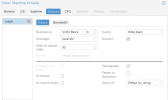
Disk tab :

Capture d’écran 2022-06-16 à 19.17.02.png

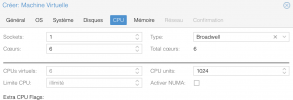
CPU tab :
(host is Xeon D-1541 which is broadwell, extra flags left as is)

Capture d’écran 2022-06-16 à 19.18.52.png

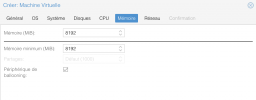
Memory Tab :

Capture d’écran 2022-06-16 à 19.19.14.png

Network :

Capture d’écran 2022-06-16 à 19.19.54.png

Step 3

With gui, attach virtio iso :

Capture d’écran 2022-06-16 à 19.20.17.png


Step 4

Boot the VM, press a key to boot from iso, follow instructions until you can add virtio drivers for scsi, ballooning and netkvm, clic install and let windows do his voodoo (install prep, updates and all...)

And voila : witness the crash, head to syslog section to find this post' title in logs.


Happened 2 times in a row (on the same host though...)

A few more details regarding this host :

Code:
proxmox-ve: 7.2-1 (running kernel: 5.15.35-2-pve)
pve-manager: 7.2-4 (running version: 7.2-4/ca9d43cc)
pve-kernel-5.15: 7.2-4
pve-kernel-helper: 7.2-4
pve-kernel-5.15.35-2-pve: 5.15.35-5
pve-kernel-5.15.30-2-pve: 5.15.30-3
pve-kernel-5.13.19-6-pve: 5.13.19-15
ceph-fuse: 15.2.16-pve1
corosync: 3.1.5-pve2
criu: 3.15-1+pve-1
glusterfs-client: 9.2-1
ifupdown2: 3.1.0-1+pmx3
ksm-control-daemon: 1.4-1
libjs-extjs: 7.0.0-1
libknet1: 1.24-pve1
libproxmox-acme-perl: 1.4.2
libproxmox-backup-qemu0: 1.3.1-1
libpve-access-control: 7.2-2
libpve-apiclient-perl: 3.2-1
libpve-common-perl: 7.2-2
libpve-guest-common-perl: 4.1-2
libpve-http-server-perl: 4.1-2
libpve-storage-perl: 7.2-4
libspice-server1: 0.14.3-2.1
lvm2: 2.03.11-2.1
lxc-pve: 4.0.12-1
lxcfs: 4.0.12-pve1
novnc-pve: 1.3.0-3
proxmox-backup-client: 2.2.3-1
proxmox-backup-file-restore: 2.2.3-1
proxmox-mini-journalreader: 1.3-1
proxmox-widget-toolkit: 3.5.1
pve-cluster: 7.2-1
pve-container: 4.2-1
pve-docs: 7.2-2
pve-edk2-firmware: 3.20210831-2
pve-firewall: 4.2-5
pve-firmware: 3.4-2
pve-ha-manager: 3.3-4
pve-i18n: 2.7-2
pve-qemu-kvm: 6.2.0-10
pve-xtermjs: 4.16.0-1
qemu-server: 7.2-3
smartmontools: 7.2-pve3
spiceterm: 3.2-2
swtpm: 0.7.1~bpo11+1
vncterm: 1.7-1
zfsutils-linux: 2.1.4-pve1


Let me know if you need more details, I'll happily share any input you might need !


Edit :
My small and silly brain got mixed up beetwin VirtIO Block (unwanted) and SCSI (wanted) during VM creation... Obviously when you do this the VM crashes...
 
Last edited:
  • Like
Reactions: rursache and itNGO