

VM can ping host but not gateway
- Thread starter rltackett
- Start date
You are using an out of date browser. It may not display this or other websites correctly.
You should upgrade or use an alternative browser.
You should upgrade or use an alternative browser.

You need to give us some more information...
What does your /etc/network/interfaces look like?
It is a homeserver or somewhere in a datacenter?
How does your network look like?
Are any firewalls active?
Does the host got a valid gateway entry?
...
What does your /etc/network/interfaces look like?
It is a homeserver or somewhere in a datacenter?
How does your network look like?
Are any firewalls active?
Does the host got a valid gateway entry?
...
Thanks for responding. Sorry it took me so long to get back to you. It's been a crazy week. For my proxmox system, it's a home server (see diagram). I pull internet service from Verizon Fios and I'm using their cable modem. the Verizon cable modem has the wireless turned off and is connected to a Netgear Orbit wireless mesh router running in Wireless Access Point Mode. The orbit is connected to an unmanaged 24 port gigabit switch. The Proxmox server is directly connected tot he unmanaged switch.You need to give us some more information...
What does your /etc/network/interfaces look like?
It is a homeserver or somewhere in a datacenter?
How does your network look like?
Are any firewalls active?
Does the host got a valid gateway entry?
...
The /etc/network/interface for the Proxmox if below
auto lo
iface lo inet loopback
auto enp4s0
iface enp4s0 inet manual
address 192.168.1.200
netmask 255.255.255.0
gateway 192.168.1.1
auto vmbr0
iface vmbr0 inet static
address 192.168.1.15/24
gateway 192.168.1.1
bridge-ports enp4s0
bridge-stp off
bridge-fd 0
The /etc/network/interface for the MineCraft Server is as below
auto lo
iface lo net loopback
auto etc0
iface eth0 net static
address 192.168.1.200
net mask 255.255.255.0
gateway 192.168.1.1
dns-nameservers 192.168.1.1
Pinging results:
Ping from MineOs to Proxmox Host: good
Ping from MineOs to Verizon router (gateway): bad
Ping from MineOs to Netgear Orbi router : bad
Ping from Proxmox to Verizon Router (gateway) good
Ping from Proxmox to MineOs Hosed server: good
Ping from other computer on network to Proxmox server: good
Ping from other computer on network to MineOs hosted server: bad
I have the firewall on the Verizon router set to it's lowest level. the Firewall on Proxmox is off.
Thanks again for your help.
Attachments
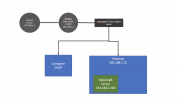
Thank you! Just to be sure, my settings on the VM should be:You cannot define gateways in two interfaces. Plus, don't define the same subnet on the bridge and the underlying NIC.
Just set enp4s0 toinet manualwithout further settings and you should be fine.
auto enp4s0
inet manual
I tried your suggestion with no change. Thanks for responding, though.Thank you! Just to be sure, my settings on the VM should be:
auto enp4s0
inet manual
I tried that and still no joy. Below are the updated /etc/network/interfacesThat's because the line has to beon the host.Code:auto enp4s0 iface enp4s0 inet manual
The VM config from above looks good.
HOST:
auto lo
iface lo inet loopback
auto enp4s0
iface enp4s0 inet manual
auto vmbr0
iface vmbr0 inet static
address 192.168.1.15/24
gateway 192.168.1.1
bridge-ports enp4s0
bridge-stp off
bridge-fd 0
VM:
auto lo
iface lo inet loopback
auto eth0
iface etho inet static
address 192.168.1.200
netmask 255.255.255.0
gateway 192.168.1.1
dns-nameservers 192.168.1.1
Yes, that's a typo. Should I have DHCP enabled on the host or the guest? I'm guessing no.Don't know if this is a typo here in the forum but you typed etho instead of eth0 in the VM's config.
That depends on your setup.
Usually the hypervisor has a static address and the guests sometimes use dhcp, but that's up to you.
From what I see I would say the error lies outside of Proxmox. The config that you posted last should work. So it's either maybe router preventing access for unknown devices or something else.
Usually the hypervisor has a static address and the guests sometimes use dhcp, but that's up to you.
From what I see I would say the error lies outside of Proxmox. The config that you posted last should work. So it's either maybe router preventing access for unknown devices or something else.
Any ideas on how to troubleshoot traffic outside of proxmox? Wire shark?That depends on your setup.
Usually the hypervisor has a static address and the guests sometimes use dhcp, but that's up to you.
From what I see I would say the error lies outside of Proxmox. The config that you posted last should work. So it's either maybe router preventing access for unknown devices or something else.
Can you pull DHCP (as a test) from DHCP scope with VM?
I ask this because I've ran in to an issue recently with a NIC card that registered in proxmox and you could ping the vmbr that it was attached to. But would not allow VM's to talk outside the bridge. Swapped NIC's. Boom. Problem gone. What NIC chipset is your host running?
I'd spin up a container with DHCP and see if it can pull an IP. With the host /etc/network/interfaces at its current state. If the container can't pull an ip. You more than likely have a bigger issue. hardware/driver related.
I ask this because I've ran in to an issue recently with a NIC card that registered in proxmox and you could ping the vmbr that it was attached to. But would not allow VM's to talk outside the bridge. Swapped NIC's. Boom. Problem gone. What NIC chipset is your host running?
I'd spin up a container with DHCP and see if it can pull an IP. With the host /etc/network/interfaces at its current state. If the container can't pull an ip. You more than likely have a bigger issue. hardware/driver related.
Last edited:
Can you pull DHCP (as a test) from DHCP scope with VM?
I ask this because I've ran in to an issue recently with a NIC card that registered in proxmox and you could ping the vmbr that it was attached to. But would not allow VM's to talk outside the bridge. Swapped NIC's. Boom. Problem gone. What NIC chipset is your host running?
I would do some research on that nic card and find out if you can compile some drivers for it. I'd suspect it's the NIC (drivers).
Or as ph0x suggested and try the 5.11 kernel.
Or as ph0x suggested and try the 5.11 kernel.
Last edited:
I'd love to try it.. how do I do it? Sorry... NOOB here.I would do some research on that nic card and find out if you can compile some drivers for it. I'd suspect it's the NIC (drivers).
Or as ph0x suggested and try the 5.11 kernel.
To install 5.11 kernel:
apt update
apt install pve-kernel-5.11
reboot
In regards to compiling a new set of drivers. Hopefully someone else can take this question on as I have been unsuccessful with my problem NIC in doing this.
apt update
apt install pve-kernel-5.11
reboot
In regards to compiling a new set of drivers. Hopefully someone else can take this question on as I have been unsuccessful with my problem NIC in doing this.