Virtual machine is eating my memory / stuck on reboot

Sjaak69

Active Member
Jun 8, 2017
5
0
41
35
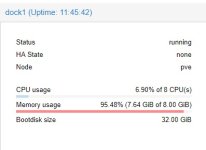
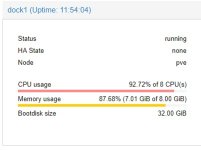
I have a virtual machine which is stock debian 9.2 with docker installed on it (nothing else). The machine runs fine, after a while the proxmox stats show that the machine is almost using all the assigned memory (8Gb):


If I check memory usage inside the machine I see this:


When I return to console i'm seeing a bunch of errors:


When I try to reboot the system, it's stuck and cpu usage spins to approx. 100%

 

Attachments

  • 1.jpg
    1.jpg
    13.9 KB · Views: 18
  • 2.jpg
    2.jpg
    22.9 KB · Views: 18
  • 3.jpg
    3.jpg
    168 KB · Views: 18
  • 4.jpg
    4.jpg
    4.6 KB · Views: 17
  • 5.jpg
    5.jpg
    25.4 KB · Views: 18
Hi,

Please post more information about your system.

Code:
pveversion -v
qm config <vmid>
 
Last edited:
root@pve:~# pveversion -v
proxmox-ve: 5.1-26 (running kernel: 4.13.4-1-pve)
pve-manager: 5.1-36 (running version: 5.1-36/131401db)
pve-kernel-4.13.4-1-pve: 4.13.4-26
libpve-http-server-perl: 2.0-6
lvm2: 2.02.168-pve6
corosync: 2.4.2-pve3
libqb0: 1.0.1-1
pve-cluster: 5.0-15
qemu-server: 5.0-17
pve-firmware: 2.0-3
libpve-common-perl: 5.0-20
libpve-guest-common-perl: 2.0-13
libpve-access-control: 5.0-7
libpve-storage-perl: 5.0-16
pve-libspice-server1: 0.12.8-3
vncterm: 1.5-2
pve-docs: 5.1-12
pve-qemu-kvm: 2.9.1-2
pve-container: 2.0-17
pve-firewall: 3.0-3
pve-ha-manager: 2.0-3
ksm-control-daemon: 1.2-2
glusterfs-client: 3.8.8-1
lxc-pve: 2.1.0-2
lxcfs: 2.0.7-pve4
criu: 2.11.1-1~bpo90
novnc-pve: 0.6-4
smartmontools: 6.5+svn4324-1
zfsutils-linux: 0.7.3-pve1~bpo9


Where do you I have to execute the second command?
 
root@pve:~# pveversion -v
proxmox-ve: 5.1-26 (running kernel: 4.13.4-1-pve)
pve-manager: 5.1-36 (running version: 5.1-36/131401db)
pve-kernel-4.13.4-1-pve: 4.13.4-26
libpve-http-server-perl: 2.0-6
lvm2: 2.02.168-pve6
corosync: 2.4.2-pve3
libqb0: 1.0.1-1
pve-cluster: 5.0-15
qemu-server: 5.0-17
pve-firmware: 2.0-3
libpve-common-perl: 5.0-20
libpve-guest-common-perl: 2.0-13
libpve-access-control: 5.0-7
libpve-storage-perl: 5.0-16
pve-libspice-server1: 0.12.8-3
vncterm: 1.5-2
pve-docs: 5.1-12
pve-qemu-kvm: 2.9.1-2
pve-container: 2.0-17
pve-firewall: 3.0-3
pve-ha-manager: 2.0-3
ksm-control-daemon: 1.2-2
glusterfs-client: 3.8.8-1
lxc-pve: 2.1.0-2
lxcfs: 2.0.7-pve4
criu: 2.11.1-1~bpo90
novnc-pve: 0.6-4
smartmontools: 6.5+svn4324-1
zfsutils-linux: 0.7.3-pve1~bpo9


Where do you I have to execute the second command?
In your host, do an

qm list

to obtain id of your VM
and then

qm config <VMID> (you had to change <VMID> to the real id number of your vm)
 
Ah of course, should have known that one. Here it is:

bootdisk: virtio0
cores: 8
ide2: none,media=cdrom
memory: 8192
name: dock1
net0: virtio=32:CB:66:87:AD:7F,bridge=vmbr0
numa: 0
ostype: l26
scsihw: virtio-scsi-pci
smbios1: uuid=35ff33d2-13be-488c-bd88-3c6a4fa287b1
sockets: 1
virtio0: ssd-virtmachines:vm-201-disk-1,size=32G